CoderFunda
  • Home
  • About us
    • Contact Us
    • Disclaimer
    • Privacy Policy
    • About us
  • Home
  • Php
  • HTML
  • CSS
  • JavaScript
    • JavaScript
    • Jquery
    • JqueryUI
    • Stock
  • SQL
  • Vue.Js
  • Python
  • Wordpress
  • C++
    • C++
    • C
  • Laravel
    • Laravel
      • Overview
      • Namespaces
      • Middleware
      • Routing
      • Configuration
      • Application Structure
      • Installation
    • Overview
  • DBMS
    • DBMS
      • PL/SQL
      • SQLite
      • MongoDB
      • Cassandra
      • MySQL
      • Oracle
      • CouchDB
      • Neo4j
      • DB2
      • Quiz
    • Overview
  • Entertainment
    • TV Series Update
    • Movie Review
    • Movie Review
  • More
    • Vue. Js
    • Php Question
    • Php Interview Question
    • Laravel Interview Question
    • SQL Interview Question
    • IAS Interview Question
    • PCS Interview Question
    • Technology
    • Other

08 April, 2022

Checkpoint

 Programing Coderfunda     April 08, 2022     RDBMS     No comments   


Checkpoint

  • The checkpoint is a type of mechanism where all the previous logs are removed from the system and permanently stored in the storage disk.
  • The checkpoint is like a bookmark. While the execution of the transaction, such checkpoints are marked, and the transaction is executed then using the steps of the transaction, the log files will be created.
  • When it reaches the checkpoint, then the transaction will be updated in the database, and till that point, the entire log file will be removed from the file. Then the log file is updated with the new step of the transaction till the next checkpoint and so on.
  • The checkpoint is used to declare a point before which the DBMS was in a consistent state, and all transactions were committed.

Recovery using Checkpoint

In the following manner, a recovery system recovers the database from this failure:
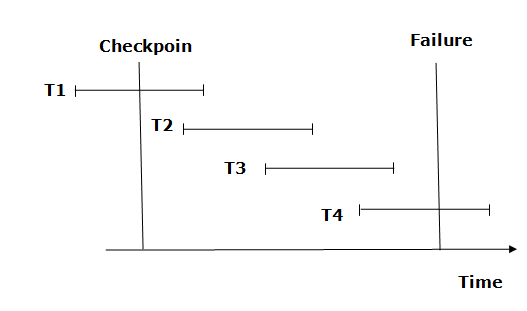

DBMS Checkpoint
  • The recovery system reads log files from the end to the start. It reads log files from T4 to T1.
  • The recovery system maintains two lists, a redo-list, and an undo list.
  • The transaction is put into a redo state if the recovery system sees a log with <Tn, Start> and <Tn, Commit> or just <Tn, Commit>. In the redo-list and their previous list, all the transactions are removed and then redone before saving their logs.
  • For example: In the log file, transactions T2 and T3 will have <Tn, Start> and <Tn, Commit>. The T1 transaction will have only <Tn, commit> in the log file. That's why the transaction is committed after the checkpoint is crossed. Hence it puts T1, T2, and T3 transactions into the redo list.
  • The transaction is put into undo state if the recovery system sees a log with <Tn, Start> but no commit or abort log is found. In the undo list, all the transactions are undone, and their logos are removed.
  • For example Transaction, T4 will have <Tn, Start>. So T4 will be put into undo list since this transaction is not yet complete and failed.
  • Share This:  
  •  Facebook
  •  Twitter
  •  Google+
  •  Stumble
  •  Digg
Email ThisBlogThis!Share to XShare to Facebook
Newer Post Older Post Home
View mobile version

0 comments:

Post a Comment

Thanks

Meta

Popular Posts

  • Crawl and Index Your Website with Laravel Site Search
      Laravel Site Search   is a package by Spatie to create a full-text search index by crawling your site. You can think of it as a private Go...
  • Sitaare Zameen Par Full Movie Review
     Here’s a  complete Vue.js tutorial for beginners to master level , structured in a progressive and simple way. It covers all essential topi...
  • Tailwindcss best practices for responsive design
    Tailwind CSS provides powerful utilities for responsive design out of the box. To use it effectively and maintain clean, scalable code, here...
  • Tailwind CSS Tutorial (Beginner to Master)
    Here's a simple and complete Tailwind CSS tutorial designed for students and beginners , progressing step-by-step from beginner to mast...
  • Create Reusable Blade Components in Laravel
    In Laravel, reusable Blade components provide a convenient way to encapsulate UI elements and logic for reuse across your application. Let...

Categories

  • Ajax (26)
  • Bootstrap (30)
  • DBMS (42)
  • HTML (12)
  • HTML5 (45)
  • JavaScript (10)
  • Jquery (34)
  • Jquery UI (2)
  • JqueryUI (32)
  • Laravel (1017)
  • Laravel Tutorials (23)
  • Laravel-Question (6)
  • Magento (9)
  • Magento 2 (95)
  • MariaDB (1)
  • MySql Tutorial (2)
  • PHP-Interview-Questions (3)
  • Php Question (13)
  • Python (36)
  • RDBMS (13)
  • SQL Tutorial (79)
  • Vue.js Tutorial (69)
  • Wordpress (150)
  • Wordpress Theme (3)
  • codeigniter (108)
  • oops (4)
  • php (853)

Social Media Links

  • Follow on Twitter
  • Like on Facebook
  • Subscribe on Youtube
  • Follow on Instagram

Pages

  • Home
  • Contact Us
  • Privacy Policy
  • About us

Blog Archive

  • July (4)
  • September (100)
  • August (50)
  • July (56)
  • June (46)
  • May (59)
  • April (50)
  • March (60)
  • February (42)
  • January (53)
  • December (58)
  • November (61)
  • October (39)
  • September (36)
  • August (36)
  • July (34)
  • June (34)
  • May (36)
  • April (29)
  • March (82)
  • February (1)
  • January (8)
  • December (14)
  • November (41)
  • October (13)
  • September (5)
  • August (48)
  • July (9)
  • June (6)
  • May (119)
  • April (259)
  • March (122)
  • February (368)
  • January (33)
  • October (2)
  • July (11)
  • June (29)
  • May (25)
  • April (168)
  • March (93)
  • February (60)
  • January (28)
  • December (195)
  • November (24)
  • October (40)
  • September (55)
  • August (6)
  • July (48)
  • May (2)
  • January (2)
  • July (6)
  • June (6)
  • February (17)
  • January (69)
  • December (122)
  • November (56)
  • October (92)
  • September (76)
  • August (6)

Loading...

Laravel News

Loading...

Copyright © CoderFunda | Powered by Blogger
Design by Coderfunda | Blogger Theme by Coderfunda | Distributed By Coderfunda