CoderFunda
  • Home
  • About us
    • Contact Us
    • Disclaimer
    • Privacy Policy
    • About us
  • Home
  • Php
  • HTML
  • CSS
  • JavaScript
    • JavaScript
    • Jquery
    • JqueryUI
    • Stock
  • SQL
  • Vue.Js
  • Python
  • Wordpress
  • C++
    • C++
    • C
  • Laravel
    • Laravel
      • Overview
      • Namespaces
      • Middleware
      • Routing
      • Configuration
      • Application Structure
      • Installation
    • Overview
  • DBMS
    • DBMS
      • PL/SQL
      • SQLite
      • MongoDB
      • Cassandra
      • MySQL
      • Oracle
      • CouchDB
      • Neo4j
      • DB2
      • Quiz
    • Overview
  • Entertainment
    • TV Series Update
    • Movie Review
    • Movie Review
  • More
    • Vue. Js
    • Php Question
    • Php Interview Question
    • Laravel Interview Question
    • SQL Interview Question
    • IAS Interview Question
    • PCS Interview Question
    • Technology
    • Other

05 December, 2018

Laravel - Installation

 Programing Coderfunda     December 05, 2018     Laravel Installation     No comments   

For managing dependencies, Laravel uses composer. Make sure you have a Composer installed on your system before you install Laravel. In this chapter, you will see the installation process of Laravel. You will have to follow the steps given below for installing Laravel onto your system −
Step 1 − Visit the following URL and download composer to install it on your system.
https://getcomposer.org/download/
Step 2 − After the Composer is installed, check the installation by typing the Composer command in the command prompt as shown in the following screenshot.
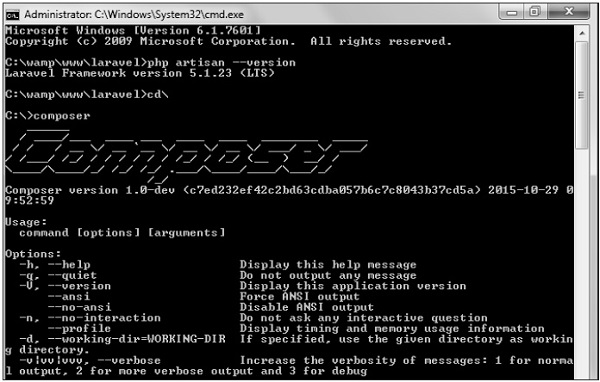
Composer
Step 3 − Create a new directory anywhere in your system for your new Laravel project. After that, move to path where you have created the new directory and type the following command there to install Laravel.
composer create-project laravel/laravel –-prefer-dist
Step 4 − The above command will install Laravel in the current directory. Start the Laravel service by executing the following command.
php artisan serve
Step 5 − After executing the above command, you will see a screen as shown below −
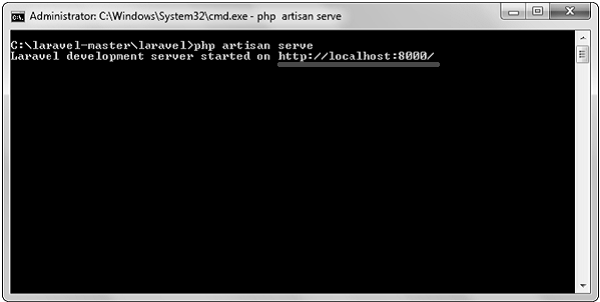
Administrator
Step 6 − Copy the URL underlined in gray in the above screenshot and open that URL in the browser. If you see the following screen, it implies Laravel has been installed successfully.
  • Share This:  
  •  Facebook
  •  Twitter
  •  Google+
  •  Stumble
  •  Digg
Email ThisBlogThis!Share to XShare to Facebook
Newer Post Older Post Home

0 comments:

Post a Comment

Thanks

Meta

Popular Posts

  • Vue.js Events
      In Vue.js, Events are used to respond to an action. Suppose, you have to build a dynamic website using Vue.js then you'll most likely ...
  • Different output in VisualStudio and Codeblocks
    I need a linear interpolation in 2D array. The output in Codeblocks is correct, but in VisualStudio is not. I got 2 main functions. ...
  • Spring Security PreAuthorize using multi-value enum
    I have a annotation that is declared as follows. @Retention(RetentionPolicy.RUNTIME) @Target(ElementType.METHOD) @PreAuthorize("hasA...
  • Python interpreter if statement issue
    So, I am making a really simple Python interpreter. But, there is a part in the interpreter that checks for if statements. But, whenever I u...
  • Running PHPStan on max with Laravel
      Over the last few years static analysis in PHP, and more specifically Laravel, has become more and more popular. With more people adopting...

Categories

  • Ajax (26)
  • Bootstrap (30)
  • DBMS (42)
  • HTML (12)
  • HTML5 (45)
  • JavaScript (10)
  • Jquery (34)
  • Jquery UI (2)
  • JqueryUI (32)
  • Laravel (1017)
  • Laravel Tutorials (23)
  • Laravel-Question (6)
  • Magento (9)
  • Magento 2 (95)
  • MariaDB (1)
  • MySql Tutorial (2)
  • PHP-Interview-Questions (3)
  • Php Question (13)
  • Python (36)
  • RDBMS (13)
  • SQL Tutorial (79)
  • Vue.js Tutorial (69)
  • Wordpress (150)
  • Wordpress Theme (3)
  • codeigniter (108)
  • oops (4)
  • php (853)

Social Media Links

  • Follow on Twitter
  • Like on Facebook
  • Subscribe on Youtube
  • Follow on Instagram

Pages

  • Home
  • Contact Us
  • Privacy Policy
  • About us

Blog Archive

  • July (4)
  • September (100)
  • August (50)
  • July (56)
  • June (46)
  • May (59)
  • April (50)
  • March (60)
  • February (42)
  • January (53)
  • December (58)
  • November (61)
  • October (39)
  • September (36)
  • August (36)
  • July (34)
  • June (34)
  • May (36)
  • April (29)
  • March (82)
  • February (1)
  • January (8)
  • December (14)
  • November (41)
  • October (13)
  • September (5)
  • August (48)
  • July (9)
  • June (6)
  • May (119)
  • April (259)
  • March (122)
  • February (368)
  • January (33)
  • October (2)
  • July (11)
  • June (29)
  • May (25)
  • April (168)
  • March (93)
  • February (60)
  • January (28)
  • December (195)
  • November (24)
  • October (40)
  • September (55)
  • August (6)
  • July (48)
  • May (2)
  • January (2)
  • July (6)
  • June (6)
  • February (17)
  • January (69)
  • December (122)
  • November (56)
  • October (92)
  • September (76)
  • August (6)

Loading...

Laravel News

Loading...

Copyright © CoderFunda | Powered by Blogger
Design by Coderfunda | Blogger Theme by Coderfunda | Distributed By Coderfunda