CoderFunda
  • Home
  • About us
    • Contact Us
    • Disclaimer
    • Privacy Policy
    • About us
  • Home
  • Php
  • HTML
  • CSS
  • JavaScript
    • JavaScript
    • Jquery
    • JqueryUI
    • Stock
  • SQL
  • Vue.Js
  • Python
  • Wordpress
  • C++
    • C++
    • C
  • Laravel
    • Laravel
      • Overview
      • Namespaces
      • Middleware
      • Routing
      • Configuration
      • Application Structure
      • Installation
    • Overview
  • DBMS
    • DBMS
      • PL/SQL
      • SQLite
      • MongoDB
      • Cassandra
      • MySQL
      • Oracle
      • CouchDB
      • Neo4j
      • DB2
      • Quiz
    • Overview
  • Entertainment
    • TV Series Update
    • Movie Review
    • Movie Review
  • More
    • Vue. Js
    • Php Question
    • Php Interview Question
    • Laravel Interview Question
    • SQL Interview Question
    • IAS Interview Question
    • PCS Interview Question
    • Technology
    • Other

19 August, 2022

Kinetic: A view-composer package for Inertia.js

 Programing Coderfunda     August 19, 2022     Laravel, Packages     No comments   

 Kinetic adds view-composer-like features to the Inertia.js Laravel adapter. Like Laravel view composers, Kinetic can bind data each time a component is rendered from a single location.

Within a service provider, you can call the composer() method to define Inertia composers:

1// In a service provider
2public function boot()
3{
4 // Class-based composer..
5 Inertia::composer('User/Profile', UserComposer::class);
6}
7 
8// Composer class
9class UserComposer
10{
11 public function compose(ResponseFactory $inertia)
12 {
13 $inertia->with('list', [
14 'foo' => 'bar',
15 'baz' => 'buzz'
16 ]);
17 }
18}

The composer() method supports closure-based composers as well:

1Inertia::composer('User/Profile', function (ResponseFactory $inertia) {
2 $inertia->with([
3 'post' => [
4 'subject' => 'Hello World!',
5 'description' => 'This is a description.'
6 ]
7 ]);
8});

With composers defined in a service provider, your props will include the composing data when you call render():

1// Includes bound data from `Inertia::composer('User/Profile')`
2Inertia::render('User/Profile');

You can learn more about this package, get full installation instructions, and view the source code on GitHub.
Read More
  • Share This:  
  •  Facebook
  •  Twitter
  •  Google+
  •  Stumble
  •  Digg

Log In Links for Your Laravel App During Development

 Programing Coderfunda     August 19, 2022     Laravel, Packages     No comments   

 Laravel Login Link is a Blade component to quickly login to your local environment.

After installing the login link package, logging in locally as an admin or normal user is as simple as adding the following blade snippet:

1@env('local')
2 <div class="space-y-2">
3 <x-login-link email="admin@spatie.be" label="Login as admin"/>
4 <x-login-link email="user@spatie.be" label="Login as regular user"/>
5 </div>
6@endenv

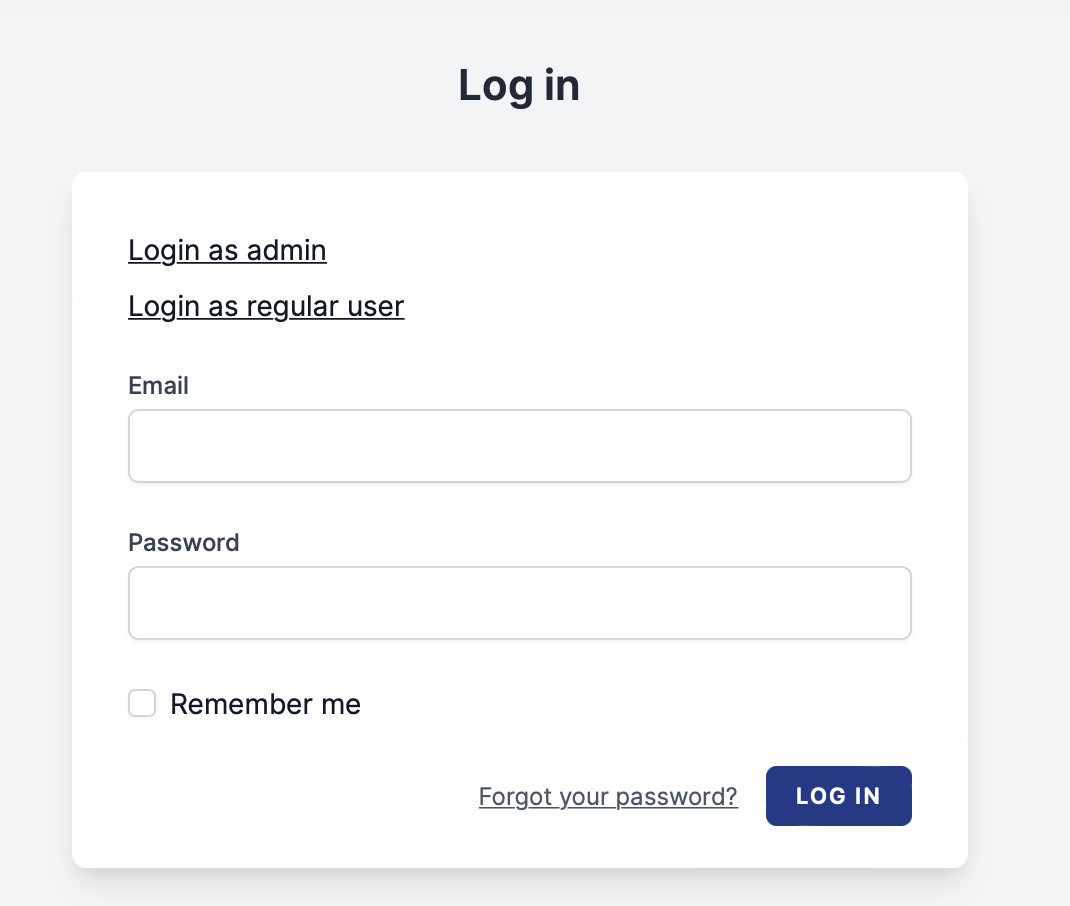
By clicking a login link, you'll be logged in automatically without having to remember or enter any credentials. Your non-local environments won't render these links, but locally your login page might look like the following:

Spatie login link

According to Spatie's Freek Van der Herten, this package was imagined and created by Spatie to deal with seeded user credentials for various roles and a package built to share with the open-source community:

When developing an app with an admin section (or any non-public section), you'll likely seed test users to log in. In large teams that work on many different apps, it can be cumbersome to keep track of the right credentials. Is the user account "yourname@company.com", or "test@company.com", or even "admin@company.com"? Is that password "password", "secret", or something else? How do I log in with a user that has a different role?

This package solves that problem by offering a component to render a login link. When clicked, you will be logged in.

Freek wrote a detailed introductory post on this package if you'd like to learn more about the background and use-case of this package. You can also learn more about setting up this package and view the source code on GitHub.

Read More
  • Share This:  
  •  Facebook
  •  Twitter
  •  Google+
  •  Stumble
  •  Digg

Laravel Comments Package

 Programing Coderfunda     August 19, 2022     Laravel, Packages     No comments   

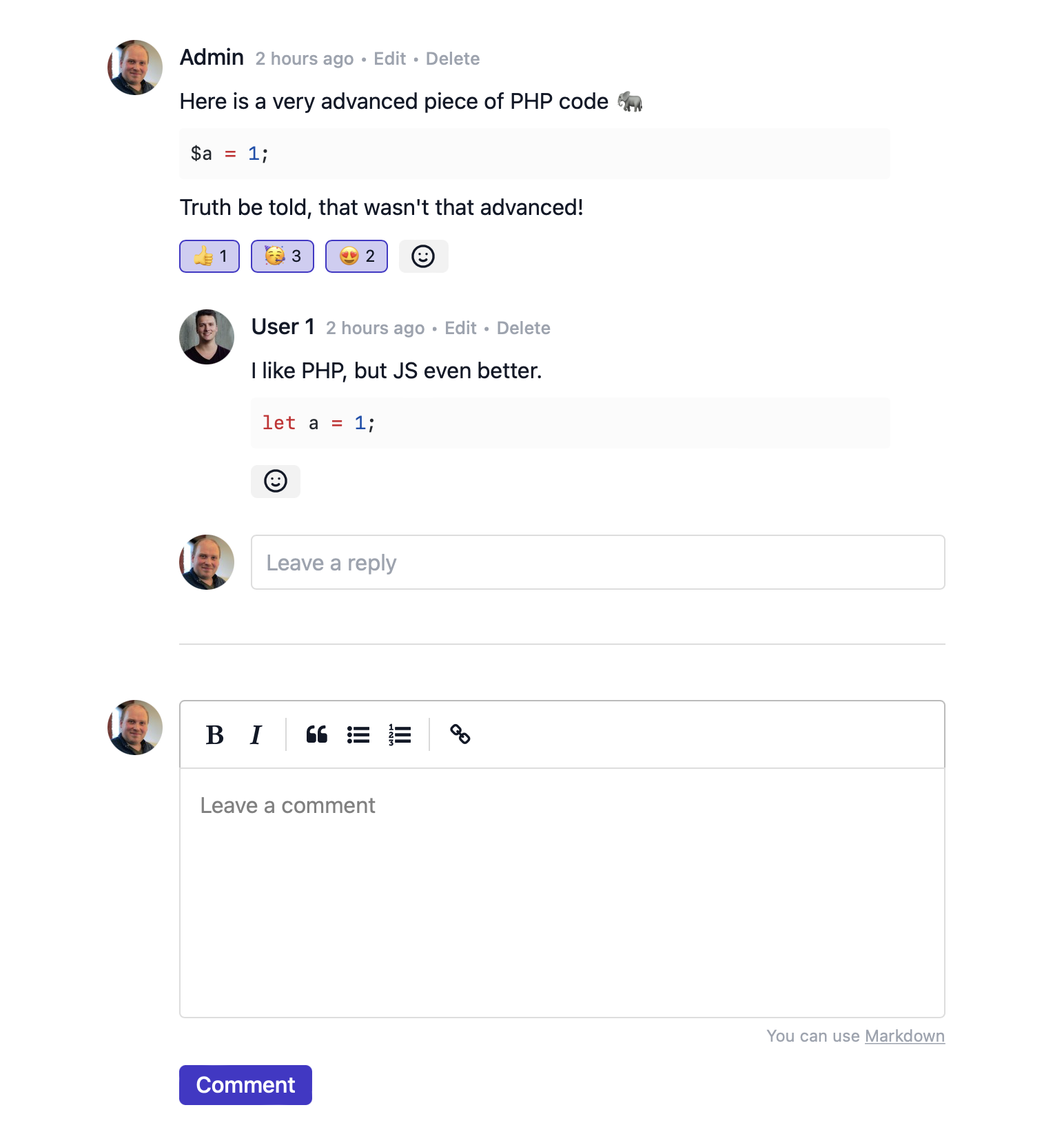
 Laravel Comments is a premium comments package for applications using PHP 8.1+ and Laravel 9+ by Spatie. Using this package, you can create and associate comments with Eloquent models.

At the time of launch, Laravel Comments' main features include:

  • A beautiful Livewire component to display comments
  • markdown submission is supported, we'll render it as html
  • code snippets that appear in comments will automatically be highlighted
  • users can react to comments (👍, ❤️, or any emoji you want)
  • optionally, you enable a comment approval flow
  • sane API for creating your own commenting UI
  • Livewire components out of the box

At the core of this package is the HasComments trait you'll add to models:

1use Illuminate\Database\Eloquent\Model;
2use Spatie\Comments\Models\Concerns\HasComments;
3 
4class Post extends Model
5{
6 use HasComments;
7}

Which then enables you to manage comments and reactions on a model:

1$post->comment("I've got a feeling");
2 
3$comment->react('😍');

While the above is a barebones example, the package also comes with a fully baked Laravel Livewire component, which also supports one level of nested comments:

Note that you must pay for a premium license to use this package. To get started, check out the Laravel Comments documentation.

Read More
  • Share This:  
  •  Facebook
  •  Twitter
  •  Google+
  •  Stumble
  •  Digg
Newer Posts Older Posts Home

Meta

Popular Posts

  • CSS Box Model
    All HTML elements can be considered as boxes. In CSS, the term "box model" is used when talking about design and layout. The CSS b...
  • CSS Borders
    CSS Border Properties The CSS  border  properties allow you to specify the style, width, and color of an element's border. I have...
  • SQL UPDATE Statement
      The SQL UPDATE Statement The UPDATE statement is used to modify the existing records in a table. UPDATE Syntax UPDATE   table_name SET   c...
  • Python Tutorial
      Python Tutorial Python tutorial provides basic and advanced concepts of Python. Our Python tutorial is designed for beginners and professi...
  • Laravel Vapor application observability with Inspector
    An extended tutorial on integrating Inspector observability platform to monitor your Laravel application deployed with Vapor. The post La...

Categories

  • Ajax (26)
  • Bootstrap (30)
  • DBMS (42)
  • HTML (12)
  • HTML5 (45)
  • JavaScript (10)
  • Jquery (34)
  • Jquery UI (2)
  • JqueryUI (32)
  • Laravel (1017)
  • Laravel Tutorials (23)
  • Laravel-Question (6)
  • Magento (9)
  • Magento 2 (95)
  • MariaDB (1)
  • MySql Tutorial (2)
  • PHP-Interview-Questions (3)
  • Php Question (13)
  • Python (36)
  • RDBMS (13)
  • SQL Tutorial (79)
  • Vue.js Tutorial (69)
  • Wordpress (150)
  • Wordpress Theme (3)
  • codeigniter (108)
  • oops (4)
  • php (853)

Social Media Links

  • Follow on Twitter
  • Like on Facebook
  • Subscribe on Youtube
  • Follow on Instagram

Pages

  • Home
  • Contact Us
  • Privacy Policy
  • About us

Blog Archive

  • July (4)
  • September (100)
  • August (50)
  • July (56)
  • June (46)
  • May (59)
  • April (50)
  • March (60)
  • February (42)
  • January (53)
  • December (58)
  • November (61)
  • October (39)
  • September (36)
  • August (36)
  • July (34)
  • June (34)
  • May (36)
  • April (29)
  • March (82)
  • February (1)
  • January (8)
  • December (14)
  • November (41)
  • October (13)
  • September (5)
  • August (48)
  • July (9)
  • June (6)
  • May (119)
  • April (259)
  • March (122)
  • February (368)
  • January (33)
  • October (2)
  • July (11)
  • June (29)
  • May (25)
  • April (168)
  • March (93)
  • February (60)
  • January (28)
  • December (195)
  • November (24)
  • October (40)
  • September (55)
  • August (6)
  • July (48)
  • May (2)
  • January (2)
  • July (6)
  • June (6)
  • February (17)
  • January (69)
  • December (122)
  • November (56)
  • October (92)
  • September (76)
  • August (6)

Loading...

Laravel News

Loading...

Copyright © CoderFunda | Powered by Blogger
Design by Coderfunda | Blogger Theme by Coderfunda | Distributed By Coderfunda