CoderFunda
  • Home
  • About us
    • Contact Us
    • Disclaimer
    • Privacy Policy
    • About us
  • Home
  • Php
  • HTML
  • CSS
  • JavaScript
    • JavaScript
    • Jquery
    • JqueryUI
    • Stock
  • SQL
  • Vue.Js
  • Python
  • Wordpress
  • C++
    • C++
    • C
  • Laravel
    • Laravel
      • Overview
      • Namespaces
      • Middleware
      • Routing
      • Configuration
      • Application Structure
      • Installation
    • Overview
  • DBMS
    • DBMS
      • PL/SQL
      • SQLite
      • MongoDB
      • Cassandra
      • MySQL
      • Oracle
      • CouchDB
      • Neo4j
      • DB2
      • Quiz
    • Overview
  • Entertainment
    • TV Series Update
    • Movie Review
    • Movie Review
  • More
    • Vue. Js
    • Php Question
    • Php Interview Question
    • Laravel Interview Question
    • SQL Interview Question
    • IAS Interview Question
    • PCS Interview Question
    • Technology
    • Other
⌕
Popular learning topics
PHP Laravel JavaScript CSS SQL Python Vue.js WordPress

24 August, 2020

start xampp in ubuntu

 Programing Coderfunda     August 24, 2020     No comments   

To start XAMPP run the following and the command will return a list of running services:
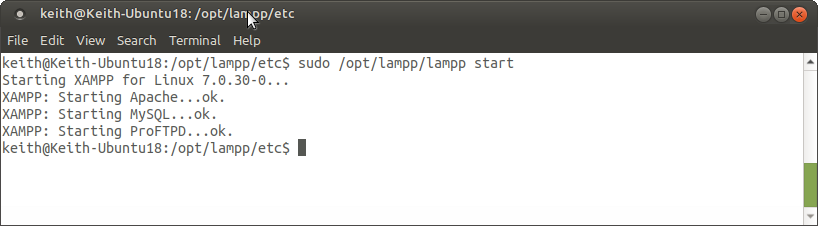
sudo /opt/lampp/lampp start
Start XAMPP
To stop XAMPP run the command below and it will return a list of the stopped services.
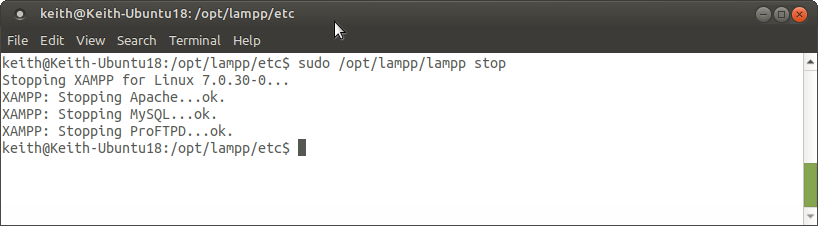
sudo /opt/lampp/lampp stop
Stop XAMPP
You can also stop/start/restart individual services by appending “apache”, “mysql” or “ftp” to the end.
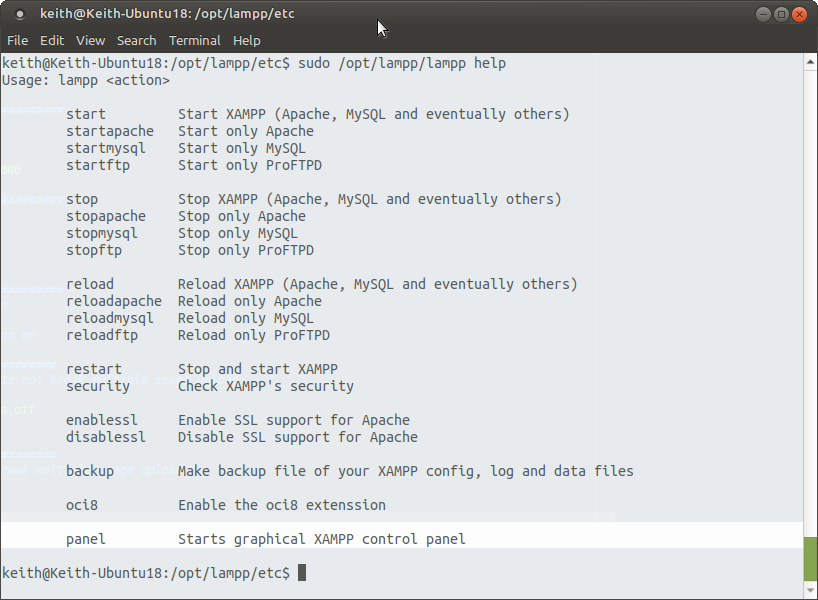
Ubuntu Help screen for XAMPP

Starting

start – Start XAMPP (Apache, MySQL and eventually others)
startapache – Start only Apache
startmysql – Start only MySQL
startftp – Start only ProFTPD

Stopping

stop – Stop XAMPP (Apache, MySQL and eventually others)
stopapache – Stop only Apache
stopmysql – Stop only MySQL
stopftp – Stop only ProFTPD

Restart

reload – Reload XAMPP (Apache, MySQL and eventually others)
reloadapache – Reload only Apache
reloadmysql – Reload only MySQL
reloadftp – Reload only ProFTPD
restart – Stop and start XAMPP

SSL & Security

security – Check XAMPP’s security
enablessl – Enable SSL support for Apache
disablessl – Disable SSL support for Apache

Config

backup – Make backup file of your XAMPP config, log and data files
oci8 – Enable the oci8 extenssion

GUI Panel

panel – Starts graphical XAMPP control panel
Read More
  • Share This:  
  •  Facebook
  •  Twitter
  •  Google+
  •  Stumble
  •  Digg

start xampp in ubuntu

 Programing Coderfunda     August 24, 2020     No comments   

To start XAMPP run the following and the command will return a list of running services:
sudo /opt/lampp/lampp start
Start XAMPP
To stop XAMPP run the command below and it will return a list of the stopped services.
sudo /opt/lampp/lampp stop
Stop XAMPP
You can also stop/start/restart individual services by appending “apache”, “mysql” or “ftp” to the end.
Ubuntu Help screen for XAMPP

Starting

start – Start XAMPP (Apache, MySQL and eventually others)
startapache – Start only Apache
startmysql – Start only MySQL
startftp – Start only ProFTPD

Stopping

stop – Stop XAMPP (Apache, MySQL and eventually others)
stopapache – Stop only Apache
stopmysql – Stop only MySQL
stopftp – Stop only ProFTPD

Restart

reload – Reload XAMPP (Apache, MySQL and eventually others)
reloadapache – Reload only Apache
reloadmysql – Reload only MySQL
reloadftp – Reload only ProFTPD
restart – Stop and start XAMPP

SSL & Security

security – Check XAMPP’s security
enablessl – Enable SSL support for Apache
disablessl – Disable SSL support for Apache

Config

backup – Make backup file of your XAMPP config, log and data files
oci8 – Enable the oci8 extenssion

GUI Panel

panel – Starts graphical XAMPP control panel
Read More
  • Share This:  
  •  Facebook
  •  Twitter
  •  Google+
  •  Stumble
  •  Digg

Running XAMPP on Ubuntu using Terminal

 Programing Coderfunda     August 24, 2020     No comments   

To start XAMPP run the following and the command will return a list of running services:
sudo /opt/lampp/lampp start
Start XAMPP
To stop XAMPP run the command below and it will return a list of the stopped services.
sudo /opt/lampp/lampp stop
Stop XAMPP
You can also stop/start/restart individual services by appending “apache”, “mysql” or “ftp” to the end.
Ubuntu Help screen for XAMPP

Starting

start – Start XAMPP (Apache, MySQL and eventually others)
startapache – Start only Apache
startmysql – Start only MySQL
startftp – Start only ProFTPD

Stopping

stop – Stop XAMPP (Apache, MySQL and eventually others)
stopapache – Stop only Apache
stopmysql – Stop only MySQL
stopftp – Stop only ProFTPD

Restart

reload – Reload XAMPP (Apache, MySQL and eventually others)
reloadapache – Reload only Apache
reloadmysql – Reload only MySQL
reloadftp – Reload only ProFTPD
restart – Stop and start XAMPP

SSL & Security

security – Check XAMPP’s security
enablessl – Enable SSL support for Apache
disablessl – Disable SSL support for Apache

Config

backup – Make backup file of your XAMPP config, log and data files
oci8 – Enable the oci8 extenssion

GUI Panel

panel – Starts graphical XAMPP control panel
Read More
  • Share This:  
  •  Facebook
  •  Twitter
  •  Google+
  •  Stumble
  •  Digg

Running XAMPP on Ubuntu using Terminal

 Programing Coderfunda     August 24, 2020     No comments   

To start XAMPP run the following and the command will return a list of running services:
sudo /opt/lampp/lampp start
Start XAMPP
To stop XAMPP run the command below and it will return a list of the stopped services.
sudo /opt/lampp/lampp stop
Stop XAMPP
You can also stop/start/restart individual services by appending “apache”, “mysql” or “ftp” to the end.
Ubuntu Help screen for XAMPP

Starting

start – Start XAMPP (Apache, MySQL and eventually others)
startapache – Start only Apache
startmysql – Start only MySQL
startftp – Start only ProFTPD

Stopping

stop – Stop XAMPP (Apache, MySQL and eventually others)
stopapache – Stop only Apache
stopmysql – Stop only MySQL
stopftp – Stop only ProFTPD

Restart

reload – Reload XAMPP (Apache, MySQL and eventually others)
reloadapache – Reload only Apache
reloadmysql – Reload only MySQL
reloadftp – Reload only ProFTPD
restart – Stop and start XAMPP

SSL & Security

security – Check XAMPP’s security
enablessl – Enable SSL support for Apache
disablessl – Disable SSL support for Apache

Config

backup – Make backup file of your XAMPP config, log and data files
oci8 – Enable the oci8 extenssion

GUI Panel

panel – Starts graphical XAMPP control panel
Read More
  • Share This:  
  •  Facebook
  •  Twitter
  •  Google+
  •  Stumble
  •  Digg
Newer Posts Older Posts Home

Meta

Popular Posts

  • Join Dependency
    Join Dependency Join decomposition is a further generalization of Multivalued dependencies. If the join of R1 and R2 over C is equal to rela...
  • Python Loops
    Python Loops The flow of the programs written in any programming language is sequential by default. Sometimes we may need to alter the flow ...
  • Python Data Types
      Python Data Types Variables can hold values, and every value has a data-type. Python is a dynamically typed language; hence we do not need...
  • Python all() Function
    Python all() Function The python  all()  function accepts an iterable object (such as list,dictionary etc.). It returns True if all items in...
  • Create a CSV file in Magento 2
    In this blog, I will make sense of, how to make a CSV document in magentoMagento 2. CSV (Comma Separated Value) is one of the most well-know...

Categories

  • Ajax (26)
  • Bootstrap (30)
  • DBMS (42)
  • HTML (12)
  • HTML5 (45)
  • JavaScript (10)
  • Jquery (34)
  • Jquery UI (2)
  • JqueryUI (32)
  • Laravel (1069)
  • Laravel Tutorials (23)
  • Laravel-Question (36)
  • Magento (9)
  • Magento 2 (95)
  • MariaDB (1)
  • MySql Tutorial (3)
  • PHP-Interview-Questions (3)
  • Php Question (13)
  • Python (36)
  • RDBMS (13)
  • SQL Tutorial (79)
  • Vue.js Tutorial (69)
  • Wordpress (158)
  • Wordpress Theme (3)
  • codeigniter (108)
  • oops (4)
  • php (853)

Social Media Links

  • Follow on Twitter
  • Like on Facebook
  • Subscribe on Youtube
  • Follow on Instagram

Pages

  • Home
  • Contact Us
  • Privacy Policy
  • About us

Blog Archive

  • ►  2026 (267)
    • ►  09/20 - 09/27 (52)
    • ►  09/13 - 09/20 (10)
    • ►  08/30 - 09/06 (87)
    • ►  08/16 - 08/23 (1)
    • ►  08/02 - 08/09 (8)
    • ►  07/26 - 08/02 (108)
    • ►  06/28 - 07/05 (1)
  • ►  2025 (4)
    • ►  07/06 - 07/13 (2)
    • ►  06/29 - 07/06 (2)
  • ►  2024 (486)
    • ►  09/15 - 09/22 (30)
    • ►  09/08 - 09/15 (35)
    • ►  09/01 - 09/08 (35)
    • ►  08/11 - 08/18 (2)
    • ►  08/04 - 08/11 (33)
    • ►  07/28 - 08/04 (30)
    • ►  07/07 - 07/14 (11)
    • ►  06/30 - 07/07 (35)
    • ►  06/23 - 06/30 (5)
    • ►  06/02 - 06/09 (31)
    • ►  05/26 - 06/02 (20)
    • ►  05/05 - 05/12 (29)
    • ►  04/28 - 05/05 (26)
    • ►  04/07 - 04/14 (10)
    • ►  03/31 - 04/07 (34)
    • ►  03/24 - 03/31 (10)
    • ►  03/03 - 03/10 (35)
    • ►  02/25 - 03/03 (15)
    • ►  02/04 - 02/11 (22)
    • ►  01/28 - 02/04 (30)
    • ►  01/07 - 01/14 (8)
  • ►  2023 (484)
    • ►  12/31 - 01/07 (35)
    • ►  12/24 - 12/31 (10)
    • ►  12/03 - 12/10 (33)
    • ►  11/26 - 12/03 (20)
    • ►  11/05 - 11/12 (35)
    • ►  10/29 - 11/05 (20)
    • ►  10/22 - 10/29 (9)
    • ►  10/15 - 10/22 (7)
    • ►  10/08 - 10/15 (9)
    • ►  10/01 - 10/08 (10)
    • ►  09/24 - 10/01 (9)
    • ►  09/17 - 09/24 (9)
    • ►  09/10 - 09/17 (7)
    • ►  09/03 - 09/10 (9)
    • ►  08/27 - 09/03 (9)
    • ►  08/20 - 08/27 (8)
    • ►  08/13 - 08/20 (8)
    • ►  08/06 - 08/13 (8)
    • ►  07/30 - 08/06 (8)
    • ►  07/23 - 07/30 (7)
    • ►  07/16 - 07/23 (8)
    • ►  07/09 - 07/16 (7)
    • ►  07/02 - 07/09 (8)
    • ►  06/25 - 07/02 (7)
    • ►  06/18 - 06/25 (7)
    • ►  06/11 - 06/18 (7)
    • ►  06/04 - 06/11 (11)
    • ►  05/28 - 06/04 (7)
    • ►  05/21 - 05/28 (8)
    • ►  05/14 - 05/21 (11)
    • ►  05/07 - 05/14 (7)
    • ►  04/30 - 05/07 (7)
    • ►  04/23 - 04/30 (8)
    • ►  04/16 - 04/23 (9)
    • ►  04/09 - 04/16 (7)
    • ►  04/02 - 04/09 (4)
    • ►  03/26 - 04/02 (21)
    • ►  03/19 - 03/26 (2)
    • ►  03/12 - 03/19 (9)
    • ►  03/05 - 03/12 (26)
    • ►  02/26 - 03/05 (25)
    • ►  01/15 - 01/22 (7)
    • ►  01/08 - 01/15 (1)
  • ►  2022 (1037)
    • ►  12/11 - 12/18 (13)
    • ►  12/04 - 12/11 (1)
    • ►  11/27 - 12/04 (40)
    • ►  11/06 - 11/13 (1)
    • ►  10/16 - 10/23 (13)
    • ►  09/04 - 09/11 (5)
    • ►  08/21 - 08/28 (24)
    • ►  08/14 - 08/21 (24)
    • ►  07/03 - 07/10 (9)
    • ►  06/19 - 06/26 (3)
    • ►  05/29 - 06/05 (3)
    • ►  05/22 - 05/29 (3)
    • ►  05/15 - 05/22 (109)
    • ►  05/01 - 05/08 (7)
    • ►  04/24 - 05/01 (7)
    • ►  04/17 - 04/24 (64)
    • ►  04/10 - 04/17 (115)
    • ►  04/03 - 04/10 (73)
    • ►  03/27 - 04/03 (77)
    • ►  03/13 - 03/20 (2)
    • ►  03/06 - 03/13 (25)
    • ►  02/27 - 03/06 (18)
    • ►  02/20 - 02/27 (153)
    • ►  02/13 - 02/20 (187)
    • ►  01/30 - 02/06 (45)
    • ►  01/23 - 01/30 (15)
    • ►  01/16 - 01/23 (1)
  • ►  2021 (412)
    • ►  10/24 - 10/31 (2)
    • ►  07/25 - 08/01 (1)
    • ►  07/11 - 07/18 (10)
    • ►  06/13 - 06/20 (29)
    • ►  05/23 - 05/30 (1)
    • ►  05/02 - 05/09 (24)
    • ►  04/25 - 05/02 (24)
    • ►  04/18 - 04/25 (112)
    • ►  04/11 - 04/18 (1)
    • ►  04/04 - 04/11 (6)
    • ►  03/28 - 04/04 (86)
    • ►  03/21 - 03/28 (19)
    • ►  03/14 - 03/21 (2)
    • ►  03/07 - 03/14 (10)
    • ►  02/28 - 03/07 (1)
    • ►  02/21 - 02/28 (29)
    • ►  02/14 - 02/21 (13)
    • ►  02/07 - 02/14 (12)
    • ►  01/31 - 02/07 (6)
    • ►  01/17 - 01/24 (2)
    • ►  01/10 - 01/17 (8)
    • ►  01/03 - 01/10 (14)
  • ▼  2020 (376)
    • ►  12/27 - 01/03 (37)
    • ►  12/20 - 12/27 (92)
    • ►  12/13 - 12/20 (29)
    • ►  12/06 - 12/13 (37)
    • ►  11/29 - 12/06 (4)
    • ►  11/15 - 11/22 (14)
    • ►  11/08 - 11/15 (8)
    • ►  11/01 - 11/08 (2)
    • ►  10/18 - 10/25 (14)
    • ►  10/11 - 10/18 (16)
    • ►  10/04 - 10/11 (10)
    • ►  09/20 - 09/27 (10)
    • ►  09/06 - 09/13 (19)
    • ►  08/30 - 09/06 (26)
    • ▼  08/23 - 08/30 (4)
      • start xampp in ubuntu
      • start xampp in ubuntu
      • Running XAMPP on Ubuntu using Terminal
      • Running XAMPP on Ubuntu using Terminal
    • ►  08/16 - 08/23 (2)
    • ►  07/12 - 07/19 (48)
    • ►  05/17 - 05/24 (2)
    • ►  01/05 - 01/12 (2)
  • ►  2019 (74)
    • ►  07/07 - 07/14 (6)
    • ►  06/16 - 06/23 (6)
    • ►  02/10 - 02/17 (17)
    • ►  01/13 - 01/20 (37)
    • ►  01/06 - 01/13 (8)
  • ►  2018 (376)
    • ►  12/30 - 01/06 (24)
    • ►  12/16 - 12/23 (8)
    • ►  12/09 - 12/16 (98)
    • ►  12/02 - 12/09 (16)
    • ►  11/18 - 11/25 (36)
    • ►  11/04 - 11/11 (18)
    • ►  10/28 - 11/04 (10)
    • ►  10/21 - 10/28 (26)
    • ►  10/14 - 10/21 (52)
    • ►  10/07 - 10/14 (4)
    • ►  09/30 - 10/07 (2)
    • ►  09/23 - 09/30 (68)
    • ►  09/16 - 09/23 (4)
    • ►  09/09 - 09/16 (4)
    • ►  08/26 - 09/02 (6)

Data Publish News

Loading...

Al Jazeera – Breaking News, World News and Video from Al Jazeera

Loading...

Laravel News

Loading...

Copyright © CoderFunda | Powered by Blogger
Design by Coderfunda | Blogger Theme by Coderfunda | Distributed By Coderfunda