CoderFunda
  • Home
  • About us
    • Contact Us
    • Disclaimer
    • Privacy Policy
    • About us
  • Home
  • Php
  • HTML
  • CSS
  • JavaScript
    • JavaScript
    • Jquery
    • JqueryUI
    • Stock
  • SQL
  • Vue.Js
  • Python
  • Wordpress
  • C++
    • C++
    • C
  • Laravel
    • Laravel
      • Overview
      • Namespaces
      • Middleware
      • Routing
      • Configuration
      • Application Structure
      • Installation
    • Overview
  • DBMS
    • DBMS
      • PL/SQL
      • SQLite
      • MongoDB
      • Cassandra
      • MySQL
      • Oracle
      • CouchDB
      • Neo4j
      • DB2
      • Quiz
    • Overview
  • Entertainment
    • TV Series Update
    • Movie Review
    • Movie Review
  • More
    • Vue. Js
    • Php Question
    • Php Interview Question
    • Laravel Interview Question
    • SQL Interview Question
    • IAS Interview Question
    • PCS Interview Question
    • Technology
    • Other

01 February, 2022

How to Customize Product Page Layout in Magento

 Programing Coderfunda     February 01, 2022     MAGENTO TUTORIALS     No comments   


How to Customize Product Page Layout in Magento


As you might know, each product requires a particular page layout based on its unique features. So the thing here is to customize a specific product page layout for several products under a category without changing the category layout.

To do that, we’ll need to go through the basics, and only from there, we will learn to customize product page layout with layout files.

About layout files

In Magento, layout files are .XML files which are used to define the structure of a given page. Layout files are classified into:

  • Base layouts: the layout files provided by modules
TypeLocation
Page configuration & generic layout files<module_dir>/view/frontend/layout
Page layout files<module_dir>/view/frontend/page_layout
  • Theme layouts: the layout files provided by themes
TypeLocation
Page configuration & generic layout files<theme_dir>/<Namespace>_<Module>/layout
Page layout files<theme_dir>/<Namespace>_<Module>/page_layout

How to customize product page layout

To customize the layout of a given page, you’ll need to override that page’s layout file with a custom one. To do so, you’ll need to locate the layout files for your theme’s product page. 

Customize product page layout for all product types

What if you want to customize the product page layout for all of your product types? 

This is the easy part, as you’ll only need to make changes to the common layout file i.e., catalog_product_view.xml (located in /theme_dir/Magento_Catalog/layout/) for the change to be reflected on all of your product types.

Structure content in the layout using containers

The layout of your product pages is structured using containers, which can be referenced or has more blocks added into it.

Example:

<move element="product.info.social" destination="product.info.main" before="product.info.price"/>

Here are the common containers used in product page layout:

  • product.info.main
  • product.info.price
  • product.info.stock.sku
  • product.info.form.content
  • product.info.extrahint
  • product.info.social
  • product.info.media

Customize product page layout for a specific product

There are two ways you can go about customizing your product page’s layout for a specific product, both involve putting files in a specified /layout/ folder.

Method 1: Create a custom layout update

Starting with Magento 2.3.4, the Layout Update XML field in Magento Admin Panel is now converted into a selector, which means you can no longer freely add code into this field anymore.
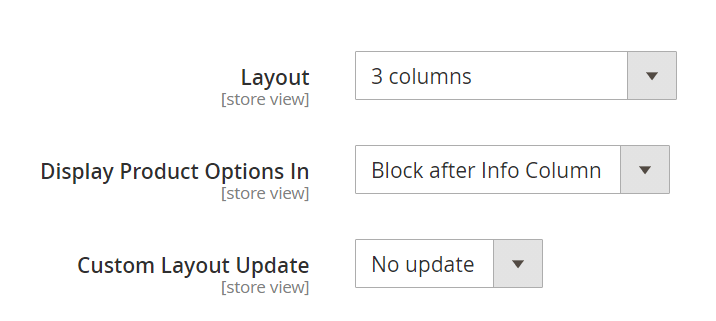
design page layout
Custom layout update for product pages is now converted into a selector

In order to apply custom layout updates for your product pages, you’ll need to put an .XML file in a specified folder (app/design/frontend/<Vendor>/<Theme>/Magento_Catalog/layout/). The layout update from that .XML file will then appear under Custom Layout Update as a selectable option.

The rule for custom layout update file names

Your custom layout update file names will need to adhere to the following rule:

catalog_product_view_selectable_<Product SKU>_<Name for Layout Update>.xml

where: 

  • <Product_SKU>: is the SKU of the product that you want to apply custom layout update
  • <Name for Layout Update>: is the name of this layout which will be shown in the Custom Layout Update selector

For example, if we want to apply a new custom layout update for this SKU: MH05. We’ll need to put a custom layout file named catalog_product_view_selectable_ MH05_test.xml in /theme_dir/Magento_Catalog/layout/, with the content like below:
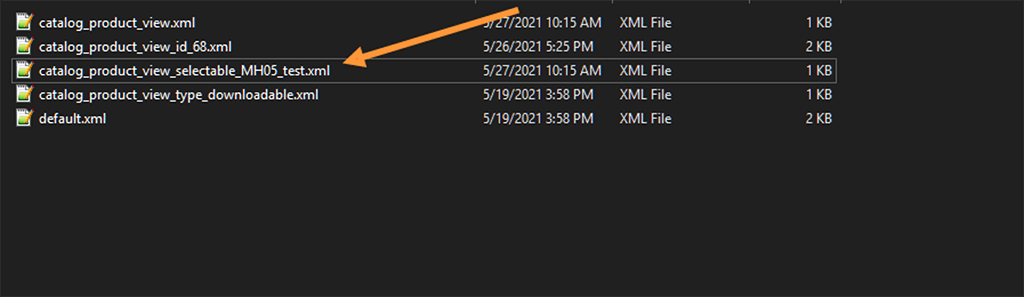
MH05 file
<?xml version="1.0"?>
<page layout="1column" xmlns:xsi="http://www.w3.org/2001/XMLSchema-instance" xsi:noNamespaceSchemaLocation="urn:magento:framework:View/Layout/etc/page_configuration.xsd">
<body>
<move element="page.main.title" destination="product.info.main" before="-"/>
<move element="product.info.stock.sku" destination="product.info.price" after="product.price.final"/>
<move element="product.info.review" destination="product.info.main" before="product.info.price"/>
<referenceContainer name="page.wrapper">
<referenceBlock name="breadcrumbs" remove="true"/>
</referenceContainer>
</body>
</page>

What this test layout will do is it’ll remove the breadcrumbs from Product SKU MH05’s product page.

Next, in Catalog > Products, choose the product with SKU MH05. You should now be able to see a custom layout update named test:
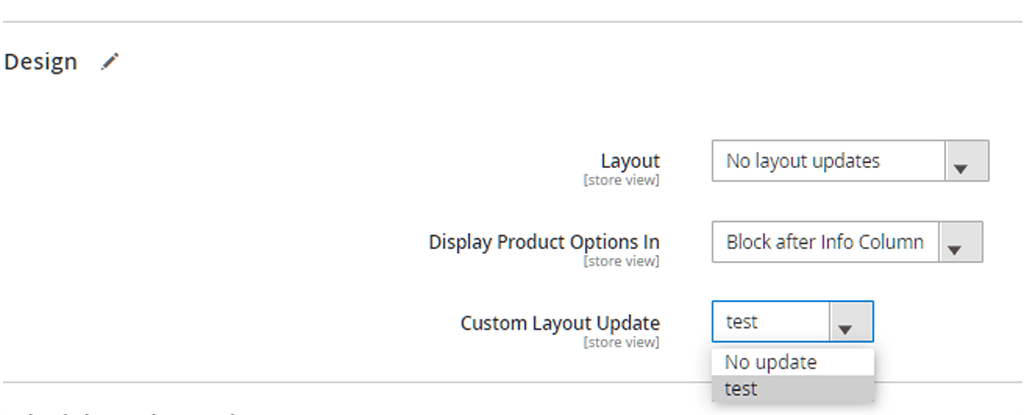
design test file

Choose this new custom layout update and Save the changes. 

Now clear your cache using:

php bin/magento cache:flush

And the changes should now be reflected on your frontend.
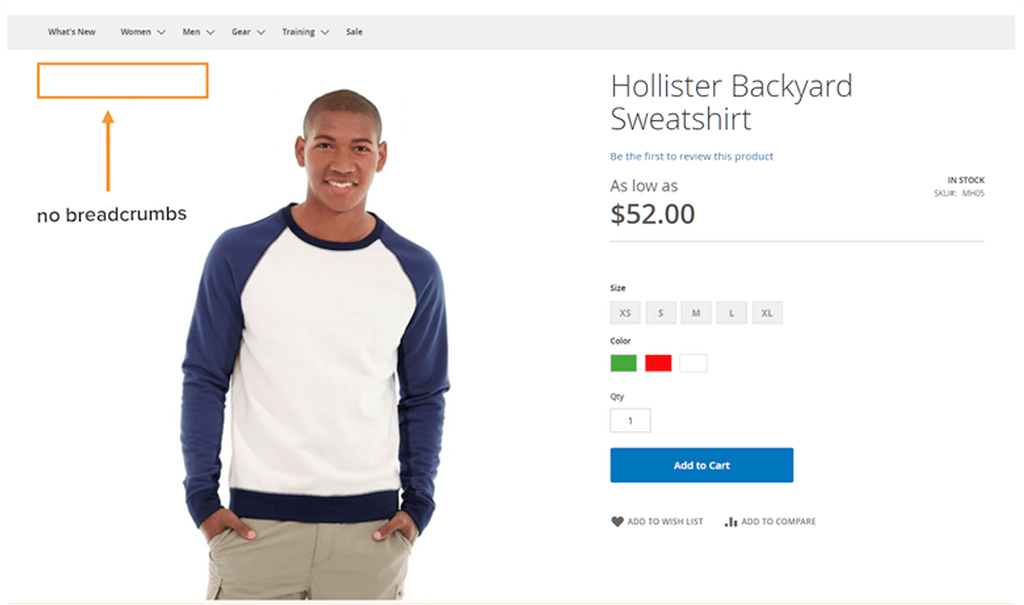
no breadcrumbs
Our product (SKU MH05) with a custom layout update to remove breadcrumbs

Method 2: Overriding layout

With the addPageLayoutHandles method, you can override the layout using:

  • Product ID 
  • Product SKU
  • Product TYPE

For example, if you want to customize the product page layout for a product with ID 68, the layout file’s name will need to adhere to the following format:

catalog_product_view_id_number.xml

e.g., catalog_product_view_id_68

And the file will need to be in the following part:

/theme_dir/Magento_Catalog/layout/

layout id 68
Customize product page layout for specific product ID/SKU/type

Clear the cache following the system’s message. If not, you can go to the frontend to check out the new customized page layout for the specific product. 

For product type, you can follow the same steps and change the file’s name accordingly. For example, use catalog_product_view_type_bundle.xml to apply the new page layout for bundled products.

Hope you enjoy your new page layout for your lovely items!


By simicart . com


  • Share This:  
  •  Facebook
  •  Twitter
  •  Google+
  •  Stumble
  •  Digg
Email ThisBlogThis!Share to XShare to Facebook
Newer Post Older Post Home

0 comments:

Post a Comment

Thanks

Meta

Popular Posts

  • Generate Migrations from an Existing Database With the Migration Generator Package
    Laravel Migration Generator Migration Generator for Laravel is a package by Bennett Treptow to generate migrations from existing database ...
  • 'Ramayana' to have 'Baahubali'-style cliffhanger ending
    image/jpeg https://timesofindia.indiatimes.com/entertainment/hindi/bollywood/news/ramayana-to-end-on-baahubali-style-cliffhanger-director-ni...
  • Vijay talks about being harassed in an uncomfortable encounter with a model coordinator
    image/jpeg https://timesofindia.indiatimes.com/entertainment/hindi/bollywood/news/he-was-getting-touchy-feely-vijay-varma-opens-up-about-bei...
  • 'Spider-Man: Brand New Day' records Rs 300 crore weekend in India
    image/jpeg https://timesofindia.indiatimes.com/entertainment/english/hollywood/box-office/spider-man-brand-new-day-box-office-collection-day...
  • SRK's King eyes record-breaking Rs 50 crore music rights deal
    image/jpeg https://timesofindia.indiatimes.com/entertainment/hindi/bollywood/news/shah-rukh-khans-king-eyes-record-breaking-rs-50-crore-musi...

Categories

  • Ajax (26)
  • Bootstrap (30)
  • DBMS (42)
  • HTML (12)
  • HTML5 (45)
  • JavaScript (10)
  • Jquery (34)
  • Jquery UI (2)
  • JqueryUI (32)
  • Laravel (1017)
  • Laravel Tutorials (23)
  • Laravel-Question (6)
  • Magento (9)
  • Magento 2 (95)
  • MariaDB (1)
  • MySql Tutorial (2)
  • PHP-Interview-Questions (3)
  • Php Question (13)
  • Python (36)
  • RDBMS (13)
  • SQL Tutorial (79)
  • Vue.js Tutorial (69)
  • Wordpress (150)
  • Wordpress Theme (3)
  • codeigniter (108)
  • oops (4)
  • php (853)

Social Media Links

  • Follow on Twitter
  • Like on Facebook
  • Subscribe on Youtube
  • Follow on Instagram

Pages

  • Home
  • Contact Us
  • Privacy Policy
  • About us

Blog Archive

  • ►  2026 (117)
    • ►  08/02 - 08/09 (8)
    • ►  07/26 - 08/02 (108)
    • ►  06/28 - 07/05 (1)
  • ►  2025 (4)
    • ►  07/06 - 07/13 (2)
    • ►  06/29 - 07/06 (2)
  • ►  2024 (486)
    • ►  09/15 - 09/22 (30)
    • ►  09/08 - 09/15 (35)
    • ►  09/01 - 09/08 (35)
    • ►  08/11 - 08/18 (2)
    • ►  08/04 - 08/11 (33)
    • ►  07/28 - 08/04 (30)
    • ►  07/07 - 07/14 (11)
    • ►  06/30 - 07/07 (35)
    • ►  06/23 - 06/30 (5)
    • ►  06/02 - 06/09 (31)
    • ►  05/26 - 06/02 (20)
    • ►  05/05 - 05/12 (29)
    • ►  04/28 - 05/05 (26)
    • ►  04/07 - 04/14 (10)
    • ►  03/31 - 04/07 (34)
    • ►  03/24 - 03/31 (10)
    • ►  03/03 - 03/10 (35)
    • ►  02/25 - 03/03 (15)
    • ►  02/04 - 02/11 (22)
    • ►  01/28 - 02/04 (30)
    • ►  01/07 - 01/14 (8)
  • ►  2023 (484)
    • ►  12/31 - 01/07 (35)
    • ►  12/24 - 12/31 (10)
    • ►  12/03 - 12/10 (33)
    • ►  11/26 - 12/03 (20)
    • ►  11/05 - 11/12 (35)
    • ►  10/29 - 11/05 (20)
    • ►  10/22 - 10/29 (9)
    • ►  10/15 - 10/22 (7)
    • ►  10/08 - 10/15 (9)
    • ►  10/01 - 10/08 (10)
    • ►  09/24 - 10/01 (9)
    • ►  09/17 - 09/24 (9)
    • ►  09/10 - 09/17 (7)
    • ►  09/03 - 09/10 (9)
    • ►  08/27 - 09/03 (9)
    • ►  08/20 - 08/27 (8)
    • ►  08/13 - 08/20 (8)
    • ►  08/06 - 08/13 (8)
    • ►  07/30 - 08/06 (8)
    • ►  07/23 - 07/30 (7)
    • ►  07/16 - 07/23 (8)
    • ►  07/09 - 07/16 (7)
    • ►  07/02 - 07/09 (8)
    • ►  06/25 - 07/02 (7)
    • ►  06/18 - 06/25 (7)
    • ►  06/11 - 06/18 (7)
    • ►  06/04 - 06/11 (11)
    • ►  05/28 - 06/04 (7)
    • ►  05/21 - 05/28 (8)
    • ►  05/14 - 05/21 (11)
    • ►  05/07 - 05/14 (7)
    • ►  04/30 - 05/07 (7)
    • ►  04/23 - 04/30 (8)
    • ►  04/16 - 04/23 (9)
    • ►  04/09 - 04/16 (7)
    • ►  04/02 - 04/09 (4)
    • ►  03/26 - 04/02 (21)
    • ►  03/19 - 03/26 (2)
    • ►  03/12 - 03/19 (9)
    • ►  03/05 - 03/12 (26)
    • ►  02/26 - 03/05 (25)
    • ►  01/15 - 01/22 (7)
    • ►  01/08 - 01/15 (1)
  • ▼  2022 (1037)
    • ►  12/11 - 12/18 (13)
    • ►  12/04 - 12/11 (1)
    • ►  11/27 - 12/04 (40)
    • ►  11/06 - 11/13 (1)
    • ►  10/16 - 10/23 (13)
    • ►  09/04 - 09/11 (5)
    • ►  08/21 - 08/28 (24)
    • ►  08/14 - 08/21 (24)
    • ►  07/03 - 07/10 (9)
    • ►  06/19 - 06/26 (3)
    • ►  05/29 - 06/05 (3)
    • ►  05/22 - 05/29 (3)
    • ►  05/15 - 05/22 (109)
    • ►  05/01 - 05/08 (7)
    • ►  04/24 - 05/01 (7)
    • ►  04/17 - 04/24 (64)
    • ►  04/10 - 04/17 (115)
    • ►  04/03 - 04/10 (73)
    • ►  03/27 - 04/03 (77)
    • ►  03/13 - 03/20 (2)
    • ►  03/06 - 03/13 (25)
    • ►  02/27 - 03/06 (18)
    • ►  02/20 - 02/27 (153)
    • ►  02/13 - 02/20 (187)
    • ▼  01/30 - 02/06 (45)
      • Image Optimization in Magento 2: Best Practices
      • Magento SEO Checklist: How to Get On Page One
      • Understanding PCI Compliance in Magento
      • Manage Invite Codes for Your Laravel Applications
      • Server Timing Metrics for your Laravel Apps
      • Laravel Option Framework
      • Laravel Telescope Dev Toolbar
      • Laravel Passwordless Login
      • Design Models Interactively With Laravel Schematics
      • Manager Pattern Package for Laravel
      • Using Google Sheets with Eloquent
      • Keep Track of Model Inventory with Laravel Stock
      • Terminal: An Elegant Wrapper around the Symfony Pr...
      • Blade Icons Package
      • Class-Based Factories with Laravel Poser
      • Class-Based Factories with Laravel Poser
      • Redaxios Fetch Wrapper With an Axios API
      • Pass Named Handler Arguments to Middleware in Laravel
      • Open Food Facts API
      • A TALL (Tailwind CSS, Alpine.js, Laravel, and Live...
      • Sub-Minute and Cron-less Scheduled Tasks in Laravel
      • Postgres Range Type Support for Laravel 7
      • How to Import Configurable Products in Magento 2
      • How to Customize Product Page Layout in Magento
      • How to Import Configurable Products in Magento 2
      • Magento PWA Studio: Useful Links and Resources
      • How to Configure Magento CAPTCHA Settings for Admi...
      • How to Add Featured Products to Homepage in Magento 2
      • Real-Time Chat Package for Laravel
      • Real-Time Chat Package for Laravel
      • PHP Progress Library to Track User Progress
      • Generate and Extract Random Data with RandoPHP
      • Eloquent State Machines
      • Fast Excel Package for Laravel
      • Laravel Macroable Models Package
      • Extract Untranslated Strings from Laravel Projects
      • Bandwagon is a Social Proof Package for Laravel
      • Snappy Image Wrapper for Laravel
      • Organize Laravel Applications With Actions
      • Squire: Static Eloquent Model Library
      • OpenAPI Initializer
      • Simplifying Service Providers With Laravel Package...
      • Laravel Console Wizard
      • Use Basecamp’s Hotwire in Laravel
      • CLI to Check For PHP Security Vulnerabilities
    • ►  01/23 - 01/30 (15)
    • ►  01/16 - 01/23 (1)
  • ►  2021 (412)
    • ►  10/24 - 10/31 (2)
    • ►  07/25 - 08/01 (1)
    • ►  07/11 - 07/18 (10)
    • ►  06/13 - 06/20 (29)
    • ►  05/23 - 05/30 (1)
    • ►  05/02 - 05/09 (24)
    • ►  04/25 - 05/02 (24)
    • ►  04/18 - 04/25 (112)
    • ►  04/11 - 04/18 (1)
    • ►  04/04 - 04/11 (6)
    • ►  03/28 - 04/04 (86)
    • ►  03/21 - 03/28 (19)
    • ►  03/14 - 03/21 (2)
    • ►  03/07 - 03/14 (10)
    • ►  02/28 - 03/07 (1)
    • ►  02/21 - 02/28 (29)
    • ►  02/14 - 02/21 (13)
    • ►  02/07 - 02/14 (12)
    • ►  01/31 - 02/07 (6)
    • ►  01/17 - 01/24 (2)
    • ►  01/10 - 01/17 (8)
    • ►  01/03 - 01/10 (14)
  • ►  2020 (376)
    • ►  12/27 - 01/03 (37)
    • ►  12/20 - 12/27 (92)
    • ►  12/13 - 12/20 (29)
    • ►  12/06 - 12/13 (37)
    • ►  11/29 - 12/06 (4)
    • ►  11/15 - 11/22 (14)
    • ►  11/08 - 11/15 (8)
    • ►  11/01 - 11/08 (2)
    • ►  10/18 - 10/25 (14)
    • ►  10/11 - 10/18 (16)
    • ►  10/04 - 10/11 (10)
    • ►  09/20 - 09/27 (10)
    • ►  09/06 - 09/13 (19)
    • ►  08/30 - 09/06 (26)
    • ►  08/23 - 08/30 (4)
    • ►  08/16 - 08/23 (2)
    • ►  07/12 - 07/19 (48)
    • ►  05/17 - 05/24 (2)
    • ►  01/05 - 01/12 (2)
  • ►  2019 (74)
    • ►  07/07 - 07/14 (6)
    • ►  06/16 - 06/23 (6)
    • ►  02/10 - 02/17 (17)
    • ►  01/13 - 01/20 (37)
    • ►  01/06 - 01/13 (8)
  • ►  2018 (376)
    • ►  12/30 - 01/06 (24)
    • ►  12/16 - 12/23 (8)
    • ►  12/09 - 12/16 (98)
    • ►  12/02 - 12/09 (16)
    • ►  11/18 - 11/25 (36)
    • ►  11/04 - 11/11 (18)
    • ►  10/28 - 11/04 (10)
    • ►  10/21 - 10/28 (26)
    • ►  10/14 - 10/21 (52)
    • ►  10/07 - 10/14 (4)
    • ►  09/30 - 10/07 (2)
    • ►  09/23 - 09/30 (68)
    • ►  09/16 - 09/23 (4)
    • ►  09/09 - 09/16 (4)
    • ►  08/26 - 09/02 (6)

Data Publish News

Loading...

Al Jazeera – Breaking News, World News and Video from Al Jazeera

Loading...

Laravel News

Loading...

Copyright © CoderFunda | Powered by Blogger
Design by Coderfunda | Blogger Theme by Coderfunda | Distributed By Coderfunda