CoderFunda
  • Home
  • About us
    • Contact Us
    • Disclaimer
    • Privacy Policy
    • About us
  • Home
  • Php
  • HTML
  • CSS
  • JavaScript
    • JavaScript
    • Jquery
    • JqueryUI
    • Stock
  • SQL
  • Vue.Js
  • Python
  • Wordpress
  • C++
    • C++
    • C
  • Laravel
    • Laravel
      • Overview
      • Namespaces
      • Middleware
      • Routing
      • Configuration
      • Application Structure
      • Installation
    • Overview
  • DBMS
    • DBMS
      • PL/SQL
      • SQLite
      • MongoDB
      • Cassandra
      • MySQL
      • Oracle
      • CouchDB
      • Neo4j
      • DB2
      • Quiz
    • Overview
  • Entertainment
    • TV Series Update
    • Movie Review
    • Movie Review
  • More
    • Vue. Js
    • Php Question
    • Php Interview Question
    • Laravel Interview Question
    • SQL Interview Question
    • IAS Interview Question
    • PCS Interview Question
    • Technology
    • Other

20 February, 2022

PHPUnit SpeedTrap

 Programing Coderfunda     February 20, 2022     Laravel, Packages, php     No comments   


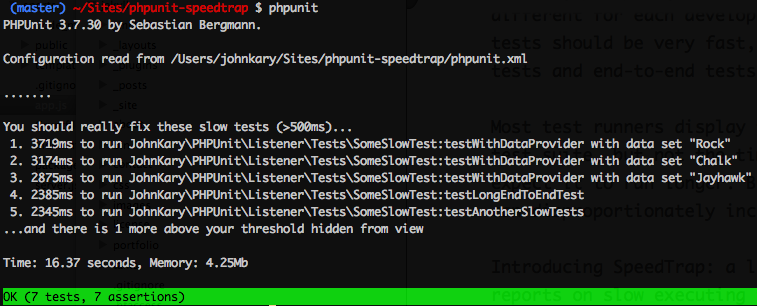
PHPUnit Speedtrap is a package by John Kary that reports on slow-running tests in your PHPUnit test suite. This package is inspired by Ruby RSpec’s --profile option that displays feedback about slow tests:

SpeedTrap reports on slow-running PHPUnit tests right in the console.

Many factors affect test execution time. A test not properly isolated from variable latency (database, network, etc.) and even basic load on the test machine will cause test execution times to fluctuate.

From the project’s readme, here’s an example of what you can expect:
I am not super familiar with tapping into PHPUnit, so I enjoyed diving into the package’s source code and learning how PHPUnit listeners work. In a phpunit.xml file you can enable this package with the following XML:

<listeners>
<listener class="JohnKary\PHPUnit\Listener\SpeedTrapListener" />
</listeners>

A more extensive example includes customizable options for defining the “slowTreshold” and “reportLength”. You can customize what your test suite considers a “slow” test defined in milliseconds:

<listeners>
<listener class="JohnKary\PHPUnit\Listener\SpeedTrapListener">
<arguments>
<array>
<element key="slowThreshold">
<integer>500</integer>
</element>
<element key="reportLength">
<integer>5</integer>
</element>
</array>
</arguments>
</listener>
</listeners>

Along with the listener, the package demonstrates using an annotation to override these configuration options on the per-test level:

/**
* @slowThreshold 5000
*/
public function testLongRunningProcess()
{
// Code that takes a longer time to execute
}

You can learn more about the PHPUnit Speedtrap package at johnkary/phpunit-speedtrap and also check out these tips on speeding up your PHPUnit tests

  • Share This:  
  •  Facebook
  •  Twitter
  •  Google+
  •  Stumble
  •  Digg
Email ThisBlogThis!Share to XShare to Facebook
Newer Post Older Post Home

0 comments:

Post a Comment

Thanks

Meta

Popular Posts

  • Vue.js Events
      In Vue.js, Events are used to respond to an action. Suppose, you have to build a dynamic website using Vue.js then you'll most likely ...
  • Is there a way to use awk to count the number of rows between 2 flags and input that number into a specific field?
    I have a set of data that consists of seismic wave travel times and their corresponding information (i.e. source that produced the wave and ...
  • Use Leaflet.js and Google Maps Blade Components in Laravel
      Laravel Maps   is a package to easily create maps using   Leaflet.js   or Google Maps and Blade components. The main features that work wi...
  • Luhn Algorithm Package for Laravel
    Laravel Luhn is a package by   Vincent Prat   that provides utilities to ease validation and computation of credit cards,   SIREN codes , an...
  • DBMS Keys
    Keys Keys play an important role in the relational database. It is used to uniquely identify any record or row of data from the table. It is...

Categories

  • Ajax (26)
  • Bootstrap (30)
  • DBMS (42)
  • HTML (12)
  • HTML5 (45)
  • JavaScript (10)
  • Jquery (34)
  • Jquery UI (2)
  • JqueryUI (32)
  • Laravel (1017)
  • Laravel Tutorials (23)
  • Laravel-Question (6)
  • Magento (9)
  • Magento 2 (95)
  • MariaDB (1)
  • MySql Tutorial (2)
  • PHP-Interview-Questions (3)
  • Php Question (13)
  • Python (36)
  • RDBMS (13)
  • SQL Tutorial (79)
  • Vue.js Tutorial (69)
  • Wordpress (150)
  • Wordpress Theme (3)
  • codeigniter (108)
  • oops (4)
  • php (853)

Social Media Links

  • Follow on Twitter
  • Like on Facebook
  • Subscribe on Youtube
  • Follow on Instagram

Pages

  • Home
  • Contact Us
  • Privacy Policy
  • About us

Blog Archive

  • July (4)
  • September (100)
  • August (50)
  • July (56)
  • June (46)
  • May (59)
  • April (50)
  • March (60)
  • February (42)
  • January (53)
  • December (58)
  • November (61)
  • October (39)
  • September (36)
  • August (36)
  • July (34)
  • June (34)
  • May (36)
  • April (29)
  • March (82)
  • February (1)
  • January (8)
  • December (14)
  • November (41)
  • October (13)
  • September (5)
  • August (48)
  • July (9)
  • June (6)
  • May (119)
  • April (259)
  • March (122)
  • February (368)
  • January (33)
  • October (2)
  • July (11)
  • June (29)
  • May (25)
  • April (168)
  • March (93)
  • February (60)
  • January (28)
  • December (195)
  • November (24)
  • October (40)
  • September (55)
  • August (6)
  • July (48)
  • May (2)
  • January (2)
  • July (6)
  • June (6)
  • February (17)
  • January (69)
  • December (122)
  • November (56)
  • October (92)
  • September (76)
  • August (6)

Loading...

Laravel News

Loading...

Copyright © CoderFunda | Powered by Blogger
Design by Coderfunda | Blogger Theme by Coderfunda | Distributed By Coderfunda