CoderFunda
  • Home
  • About us
    • Contact Us
    • Disclaimer
    • Privacy Policy
    • About us
  • Home
  • Php
  • HTML
  • CSS
  • JavaScript
    • JavaScript
    • Jquery
    • JqueryUI
    • Stock
  • SQL
  • Vue.Js
  • Python
  • Wordpress
  • C++
    • C++
    • C
  • Laravel
    • Laravel
      • Overview
      • Namespaces
      • Middleware
      • Routing
      • Configuration
      • Application Structure
      • Installation
    • Overview
  • DBMS
    • DBMS
      • PL/SQL
      • SQLite
      • MongoDB
      • Cassandra
      • MySQL
      • Oracle
      • CouchDB
      • Neo4j
      • DB2
      • Quiz
    • Overview
  • Entertainment
    • TV Series Update
    • Movie Review
    • Movie Review
  • More
    • Vue. Js
    • Php Question
    • Php Interview Question
    • Laravel Interview Question
    • SQL Interview Question
    • IAS Interview Question
    • PCS Interview Question
    • Technology
    • Other

16 April, 2022

Laravel Prose Linter

 Programing Coderfunda     April 16, 2022     Laravel, Packages     No comments   

Laravel Prose Linter is a package that provides syntax-aware proofreading for your Laravel application:

The Laravel Prose Linter helps you to polish the texts of your Laravel application. Let it check your translations and even your blade templates for typos, slang and get suggestions for a better writing style depending on which prose style you choose.

Prose Linter uses a Golang binary called Vale, a command-line tool that brings code-like linting to prose. Vale is a valuable package by itself, and Prose Linter leverages it to give you a clean CLI tool to check your Laravel Translations and Blade templates for prose linting:
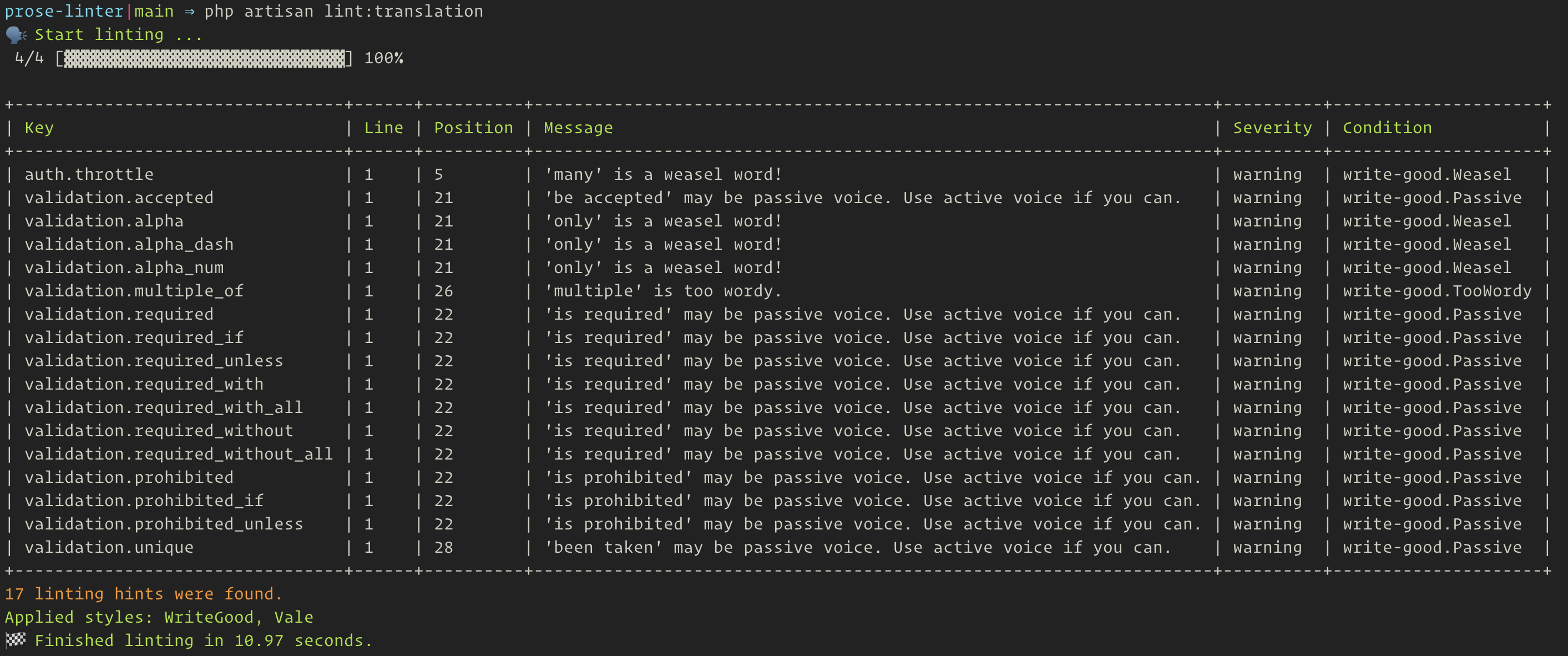
Laravel Prose Linter CLI Output Example

Here are the available commands provided by Laravel Prose Linter:

1# Lint blade templates
2php artisan lint:blade
3 
4# Lint a single blade template
5php artisan lint:blade auth.login
6 
7# Lint translations
8php artisan lint:translation
9 
10# Lint specific translation namespace(s)
11php artisan lint:translation auth validation

This package also comes with customizable style configuration, which you can configure via the config/linter.php file:

1use Beyondcode\LaravelProseLinter\Styles\WriteGood;
2use Beyondcode\LaravelProseLinter\Styles\Vale;
3 
4/*
5 * Customize the Vale styles used by the linter.
6 */
7return [
8 'styles' => [
9 WriteGood::class,
10 Vale::class
11 ]
12];

Check out the Vale Styles documentation for details on configuring styles to work with Vale. As you can see in the snippet above, Laravel Prose Linter comes with two default styles: write-good and vale.

To get started with this package, check out the official documentation for installation and usage instructions. You can check out the source code on GitHub.

  • Share This:  
  •  Facebook
  •  Twitter
  •  Google+
  •  Stumble
  •  Digg
Email ThisBlogThis!Share to XShare to Facebook
Newer Post Older Post Home

0 comments:

Post a Comment

Thanks

Meta

Popular Posts

  • Laravel DynamoDB Eloquent Models and Query Builder
    Laravel   DynamoDB   is a DynamoDB-based Eloquent model and Query builder for Laravel. Using the provided Dynamo driver, models extend the E...
  • There are two solutions for one board, using different chips. But one of their i2c address is the same. How to resolve conflict in one dts?
    Two chips A and B conflict with 0x62 on i2c bus 10. If A@62 and B@62 are configured on dts, Linux loads the driver of A. If B@62 is in front...
  • Using Laravel Model Factories in your tests
    Laravel Model factories are one of the best features you can use in your application when it comes to testing. They provide a way to define ...
  • Detecting .NET8 with Inno Setup and InnoDependenciyInstaller
    I am looking at using InnoDependencyInstaller and it has a function that it uses under the hood: Dependency_AddDotNet80 procedure Depend...
  • How to install Wordpress In Localhost
    Install Wordpress in local host is very easy. Please follow the below step to install wordpress in your local host. Requirements Database  −...

Categories

  • Ajax (26)
  • Bootstrap (30)
  • DBMS (42)
  • HTML (12)
  • HTML5 (45)
  • JavaScript (10)
  • Jquery (34)
  • Jquery UI (2)
  • JqueryUI (32)
  • Laravel (1017)
  • Laravel Tutorials (23)
  • Laravel-Question (6)
  • Magento (9)
  • Magento 2 (95)
  • MariaDB (1)
  • MySql Tutorial (2)
  • PHP-Interview-Questions (3)
  • Php Question (13)
  • Python (36)
  • RDBMS (13)
  • SQL Tutorial (79)
  • Vue.js Tutorial (69)
  • Wordpress (150)
  • Wordpress Theme (3)
  • codeigniter (108)
  • oops (4)
  • php (853)

Social Media Links

  • Follow on Twitter
  • Like on Facebook
  • Subscribe on Youtube
  • Follow on Instagram

Pages

  • Home
  • Contact Us
  • Privacy Policy
  • About us

Blog Archive

  • July (4)
  • September (100)
  • August (50)
  • July (56)
  • June (46)
  • May (59)
  • April (50)
  • March (60)
  • February (42)
  • January (53)
  • December (58)
  • November (61)
  • October (39)
  • September (36)
  • August (36)
  • July (34)
  • June (34)
  • May (36)
  • April (29)
  • March (82)
  • February (1)
  • January (8)
  • December (14)
  • November (41)
  • October (13)
  • September (5)
  • August (48)
  • July (9)
  • June (6)
  • May (119)
  • April (259)
  • March (122)
  • February (368)
  • January (33)
  • October (2)
  • July (11)
  • June (29)
  • May (25)
  • April (168)
  • March (93)
  • February (60)
  • January (28)
  • December (195)
  • November (24)
  • October (40)
  • September (55)
  • August (6)
  • July (48)
  • May (2)
  • January (2)
  • July (6)
  • June (6)
  • February (17)
  • January (69)
  • December (122)
  • November (56)
  • October (92)
  • September (76)
  • August (6)

Loading...

Laravel News

Loading...

Copyright © CoderFunda | Powered by Blogger
Design by Coderfunda | Blogger Theme by Coderfunda | Distributed By Coderfunda