CoderFunda
  • Home
  • About us
    • Contact Us
    • Disclaimer
    • Privacy Policy
    • About us
  • Home
  • Php
  • HTML
  • CSS
  • JavaScript
    • JavaScript
    • Jquery
    • JqueryUI
    • Stock
  • SQL
  • Vue.Js
  • Python
  • Wordpress
  • C++
    • C++
    • C
  • Laravel
    • Laravel
      • Overview
      • Namespaces
      • Middleware
      • Routing
      • Configuration
      • Application Structure
      • Installation
    • Overview
  • DBMS
    • DBMS
      • PL/SQL
      • SQLite
      • MongoDB
      • Cassandra
      • MySQL
      • Oracle
      • CouchDB
      • Neo4j
      • DB2
      • Quiz
    • Overview
  • Entertainment
    • TV Series Update
    • Movie Review
    • Movie Review
  • More
    • Vue. Js
    • Php Question
    • Php Interview Question
    • Laravel Interview Question
    • SQL Interview Question
    • IAS Interview Question
    • PCS Interview Question
    • Technology
    • Other
Showing posts with label CodeIgniter Form Validation. Show all posts

11 December, 2018

CodeIgniter - Form Validation

 Programing Coderfunda     December 11, 2018     codeigniter, CodeIgniter Form Validation     No comments   

Validation is an important process while building web application. It ensures that the data that we are getting is proper and valid to store or process. CodeIgniter has made this task very easy. Let us understand this process with a simple example.

Example

Create a view file myform.php and save the below code it in application/views/myform.php. This page will display form where user can submit his name and we will validate this page to ensure that it should not be empty while submitting.
<html>

<head>
<title>My Form</title>
</head>

<body>
<form action = "" method = "">
<?php echo validation_errors(); ?>
<?php echo form_open('form'); ?>
<h5>Name</h5>
<input type = "text" name = "name" value = "" size = "50" />
<div><input type = "submit" value = "Submit" /></div>
</form>
</body>

</html>
Create a view file formsuccess.php and save it in application/views/formsuccess.php. This page will be displayed if the form is validated successfully.
<html>

<head>
<title>My Form</title>
</head>

<body>
<h3>Your form was successfully submitted!</h3>
<p><?php echo anchor('form', 'Try it again!'); ?></p>
</body>

</html>
Create a controller file Form.php and save it in application/controller/Form.php. This form will either, show errors if it is not validated properly or redirected to formsuccess.php page.
<?php

class Form extends CI_Controller {

public function index() {
/* Load form helper */
$this
->load->helper(array('form'));

/* Load form validation library */
$this
->load->library('form_validation');

/* Set validation rule for name field in the form */
$this
->form_validation->set_rules('name', 'Name', 'required');

if ($this->form_validation->run() == FALSE) {
$this
->load->view('myform');
}
else {
$this
->load->view('formsuccess');
}
}
}
?>
Add the following line in application/config/routes.php.
$route['validation'] = 'Form';
Let us execute this example by visiting the following URL in the browser. This URL may be different based on your site.
http://yoursite.com/index.php/validation
It will produce the following screen −
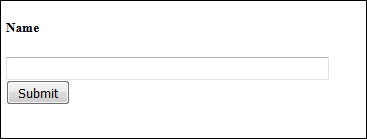
Validation Form
We have added a validation in the controller − Name is required field before submitting the form. So, if you click the submit button without entering anything in the name field, then you will be asked to enter the name before submitting as shown in the screen below.
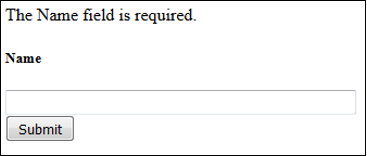
Not Validated Successfully
After entering the name successfully, you will be redirected to the screen as shown below.

Validated Successfully
In the above example, we have used the required rule setting. There are many rules available in the CodeIgniter, which are described below.

Validation Rule Reference

The following is a list of all the native rules that are available to use −

Read More
  • Share This:  
  •  Facebook
  •  Twitter
  •  Google+
  •  Stumble
  •  Digg

CodeIgniter - Form Validation

 Programing Coderfunda     December 11, 2018     codeigniter, CodeIgniter Form Validation     No comments   

Validation is an important process while building web application. It ensures that the data that we are getting is proper and valid to store or process. CodeIgniter has made this task very easy. Let us understand this process with a simple example.

Example

Create a view file myform.php and save the below code it in application/views/myform.php. This page will display form where user can submit his name and we will validate this page to ensure that it should not be empty while submitting.
<html>
 
   <head> 
      <title>My Form</title> 
   </head>
 
   <body>
      <form action = "" method = "">
         <?php echo validation_errors(); ?>  
         <?php echo form_open('form'); ?>  
         <h5>Name</h5> 
         <input type = "text" name = "name" value = "" size = "50" />  
         <div><input type = "submit" value = "Submit" /></div>  
      </form>  
   </body>
 
</html>
Create a view file formsuccess.php and save it in application/views/formsuccess.php. This page will be displayed if the form is validated successfully.
<html>
 
   <head> 
      <title>My Form</title>
   </head> 
 
   <body>  
      <h3>Your form was successfully submitted!</h3>  
      <p><?php echo anchor('form', 'Try it again!'); ?></p>  
   </body>
 
</html>
Create a controller file Form.php and save it in application/controller/Form.php. This form will either, show errors if it is not validated properly or redirected to formsuccess.php page.
<?php
  
   class Form extends CI_Controller { 
 
      public function index() { 
         /* Load form helper */ 
         $this->load->helper(array('form'));
   
         /* Load form validation library */ 
         $this->load->library('form_validation');
   
         /* Set validation rule for name field in the form */ 
         $this->form_validation->set_rules('name', 'Name', 'required'); 
   
         if ($this->form_validation->run() == FALSE) { 
         $this->load->view('myform'); 
         } 
         else { 
            $this->load->view('formsuccess'); 
         } 
      }
   }
?>
Add the following line in application/config/routes.php.
$route['validation'] = 'Form';
Let us execute this example by visiting the following URL in the browser. This URL may be different based on your site.
http://yoursite.com/index.php/validation
It will produce the following screen −
Validation Form
We have added a validation in the controller − Name is required field before submitting the form. So, if you click the submit button without entering anything in the name field, then you will be asked to enter the name before submitting as shown in the screen below.
Not Validated Successfully
After entering the name successfully, you will be redirected to the screen as shown below.
Validated Successfully
In the above example, we have used the required rule setting. There are many rules available in the CodeIgniter, which are described below.

Validation Rule Reference

The following is a list of all the native rules that are available to use −

Read More
  • Share This:  
  •  Facebook
  •  Twitter
  •  Google+
  •  Stumble
  •  Digg
Older Posts Home

Meta

Popular Posts

  • Vue.js Events
      In Vue.js, Events are used to respond to an action. Suppose, you have to build a dynamic website using Vue.js then you'll most likely ...
  • Is there a way to use awk to count the number of rows between 2 flags and input that number into a specific field?
    I have a set of data that consists of seismic wave travel times and their corresponding information (i.e. source that produced the wave and ...
  • Use Leaflet.js and Google Maps Blade Components in Laravel
      Laravel Maps   is a package to easily create maps using   Leaflet.js   or Google Maps and Blade components. The main features that work wi...
  • How to use Filament 3 with Laravel 11 | Beginner Course
    How to install filament 3 from scratch with Laravel 11. submitted by /u/Tilly-w-e [link] [comments]
  • How to Run a Python File on a Specific Virtual Desktop Only?
    I want to run a Python script on a specific virtual desktop without affecting other desktops. Currently, when I execute my Python file us...

Categories

  • Ajax (26)
  • Bootstrap (30)
  • DBMS (42)
  • HTML (12)
  • HTML5 (45)
  • JavaScript (10)
  • Jquery (34)
  • Jquery UI (2)
  • JqueryUI (32)
  • Laravel (1017)
  • Laravel Tutorials (23)
  • Laravel-Question (6)
  • Magento (9)
  • Magento 2 (95)
  • MariaDB (1)
  • MySql Tutorial (2)
  • PHP-Interview-Questions (3)
  • Php Question (13)
  • Python (36)
  • RDBMS (13)
  • SQL Tutorial (79)
  • Vue.js Tutorial (69)
  • Wordpress (150)
  • Wordpress Theme (3)
  • codeigniter (108)
  • oops (4)
  • php (853)

Social Media Links

  • Follow on Twitter
  • Like on Facebook
  • Subscribe on Youtube
  • Follow on Instagram

Pages

  • Home
  • Contact Us
  • Privacy Policy
  • About us

Blog Archive

  • July (4)
  • September (100)
  • August (50)
  • July (56)
  • June (46)
  • May (59)
  • April (50)
  • March (60)
  • February (42)
  • January (53)
  • December (58)
  • November (61)
  • October (39)
  • September (36)
  • August (36)
  • July (34)
  • June (34)
  • May (36)
  • April (29)
  • March (82)
  • February (1)
  • January (8)
  • December (14)
  • November (41)
  • October (13)
  • September (5)
  • August (48)
  • July (9)
  • June (6)
  • May (119)
  • April (259)
  • March (122)
  • February (368)
  • January (33)
  • October (2)
  • July (11)
  • June (29)
  • May (25)
  • April (168)
  • March (93)
  • February (60)
  • January (28)
  • December (195)
  • November (24)
  • October (40)
  • September (55)
  • August (6)
  • July (48)
  • May (2)
  • January (2)
  • July (6)
  • June (6)
  • February (17)
  • January (69)
  • December (122)
  • November (56)
  • October (92)
  • September (76)
  • August (6)

Loading...

Laravel News

Loading...

Copyright © CoderFunda | Powered by Blogger
Design by Coderfunda | Blogger Theme by Coderfunda | Distributed By Coderfunda