CoderFunda
  • Home
  • About us
    • Contact Us
    • Disclaimer
    • Privacy Policy
    • About us
  • Home
  • Php
  • HTML
  • CSS
  • JavaScript
    • JavaScript
    • Jquery
    • JqueryUI
    • Stock
  • SQL
  • Vue.Js
  • Python
  • Wordpress
  • C++
    • C++
    • C
  • Laravel
    • Laravel
      • Overview
      • Namespaces
      • Middleware
      • Routing
      • Configuration
      • Application Structure
      • Installation
    • Overview
  • DBMS
    • DBMS
      • PL/SQL
      • SQLite
      • MongoDB
      • Cassandra
      • MySQL
      • Oracle
      • CouchDB
      • Neo4j
      • DB2
      • Quiz
    • Overview
  • Entertainment
    • TV Series Update
    • Movie Review
    • Movie Review
  • More
    • Vue. Js
    • Php Question
    • Php Interview Question
    • Laravel Interview Question
    • SQL Interview Question
    • IAS Interview Question
    • PCS Interview Question
    • Technology
    • Other

23 April, 2021

Five Hidden Features of the Laravel Excel Package

 Programing Coderfunda     April 23, 2021     Packages, php     No comments   


Five Hidden Features of the Laravel Excel Package

The Laravel Excel package recently celebrated a new milestone of version 3, with new features that help ease advanced use-cases, and is simple to use. Let’s explore some of these hidden features you might not know about, that make Laravel Excel a go-to package for working with Excel.

  1. Exporting from HTML/Blade

Let’s imagine you already have a list page with HTML table:

Five Hidden Features of the Laravel Excel Package

And here’s the Blade code – resources/views/customers/table.blade.php:

<table class="table">
<thead>
<tr>
<th></th>
<th>First name</th>
<th>Last name</th>
<th>Email</th>
<th>Created at</th>
<th>Updated at</th>
</tr>
</thead>
<tbody>
@foreach ($customers as $customer)
<tr>
<td>{{ $customer->id }}</td>
<td>{{ $customer->first_name }}</td>
<td>{{ $customer->last_name }}</td>
<td>{{ $customer->email }}</td>
<td>{{ $customer->created_at }}</td>
<td>{{ $customer->updated_at }}</td>
</tr>
@endforeach
</tbody>
</table>

You can re-use it to export the same table into Excel.

Step 1. Generate Export class

php artisan make:export CustomersFromView --model=Customer

Step 2. Use FromView to perform the operation.

namespace App\Exports;

use App\Customer;
use Illuminate\Contracts\View\View;
use Maatwebsite\Excel\Concerns\FromView;

class CustomersExportView implements FromView
{
public function view(): View
{
return view('customers.table', [
'customers' => Customer::orderBy('id', 'desc')->take(100)->get()
]);
}
}

Here’s the result Excel file:

Five Hidden Features of the Laravel Excel Package

Notice: you can export only HTML table, without any layout tags like html, body, div, etc.


  1. Export to PDF, HTML, and others

Although the package is called Laravel Excel, it provides export to more formats. It’s straightforward to use, add one more parameter to the class:

return Excel::download(new CustomersExport(), 'customers.xlsx', 'Html');

Yes, you got it right. HTML. Here’s how it looks:

Five Hidden Features of the Laravel Excel Package

Not much styling, I know. And here’s the source:

Five Hidden Features of the Laravel Excel Package

Not only that, it allows to export to PDF, and you can even choose from three libraries for it. Again, all you need to do is specify the format as the last parameter – here’s screenshot from their docs:

Five Hidden Features of the Laravel Excel Package

Notice: you will also have to install a chosen PDF package via composer, like:

composer require dompdf/dompdf

Here’s how PDF looks like:

Five Hidden Features of the Laravel Excel Package


  1. Format Cells However You Want

Laravel Excel package has a powerful “parent” – PhpSpreadsheet. So it adopts all the underneath functionality, including cell formatting in various ways.

Here’s how to use it in Laravel Export class, like app/Exports/CustomersExportStyling.php:

Step 1. Use appropriate classes in the header.

use Maatwebsite\Excel\Concerns\WithEvents;
use Maatwebsite\Excel\Events\AfterSheet;

Step 2. Use WithEvents in implements section.

class CustomersExportStyling implements FromCollection, WithEvents
{
// ...

Step 3. Create registerEvents() method with AfterSheet event.

/**
* @return array
*/
public function registerEvents(): array
{
return [
AfterSheet::class => function(AfterSheet $event) {
// ... HERE YOU CAN DO ANY FORMATTING
},
];
}

Here’s an example:

/**
* @return array
*/
public function registerEvents(): array
{
return [
AfterSheet::class => function(AfterSheet $event) {
// All headers - set font size to 14
$cellRange = 'A1:W1';
$event->sheet->getDelegate()->getStyle($cellRange)->getFont()->setSize(14);

// Apply array of styles to B2:G8 cell range
$styleArray = [
'borders' => [
'outline' => [
'borderStyle' => \PhpOffice\PhpSpreadsheet\Style\Border::BORDER_THICK,
'color' => ['argb' => 'FFFF0000'],
]
]
];
$event->sheet->getDelegate()->getStyle('B2:G8')->applyFromArray($styleArray);

// Set first row to height 20
$event->sheet->getDelegate()->getRowDimension(1)->setRowHeight(20);

// Set A1:D4 range to wrap text in cells
$event->sheet->getDelegate()->getStyle('A1:D4')
->getAlignment()->setWrapText(true);
},
];
}


The result of these “random” demo-styling examples looks like this:

Five Hidden Features of the Laravel Excel Package

All these examples, and many more, you can find in Recipes page of PhpSpreadsheet docs.


  1. Hidden Fields From Model

Let’s imagine we’ve seeded a default Laravel 5.7 users table:

Five Hidden Features of the Laravel Excel Package

Let’s try to export this one with a simple class FromCollection:

class UsersExport implements FromCollection
{
public function collection()
{
return User::all();
}
}

In the result Excel, you will see some fields missing: password and remember_token:

Five Hidden Features of the Laravel Excel Package

This is because of this app/User.php property:

class User extends Authenticatable
{
// ...

/**
* The attributes that should be hidden for arrays.
*
* @var array
*/
protected $hidden = [
'password', 'remember_token',
];
}

So, these fields are hidden by default, but it shows us Laravel Excel package behavior – if you want to protect some fields from export, you can do it directly in the model.


  1. Formulas

For some reason, official Laravel Excel package documentation doesn’t mention anything about formulas. But that’s the whole point of using Excel!

Luckily, it’s straightforward to write formulas into our exported file. We need to set cell values like we would to in Excel, for example, =A2+1 or SUM(A1:A10).

One of the ways to do it is to use WithMapping:

use App\Customer;
use Maatwebsite\Excel\Concerns\FromCollection;
use Maatwebsite\Excel\Concerns\WithMapping;

class CustomersExportFormulas implements FromCollection, WithMapping
{
public function collection()
{
return Customer::all();
}

/**
* @var Customer $customer
* @return array
*/
public function map($customer): array
{
return [
$customer->id,
'=A2+1',
$customer->first_name,
$customer->last_name,
$customer->email,
];
}
}

So, these are just five less-known features of Laravel Excel. If you want to find out more, I have a unique online course called Excel Export/Import in Laravel, go check it out!

Read More
  • Share This:  
  •  Facebook
  •  Twitter
  •  Google+
  •  Stumble
  •  Digg

Laravel Mailbox

 Programing Coderfunda     April 23, 2021     Packages, php     No comments   

Laravel Mailbox


Laravel Mailbox is a package by Marcel Pociot for handling incoming emails in your Laravel application. Mailbox features a fluent API that allows you to define custom mailboxes to catch incoming emails.

Here’s a quick example of an inbound email handler from the documentation:

Mailbox::from('{username}@gmail.com', function (InboundEmail $email, $username) {
// Access email attributes and content
$subject = $email->subject();

$email->reply(new ReplyMailable);
});

Laravel Mailbox works by listening for incoming emails from the supported drivers (options include “mailgun,” “sendgrid,” and “log”) and then responding to them through custom mailbox classes. At a basic level, here’s an example of how you can define a mailbox in a service provider:

use BeyondCode\Mailbox\Facades\Mailbox;

class AppServiceProvider extends ServiceProvider
{
/**
* Bootstrap any application services.
*
* @return void
*/
public function boot()
{
Mailbox::from('sender@domain.com', function (InboundEmail $email) {
// Handle the incoming email
});
}
}

The above example uses a closure, but the second argument can also be an invocable class:

Mailbox::from('sender@domain.com', MyMailbox::class);

By default, this package stores all inbound emails in the database, with a configurable duration to keep them. You can use Laravel’s scheduler with the package’s ‘mailbox:clean’ command, which will remove emails from the database older than the configurable duration to keep them. Check the storing emails documentation for further details.

Out of the box, Mailbox supports Mailgun, Sendgrid, and a local development driver/log. However, you can easily extend/add custom drivers—Laravel Mailbox uses the same manager pattern that is familiar to Laravel users (i.e., database drivers).

To learn more about Laravel Mailbox, you can check out the source code on GitHub at beyondcode/laravel-mailbox. To learn how to install and use the package, check out the Laravel Mailbox documentation.

by : laravel-news

Read More
  • Share This:  
  •  Facebook
  •  Twitter
  •  Google+
  •  Stumble
  •  Digg

Subdomain Multitenency Package for Laravel

 Programing Coderfunda     April 23, 2021     Packages, php     No comments   

Subdomain Multitenency Package for Laravel

Subdomain Multitenency Package for Laravel

Romega Digital released a package to make it easier to create subdomain-based multitenancy in your Laravel applications:

This package is meant to be a quick and easy way to add multitenancy to your Laravel application. It simply creates models and relationships for Tenants and models. The package identifies incoming traffic by subdomain, and finds a corresponding tenant in the Tenant table. If none are found or the user is not associated with a particular subdomain, the user is met with a 403 error.

Remega’s package provides multitenant support to your models through a trait called HasTenants, and also leverages Spatie’s permissions package for some functionality.

Related: Two Best Laravel Packages to Manage Roles/Permissions

Here’s an example from the readme:

use Spatie\Permission\Traits\HasRoles;
use RomegaDigital\Multitenancy\Traits\HasTenants;
use Illuminate\Foundation\Auth\User as Authenticatable;

class User extends Authenticatable
{
use HasTenants, HasRoles;

// ...
}

With the HasTenants trait in place, you can get the users associated with a Tenant model:

User::tenants()->get()

And finally here’s how you create tenants:

Tenant::createMany([
[
'name' => 'An Identifying Name',
'domain' => 'tenant1'
],
[
'name' => 'A Second Customer',
'domain' => 'tenant2'
]
]);

Along with this package, there’s an accompanying Nova package called Multitenency Nova Tool to manage the multitenancy functionality in your application.

To learn more about this Multitenancy package, you can check out the source code on GitHub at romegadigital/Multitenancy. To learn how to install and use the package, check out the Multitenency readme file.

by : laravel-news

Read More
  • Share This:  
  •  Facebook
  •  Twitter
  •  Google+
  •  Stumble
  •  Digg

Laravel Options Package

 Programing Coderfunda     April 23, 2021     Packages, php     No comments   

Laravel Options Package


The Laravel Options package from Appstract is a global database key-value options store for Laravel. This package uses a simple options database table with a key and value field and an Option model available via a service provider.

Related: Storing Global Application Settings

Laravel Options has some helpers and a Facade for working with the options table, along with a common public API for creating, getting, setting, and deleting options by key:

// Get an option
option('someKey');

// Set option
option(['someKey' => 'someValue']);

// Check the option exists
option_exists('someKey');

The package ships with a console command to set global options via the command line:

php artisan option:set site_name "Laravel News"

Laravel Options takes away some boilerplate that you might have in your app to replicate a simple key-value store, but doesn’t have much functionality beyond setting simple key-values and you’ll be responsible for any data transformations.

For complete installation instructions check out appstract/laravel-options on GitHub.

by : Laravel-news

Read More
  • Share This:  
  •  Facebook
  •  Twitter
  •  Google+
  •  Stumble
  •  Digg

Laravel Favicon Package

 Programing Coderfunda     April 23, 2021     Packages, php     No comments   


Laravel Favicon Package

Laravel Favicon is a package by Marcel Pociot that enables you to create dynamic favicons based on your environment settings:

Laravel Favicon Package
 
The package works by using a favicon() helper function in your template, which is then modified in the environments you configure:

<link rel="icon" type="image/png" sizes="32x32" href="{{ favicon(asset('favicon-32x32.png')) }}">

Here’s an example of the default enabled environment configuration at the time of writing to give you an idea the values you can specify:

'enabled_environments' => [
'local' => [
'text' => 'DEV',
'color' => '#000000',
'background_color' => '#ffffff',
],
],

It uses Intervention Image, which at the time of writing supports to processing extensions: gd and imagick. If you want to convert ICO files, you need to use the imagick configuration option.

The intended use of this package is for non-production environments. Environments that don’t have matching configuration values will return the original path/URI to the static icon.

Related: Laravel View X-Ray

You can learn more about the Laravel Favicon package at beyondcode/laravel-favicon. To learn how to install and use the package, check out the project’s README file.

by : Laravel-news

Read More
  • Share This:  
  •  Facebook
  •  Twitter
  •  Google+
  •  Stumble
  •  Digg

Laravel Tinker Server Package

 Programing Coderfunda     April 23, 2021     Packages, php     No comments   

Laravel Tinker Server Package


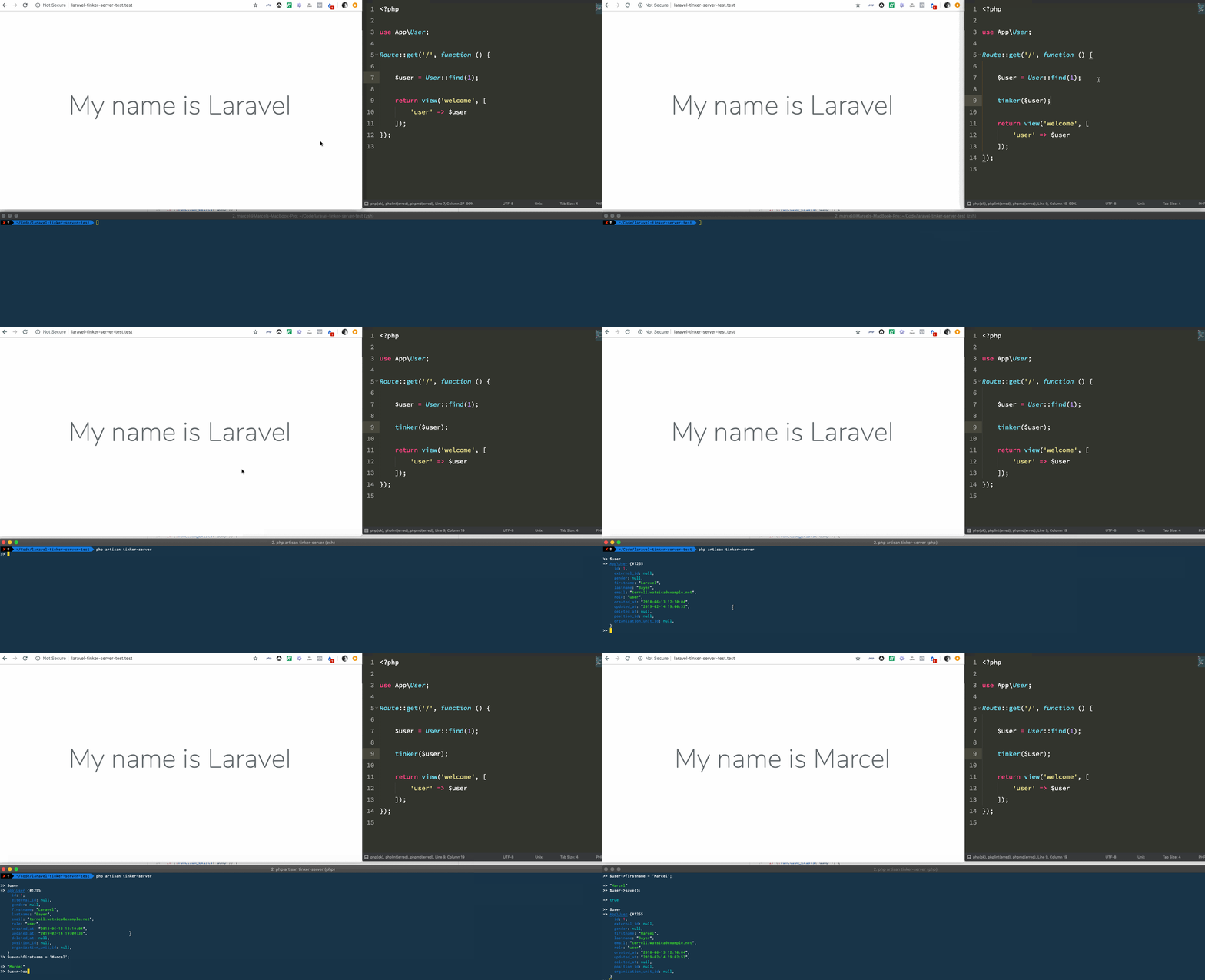
Laravel Tinker Server is a package by Marcel Pociot that enables you to tinker with your variables in real-time while working on your Laravel app. This package collects data via calls to a tinker() helper that ships with the package and allow you to then interact with those variables on the fly.

Related: Laravel Dump Server

The best way to demonstrate this package is the following gif from the project’s README file:

Laravel Tinker Server Package

The primary usage for this is first starting up a tinker server in a new console session:

php artisan tinker-server

Then when you call tinker() from within your code it will be instantly available in an interactive REPL shell. Here’s a basic example from the README:

$user = App\User::find(1);

tinker($user);

Using XDebug

An alternative approach that I use which has similar benefits is setting breakpoints during an XDebug session. If you’re using a client like PhpStorm’s client/UI, you can interactively inspect variables within the scope of the call stack and run code via a console.

The nice thing about using XDebug is that it works for all PHP projects, where this approach is specific to Laravel. You can see this technique in our Learn how to set up Xdebug for PhpStorm and Laravel Valet video.

Learn More

You can learn more about the Laravel Tinker Server package at beyondcode/laravel-tinker-server. To learn how to install and use the package, check out the Laravel Tinker Server README file.

by : Laravel-news

Read More
  • Share This:  
  •  Facebook
  •  Twitter
  •  Google+
  •  Stumble
  •  Digg

Snipe Migrations Laravel Package

 Programing Coderfunda     April 23, 2021     Packages, php     No comments   


Snipe Migrations Laravel Package

Snipe Migrations is a Laravel package by Dustin Fraker for “blazing fast” database migrations for tests:

The package takes a snapshot of your mysql database and imports the schema to your test database rather than running all of your migrations when the test suite starts up.

On projects with many migration files, Snipe Migrations may have a huge speed improvement over migrating the database during setup.

It works by adding this method to your base test class that your other tests extend:

public function setUpTraits()
{
parent::setUpTraits();

$uses = array_flip(class_uses_recursive(static::class));

if (isset($uses[DatabaseTransactions::class])) {
(new Snipe())->importSnapshot();
}
}

After you’ve added the setUpTraits() method, you then use it by importing the use DatabaseTransactions trait in your tests.

Learn More

In his writeup, Dustin talks about his reasons for creating Snipe Migrations. You should check out his full post about building the package, including a video at the end which goes over his use-case and how to set up the package.

You can learn more about the Snipe Migrations package at drfraker/snipe-migrations. To learn how to install and use the package, check out the Snipe Migration README file.

Congratulations on your first open-source Laravel package Dustin!

by : laravel-news

Read More
  • Share This:  
  •  Facebook
  •  Twitter
  •  Google+
  •  Stumble
  •  Digg
Newer Posts Older Posts Home

Meta

Popular Posts

  • Sitaare Zameen Par Full Movie Review
     Here’s a  complete Vue.js tutorial for beginners to master level , structured in a progressive and simple way. It covers all essential topi...
  • Tailwindcss best practices for responsive design
    Tailwind CSS provides powerful utilities for responsive design out of the box. To use it effectively and maintain clean, scalable code, here...
  • Crawl and Index Your Website with Laravel Site Search
      Laravel Site Search   is a package by Spatie to create a full-text search index by crawling your site. You can think of it as a private Go...
  • Tailwind CSS Tutorial (Beginner to Master)
    Here's a simple and complete Tailwind CSS tutorial designed for students and beginners , progressing step-by-step from beginner to mast...
  • Is there a way to write a JavaScript program that enables you to Search Words in Multiple PDF Files?
    I need to create a simple program/system/application using JavaScript that enables a user to search a certain word in multiple scanned PDF f...

Categories

  • Ajax (26)
  • Bootstrap (30)
  • DBMS (42)
  • HTML (12)
  • HTML5 (45)
  • JavaScript (10)
  • Jquery (34)
  • Jquery UI (2)
  • JqueryUI (32)
  • Laravel (1017)
  • Laravel Tutorials (23)
  • Laravel-Question (6)
  • Magento (9)
  • Magento 2 (95)
  • MariaDB (1)
  • MySql Tutorial (2)
  • PHP-Interview-Questions (3)
  • Php Question (13)
  • Python (36)
  • RDBMS (13)
  • SQL Tutorial (79)
  • Vue.js Tutorial (69)
  • Wordpress (150)
  • Wordpress Theme (3)
  • codeigniter (108)
  • oops (4)
  • php (853)

Social Media Links

  • Follow on Twitter
  • Like on Facebook
  • Subscribe on Youtube
  • Follow on Instagram

Pages

  • Home
  • Contact Us
  • Privacy Policy
  • About us

Blog Archive

  • July (4)
  • September (100)
  • August (50)
  • July (56)
  • June (46)
  • May (59)
  • April (50)
  • March (60)
  • February (42)
  • January (53)
  • December (58)
  • November (61)
  • October (39)
  • September (36)
  • August (36)
  • July (34)
  • June (34)
  • May (36)
  • April (29)
  • March (82)
  • February (1)
  • January (8)
  • December (14)
  • November (41)
  • October (13)
  • September (5)
  • August (48)
  • July (9)
  • June (6)
  • May (119)
  • April (259)
  • March (122)
  • February (368)
  • January (33)
  • October (2)
  • July (11)
  • June (29)
  • May (25)
  • April (168)
  • March (93)
  • February (60)
  • January (28)
  • December (195)
  • November (24)
  • October (40)
  • September (55)
  • August (6)
  • July (48)
  • May (2)
  • January (2)
  • July (6)
  • June (6)
  • February (17)
  • January (69)
  • December (122)
  • November (56)
  • October (92)
  • September (76)
  • August (6)

Loading...

Laravel News

Loading...

Copyright © CoderFunda | Powered by Blogger
Design by Coderfunda | Blogger Theme by Coderfunda | Distributed By Coderfunda