CoderFunda
  • Home
  • About us
    • Contact Us
    • Disclaimer
    • Privacy Policy
    • About us
  • Home
  • Php
  • HTML
  • CSS
  • JavaScript
    • JavaScript
    • Jquery
    • JqueryUI
    • Stock
  • SQL
  • Vue.Js
  • Python
  • Wordpress
  • C++
    • C++
    • C
  • Laravel
    • Laravel
      • Overview
      • Namespaces
      • Middleware
      • Routing
      • Configuration
      • Application Structure
      • Installation
    • Overview
  • DBMS
    • DBMS
      • PL/SQL
      • SQLite
      • MongoDB
      • Cassandra
      • MySQL
      • Oracle
      • CouchDB
      • Neo4j
      • DB2
      • Quiz
    • Overview
  • Entertainment
    • TV Series Update
    • Movie Review
    • Movie Review
  • More
    • Vue. Js
    • Php Question
    • Php Interview Question
    • Laravel Interview Question
    • SQL Interview Question
    • IAS Interview Question
    • PCS Interview Question
    • Technology
    • Other

23 April, 2021

PHPUnit SpeedTrap

 Programing Coderfunda     April 23, 2021     Packages, php     No comments   

PHPUnit SpeedTrap


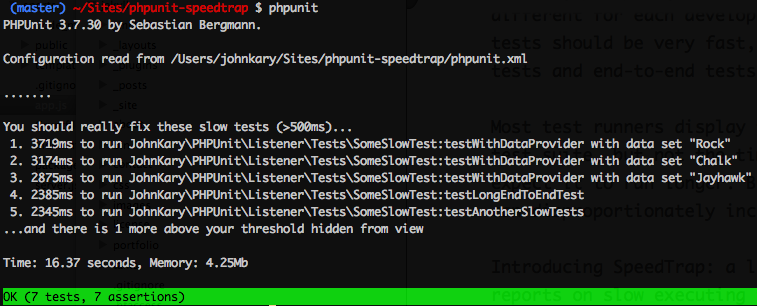
PHPUnit Speedtrap is a package by John Kary that reports on slow-running tests in your PHPUnit test suite. This package is inspired by Ruby RSpec’s --profile option that displays feedback about slow tests:

SpeedTrap reports on slow-running PHPUnit tests right in the console.

Many factors affect test execution time. A test not properly isolated from variable latency (database, network, etc.) and even basic load on the test machine will cause test execution times to fluctuate.

From the project’s readme, here’s an example of what you can expect:
I am not super familiar with tapping into PHPUnit, so I enjoyed diving into the package’s source code and learning how PHPUnit listeners work. In a phpunit.xml file you can enable this package with the following XML:

<listeners>
<listener class="JohnKary\PHPUnit\Listener\SpeedTrapListener" />
</listeners>

A more extensive example includes customizable options for defining the “slowTreshold” and “reportLength”. You can customize what your test suite considers a “slow” test defined in milliseconds:

<listeners>
<listener class="JohnKary\PHPUnit\Listener\SpeedTrapListener">
<arguments>
<array>
<element key="slowThreshold">
<integer>500</integer>
</element>
<element key="reportLength">
<integer>5</integer>
</element>
</array>
</arguments>
</listener>
</listeners>

Along with the listener, the package demonstrates using an annotation to override these configuration options on the per-test level:

/**
* @slowThreshold 5000
*/
public function testLongRunningProcess()
{
// Code that takes a longer time to execute
}

You can learn more about the PHPUnit Speedtrap package at johnkary/phpunit-speedtrap and also check out these tips on speeding up your PHPUnit tests

Read More
  • Share This:  
  •  Facebook
  •  Twitter
  •  Google+
  •  Stumble
  •  Digg

Customizing Stubs in Laravel

 Programing Coderfunda     April 23, 2021     Packages, php     No comments   


Customizing Stubs in Laravel

This post will show you how to customize stubs used to generate various classes in your application. While a minor inconvenience, manually adjusting every generated class can be tedious, and Laravel provides a way for developers to publish and version stubs in an application if you want to suit generated classes to your specific taste.

If you want to follow along, you can create a new Laravel project with the Laravel installer, using Sail, or any other way you prefer to create a new application:

laravel new stub-demo --git

You might have noticed that the Laravel installer now supports Git and GitHub integration assuming you have the minimum git version required, you should have a new repository and a first commit.

Versioning our demo project is an excellent way to visualize the stub changes we make along the way and see what kind of files Laravel publishes to the app.

Publishing Stubs

The first step in customizing stubs could be to add stubs you'd like to customize individually to the /stubs folder at the root of a Laravel project, or you can publish all of them with Artisan:

$ php artisan stub:publish
$ git add stubs
$ git status
Changes to be committed:
(use "git reset HEAD <file>..." to unstage)

new file: stubs/cast.stub
new file: stubs/console.stub
new file: stubs/controller.api.stub
new file: stubs/controller.invokable.stub
new file: stubs/controller.model.api.stub
new file: stubs/controller.model.stub
new file: stubs/controller.nested.api.stub
new file: stubs/controller.nested.stub
new file: stubs/controller.plain.stub
new file: stubs/controller.stub
new file: stubs/factory.stub
new file: stubs/job.queued.stub
new file: stubs/job.stub
new file: stubs/middleware.stub
new file: stubs/migration.create.stub
new file: stubs/migration.stub
new file: stubs/migration.update.stub
new file: stubs/model.pivot.stub
new file: stubs/model.stub
new file: stubs/observer.plain.stub
new file: stubs/observer.stub
new file: stubs/policy.plain.stub
new file: stubs/policy.stub
new file: stubs/request.stub
new file: stubs/resource-collection.stub
new file: stubs/resource.stub
new file: stubs/rule.stub
new file: stubs/seeder.stub
new file: stubs/test.stub
new file: stubs/test.unit.stub

As you can see, we have quite a few stubs published in the app folder! I'll leave it up to you if you want to version all of them, but you could either keep a copy of them or only keep the specific stubs you want to customize.

Custom Controller Stubs

Laravel 8.36 introduced the idea of a --type flag when making a controller, allowing you to write custom stub files for generating a controller:

<?php
// stubs/controller.custom.stub
namespace {{ namespace }};

use {{ rootNamespace }}Http\Controllers\Controller;
use Illuminate\Http\Request;

/**
* Hello from the custom controller stub
*/
class {{ class }}
{
//
}

After adding the custom stub class, you can generate a controller using this template:

php artisan make:controller --type=custom MyController

Which would generate the following controller file:

<?php

namespace App\Http\Controllers;

use Illuminate\Http\Request;

/**
* Hello from the custom controller stub
*/
class MyController
{
//
}

While this flexibility level is neat, I believe most developers can fit within the bounds of the stubs provided by the framework. Using the new --type flag is a manual way of picking which controller template you want to generate:

php artisan make:controller --type=plain PlainController

Which would generate a file based on the stubs/controller.plain.stub file published by Laravel:

<?php

namespace App\Http\Controllers;

use Illuminate\Http\Request;

class PlainController extends Controller
{
//
}

A Sane Approach

Suppose you wanted to prepend a copyright comment to every file generated in your Laravel application. In that case, you could consider versioning all available stubs, and as you upgrade, run the stub:publish command to get newly added stubs.

For typical use-cases, though, perhaps you might only version the stubs you need to customize. For example, let's say that you don't want any controllers to extend the base Controller class; you could version all the controller.* stubs with your customizations but remove all the other stubs.

What If Stubs Change Upstream?

Let's say you version all the stubs from stub:publish, but you are concerned that as the Laravel framework receives updates to core stub files, your app will be out-of-date. If you version all stubs, you can always force an update to get the latest versions.

Take this for example, let's modify a stub and commit it to Git:

echo "/* test */" >> stubs/test.stub
git commit -am"Testing stub update"

You've updated the test stub and committed the update to Git. Let's say later Laravel publishes some updates to stubs and you want to verify if any have changed:

$ php artisan stub:publish --force
$ git diff
diff --git a/stubs/test.stub b/stubs/test.stub
index 834a53d..84c75cb 100644
--- a/stubs/test.stub
+++ b/stubs/test.stub
@@ -20,4 +20,3 @@ class {{ class }} extends TestCase
$response->assertStatus(200);
}
}
-/* test */

You have an easy way to see how your stubs have diverged from the Laravel codebase over time! Since the stubs are versioned you can simply undo changes the --force flag causes if you need to merge your changes with the latest stub changes.

Read More
  • Share This:  
  •  Facebook
  •  Twitter
  •  Google+
  •  Stumble
  •  Digg

Bagisto E-commerce Platform

 Programing Coderfunda     April 23, 2021     Packages, php     No comments   


Bagisto E-commerce Platform

Bagisto is an open-source E-commerce platform built on top of Laravel and Vue.js by Webkul.

Bagisto is an E-commerce ecosystem designed for all to build and scale your business. It’s a free and open-source framework which offers you a wide range of functionality and lets you have total control of your store.

Built on top of Laravel, it is coupled with easy product information management and fast time to market a product. The framework is very flexible and easy to use even for non-tech users.

At the time of writing, Bagisto’s main feature list includes:

  • RTL Support
  • Supports multiple channels, locales, and currencies
  • Built-in access control layer
  • Responsive storefront
  • Admin Panel and Dashboard
  • Custom product attributes
  • Support for multiple store themes
  • Multi-store inventory
  • Order management system
  • Customer cart, wishlist, and product reviews

Bagisto features an administration panel with a Dashboard, sales data, a catalog of products you can manage, and customer management:

Besides the features already available, the Bagisto’s roadmap includes:

  • API Support (REST and GraphQL)
  • Progressive web application
  • Mobile application on the Google Play and Apple App Store
  • Dropshipping
  • Docker integration
  • Elasticsearch integration
  • Support for Redis, Varnish, Nginx, and Memcached
  • Percona support
  • Accelerated mobile pages (AMP) integration
  • CI/CD Pipeline management
  • New product types like subscriptions, bookings, and recurring billing.
  • GDPR compliance

To learn more about Bagisto’s features and try a demo, check out bagisto.com. You can get started with the source code by checking out the repo on GitHub at bagisto/bagisto.

by: webkul

Read More
  • Share This:  
  •  Facebook
  •  Twitter
  •  Google+
  •  Stumble
  •  Digg

GitDown Parsing Markdown in PHP

 Programing Coderfunda     April 23, 2021     Packages, php     No comments   

GitDown Parsing Markdown in PHP


GitDown is a simple package for parsing (GitHub-flavored) Markdown in PHP by Caleb Porzio. It works by sending the provided markdown to a public GitHub API that parses it as HTML.

If you aren’t using Laravel, you can still use this package by Here’s the basic usage in a Laravel project:

GitDown::parse($markdown);

// Will be cached forever. (suggested)
GitDown::parseAndCache($markdown);

// Will be cached for 24 hours. (minutes in Laravel < 5.8, seconds otherwise)
GitDown::parseAndCache($markdown, $seconds = 86400);

// Pass in your own custom caching strategy.
GitDown::parseAndCache($markdown, function ($parse) {
return Cache::rememberForever(sha1($markdown), function () use ($parse) {
return $parse();
});
});

You don’t have to use Laravel to use GitDown—you can create a GitDown\GitDown instance and bring your own caching strategy:

$gitDown = new GitDown\GitDown(
$token = 'foo',
$context = 'your/repo',
$allowIframes = false
);

$gitDown->parse($markdown);

// Pass in your own custom caching strategy.
$gitDown->parseAndCache($markdown, function ($parse) {
return Cache::rememberForever(sha1($markdown), function () use ($parse) {
return $parse();
});
});

It’s important to remember that without caching the results, you are going to run into GitHub rate limiting quickly and your pages will load super-slow.

On the frontend, you can benefit from the @gitdown directive in Laravel projects to the <head> of your layout, wrapping the markdown content in a .markdown-body class:

<head>
[...]
@gitdown
</head>
<body>
<div class="markdown-body">
{!! GitDown::parseAndCache($content) !!}
</div>
</body>

If you’re not using Laravel, you can use the following:

<style><?php echo GitDown\GitDown::styles(); ?></style>

Check out the project’s README for detailed instructions on rendering styles.

To learn more about GitDown and the gory details of why you might want to use it, read Caleb’s writeup Parsing Markdown: The Easy Way (With Code Highlighting).

You can learn more about this package, get full installation instructions, and view the source code on GitHub at calebporzio/gitdown.

Read More
  • Share This:  
  •  Facebook
  •  Twitter
  •  Google+
  •  Stumble
  •  Digg

Laravel Personal Data Export

 Programing Coderfunda     April 23, 2021     Packages, php     No comments   

Laravel Personal Data Export


Laravel Personal Data Export

Freek Van der Herten released a Spatie package called Laravel Personal Data Export last week to help you create zip files containing personal data in your Laravel applications:

This package makes it easy to let a user download an export containing all the personal data. Such an export consists of a zip file containing all the user properties and related info.

With privacy concerns rising on social media and other web applications, exporting user data might be something you want to consider. As seen in the package’s readme, you configure the file and data export by defining a selectPersonalData method the user model:

// in your User model

public function selectPersonalData(PersonalDataSelection $personalDataSelection) {
$personalDataSelection
->add('user.json', ['name' => $this->name, 'email' => $this->email])
->addFile(storage_path("avatars/{$this->id}.jpg");
->addFile('other-user-data.xml', 's3');
}

The Laravel Personal Data Export package provides configuration for how many days the personal data will be available to the user, along with some other customizable options:

return [
/*
* The disk where the exports will be stored by default.
*/
'disk' => 'personal-data-exports',

/*
* The amount of days the exports will be available.
*/
'delete_after_days' => 5,

/*
* Determines whether the user should be logged in to be able
* to access the export.
*/
'authentication_required' => true,

/*
* The mailable which will be sent to the user when the export
* has been created.
*/
'mailable' => \Spatie\PersonalDataExport\Mail\PersonalDataExportCreatedMail::class,
];

This package takes care of the boilerplate of all the tasks involved in initiating the data export and then fulfilling it roughly in the following sequence:

First, the package generates the data when you dispatch a CreatePersonalDataExportJob in the application (a queued job by default).

Next, when the job runs, the exported data is zipped and copied to the configured disk. Finally, the user receives a notification email with the URL to the download.

Almost every piece (if not all) of the export process is customizable. You can check out this package on GitHub at spatie/laravel-personal-data-export.


Read More
  • Share This:  
  •  Facebook
  •  Twitter
  •  Google+
  •  Stumble
  •  Digg
Newer Posts Older Posts Home

Meta

Popular Posts

  • How to use Filament 3 with Laravel 11 | Beginner Course
    How to install filament 3 from scratch with Laravel 11. submitted by /u/Tilly-w-e [link] [comments]
  • Vue.js Events
      In Vue.js, Events are used to respond to an action. Suppose, you have to build a dynamic website using Vue.js then you'll most likely ...
  • How to create a responsive circle with two lines of text in HTML and CSS?
    body { display: flex; justify-content: center; align-items: center; gap: 15px; } .circle { display: flex; flex-direction: col...
  • Is there a way to use awk to count the number of rows between 2 flags and input that number into a specific field?
    I have a set of data that consists of seismic wave travel times and their corresponding information (i.e. source that produced the wave and ...
  • Use Leaflet.js and Google Maps Blade Components in Laravel
      Laravel Maps   is a package to easily create maps using   Leaflet.js   or Google Maps and Blade components. The main features that work wi...

Categories

  • Ajax (26)
  • Bootstrap (30)
  • DBMS (42)
  • HTML (12)
  • HTML5 (45)
  • JavaScript (10)
  • Jquery (34)
  • Jquery UI (2)
  • JqueryUI (32)
  • Laravel (1017)
  • Laravel Tutorials (23)
  • Laravel-Question (6)
  • Magento (9)
  • Magento 2 (95)
  • MariaDB (1)
  • MySql Tutorial (2)
  • PHP-Interview-Questions (3)
  • Php Question (13)
  • Python (36)
  • RDBMS (13)
  • SQL Tutorial (79)
  • Vue.js Tutorial (69)
  • Wordpress (150)
  • Wordpress Theme (3)
  • codeigniter (108)
  • oops (4)
  • php (853)

Social Media Links

  • Follow on Twitter
  • Like on Facebook
  • Subscribe on Youtube
  • Follow on Instagram

Pages

  • Home
  • Contact Us
  • Privacy Policy
  • About us

Blog Archive

  • July (4)
  • September (100)
  • August (50)
  • July (56)
  • June (46)
  • May (59)
  • April (50)
  • March (60)
  • February (42)
  • January (53)
  • December (58)
  • November (61)
  • October (39)
  • September (36)
  • August (36)
  • July (34)
  • June (34)
  • May (36)
  • April (29)
  • March (82)
  • February (1)
  • January (8)
  • December (14)
  • November (41)
  • October (13)
  • September (5)
  • August (48)
  • July (9)
  • June (6)
  • May (119)
  • April (259)
  • March (122)
  • February (368)
  • January (33)
  • October (2)
  • July (11)
  • June (29)
  • May (25)
  • April (168)
  • March (93)
  • February (60)
  • January (28)
  • December (195)
  • November (24)
  • October (40)
  • September (55)
  • August (6)
  • July (48)
  • May (2)
  • January (2)
  • July (6)
  • June (6)
  • February (17)
  • January (69)
  • December (122)
  • November (56)
  • October (92)
  • September (76)
  • August (6)

Loading...

Laravel News

Loading...

Copyright © CoderFunda | Powered by Blogger
Design by Coderfunda | Blogger Theme by Coderfunda | Distributed By Coderfunda