CoderFunda
  • Home
  • About us
    • Contact Us
    • Disclaimer
    • Privacy Policy
    • About us
  • Home
  • Php
  • HTML
  • CSS
  • JavaScript
    • JavaScript
    • Jquery
    • JqueryUI
    • Stock
  • SQL
  • Vue.Js
  • Python
  • Wordpress
  • C++
    • C++
    • C
  • Laravel
    • Laravel
      • Overview
      • Namespaces
      • Middleware
      • Routing
      • Configuration
      • Application Structure
      • Installation
    • Overview
  • DBMS
    • DBMS
      • PL/SQL
      • SQLite
      • MongoDB
      • Cassandra
      • MySQL
      • Oracle
      • CouchDB
      • Neo4j
      • DB2
      • Quiz
    • Overview
  • Entertainment
    • TV Series Update
    • Movie Review
    • Movie Review
  • More
    • Vue. Js
    • Php Question
    • Php Interview Question
    • Laravel Interview Question
    • SQL Interview Question
    • IAS Interview Question
    • PCS Interview Question
    • Technology
    • Other

08 April, 2022

Python If-else statements

 Programing Coderfunda     April 08, 2022     Python     No comments   


Python If-else statements

Decision making is the most important aspect of almost all the programming languages. As the name implies, decision making allows us to run a particular block of code for a particular decision. Here, the decisions are made on the validity of the particular conditions. Condition checking is the backbone of decision making.

In python, decision making is performed by the following statements.

StatementDescription
If StatementThe if statement is used to test a specific condition. If the condition is true, a block of code (if-block) will be executed.
If - else StatementThe if-else statement is similar to if statement except the fact that, it also provides the block of the code for the false case of the condition to be checked. If the condition provided in the if statement is false, then the else statement will be executed.
Nested if StatementNested if statements enable us to use if ? else statement inside an outer if statement.

Indentation in Python

For the ease of programming and to achieve simplicity, python doesn't allow the use of parentheses for the block level code. In Python, indentation is used to declare a block. If two statements are at the same indentation level, then they are the part of the same block.

Generally, four spaces are given to indent the statements which are a typical amount of indentation in python.

Indentation is the most used part of the python language since it declares the block of code. All the statements of one block are intended at the same level indentation. We will see how the actual indentation takes place in decision making and other stuff in python.

The if statement

The if statement is used to test a particular condition and if the condition is true, it executes a block of code known as if-block. The condition of if statement can be any valid logical expression which can be either evaluated to true or false.
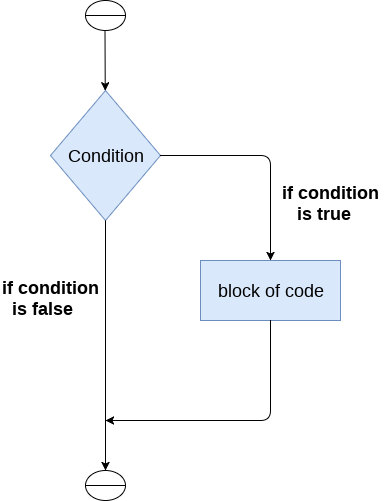
Python If-else statements

The syntax of the if-statement is given below.

  1. if expression:  
  2.     statement  

Example 1

  1. num = int(input("enter the number?"))  
  2. if num%2 == 0:  
  3.     print("Number is even")  

Output:

enter the number?10
Number is even

Example 2 : Program to print the largest of the three numbers.

  1. a = int(input("Enter a? "));  
  2. b = int(input("Enter b? "));  
  3. c = int(input("Enter c? "));  
  4. if a>b and a>c:  
  5.     print("a is largest");  
  6. if b>a and b>c:  
  7.     print("b is largest");  
  8. if c>a and c>b:  
  9.     print("c is largest");  

Output:

Enter a? 100
Enter b? 120
Enter c? 130
c is largest

The if-else statement

The if-else statement provides an else block combined with the if statement which is executed in the false case of the condition.

If the condition is true, then the if-block is executed. Otherwise, the else-block is executed.
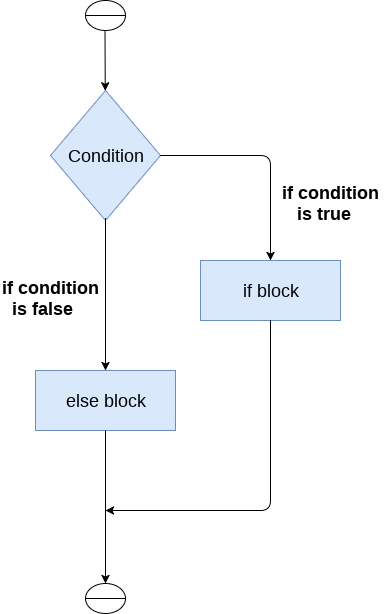
Python If-else statements

The syntax of the if-else statement is given below.

  1. if condition:  
  2.     #block of statements   
  3. else:   
  4.     #another block of statements (else-block)   

Example 1 : Program to check whether a person is eligible to vote or not.

  1. age = int (input("Enter your age? "))  
  2. if age>=18:  
  3.     print("You are eligible to vote !!");  
  4. else:  
  5.     print("Sorry! you have to wait !!");  

Output:

Enter your age? 90
You are eligible to vote !!

Example 2: Program to check whether a number is even or not.

  1. num = int(input("enter the number?"))  
  2. if num%2 == 0:  
  3.     print("Number is even...")  
  4. else:  
  5.     print("Number is odd...")  

Output:

enter the number?10
Number is even

The elif statement

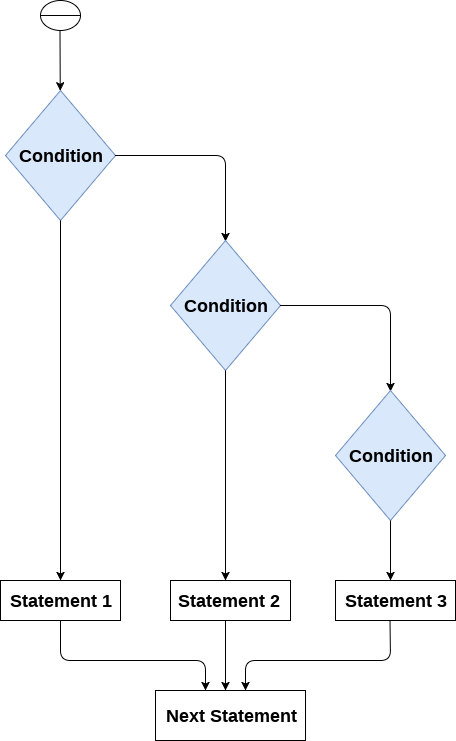
The elif statement enables us to check multiple conditions and execute the specific block of statements depending upon the true condition among them. We can have any number of elif statements in our program depending upon our need. However, using elif is optional.

The elif statement works like an if-else-if ladder statement in C. It must be succeeded by an if statement.

The syntax of the elif statement is given below.
  1. if expression 1:   
  2.     # block of statements   
  3.   
  4. elif expression 2:   
  5.     # block of statements   
  6.   
  7. elif expression 3:   
  8.     # block of statements   
  9.   
  10. else:   
  11.     # block of statements  
Python If-else statements

Example 1

  1. number = int(input("Enter the number?"))  
  2. if number==10:  
  3.     print("number is equals to 10")  
  4. elif number==50:  
  5.     print("number is equal to 50");  
  6. elif number==100:  
  7.     print("number is equal to 100");  
  8. else:  
  9.     print("number is not equal to 10, 50 or 100");  

Output:

Enter the number?15
number is not equal to 10, 50 or 100

Example 2

  1. marks = int(input("Enter the marks? "))  
  2. f marks > 85 and marks <= 100:  
  3.    print("Congrats ! you scored grade A ...")  
  4. lif marks > 60 and marks <= 85:  
  5.    print("You scored grade B + ...")  
  6. lif marks > 40 and marks <= 60:  
  7.    print("You scored grade B ...")  
  8. lif (marks > 30 and marks <= 40):  
  9.    print("You scored grade C ...")  
  10. lse:  
  11.    print("Sorry you are fail ?")  
Read More
  • Share This:  
  •  Facebook
  •  Twitter
  •  Google+
  •  Stumble
  •  Digg

Python Comments

 Programing Coderfunda     April 08, 2022     Python     No comments   


Python Comments

Python Comment is an essential tool for the programmers. Comments are generally used to explain the code. We can easily understand the code if it has a proper explanation. A good programmer must use the comments because in the future anyone wants to modify the code as well as implement the new module; then, it can be done easily.

In the other programming language such as C++, It provides the // for single-lined comment and /*.... */ for multiple-lined comment, but Python provides the single-lined Python comment. To apply the comment in the code we use the hash(#) at the beginning of the statement or code.

Let's understand the following example.

  1. # This is the print statement  
  2. print("Hello Python")  

Here we have written comment over the print statement using the hash(#). It will not affect our print statement.

Multiline Python Comment

We must use the hash(#) at the beginning of every line of code to apply the multiline Python comment. Consider the following example.

  1. # First line of the comment   
  2. # Second line of the comment  
  3. # Third line of the comment  

Example:

  1. # Variable a holds value 5  
  2. # Variable b holds value 10  
  3. # Variable c holds sum of a and b  
  4. # Print the result  
  5. a = 5  
  6. b = 10  
  7. c = a+b  
  8. print("The sum is:", c)  

Output:

The sum is: 15

The above code is very readable even the absolute beginners can under that what is happening in each line of the code. This is the advantage of using comments in code.

We can also use the triple quotes ('''''') for multiline comment. The triple quotes are also used to string formatting. Consider the following example.

Docstrings Python Comment

The docstring comment is mostly used in the module, function, class or method. It is a documentation Python string. We will explain the class/method in further tutorials.

Example:

  1. def intro():  
  2.   """ 
  3.   This function prints Hello Joseph 
  4.   """  
  5.   print("Hi Joseph")              
  6. intro()  

Output:

Hello Joseph

We can check a function's docstring by using the __doc__ attribute.

Generally, four whitespaces are used as the indentation. The amount of indentation depends on user, but it must be consistent throughout that block.
  1. def intro():  
  2.   """ 
  3.   This function prints Hello Joseph 
  4.   """  
  5.   print("Hello Joseph")              
  6. intro.__doc__  

Output:

Output:
'\n  This function prints Hello Joseph\n  '

Note: The docstring must be the first thing in the function; otherwise, Python interpreter cannot get the docstring.

Python indentation

Python indentation uses to define the block of the code. The other programming languages such as C, C++, and Java use curly braces {}, whereas Python uses an indentation. Whitespaces are used as indentation in Python.

Indentation uses at the beginning of the code and ends with the unintended line. That same line indentation defines the block of the code (body of a function, loop, etc.)

Generally, four whitespaces are used as the indentation. The amount of indentation depends on user, but it must be consistent throughout that block.

  1. for i in range(5):  
  2.     print(i)  
  3.     if(i == 3):  
  4.         break  

To indicate a block of code we indented each line of the block by the same whitespaces.

Consider the following example.

  1. dn = int(input("Enter the number:"))  
  2. if(n%2 == 0):  
  3.     print("Even Number")  
  4. else:  
  5.     print("Odd Number")  
  6.      
  7. print("Task Complete")  

Output:

Enter the number: 10
Even Number
Task Complete

The above code, if and else are two separate code blocks. Both code blocks are indented four spaces. The print("Task Complete") statement is not indented four whitespaces and it is out of the if-else block.

If the indentation is not used properly, then that will result in IndentationError.


Read More
  • Share This:  
  •  Facebook
  •  Twitter
  •  Google+
  •  Stumble
  •  Digg

Python Operators

 Programing Coderfunda     April 08, 2022     Python     No comments   

Python Operators

The operator can be defined as a symbol which is responsible for a particular operation between two operands. Operators are the pillars of a program on which the logic is built in a specific programming language. Python provides a variety of operators, which are described as follows.

  • Arithmetic operators
  • Comparison operators
  • Assignment Operators
  • Logical Operators
  • Bitwise Operators
  • Membership Operators
  • Identity Operators

Arithmetic Operators

Arithmetic operators are used to perform arithmetic operations between two operands. It includes + (addition), - (subtraction), *(multiplication), /(divide), %(reminder), //(floor division), and exponent (**) operators.

Consider the following table for a detailed explanation of arithmetic operators.

OperatorDescription
+ (Addition)It is used to add two operands. For example, if a = 20, b = 10 => a+b = 30
- (Subtraction)It is used to subtract the second operand from the first operand. If the first operand is less than the second operand, the value results negative. For example, if a = 20, b = 10 => a - b = 10
/ (divide)It returns the quotient after dividing the first operand by the second operand. For example, if a = 20, b = 10 => a/b = 2.0
* (Multiplication)It is used to multiply one operand with the other. For example, if a = 20, b = 10 => a * b = 200
% (reminder)It returns the reminder after dividing the first operand by the second operand. For example, if a = 20, b = 10 => a%b = 0
** (Exponent)It is an exponent operator represented as it calculates the first operand power to the second operand.
// (Floor division)It gives the floor value of the quotient produced by dividing the two operands.

Comparison operator

Comparison operators are used to comparing the value of the two operands and returns Boolean true or false accordingly. The comparison operators are described in the following table.

OperatorDescription
==If the value of two operands is equal, then the condition becomes true.
!=If the value of two operands is not equal, then the condition becomes true.
<=If the first operand is less than or equal to the second operand, then the condition becomes true.
>=If the first operand is greater than or equal to the second operand, then the condition becomes true.
>If the first operand is greater than the second operand, then the condition becomes true.
<If the first operand is less than the second operand, then the condition becomes true.

Assignment Operators

The assignment operators are used to assign the value of the right expression to the left operand. The assignment operators are described in the following table.

OperatorDescription
=It assigns the value of the right expression to the left operand.
+=It increases the value of the left operand by the value of the right operand and assigns the modified value back to left operand. For example, if a = 10, b = 20 => a+ = b will be equal to a = a+ b and therefore, a = 30.
-=It decreases the value of the left operand by the value of the right operand and assigns the modified value back to left operand. For example, if a = 20, b = 10 => a- = b will be equal to a = a- b and therefore, a = 10.
*=It multiplies the value of the left operand by the value of the right operand and assigns the modified value back to then the left operand. For example, if a = 10, b = 20 => a* = b will be equal to a = a* b and therefore, a = 200.
%=It divides the value of the left operand by the value of the right operand and assigns the reminder back to the left operand. For example, if a = 20, b = 10 => a % = b will be equal to a = a % b and therefore, a = 0.
**=a**=b will be equal to a=a**b, for example, if a = 4, b =2, a**=b will assign 4**2 = 16 to a.
//=A//=b will be equal to a = a// b, for example, if a = 4, b = 3, a//=b will assign 4//3 = 1 to a.

Bitwise Operators

The bitwise operators perform bit by bit operation on the values of the two operands. Consider the following example.

For example,

  1. if a = 7   
  2.    b = 6     
  3. then, binary (a) = 0111    
  4.     binary (b) = 0110    
  5.     
  6. hence, a & b = 0011    
  7.       a | b = 0111    
  8.              a ^ b = 0100    
  9.        ~ a = 1000  

OperatorDescription
& (binary and)If both the bits at the same place in two operands are 1, then 1 is copied to the result. Otherwise, 0 is copied.
| (binary or)The resulting bit will be 0 if both the bits are zero; otherwise, the resulting bit will be 1.
^ (binary xor)The resulting bit will be 1 if both the bits are different; otherwise, the resulting bit will be 0.
~ (negation)It calculates the negation of each bit of the operand, i.e., if the bit is 0, the resulting bit will be 1 and vice versa.
<< (left shift)The left operand value is moved left by the number of bits present in the right operand.
>> (right shift)The left operand is moved right by the number of bits present in the right operand.

Logical Operators

The logical operators are used primarily in the expression evaluation to make a decision. Python supports the following logical operators.

OperatorDescription
andIf both the expression are true, then the condition will be true. If a and b are the two expressions, a → true, b → true => a and b → true.
orIf one of the expressions is true, then the condition will be true. If a and b are the two expressions, a → true, b → false => a or b → true.
notIf an expression a is true, then not (a) will be false and vice versa.

Membership Operators

Python membership operators are used to check the membership of value inside a Python data structure. If the value is present in the data structure, then the resulting value is true otherwise it returns false.

OperatorDescription
inIt is evaluated to be true if the first operand is found in the second operand (list, tuple, or dictionary).
not inIt is evaluated to be true if the first operand is not found in the second operand (list, tuple, or dictionary).

Identity Operators

The identity operators are used to decide whether an element certain class or type.

OperatorDescription
isIt is evaluated to be true if the reference present at both sides point to the same object.
is notIt is evaluated to be true if the reference present at both sides do not point to the same object.

Operator Precedence

The precedence of the operators is essential to find out since it enables us to know which operator should be evaluated first. The precedence table of the operators in Python is given below.

OperatorDescription
**The exponent operator is given priority over all the others used in the expression.
~ + -The negation, unary plus, and minus.
* / % //The multiplication, divide, modules, reminder, and floor division.
+ -Binary plus, and minus
>> <<Left shift. and right shift
&Binary and.
^ |Binary xor, and or
<= < > >=Comparison operators (less than, less than equal to, greater than, greater then equal to).
<> == !=Equality operators.
= %= /= //= -= +=
*= **=
Assignment operators
is is notIdentity operators
in not inMembership operators
not or andLogical operators
Read More
  • Share This:  
  •  Facebook
  •  Twitter
  •  Google+
  •  Stumble
  •  Digg
Newer Posts Older Posts Home

Meta

Popular Posts

  • Generate Migrations from an Existing Database With the Migration Generator Package
    Laravel Migration Generator Migration Generator for Laravel is a package by Bennett Treptow to generate migrations from existing database ...
  • Tailwindcss best practices for responsive design
    Tailwind CSS provides powerful utilities for responsive design out of the box. To use it effectively and maintain clean, scalable code, here...
  • Search Through Models with Laravel Searchable
      Laravel Searchable   is a package by   Spatie   to search through models and other sources pragmatically. Using this package, you can get ...
  • Laravel Razorpay Integration | Payment gateway integration Laravel in 30 mins | Laravel Razorpay
    1 Integration of Razorpay with Laravel. In this tutorial, I have taught how to integrate payment gateway with laravel with mini-project. If...
  • Vue.js Render functions
        Vue.js Render functions Vue.js recommends us to use templates to build HTML. Here, we can use the render function as a closer-to-the-co...

Categories

  • Ajax (26)
  • Bootstrap (30)
  • DBMS (42)
  • HTML (12)
  • HTML5 (45)
  • JavaScript (10)
  • Jquery (34)
  • Jquery UI (2)
  • JqueryUI (32)
  • Laravel (1017)
  • Laravel Tutorials (23)
  • Laravel-Question (6)
  • Magento (9)
  • Magento 2 (95)
  • MariaDB (1)
  • MySql Tutorial (2)
  • PHP-Interview-Questions (3)
  • Php Question (13)
  • Python (36)
  • RDBMS (13)
  • SQL Tutorial (79)
  • Vue.js Tutorial (69)
  • Wordpress (150)
  • Wordpress Theme (3)
  • codeigniter (108)
  • oops (4)
  • php (853)

Social Media Links

  • Follow on Twitter
  • Like on Facebook
  • Subscribe on Youtube
  • Follow on Instagram

Pages

  • Home
  • Contact Us
  • Privacy Policy
  • About us

Blog Archive

  • ▼  2026 (3)
    • ▼  07/26 - 08/02 (2)
      • A stormwater pond in Calgary appears filled with P...
      • Inside Kriti Sanon's duplex sea-facing penthouse w...
    • ►  06/28 - 07/05 (1)
  • ►  2025 (4)
    • ►  07/06 - 07/13 (2)
    • ►  06/29 - 07/06 (2)
  • ►  2024 (486)
    • ►  09/15 - 09/22 (30)
    • ►  09/08 - 09/15 (35)
    • ►  09/01 - 09/08 (35)
    • ►  08/11 - 08/18 (2)
    • ►  08/04 - 08/11 (33)
    • ►  07/28 - 08/04 (30)
    • ►  07/07 - 07/14 (11)
    • ►  06/30 - 07/07 (35)
    • ►  06/23 - 06/30 (5)
    • ►  06/02 - 06/09 (31)
    • ►  05/26 - 06/02 (20)
    • ►  05/05 - 05/12 (29)
    • ►  04/28 - 05/05 (26)
    • ►  04/07 - 04/14 (10)
    • ►  03/31 - 04/07 (34)
    • ►  03/24 - 03/31 (10)
    • ►  03/03 - 03/10 (35)
    • ►  02/25 - 03/03 (15)
    • ►  02/04 - 02/11 (22)
    • ►  01/28 - 02/04 (30)
    • ►  01/07 - 01/14 (8)
  • ►  2023 (484)
    • ►  12/31 - 01/07 (35)
    • ►  12/24 - 12/31 (10)
    • ►  12/03 - 12/10 (33)
    • ►  11/26 - 12/03 (20)
    • ►  11/05 - 11/12 (35)
    • ►  10/29 - 11/05 (20)
    • ►  10/22 - 10/29 (9)
    • ►  10/15 - 10/22 (7)
    • ►  10/08 - 10/15 (9)
    • ►  10/01 - 10/08 (10)
    • ►  09/24 - 10/01 (9)
    • ►  09/17 - 09/24 (9)
    • ►  09/10 - 09/17 (7)
    • ►  09/03 - 09/10 (9)
    • ►  08/27 - 09/03 (9)
    • ►  08/20 - 08/27 (8)
    • ►  08/13 - 08/20 (8)
    • ►  08/06 - 08/13 (8)
    • ►  07/30 - 08/06 (8)
    • ►  07/23 - 07/30 (7)
    • ►  07/16 - 07/23 (8)
    • ►  07/09 - 07/16 (7)
    • ►  07/02 - 07/09 (8)
    • ►  06/25 - 07/02 (7)
    • ►  06/18 - 06/25 (7)
    • ►  06/11 - 06/18 (7)
    • ►  06/04 - 06/11 (11)
    • ►  05/28 - 06/04 (7)
    • ►  05/21 - 05/28 (8)
    • ►  05/14 - 05/21 (11)
    • ►  05/07 - 05/14 (7)
    • ►  04/30 - 05/07 (7)
    • ►  04/23 - 04/30 (8)
    • ►  04/16 - 04/23 (9)
    • ►  04/09 - 04/16 (7)
    • ►  04/02 - 04/09 (4)
    • ►  03/26 - 04/02 (21)
    • ►  03/19 - 03/26 (2)
    • ►  03/12 - 03/19 (9)
    • ►  03/05 - 03/12 (26)
    • ►  02/26 - 03/05 (25)
    • ►  01/15 - 01/22 (7)
    • ►  01/08 - 01/15 (1)
  • ►  2022 (1037)
    • ►  12/11 - 12/18 (13)
    • ►  12/04 - 12/11 (1)
    • ►  11/27 - 12/04 (40)
    • ►  11/06 - 11/13 (1)
    • ►  10/16 - 10/23 (13)
    • ►  09/04 - 09/11 (5)
    • ►  08/21 - 08/28 (24)
    • ►  08/14 - 08/21 (24)
    • ►  07/03 - 07/10 (9)
    • ►  06/19 - 06/26 (3)
    • ►  05/29 - 06/05 (3)
    • ►  05/22 - 05/29 (3)
    • ►  05/15 - 05/22 (109)
    • ►  05/01 - 05/08 (7)
    • ►  04/24 - 05/01 (7)
    • ►  04/17 - 04/24 (64)
    • ►  04/10 - 04/17 (115)
    • ►  04/03 - 04/10 (73)
    • ►  03/27 - 04/03 (77)
    • ►  03/13 - 03/20 (2)
    • ►  03/06 - 03/13 (25)
    • ►  02/27 - 03/06 (18)
    • ►  02/20 - 02/27 (153)
    • ►  02/13 - 02/20 (187)
    • ►  01/30 - 02/06 (45)
    • ►  01/23 - 01/30 (15)
    • ►  01/16 - 01/23 (1)
  • ►  2021 (412)
    • ►  10/24 - 10/31 (2)
    • ►  07/25 - 08/01 (1)
    • ►  07/11 - 07/18 (10)
    • ►  06/13 - 06/20 (29)
    • ►  05/23 - 05/30 (1)
    • ►  05/02 - 05/09 (24)
    • ►  04/25 - 05/02 (24)
    • ►  04/18 - 04/25 (112)
    • ►  04/11 - 04/18 (1)
    • ►  04/04 - 04/11 (6)
    • ►  03/28 - 04/04 (86)
    • ►  03/21 - 03/28 (19)
    • ►  03/14 - 03/21 (2)
    • ►  03/07 - 03/14 (10)
    • ►  02/28 - 03/07 (1)
    • ►  02/21 - 02/28 (29)
    • ►  02/14 - 02/21 (13)
    • ►  02/07 - 02/14 (12)
    • ►  01/31 - 02/07 (6)
    • ►  01/17 - 01/24 (2)
    • ►  01/10 - 01/17 (8)
    • ►  01/03 - 01/10 (14)
  • ►  2020 (376)
    • ►  12/27 - 01/03 (37)
    • ►  12/20 - 12/27 (92)
    • ►  12/13 - 12/20 (29)
    • ►  12/06 - 12/13 (37)
    • ►  11/29 - 12/06 (4)
    • ►  11/15 - 11/22 (14)
    • ►  11/08 - 11/15 (8)
    • ►  11/01 - 11/08 (2)
    • ►  10/18 - 10/25 (14)
    • ►  10/11 - 10/18 (16)
    • ►  10/04 - 10/11 (10)
    • ►  09/20 - 09/27 (10)
    • ►  09/06 - 09/13 (19)
    • ►  08/30 - 09/06 (26)
    • ►  08/23 - 08/30 (4)
    • ►  08/16 - 08/23 (2)
    • ►  07/12 - 07/19 (48)
    • ►  05/17 - 05/24 (2)
    • ►  01/05 - 01/12 (2)
  • ►  2019 (74)
    • ►  07/07 - 07/14 (6)
    • ►  06/16 - 06/23 (6)
    • ►  02/10 - 02/17 (17)
    • ►  01/13 - 01/20 (37)
    • ►  01/06 - 01/13 (8)
  • ►  2018 (376)
    • ►  12/30 - 01/06 (24)
    • ►  12/16 - 12/23 (8)
    • ►  12/09 - 12/16 (98)
    • ►  12/02 - 12/09 (16)
    • ►  11/18 - 11/25 (36)
    • ►  11/04 - 11/11 (18)
    • ►  10/28 - 11/04 (10)
    • ►  10/21 - 10/28 (26)
    • ►  10/14 - 10/21 (52)
    • ►  10/07 - 10/14 (4)
    • ►  09/30 - 10/07 (2)
    • ►  09/23 - 09/30 (68)
    • ►  09/16 - 09/23 (4)
    • ►  09/09 - 09/16 (4)
    • ►  08/26 - 09/02 (6)

Data Publish News

Loading...

Al Jazeera – Breaking News, World News and Video from Al Jazeera

Loading...

Laravel News

Loading...

Copyright © CoderFunda | Powered by Blogger
Design by Coderfunda | Blogger Theme by Coderfunda | Distributed By Coderfunda