CoderFunda
  • Home
  • About us
    • Contact Us
    • Disclaimer
    • Privacy Policy
    • About us
  • Home
  • Php
  • HTML
  • CSS
  • JavaScript
    • JavaScript
    • Jquery
    • JqueryUI
    • Stock
  • SQL
  • Vue.Js
  • Python
  • Wordpress
  • C++
    • C++
    • C
  • Laravel
    • Laravel
      • Overview
      • Namespaces
      • Middleware
      • Routing
      • Configuration
      • Application Structure
      • Installation
    • Overview
  • DBMS
    • DBMS
      • PL/SQL
      • SQLite
      • MongoDB
      • Cassandra
      • MySQL
      • Oracle
      • CouchDB
      • Neo4j
      • DB2
      • Quiz
    • Overview
  • Entertainment
    • TV Series Update
    • Movie Review
    • Movie Review
  • More
    • Vue. Js
    • Php Question
    • Php Interview Question
    • Laravel Interview Question
    • SQL Interview Question
    • IAS Interview Question
    • PCS Interview Question
    • Technology
    • Other
Showing posts with label CodeIgniter Internationalization. Show all posts

11 December, 2018

CodeIgniter - Internationalization

 Programing Coderfunda     December 11, 2018     codeigniter, CodeIgniter Internationalization     No comments   

The language class in CodeIgniter provides an easy way to support multiple languages for internationalization. To some extent, we can use different language files to display text in many different languages.
We can put different language files in application/language directory. System language files can be found at system/language directory, but to add your own language to your application, you should create a separate folder for each language in application/language directory.

Creating files Language

To create a language file, you must end it with _lang.php. For example, you want to create a language file for French language, then you must save it with french_lang.php. Within this file you can store all your language texts in key, value combination in $lang array as shown below.
$lang[‘key’] = ‘val’;

Loading Language file

To use any of the language in your application, you must first load the file of that particular language to retrieve various texts stored in that file. You can use the following code to load the language file.
$this->lang->load('filename', 'language');
  • filename − It is the name of file you want to load. Don’t use extension of file here but only name of file.
  • Language − It is the language set containing it.

Fetching Language Text

To fetch a line from the language file simply execute the following code.
$this->lang->line('language_key');
Where language_key is the key parameter used to fetch value of the key in the loaded language file.

Autoload Languages

If you need some language globally, then you can autoload it in application/config/autoload.php file as shown below.
| -----------------------------------------------------------------------
| Auto-load Language files
| -----------------------------------------------------------------------
| Prototype:
| $autoload['language'] = array('lang1', 'lang2');
|
| NOTE: Do not include the "_lang" part of your file. For example
| "codeigniter_lang.php" would be referenced as array('codeigniter');
|
*/
$autoload
['language'] = array();
Simply, pass the different languages to be autoloaded by CodeIgniter.

Example

Create a controller called Lang_controller.php and save it in application/controller/Lang_controller.php
<?php
class Lang_controller extends CI_Controller {

public function index(){
//Load form helper
$this
->load->helper('form');

//Get the selected language
$language
= $this->input->post('language');

//Choose language file according to selected lanaguage
if($language == "french")
$this
->lang->load('french_lang','french');
else if($language == "german")
$this
->lang->load('german_lang','german');
else
$this
->lang->load('english_lang','english');

//Fetch the message from language file.
$data
['msg'] = $this->lang->line('msg');

$data
['language'] = $language;
//Load the view file
$this
->load->view('lang_view',$data);
}
}
?>
Create a view file called lang_view.php and save it at application/views/ lang_view.php
<!DOCTYPE html>
<html lang = "en">

<head>
<meta charset = "utf-8">
<title>CodeIgniter Internationalization Example</title>
</head>

<body>
<?php
echo form_open
('/lang');
?>

<select name = "language" onchange = "javascript:this.form.submit();">
<?php
$lang
= array('english'=>"English",'french'=>"French",'german'=>"German");

foreach($lang as $key=>$val) {
if($key == $language)
echo
"<option value = '".$key."' selected>".$val."</option>";
else
echo
"<option value = '".$key."'>".$val."</option>";
}

?>

</select>

<br>

<?php
form_close
();
echo $msg
;
?>

</body>

</html>
Create three folders called English, French, and German in application/language as shown in the figure below.
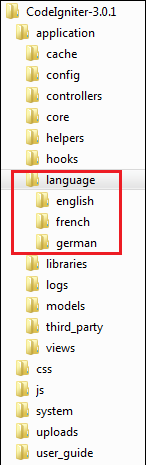
Three Folders
Copy the below given code and save it in english_lang.php file in application/language/english folder.
<?php
$lang
['msg'] = "CodeIgniter Internationalization example.";
?>
Copy the below given code and save it in french_lang.php file in application/language/French folder.
<?php
$lang
['msg'] = "Exemple CodeIgniter internationalisation.";
?>
Copy the below given code and save it in german_lang.php file in application/language/german folder.
<?php
$lang
['msg'] = "CodeIgniter Internationalisierung Beispiel.";
?>
Change the routes.php file in application/config/routes.php to add route for the above controller and add the following line at the end of the file.
$route['lang'] = "Lang_controller";
Execute the following URL in the browser to execute the above example.
http://yoursite.com/index.php/lang
It will produce an output as shown in the following screenshot. If you change the language in the dropdown list, the language of the sentence written below the dropdown will also change accordingly.
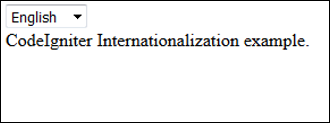
Internationalization Example

Read More
  • Share This:  
  •  Facebook
  •  Twitter
  •  Google+
  •  Stumble
  •  Digg

CodeIgniter - Internationalization

 Programing Coderfunda     December 11, 2018     codeigniter, CodeIgniter Internationalization     No comments   

The language class in CodeIgniter provides an easy way to support multiple languages for internationalization. To some extent, we can use different language files to display text in many different languages.
We can put different language files in application/language directory. System language files can be found at system/language directory, but to add your own language to your application, you should create a separate folder for each language in application/language directory.

Creating files Language

To create a language file, you must end it with _lang.php. For example, you want to create a language file for French language, then you must save it with french_lang.php. Within this file you can store all your language texts in key, value combination in $lang array as shown below.
$lang[‘key’] = ‘val’;

Loading Language file

To use any of the language in your application, you must first load the file of that particular language to retrieve various texts stored in that file. You can use the following code to load the language file.
$this->lang->load('filename', 'language');
  • filename − It is the name of file you want to load. Don’t use extension of file here but only name of file.
  • Language − It is the language set containing it.

Fetching Language Text

To fetch a line from the language file simply execute the following code.
$this->lang->line('language_key');
Where language_key is the key parameter used to fetch value of the key in the loaded language file.

Autoload Languages

If you need some language globally, then you can autoload it in application/config/autoload.php file as shown below.
| -----------------------------------------------------------------------
|  Auto-load Language files
| -----------------------------------------------------------------------
| Prototype:
|   $autoload['language'] = array('lang1', 'lang2');
|
| NOTE: Do not include the "_lang" part of your file. For example
| "codeigniter_lang.php" would be referenced as array('codeigniter');
|
*/
$autoload['language'] = array();
Simply, pass the different languages to be autoloaded by CodeIgniter.

Example

Create a controller called Lang_controller.php and save it in application/controller/Lang_controller.php
<?php
   class Lang_controller extends CI_Controller {

      public function index(){
         //Load form helper
         $this->load->helper('form');

         //Get the selected language
         $language = $this->input->post('language');
  
         //Choose language file according to selected lanaguage
         if($language == "french")
            $this->lang->load('french_lang','french');
         else if($language == "german")
            $this->lang->load('german_lang','german');
         else
         $this->lang->load('english_lang','english');
  
         //Fetch the message from language file.
         $data['msg'] = $this->lang->line('msg');
  
         $data['language'] = $language;
         //Load the view file
         $this->load->view('lang_view',$data);
      }
   }
?>
Create a view file called lang_view.php and save it at application/views/ lang_view.php
<!DOCTYPE html>
<html lang = "en"> 

   <head>
      <meta charset = "utf-8">
      <title>CodeIgniter Internationalization Example</title>
   </head>
 
   <body>
      <?php
         echo form_open('/lang');
      ?>
  
      <select name = "language" onchange = "javascript:this.form.submit();">
         <?php
            $lang = array('english'=>"English",'french'=>"French",'german'=>"German");
    
            foreach($lang as $key=>$val) {
               if($key == $language)
               echo "<option value = '".$key."' selected>".$val."</option>";
               else
               echo "<option value = '".$key."'>".$val."</option>";
            }
    
         ?>
   
      </select>
  
      <br>
  
      <?php
         form_close();
         echo $msg;
      ?>
  
   </body>
 
</html>
Create three folders called English, French, and German in application/language as shown in the figure below.
Three Folders
Copy the below given code and save it in english_lang.php file in application/language/english folder.
<?php
   $lang['msg'] = "CodeIgniter Internationalization example.";
?>
Copy the below given code and save it in french_lang.php file in application/language/French folder.
<?php
   $lang['msg'] = "Exemple CodeIgniter internationalisation.";
?>
Copy the below given code and save it in german_lang.php file in application/language/german folder.
<?php
   $lang['msg'] = "CodeIgniter Internationalisierung Beispiel.";
?>
Change the routes.php file in application/config/routes.php to add route for the above controller and add the following line at the end of the file.
$route['lang'] = "Lang_controller";
Execute the following URL in the browser to execute the above example.
http://yoursite.com/index.php/lang
It will produce an output as shown in the following screenshot. If you change the language in the dropdown list, the language of the sentence written below the dropdown will also change accordingly.
Internationalization Example

Read More
  • Share This:  
  •  Facebook
  •  Twitter
  •  Google+
  •  Stumble
  •  Digg
Older Posts Home

Meta

Popular Posts

  • Vue.js Events
      In Vue.js, Events are used to respond to an action. Suppose, you have to build a dynamic website using Vue.js then you'll most likely ...
  • Is there a way to use awk to count the number of rows between 2 flags and input that number into a specific field?
    I have a set of data that consists of seismic wave travel times and their corresponding information (i.e. source that produced the wave and ...
  • Use Leaflet.js and Google Maps Blade Components in Laravel
      Laravel Maps   is a package to easily create maps using   Leaflet.js   or Google Maps and Blade components. The main features that work wi...
  • Use Emmet-style Abbreviations in Blade Components
      Laravel   Blade Emerald   provides   Emmet -like abbreviations to generate and wrap Laravel Blade components with markup. It works by usin...
  • What is WordPress
      What is WordPress WordPress is a free and open-source  C ontent  M anagement  S ystem (CMS). It is an online site based on PHP and MySQL. ...

Categories

  • Ajax (26)
  • Bootstrap (30)
  • DBMS (42)
  • HTML (12)
  • HTML5 (45)
  • JavaScript (10)
  • Jquery (34)
  • Jquery UI (2)
  • JqueryUI (32)
  • Laravel (1017)
  • Laravel Tutorials (23)
  • Laravel-Question (6)
  • Magento (9)
  • Magento 2 (95)
  • MariaDB (1)
  • MySql Tutorial (2)
  • PHP-Interview-Questions (3)
  • Php Question (13)
  • Python (36)
  • RDBMS (13)
  • SQL Tutorial (79)
  • Vue.js Tutorial (69)
  • Wordpress (150)
  • Wordpress Theme (3)
  • codeigniter (108)
  • oops (4)
  • php (853)

Social Media Links

  • Follow on Twitter
  • Like on Facebook
  • Subscribe on Youtube
  • Follow on Instagram

Pages

  • Home
  • Contact Us
  • Privacy Policy
  • About us

Blog Archive

  • July (4)
  • September (100)
  • August (50)
  • July (56)
  • June (46)
  • May (59)
  • April (50)
  • March (60)
  • February (42)
  • January (53)
  • December (58)
  • November (61)
  • October (39)
  • September (36)
  • August (36)
  • July (34)
  • June (34)
  • May (36)
  • April (29)
  • March (82)
  • February (1)
  • January (8)
  • December (14)
  • November (41)
  • October (13)
  • September (5)
  • August (48)
  • July (9)
  • June (6)
  • May (119)
  • April (259)
  • March (122)
  • February (368)
  • January (33)
  • October (2)
  • July (11)
  • June (29)
  • May (25)
  • April (168)
  • March (93)
  • February (60)
  • January (28)
  • December (195)
  • November (24)
  • October (40)
  • September (55)
  • August (6)
  • July (48)
  • May (2)
  • January (2)
  • July (6)
  • June (6)
  • February (17)
  • January (69)
  • December (122)
  • November (56)
  • October (92)
  • September (76)
  • August (6)

Loading...

Laravel News

Loading...

Copyright © CoderFunda | Powered by Blogger
Design by Coderfunda | Blogger Theme by Coderfunda | Distributed By Coderfunda