CoderFunda
  • Home
  • About us
    • Contact Us
    • Disclaimer
    • Privacy Policy
    • About us
  • Home
  • Php
  • HTML
  • CSS
  • JavaScript
    • JavaScript
    • Jquery
    • JqueryUI
    • Stock
  • SQL
  • Vue.Js
  • Python
  • Wordpress
  • C++
    • C++
    • C
  • Laravel
    • Laravel
      • Overview
      • Namespaces
      • Middleware
      • Routing
      • Configuration
      • Application Structure
      • Installation
    • Overview
  • DBMS
    • DBMS
      • PL/SQL
      • SQLite
      • MongoDB
      • Cassandra
      • MySQL
      • Oracle
      • CouchDB
      • Neo4j
      • DB2
      • Quiz
    • Overview
  • Entertainment
    • TV Series Update
    • Movie Review
    • Movie Review
  • More
    • Vue. Js
    • Php Question
    • Php Interview Question
    • Laravel Interview Question
    • SQL Interview Question
    • IAS Interview Question
    • PCS Interview Question
    • Technology
    • Other
Showing posts with label CodeIgniter Tempdata. Show all posts

11 December, 2018

CodeIgniter - Tempdata

 Programing Coderfunda     December 11, 2018     codeigniter, CodeIgniter Tempdata     No comments   

In some situations, where you want to remove data stored in session after some specific time-period, this can be done using tempdata functionality in CodeIgniter.

Add Tempdata

To add data as tempdata, we have to use mark_as_tempdata() function. This function takes two argument items or items to be stored as tempdataand the expiration time for those items are as shown below.
// 'item' will be erased after 300 seconds(5 minutes) 
$this->session->mark_as_temp('item',300);
You can also pass an array to store multiple data. All the items stored below will be expired after 300 seconds.
$this->session->mark_as_temp(array('item','item2'),300);
You can also set different expiration time for each item as shown below.
// 'item' will be erased after 300 seconds, while 'item2' 
// will do so after only 240 seconds

$this
->session->mark_as_temp(array(
'item'=>300,
'item2'=>240
));

Retrieve Tempdata

We can retrieve the tempdata using tempdata() function. This function assures that you are getting only tempdata and not any other data. Look at the example given below to see how to retrieve tempdata. tempdata()function will take one argument of the item to be fetched.
$this->session->tempdata('item');
If you omit the argument, then you can retrieve all the existing tempdata.

Remove Tempdata

Tempdata is removed automatically after its expiration time but if you want to remove tempdata before that, then you can do as shown below using the unset_tempdata() function, which takes one argument of the item to be removed.
$this->session->unset_tempdata('item');

Example

Create a class called Tempdata_controller.php and save it in application/controller/Tempdata_controller.php.
<?php 
class Tempdata_controller extends CI_Controller {

public function index() {
$this
->load->library('session');
$this
->load->view('tempdata_view');
}

public function add() {
$this
->load->library('session');
$this
->load->helper('url');

//tempdata will be removed after 5 seconds
$this
->session->set_tempdata('item','item-value',5);

redirect
('tempdata');
}
}
?>
Create a file called tempdata_view.php and save it in application/views/tempdata_view.php
<!DOCTYPE html> 
<html lang = "en">

<head>
<meta charset = "utf-8">
<title>CodeIgniter Tempdata Example</title>
</head>

<body>
Temp Data Example
<h2><?php echo $this->session->tempdata('item'); ?></h2>
<a href = 'tempdata/add'>Click Here</a> to add temp data.
</body>

</html>
Make the changes in the routes.php file in application/config/routes.php and add the following line at the end of the file.
$route['tempdata'] = "Tempdata_controller"; 
$route
['tempdata/add'] = "Tempdata_controller/add";
Execute the above example by visiting the following link. Replace the yoursite.com with the URL of your site.
http://yoursite.com/index.php/tempdata
After visiting the above URL, you will see a screen as shown below.
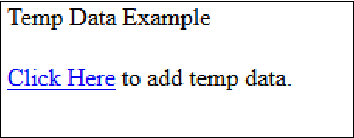
TempData
Click on “Click Here” link and you will see a screen as shown below.
Here, in this screen you will see a value of temp data variable. Refresh the same page after five seconds again as we have set the temp data for five seconds and you will see a screen like above and temp data variable will be removed automatically after five seconds. If you refresh the same page before 5 seconds, then the temp data will not be removed, as the time period is not over.
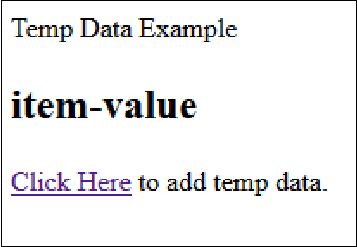
Add Temp Data

Destroying a Session

In PHP, we are using the session_destroy() function to destroy the session and in CodeIgniter we can destroy the function as shown below.
$this->session->sess_destroy();
After calling this function, all the session data including the flashdata and tempdata will be deleted permanently and cannot be retrieved back.
Read More
  • Share This:  
  •  Facebook
  •  Twitter
  •  Google+
  •  Stumble
  •  Digg

CodeIgniter - Tempdata

 Programing Coderfunda     December 11, 2018     codeigniter, CodeIgniter Tempdata     No comments   

In some situations, where you want to remove data stored in session after some specific time-period, this can be done using tempdata functionality in CodeIgniter.

Add Tempdata

To add data as tempdata, we have to use mark_as_tempdata() function. This function takes two argument items or items to be stored as tempdataand the expiration time for those items are as shown below.
// 'item' will be erased after 300 seconds(5 minutes) 
$this->session->mark_as_temp('item',300);
You can also pass an array to store multiple data. All the items stored below will be expired after 300 seconds.
$this->session->mark_as_temp(array('item','item2'),300);
You can also set different expiration time for each item as shown below.
// 'item' will be erased after 300 seconds, while 'item2' 
// will do so after only 240 seconds 

$this->session->mark_as_temp(array( 
   'item'=>300, 
   'item2'=>240 
));

Retrieve Tempdata

We can retrieve the tempdata using tempdata() function. This function assures that you are getting only tempdata and not any other data. Look at the example given below to see how to retrieve tempdata. tempdata()function will take one argument of the item to be fetched.
$this->session->tempdata('item');
If you omit the argument, then you can retrieve all the existing tempdata.

Remove Tempdata

Tempdata is removed automatically after its expiration time but if you want to remove tempdata before that, then you can do as shown below using the unset_tempdata() function, which takes one argument of the item to be removed.
$this->session->unset_tempdata('item');

Example

Create a class called Tempdata_controller.php and save it in application/controller/Tempdata_controller.php.
<?php 
   class Tempdata_controller extends CI_Controller {
 
      public function index() { 
         $this->load->library('session'); 
         $this->load->view('tempdata_view'); 
      } 
  
      public function add() { 
         $this->load->library('session'); 
         $this->load->helper('url'); 
   
         //tempdata will be removed after 5 seconds 
         $this->session->set_tempdata('item','item-value',5); 
   
         redirect('tempdata'); 
      } 
   } 
?>
Create a file called tempdata_view.php and save it in application/views/tempdata_view.php
<!DOCTYPE html> 
<html lang = "en">
 
   <head> 
      <meta charset = "utf-8"> 
      <title>CodeIgniter Tempdata Example</title> 
   </head>
 
   <body> 
      Temp Data Example 
      <h2><?php echo $this->session->tempdata('item'); ?></h2>
      <a href = 'tempdata/add'>Click Here</a> to add temp data. 
   </body>
 
</html>
Make the changes in the routes.php file in application/config/routes.php and add the following line at the end of the file.
$route['tempdata'] = "Tempdata_controller"; 
$route['tempdata/add'] = "Tempdata_controller/add";
Execute the above example by visiting the following link. Replace the yoursite.com with the URL of your site.
http://yoursite.com/index.php/tempdata
After visiting the above URL, you will see a screen as shown below.
TempData
Click on “Click Here” link and you will see a screen as shown below.
Here, in this screen you will see a value of temp data variable. Refresh the same page after five seconds again as we have set the temp data for five seconds and you will see a screen like above and temp data variable will be removed automatically after five seconds. If you refresh the same page before 5 seconds, then the temp data will not be removed, as the time period is not over.
Add Temp Data

Destroying a Session

In PHP, we are using the session_destroy() function to destroy the session and in CodeIgniter we can destroy the function as shown below.
$this->session->sess_destroy();
After calling this function, all the session data including the flashdata and tempdata will be deleted permanently and cannot be retrieved back.
Read More
  • Share This:  
  •  Facebook
  •  Twitter
  •  Google+
  •  Stumble
  •  Digg
Older Posts Home

Meta

Popular Posts

  • Generate Migrations from an Existing Database With the Migration Generator Package
    Laravel Migration Generator Migration Generator for Laravel is a package by Bennett Treptow to generate migrations from existing database ...
  • 'Ramayana' to have 'Baahubali'-style cliffhanger ending
    image/jpeg https://timesofindia.indiatimes.com/entertainment/hindi/bollywood/news/ramayana-to-end-on-baahubali-style-cliffhanger-director-ni...
  • Vue.js Events
      In Vue.js, Events are used to respond to an action. Suppose, you have to build a dynamic website using Vue.js then you'll most likely ...
  • Bagisto E-commerce Platform
      Bagisto is an open-source E-commerce platform built on top of Laravel and Vue.js by Webkul. Bagisto is an E-commerce ecosystem designed...
  • Andhra Pradesh NEET UG 2026 rank list released at drntr.uhsap.in: Direct link to download here
    Dr. NTR University of Health Sciences has published the Andhra Pradesh NEET UG 2026 rank-wise list, declaring 33,220 candidates eligible for...

Categories

  • Ajax (26)
  • Bootstrap (30)
  • DBMS (42)
  • HTML (12)
  • HTML5 (45)
  • JavaScript (10)
  • Jquery (34)
  • Jquery UI (2)
  • JqueryUI (32)
  • Laravel (1017)
  • Laravel Tutorials (23)
  • Laravel-Question (6)
  • Magento (9)
  • Magento 2 (95)
  • MariaDB (1)
  • MySql Tutorial (2)
  • PHP-Interview-Questions (3)
  • Php Question (13)
  • Python (36)
  • RDBMS (13)
  • SQL Tutorial (79)
  • Vue.js Tutorial (69)
  • Wordpress (150)
  • Wordpress Theme (3)
  • codeigniter (108)
  • oops (4)
  • php (853)

Social Media Links

  • Follow on Twitter
  • Like on Facebook
  • Subscribe on Youtube
  • Follow on Instagram

Pages

  • Home
  • Contact Us
  • Privacy Policy
  • About us

Blog Archive

  • ▼  2026 (117)
    • ▼  08/02 - 08/09 (8)
      • हरदोई में अस्पताल के सामने से बाइक चोरी, VIDEO:कुछ...
      • 'Spider-Man: Brand New Day' eyes Rs 250 crore net;...
      • Yash Chopra replaced Sudesh Berry with Shah Rukh K...
      • Anees shot with Divya Bharti a day before she pass...
      • 'Spider-Man: Brand New Day' records Rs 300 crore w...
      • 'Jana Nayagan' BO day 11: Thalapathy Vijay records...
      • When Dilip Kumar revealed why he changed his name ...
      • Quote of the day by Cicero: 'If we are not ashamed...
    • ►  07/26 - 08/02 (108)
    • ►  06/28 - 07/05 (1)
  • ►  2025 (4)
    • ►  07/06 - 07/13 (2)
    • ►  06/29 - 07/06 (2)
  • ►  2024 (486)
    • ►  09/15 - 09/22 (30)
    • ►  09/08 - 09/15 (35)
    • ►  09/01 - 09/08 (35)
    • ►  08/11 - 08/18 (2)
    • ►  08/04 - 08/11 (33)
    • ►  07/28 - 08/04 (30)
    • ►  07/07 - 07/14 (11)
    • ►  06/30 - 07/07 (35)
    • ►  06/23 - 06/30 (5)
    • ►  06/02 - 06/09 (31)
    • ►  05/26 - 06/02 (20)
    • ►  05/05 - 05/12 (29)
    • ►  04/28 - 05/05 (26)
    • ►  04/07 - 04/14 (10)
    • ►  03/31 - 04/07 (34)
    • ►  03/24 - 03/31 (10)
    • ►  03/03 - 03/10 (35)
    • ►  02/25 - 03/03 (15)
    • ►  02/04 - 02/11 (22)
    • ►  01/28 - 02/04 (30)
    • ►  01/07 - 01/14 (8)
  • ►  2023 (484)
    • ►  12/31 - 01/07 (35)
    • ►  12/24 - 12/31 (10)
    • ►  12/03 - 12/10 (33)
    • ►  11/26 - 12/03 (20)
    • ►  11/05 - 11/12 (35)
    • ►  10/29 - 11/05 (20)
    • ►  10/22 - 10/29 (9)
    • ►  10/15 - 10/22 (7)
    • ►  10/08 - 10/15 (9)
    • ►  10/01 - 10/08 (10)
    • ►  09/24 - 10/01 (9)
    • ►  09/17 - 09/24 (9)
    • ►  09/10 - 09/17 (7)
    • ►  09/03 - 09/10 (9)
    • ►  08/27 - 09/03 (9)
    • ►  08/20 - 08/27 (8)
    • ►  08/13 - 08/20 (8)
    • ►  08/06 - 08/13 (8)
    • ►  07/30 - 08/06 (8)
    • ►  07/23 - 07/30 (7)
    • ►  07/16 - 07/23 (8)
    • ►  07/09 - 07/16 (7)
    • ►  07/02 - 07/09 (8)
    • ►  06/25 - 07/02 (7)
    • ►  06/18 - 06/25 (7)
    • ►  06/11 - 06/18 (7)
    • ►  06/04 - 06/11 (11)
    • ►  05/28 - 06/04 (7)
    • ►  05/21 - 05/28 (8)
    • ►  05/14 - 05/21 (11)
    • ►  05/07 - 05/14 (7)
    • ►  04/30 - 05/07 (7)
    • ►  04/23 - 04/30 (8)
    • ►  04/16 - 04/23 (9)
    • ►  04/09 - 04/16 (7)
    • ►  04/02 - 04/09 (4)
    • ►  03/26 - 04/02 (21)
    • ►  03/19 - 03/26 (2)
    • ►  03/12 - 03/19 (9)
    • ►  03/05 - 03/12 (26)
    • ►  02/26 - 03/05 (25)
    • ►  01/15 - 01/22 (7)
    • ►  01/08 - 01/15 (1)
  • ►  2022 (1037)
    • ►  12/11 - 12/18 (13)
    • ►  12/04 - 12/11 (1)
    • ►  11/27 - 12/04 (40)
    • ►  11/06 - 11/13 (1)
    • ►  10/16 - 10/23 (13)
    • ►  09/04 - 09/11 (5)
    • ►  08/21 - 08/28 (24)
    • ►  08/14 - 08/21 (24)
    • ►  07/03 - 07/10 (9)
    • ►  06/19 - 06/26 (3)
    • ►  05/29 - 06/05 (3)
    • ►  05/22 - 05/29 (3)
    • ►  05/15 - 05/22 (109)
    • ►  05/01 - 05/08 (7)
    • ►  04/24 - 05/01 (7)
    • ►  04/17 - 04/24 (64)
    • ►  04/10 - 04/17 (115)
    • ►  04/03 - 04/10 (73)
    • ►  03/27 - 04/03 (77)
    • ►  03/13 - 03/20 (2)
    • ►  03/06 - 03/13 (25)
    • ►  02/27 - 03/06 (18)
    • ►  02/20 - 02/27 (153)
    • ►  02/13 - 02/20 (187)
    • ►  01/30 - 02/06 (45)
    • ►  01/23 - 01/30 (15)
    • ►  01/16 - 01/23 (1)
  • ►  2021 (412)
    • ►  10/24 - 10/31 (2)
    • ►  07/25 - 08/01 (1)
    • ►  07/11 - 07/18 (10)
    • ►  06/13 - 06/20 (29)
    • ►  05/23 - 05/30 (1)
    • ►  05/02 - 05/09 (24)
    • ►  04/25 - 05/02 (24)
    • ►  04/18 - 04/25 (112)
    • ►  04/11 - 04/18 (1)
    • ►  04/04 - 04/11 (6)
    • ►  03/28 - 04/04 (86)
    • ►  03/21 - 03/28 (19)
    • ►  03/14 - 03/21 (2)
    • ►  03/07 - 03/14 (10)
    • ►  02/28 - 03/07 (1)
    • ►  02/21 - 02/28 (29)
    • ►  02/14 - 02/21 (13)
    • ►  02/07 - 02/14 (12)
    • ►  01/31 - 02/07 (6)
    • ►  01/17 - 01/24 (2)
    • ►  01/10 - 01/17 (8)
    • ►  01/03 - 01/10 (14)
  • ►  2020 (376)
    • ►  12/27 - 01/03 (37)
    • ►  12/20 - 12/27 (92)
    • ►  12/13 - 12/20 (29)
    • ►  12/06 - 12/13 (37)
    • ►  11/29 - 12/06 (4)
    • ►  11/15 - 11/22 (14)
    • ►  11/08 - 11/15 (8)
    • ►  11/01 - 11/08 (2)
    • ►  10/18 - 10/25 (14)
    • ►  10/11 - 10/18 (16)
    • ►  10/04 - 10/11 (10)
    • ►  09/20 - 09/27 (10)
    • ►  09/06 - 09/13 (19)
    • ►  08/30 - 09/06 (26)
    • ►  08/23 - 08/30 (4)
    • ►  08/16 - 08/23 (2)
    • ►  07/12 - 07/19 (48)
    • ►  05/17 - 05/24 (2)
    • ►  01/05 - 01/12 (2)
  • ►  2019 (74)
    • ►  07/07 - 07/14 (6)
    • ►  06/16 - 06/23 (6)
    • ►  02/10 - 02/17 (17)
    • ►  01/13 - 01/20 (37)
    • ►  01/06 - 01/13 (8)
  • ►  2018 (376)
    • ►  12/30 - 01/06 (24)
    • ►  12/16 - 12/23 (8)
    • ►  12/09 - 12/16 (98)
    • ►  12/02 - 12/09 (16)
    • ►  11/18 - 11/25 (36)
    • ►  11/04 - 11/11 (18)
    • ►  10/28 - 11/04 (10)
    • ►  10/21 - 10/28 (26)
    • ►  10/14 - 10/21 (52)
    • ►  10/07 - 10/14 (4)
    • ►  09/30 - 10/07 (2)
    • ►  09/23 - 09/30 (68)
    • ►  09/16 - 09/23 (4)
    • ►  09/09 - 09/16 (4)
    • ►  08/26 - 09/02 (6)

Data Publish News

Loading...

Al Jazeera – Breaking News, World News and Video from Al Jazeera

Loading...

Laravel News

Loading...

Copyright © CoderFunda | Powered by Blogger
Design by Coderfunda | Blogger Theme by Coderfunda | Distributed By Coderfunda