CoderFunda
  • Home
  • About us
    • Contact Us
    • Disclaimer
    • Privacy Policy
    • About us
  • Home
  • Php
  • HTML
  • CSS
  • JavaScript
    • JavaScript
    • Jquery
    • JqueryUI
    • Stock
  • SQL
  • Vue.Js
  • Python
  • Wordpress
  • C++
    • C++
    • C
  • Laravel
    • Laravel
      • Overview
      • Namespaces
      • Middleware
      • Routing
      • Configuration
      • Application Structure
      • Installation
    • Overview
  • DBMS
    • DBMS
      • PL/SQL
      • SQLite
      • MongoDB
      • Cassandra
      • MySQL
      • Oracle
      • CouchDB
      • Neo4j
      • DB2
      • Quiz
    • Overview
  • Entertainment
    • TV Series Update
    • Movie Review
    • Movie Review
  • More
    • Vue. Js
    • Php Question
    • Php Interview Question
    • Laravel Interview Question
    • SQL Interview Question
    • IAS Interview Question
    • PCS Interview Question
    • Technology
    • Other
Showing posts with label Laravel - Application Structure. Show all posts

05 December, 2018

Laravel - Application Structure

 Programing Coderfunda     December 05, 2018     Laravel - Application Structure     No comments   

The application structure in Laravel is basically the structure of folders, sub-folders and files included in a project. Once we create a project in Laravel, we get an overview of the application structure as shown in the image here.
The snapshot shown here refers to the root folder of Laravel namely laravel-project. It includes various sub-folders and files. The analysis of folders and files, along with their functional aspects is given below −
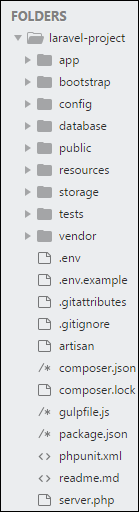
Root Directory

App

It is the application folder and includes the entire source code of the project. It contains events, exceptions and middleware declaration. The app folder comprises various sub folders as explained below −

Console

Console includes the artisan commands necessary for Laravel. It includes a directory named Commands, where all the commands are declared with the appropriate signature. The file Kernal.php calls the commands declared in Inspire.php.
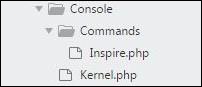
Console
If we need to call a specific command in Laravel, then we should make appropriate changes in this directory.

Events

This folder includes all the events for the project.

Events
Events are used to trigger activities, raise errors or necessary validations and provide greater flexibility. Laravel keeps all the events under one directory. The default file included is event.php where all the basic events are declared.

Exceptions

This folder contains all the methods needed to handle exceptions. It also contains the file handle.php that handles all the exceptions.

Http

The Http folder has sub-folders for controllers, middleware and application requests. As Laravel follows the MVC design pattern, this folder includes model, controllers and views defined for the specific directories.
The Middleware sub-folder includes middleware mechanism, comprising the filter mechanism and communication between response and request.
The Requests sub-folder includes all the requests of the application.

Jobs

The Jobs directory maintains the activities queued for Laravel application. The base class is shared among all the Jobs and provides a central location to place them under one roof.

Listeners

Listeners are event-dependent and they include methods which are used to handle events and exceptions. For example, the login event declared includes a LoginListener event.

Policies

Policies are the PHP classes which includes the authorization logic. Laravel includes a feature to create all authorization logic within policy classes inside this sub folder.

Providers

This folder includes all the service providers required to register events for core servers and to configure a Laravel application.

Bootstrap

This folder encloses all the application bootstrap scripts. It contains a sub-folder namely cache, which includes all the files associated for caching a web application. You can also find the file app.php, which initializes the scripts necessary for bootstrap.

Config

The config folder includes various configurations and associated parameters required for the smooth functioning of a Laravel application. Various files included within the config folder are as shown in the image here. The filenames work as per the functionality associated with them.
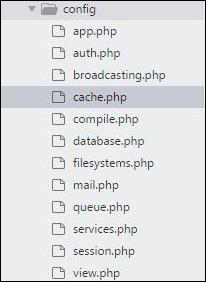
Config-folder

Database

As the name suggests, this directory includes various parameters for database functionalities. It includes three sub-directories as given below −
  • Seeds − This contains the classes used for unit testing database.
  • Migrations − This folder helps in queries for migrating the database used in the web application.
  • Factories − This folder is used to generate large number of data records.

Public

It is the root folder which helps in initializing the Laravel application. It includes the following files and folders −
  • .htaccess − This file gives the server configuration.
  • javascript and css − These files are considered as assets.
  • index.php − This file is required for the initialization of a web application.

Resources

Resources directory contains the files which enhances your web application. The sub-folders included in this directory and their purpose is explained below −
  • assets − The assets folder include files such as LESS and SCSS, that are required for styling the web application.
  • lang − This folder includes configuration for localization or internalization.
  • views − Views are the HTML files or templates which interact with end users and play a primary role in MVC architecture.

Storage

This is the folder that stores all the logs and necessary files which are needed frequently when a Laravel project is running. The sub-folders included in this directory and their purpose is given below −
  • app − This folder contains the files that are called in succession.
  • framework − It contains sessions, cache and views which are called frequently.
  • Logs − All exceptions and error logs are tracked in this sub folder.

Tests

All the unit test cases are included in this directory. The naming convention for naming test case classes is camel_case and follows the convention as per the functionality of the class.

Vendor

Laravel is completely based on Composer dependencies, for example to install Laravel setup or to include third party libraries, etc. The Vendor folder includes all the composer dependencies.
In addition to the above mentioned files, Laravel also includes some other files which play a primary role in various functionalities such as GitHub configuration, packages and third party libraries.
The files included in the application structure are shown below −
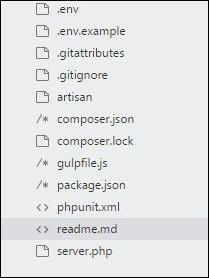
Files
Read More
  • Share This:  
  •  Facebook
  •  Twitter
  •  Google+
  •  Stumble
  •  Digg

Laravel - Application Structure

 Programing Coderfunda     December 05, 2018     Laravel - Application Structure     No comments   

The application structure in Laravel is basically the structure of folders, sub-folders and files included in a project. Once we create a project in Laravel, we get an overview of the application structure as shown in the image here.
The snapshot shown here refers to the root folder of Laravel namely laravel-project. It includes various sub-folders and files. The analysis of folders and files, along with their functional aspects is given below −
Root Directory

App

It is the application folder and includes the entire source code of the project. It contains events, exceptions and middleware declaration. The app folder comprises various sub folders as explained below −

Console

Console includes the artisan commands necessary for Laravel. It includes a directory named Commands, where all the commands are declared with the appropriate signature. The file Kernal.php calls the commands declared in Inspire.php.
Console
If we need to call a specific command in Laravel, then we should make appropriate changes in this directory.

Events

This folder includes all the events for the project.
Events
Events are used to trigger activities, raise errors or necessary validations and provide greater flexibility. Laravel keeps all the events under one directory. The default file included is event.php where all the basic events are declared.

Exceptions

This folder contains all the methods needed to handle exceptions. It also contains the file handle.php that handles all the exceptions.

Http

The Http folder has sub-folders for controllers, middleware and application requests. As Laravel follows the MVC design pattern, this folder includes model, controllers and views defined for the specific directories.
The Middleware sub-folder includes middleware mechanism, comprising the filter mechanism and communication between response and request.
The Requests sub-folder includes all the requests of the application.

Jobs

The Jobs directory maintains the activities queued for Laravel application. The base class is shared among all the Jobs and provides a central location to place them under one roof.

Listeners

Listeners are event-dependent and they include methods which are used to handle events and exceptions. For example, the login event declared includes a LoginListener event.

Policies

Policies are the PHP classes which includes the authorization logic. Laravel includes a feature to create all authorization logic within policy classes inside this sub folder.

Providers

This folder includes all the service providers required to register events for core servers and to configure a Laravel application.

Bootstrap

This folder encloses all the application bootstrap scripts. It contains a sub-folder namely cache, which includes all the files associated for caching a web application. You can also find the file app.php, which initializes the scripts necessary for bootstrap.

Config

The config folder includes various configurations and associated parameters required for the smooth functioning of a Laravel application. Various files included within the config folder are as shown in the image here. The filenames work as per the functionality associated with them.
Config-folder

Database

As the name suggests, this directory includes various parameters for database functionalities. It includes three sub-directories as given below −
  • Seeds − This contains the classes used for unit testing database.
  • Migrations − This folder helps in queries for migrating the database used in the web application.
  • Factories − This folder is used to generate large number of data records.

Public

It is the root folder which helps in initializing the Laravel application. It includes the following files and folders −
  • .htaccess − This file gives the server configuration.
  • javascript and css − These files are considered as assets.
  • index.php − This file is required for the initialization of a web application.

Resources

Resources directory contains the files which enhances your web application. The sub-folders included in this directory and their purpose is explained below −
  • assets − The assets folder include files such as LESS and SCSS, that are required for styling the web application.
  • lang − This folder includes configuration for localization or internalization.
  • views − Views are the HTML files or templates which interact with end users and play a primary role in MVC architecture.

Storage

This is the folder that stores all the logs and necessary files which are needed frequently when a Laravel project is running. The sub-folders included in this directory and their purpose is given below −
  • app − This folder contains the files that are called in succession.
  • framework − It contains sessions, cache and views which are called frequently.
  • Logs − All exceptions and error logs are tracked in this sub folder.

Tests

All the unit test cases are included in this directory. The naming convention for naming test case classes is camel_case and follows the convention as per the functionality of the class.

Vendor

Laravel is completely based on Composer dependencies, for example to install Laravel setup or to include third party libraries, etc. The Vendor folder includes all the composer dependencies.
In addition to the above mentioned files, Laravel also includes some other files which play a primary role in various functionalities such as GitHub configuration, packages and third party libraries.
The files included in the application structure are shown below −
Files
Read More
  • Share This:  
  •  Facebook
  •  Twitter
  •  Google+
  •  Stumble
  •  Digg
Older Posts Home

Meta

Popular Posts

  • Blade Component to Render Markdown in Laravel
      Laravel Markdown   is a highly configurable markdown renderer and Blade component for Laravel by the folks at   Spatie : The package featu...
  • There are two solutions for one board, using different chips. But one of their i2c address is the same. How to resolve conflict in one dts?
    Two chips A and B conflict with 0x62 on i2c bus 10. If A@62 and B@62 are configured on dts, Linux loads the driver of A. If B@62 is in front...
  • Real-Time Chat Package for Laravel
      Chatify   is a Laravel package by   Munaf Aqeel Mahdi   that adds a complete real-time chat system to your application without any additio...
  • Using Laravel Model Factories in your tests
    Laravel Model factories are one of the best features you can use in your application when it comes to testing. They provide a way to define ...
  • Detecting .NET8 with Inno Setup and InnoDependenciyInstaller
    I am looking at using InnoDependencyInstaller and it has a function that it uses under the hood: Dependency_AddDotNet80 procedure Depend...

Categories

  • Ajax (26)
  • Bootstrap (30)
  • DBMS (42)
  • HTML (12)
  • HTML5 (45)
  • JavaScript (10)
  • Jquery (34)
  • Jquery UI (2)
  • JqueryUI (32)
  • Laravel (1017)
  • Laravel Tutorials (23)
  • Laravel-Question (6)
  • Magento (9)
  • Magento 2 (95)
  • MariaDB (1)
  • MySql Tutorial (2)
  • PHP-Interview-Questions (3)
  • Php Question (13)
  • Python (36)
  • RDBMS (13)
  • SQL Tutorial (79)
  • Vue.js Tutorial (69)
  • Wordpress (150)
  • Wordpress Theme (3)
  • codeigniter (108)
  • oops (4)
  • php (853)

Social Media Links

  • Follow on Twitter
  • Like on Facebook
  • Subscribe on Youtube
  • Follow on Instagram

Pages

  • Home
  • Contact Us
  • Privacy Policy
  • About us

Blog Archive

  • July (4)
  • September (100)
  • August (50)
  • July (56)
  • June (46)
  • May (59)
  • April (50)
  • March (60)
  • February (42)
  • January (53)
  • December (58)
  • November (61)
  • October (39)
  • September (36)
  • August (36)
  • July (34)
  • June (34)
  • May (36)
  • April (29)
  • March (82)
  • February (1)
  • January (8)
  • December (14)
  • November (41)
  • October (13)
  • September (5)
  • August (48)
  • July (9)
  • June (6)
  • May (119)
  • April (259)
  • March (122)
  • February (368)
  • January (33)
  • October (2)
  • July (11)
  • June (29)
  • May (25)
  • April (168)
  • March (93)
  • February (60)
  • January (28)
  • December (195)
  • November (24)
  • October (40)
  • September (55)
  • August (6)
  • July (48)
  • May (2)
  • January (2)
  • July (6)
  • June (6)
  • February (17)
  • January (69)
  • December (122)
  • November (56)
  • October (92)
  • September (76)
  • August (6)

Loading...

Laravel News

Loading...

Copyright © CoderFunda | Powered by Blogger
Design by Coderfunda | Blogger Theme by Coderfunda | Distributed By Coderfunda