CoderFunda
  • Home
  • About us
    • Contact Us
    • Disclaimer
    • Privacy Policy
    • About us
  • Home
  • Php
  • HTML
  • CSS
  • JavaScript
    • JavaScript
    • Jquery
    • JqueryUI
    • Stock
  • SQL
  • Vue.Js
  • Python
  • Wordpress
  • C++
    • C++
    • C
  • Laravel
    • Laravel
      • Overview
      • Namespaces
      • Middleware
      • Routing
      • Configuration
      • Application Structure
      • Installation
    • Overview
  • DBMS
    • DBMS
      • PL/SQL
      • SQLite
      • MongoDB
      • Cassandra
      • MySQL
      • Oracle
      • CouchDB
      • Neo4j
      • DB2
      • Quiz
    • Overview
  • Entertainment
    • TV Series Update
    • Movie Review
    • Movie Review
  • More
    • Vue. Js
    • Php Question
    • Php Interview Question
    • Laravel Interview Question
    • SQL Interview Question
    • IAS Interview Question
    • PCS Interview Question
    • Technology
    • Other

11 December, 2018

CodeIgniter Benchmarking,CodeIgniter

 Programing Coderfunda     December 11, 2018     codeigniter, CodeIgniter Benchmarking     No comments   

Setting Benchmark Points

If you want to measure the time taken to execute a set of lines or memory usage, you can calculate it by using Benchmarking points in CodeIgniter. There is a separate “Benchmarking” class for this purpose in CodeIgniter.
This class is loaded automatically; you do not have to load it. It can be used anywhere in your controller, view, and model classes. All you have to do is to mark a start point and end point and then execute the elapsed_time()function between these two marked points and you can get the time it took to execute that code as shown below.
<?php 
$this
->benchmark->mark('code_start');

// Some code happens here

$this
->benchmark->mark('code_end');

echo $this
->benchmark->elapsed_time('code_start', 'code_end');
?>
To display the memory usage, use the function memory_usage() as shown in the following code.
<?php 
echo $this
->benchmark->memory_usage();
?>

Example

Create a controller called Profiler_controller.php and save it in application/controller/Profiler_controller.php
<?php 
class Profiler_controller extends CI_Controller {

public function index() {

//enable profiler
$this
->output->enable_profiler(TRUE);
$this
->load->view('test');
}

public function disable() {

//disable profiler
$this
->output->enable_profiler(FALSE);
$this
->load->view('test');
}

}
?>
Create a view file called test.php and save it at application/views/test.php
<!DOCTYPE html> 
<html lang = "en">

<head>
<meta charset = "utf-8">
<title>CodeIgniter View Example</title>
</head>

<body>
CodeIgniter View Example
</body>

</html>
Change the routes.php file at application/config/routes.php to add route for the above controller and add the following line at the end of the file.
$route['profiler'] = "Profiler_controller"; 
$route
['profiler/disable'] = "Profiler_controller/disable"
After that, you can type the following URL in the address bar of your browser to execute the example.
http://yoursite.com/index.php/profiler
The above URL will enable the profiler and it will produce an output as shown in the following screenshot.
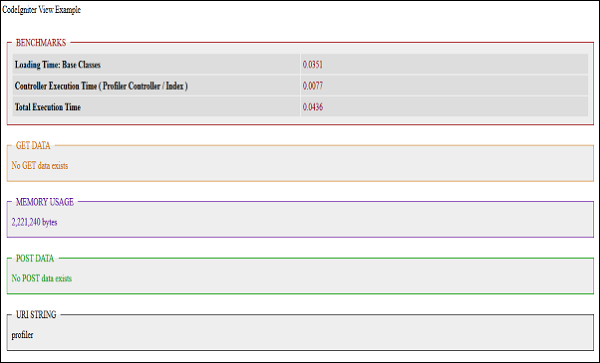
View Example
To disable the profiling, execute the following URL.
http://yoursite.com/index.php/profiler/disable

  • Share This:  
  •  Facebook
  •  Twitter
  •  Google+
  •  Stumble
  •  Digg
Email ThisBlogThis!Share to XShare to Facebook
Location NM-3, Villanueva, NM 87583, USA
Newer Post Older Post Home

0 comments:

Post a Comment

Thanks

Meta

Popular Posts

  • Blade Component to Render Markdown in Laravel
      Laravel Markdown   is a highly configurable markdown renderer and Blade component for Laravel by the folks at   Spatie : The package featu...
  • Real-Time Chat Package for Laravel
      Chatify   is a Laravel package by   Munaf Aqeel Mahdi   that adds a complete real-time chat system to your application without any additio...
  • Using Laravel Model Factories in your tests
    Laravel Model factories are one of the best features you can use in your application when it comes to testing. They provide a way to define ...
  • Detecting .NET8 with Inno Setup and InnoDependenciyInstaller
    I am looking at using InnoDependencyInstaller and it has a function that it uses under the hood: Dependency_AddDotNet80 procedure Depend...
  • Magento 2 Slow? 10 Steps to Speed Up Magento 2
      Magento 2 Slow? 10 Steps to Speed Up Magento 2 In the digital age, there are various ecommerce CMSs available in the market such as Shopif...

Categories

  • Ajax (26)
  • Bootstrap (30)
  • DBMS (42)
  • HTML (12)
  • HTML5 (45)
  • JavaScript (10)
  • Jquery (34)
  • Jquery UI (2)
  • JqueryUI (32)
  • Laravel (1017)
  • Laravel Tutorials (23)
  • Laravel-Question (6)
  • Magento (9)
  • Magento 2 (95)
  • MariaDB (1)
  • MySql Tutorial (2)
  • PHP-Interview-Questions (3)
  • Php Question (13)
  • Python (36)
  • RDBMS (13)
  • SQL Tutorial (79)
  • Vue.js Tutorial (69)
  • Wordpress (150)
  • Wordpress Theme (3)
  • codeigniter (108)
  • oops (4)
  • php (853)

Social Media Links

  • Follow on Twitter
  • Like on Facebook
  • Subscribe on Youtube
  • Follow on Instagram

Pages

  • Home
  • Contact Us
  • Privacy Policy
  • About us

Blog Archive

  • July (4)
  • September (100)
  • August (50)
  • July (56)
  • June (46)
  • May (59)
  • April (50)
  • March (60)
  • February (42)
  • January (53)
  • December (58)
  • November (61)
  • October (39)
  • September (36)
  • August (36)
  • July (34)
  • June (34)
  • May (36)
  • April (29)
  • March (82)
  • February (1)
  • January (8)
  • December (14)
  • November (41)
  • October (13)
  • September (5)
  • August (48)
  • July (9)
  • June (6)
  • May (119)
  • April (259)
  • March (122)
  • February (368)
  • January (33)
  • October (2)
  • July (11)
  • June (29)
  • May (25)
  • April (168)
  • March (93)
  • February (60)
  • January (28)
  • December (195)
  • November (24)
  • October (40)
  • September (55)
  • August (6)
  • July (48)
  • May (2)
  • January (2)
  • July (6)
  • June (6)
  • February (17)
  • January (69)
  • December (122)
  • November (56)
  • October (92)
  • September (76)
  • August (6)

Loading...

Laravel News

Loading...

Copyright © CoderFunda | Powered by Blogger
Design by Coderfunda | Blogger Theme by Coderfunda | Distributed By Coderfunda