CoderFunda
  • Home
  • About us
    • Contact Us
    • Disclaimer
    • Privacy Policy
    • About us
  • Home
  • Php
  • HTML
  • CSS
  • JavaScript
    • JavaScript
    • Jquery
    • JqueryUI
    • Stock
  • SQL
  • Vue.Js
  • Python
  • Wordpress
  • C++
    • C++
    • C
  • Laravel
    • Laravel
      • Overview
      • Namespaces
      • Middleware
      • Routing
      • Configuration
      • Application Structure
      • Installation
    • Overview
  • DBMS
    • DBMS
      • PL/SQL
      • SQLite
      • MongoDB
      • Cassandra
      • MySQL
      • Oracle
      • CouchDB
      • Neo4j
      • DB2
      • Quiz
    • Overview
  • Entertainment
    • TV Series Update
    • Movie Review
    • Movie Review
  • More
    • Vue. Js
    • Php Question
    • Php Interview Question
    • Laravel Interview Question
    • SQL Interview Question
    • IAS Interview Question
    • PCS Interview Question
    • Technology
    • Other

17 October, 2018

CSS Colors

 Programing Coderfunda     October 17, 2018     css     No comments   

CSS Colors


Colors are specified using predefined color names, or RGB, HEX, HSL, RGBA, HSLA values.


Color Names


In HTML, a color can be specified by using a color name:


Tomato
Orange
DodgerBlue
MediumSeaGreen
Gray
SlateBlue
Violet
LightGray


Background Color

You can set the background color for HTML elements:

Hello World


Lorem ipsum dolor sit amet, consectetuer adipiscing elit, sed diam nonummy nibh euismod tincidunt ut laoreet dolore magna aliquam erat volutpat. Ut wisi enim ad minim veniam, quis nostrud exerci tation ullamcorper suscipit lobortis nisl ut aliquip ex ea commodo consequat.
1

<h1 style="background-color:DodgerBlue;">Hello World</h1>
<p style="background-color:Tomato;">Lorem ipsum...</p>


Text Color

You can set the color of text:

Hello World

Lorem ipsum dolor sit amet, consectetuer adipiscing elit, sed diam nonummy nibh euismod tincidunt ut laoreet dolore magna aliquam erat volutpat.

Ut wisi enim ad minim veniam, quis nostrud exerci tation ullamcorper suscipit lobortis nisl ut aliquip ex ea commodo consequat.


<h1 style="color:Tomato;">Hello World</h1>
<p style="color:DodgerBlue;">Lorem ipsum...</p>
<p style="color:MediumSeaGreen;">Ut wisi enim...</p>


Border Color


You can set the color of borders:

Hello World

Hello World

Hello World

1

<h1 style="border:2px solid Tomato;">Hello World</h1>
<h1 style="border:2px solid DodgerBlue;">Hello World</h1>
<h1 style="border:2px solid Violet;">Hello World</h1>


Color Values

In HTML, colors can also be specified using RGB values, HEX values, HSL values, RGBA values, and HSLA values:

Same as color name "Tomato":


rgb(255, 99, 71)
#ff6347
hsl(9, 100%, 64%)
Same as color name "Tomato", but 50% transparent:
rgba(255, 99, 71, 0.5)
hsla(9, 100%, 64%, 0.5)
<h1 style="background-color:rgb(255, 99, 71);">...</h1>
<h1 style="background-color:#ff6347;">...</h1>
<h1 style="background-color:hsl(9, 100%, 64%);">...</h1>

<h1 style="background-color:rgba(255, 99, 71, 0.5);">...</h1>
<h1 style="background-color:hsla(9, 100%, 64%, 0.5);">...</h1>

RGB Value

In HTML, a color can be specified as an RGB value, using this formula:
rgb(red, green, blue)
Each parameter (red, green, and blue) defines the intensity of the color between 0 and 255.
For example, rgb(255, 0, 0) is displayed as red, because red is set to its highest value (255) and the others are set to 0.
To display the color black, all color parameters must be set to 0, like this: rgb(0, 0, 0).
To display the color white, all color parameters must be set to 255, like this: rgb(255, 255, 255).
Experiment by mixing the RGB values below:
rgb(255, 99, 71)
RED
255
GREEN
99
BLUE
71

Example

rgb(255, 0, 0)
rgb(0, 0, 255)
rgb(60, 179, 113)
rgb(238, 130, 238)
rgb(255, 165, 0)
rgb(106, 90, 205)

Shades of gray are often defined using equal values for all the 3 light sources:

Example

rgb(0, 0, 0)
rgb(60, 60, 60)
rgb(120, 120, 120)
rgb(180, 180, 180)
rgb(240, 240, 240)
rgb(255, 255, 255)


HEX Value

In HTML, a color can be specified using a hexadecimal value in the form:
#rrggbb
Where rr (red), gg (green) and bb (blue) are hexadecimal values between 00 and ff (same as decimal 0-255).
For example, #ff0000 is displayed as red, because red is set to its highest value (ff) and the others are set to the lowest value (00).

Example

#ff0000
#0000ff
#3cb371
#ee82ee
#ffa500
#6a5acd

Shades of gray are often defined using equal values for all the 3 light sources:

Example

#000000
#3c3c3c
#787878
#b4b4b4
#f0f0f0
#ffffff


HSL Value

In HTML, a color can be specified using hue, saturation, and lightness (HSL) in the form:
hsl(hue, saturation, lightness)
Hue is a degree on the color wheel from 0 to 360. 0 is red, 120 is green, and 240 is blue.
Saturation is a percentage value, 0% means a shade of gray, and 100% is the full color.
Lightness is also a percentage, 0% is black, 50% is neither light or dark, 100% is white

Example

hsl(0, 100%, 50%)
hsl(240, 100%, 50%)
hsl(147, 50%, 47%)
hsl(300, 76%, 72%)
hsl(39, 100%, 50%)
hsl(248, 53%, 58%)


Saturation

Saturation can be describe as the intensity of a color.
100% is pure color, no shades of gray
50% is 50% gray, but you can still see the color.
0% is completely gray, you can no longer see the color.

Example

hsl(0, 100%, 50%)
hsl(0, 80%, 50%)
hsl(0, 60%, 50%)
hsl(0, 40%, 50%)
hsl(0, 20%, 50%)
hsl(0, 0%, 50%)


Lightness

The lightness of a color can be described as how much light you want to give the color, where 0% means no light (black), 50% means 50% light (neither dark nor light) 100% means full lightness (white).

Example

hsl(0, 100%, 0%)
hsl(0, 100%, 25%)
hsl(0, 100%, 50%)
hsl(0, 100%, 75%)
hsl(0, 100%, 90%)
hsl(0, 100%, 100%)


Shades of gray are often defined by setting the hue and saturation to 0, and adjust the lightness from 0% to 100% to get darker/lighter shades:

Example


RGBA Value

RGBA color values are an extension of RGB color values with an alpha channel - which specifies the opacity for a color.
An RGBA color value is specified with:
rgba(red, green, blue, alpha)
The alpha parameter is a number between 0.0 (fully transparent) and 1.0 (not transparent at all):

Example

rgba(255, 99, 71, 0)
rgba(255, 99, 71, 0.2)
rgba(255, 99, 71, 0.4)
rgba(255, 99, 71, 0.6)
rgba(255, 99, 71, 0.8)
rgba(255, 99, 71, 1)


HSLA Value

HSLA color values are an extension of HSL color values with an alpha channel - which specifies the opacity for a color.
An HSLA color value is specified with:
hsla(hue, saturation, lightness, alpha)
The alpha parameter is a number between 0.0 (fully transparent) and 1.0 (not transparent at all):

Example

hsla(9, 100%, 64%, 0)
hsla(9, 100%, 64%, 0.2)
hsla(9, 100%, 64%, 0.4)
hsla(9, 100%, 64%, 0.6)
hsla(9, 100%, 64%, 0.8)
hsla(9, 100%, 64%, 1)
Read More
  • Share This:  
  •  Facebook
  •  Twitter
  •  Google+
  •  Stumble
  •  Digg

CSS Syntax and Selectors

 Programing Coderfunda     October 17, 2018     css     No comments   

CSS Syntax and Selectors


CSS Syntax

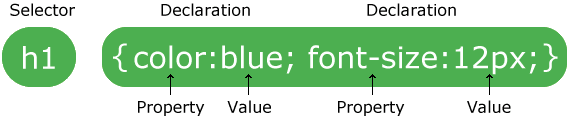
A CSS rule-set consists of a selector and a declaration block:
CSS selector
The selector points to the HTML element you want to style.
The declaration block contains one or more declarations separated by semicolons.
Each declaration includes a CSS property name and a value, separated by a colon.
A CSS declaration always ends with a semicolon, and declaration blocks are surrounded by curly braces.
In the following example all <p> elements will be center-aligned, with a red text color:

p {
    color: red;
    text-align: center;
}


CSS Selectors

CSS selectors are used to "find" (or select) HTML elements based on their element name, id, class, attribute, and more.

The element Selector

The element selector selects elements based on the element name.
You can select all <p> elements on a page like this (in this case, all <p> elements will be center-aligned, with a red text color):

p {
    text-align: center;
    color: red;
}


The id Selector

The id selector uses the id attribute of an HTML element to select a specific element.
The id of an element should be unique within a page, so the id selector is used to select one unique element!
To select an element with a specific id, write a hash (#) character, followed by the id of the element.
The style rule below will be applied to the HTML element with id="para1":

#para1 {
    text-align: center;
    color: red;
}

The class Selector

The class selector selects elements with a specific class attribute.
To select elements with a specific class, write a period (.) character, followed by the name of the class.
In the example below, all HTML elements with class="center" will be red and center-aligned:

.center {
    text-align: center;
    color: red;
}

You can also specify that only specific HTML elements should be affected by a class.
In the example below, only <p> elements with class="center" will be center-aligned:

p.center {
    text-align: center;
    color: red;
}

HTML elements can also refer to more than one class.
In the example below, the <p> element will be styled according to class="center" and to class="large":

<p class="center large">This paragraph refers to two classes.</p>

Grouping Selectors

If you have elements with the same style definitions, like this:

h1 {
    text-align: center;
    color: red;
}

h2 {
    text-align: center;
    color: red;
}

p {
    text-align: center;
    color: red;
}


It will be better to group the selectors, to minimize the code.
To group selectors, separate each selector with a comma.
In the example below we have grouped the selectors from the code above:

h1, h2, p {
    text-align: center;
    color: red;
}

CSS Comments

Comments are used to explain the code, and may help when you edit the source code at a later date.
Comments are ignored by browsers.
A CSS comment starts with /* and ends with */. Comments can also span multiple lines:

p {
    color: red;
    /* This is a single-line comment */
    text-align: center;
}

/* This is
a multi-line
comment */
Read More
  • Share This:  
  •  Facebook
  •  Twitter
  •  Google+
  •  Stumble
  •  Digg

CSS Syntax and Selectors

 Programing Coderfunda     October 17, 2018     css     No comments   

CSS Syntax and Selectors


CSS Syntax

A CSS rule-set consists of a selector and a declaration block:
CSS selector
The selector points to the HTML element you want to style.
The declaration block contains one or more declarations separated by semicolons.
Each declaration includes a CSS property name and a value, separated by a colon.
A CSS declaration always ends with a semicolon, and declaration blocks are surrounded by curly braces.
In the following example all <p> elements will be center-aligned, with a red text color:

p {
    color: red;
    text-align: center;
}


CSS Selectors

CSS selectors are used to "find" (or select) HTML elements based on their element name, id, class, attribute, and more.

The element Selector

The element selector selects elements based on the element name.
You can select all <p> elements on a page like this (in this case, all <p> elements will be center-aligned, with a red text color):

p {
    text-align: center;
    color: red;
}


The id Selector

The id selector uses the id attribute of an HTML element to select a specific element.
The id of an element should be unique within a page, so the id selector is used to select one unique element!
To select an element with a specific id, write a hash (#) character, followed by the id of the element.
The style rule below will be applied to the HTML element with id="para1":

#para1 {
    text-align: center;
    color: red;
}

The class Selector

The class selector selects elements with a specific class attribute.
To select elements with a specific class, write a period (.) character, followed by the name of the class.
In the example below, all HTML elements with class="center" will be red and center-aligned:

.center {
    text-align: center;
    color: red;
}

You can also specify that only specific HTML elements should be affected by a class.
In the example below, only <p> elements with class="center" will be center-aligned:

p.center {
    text-align: center;
    color: red;
}

HTML elements can also refer to more than one class.
In the example below, the <p> element will be styled according to class="center" and to class="large":

<p class="center large">This paragraph refers to two classes.</p>

Grouping Selectors

If you have elements with the same style definitions, like this:

h1 {
    text-align: center;
    color: red;
}

h2 {
    text-align: center;
    color: red;
}

p {
    text-align: center;
    color: red;
}


It will be better to group the selectors, to minimize the code.
To group selectors, separate each selector with a comma.
In the example below we have grouped the selectors from the code above:

h1, h2, p {
    text-align: center;
    color: red;
}

CSS Comments

Comments are used to explain the code, and may help when you edit the source code at a later date.
Comments are ignored by browsers.
A CSS comment starts with /* and ends with */. Comments can also span multiple lines:

p {
    color: red;
    /* This is a single-line comment */
    text-align: center;
}

/* This is
a multi-line
comment */
Read More
  • Share This:  
  •  Facebook
  •  Twitter
  •  Google+
  •  Stumble
  •  Digg

What is CSS?

 Programing Coderfunda     October 17, 2018     css     No comments   

What is CSS?

CSS stands for Cascading Style Sheets

CSS describes how HTML elements are to be displayed on screen, paper, or in other media
CSS saves a lot of work. It can control the layout of multiple web pages all at once
External stylesheets are stored in CSS files

CSS Demo - One HTML Page - Multiple Styles!

Here we will show one HTML page displayed with four different stylesheets. Click on the "Stylesheet 1", "Stylesheet 2", "Stylesheet 3", "Stylesheet 4" links below to see the different styles:

Why Use CSS?

CSS is used to define styles for your web pages, including the design, layout and variations in display for different devices and screen sizes. 

CSS Solved a Big Problem

HTML was NEVER intended to contain tags for formatting a web page!
HTML was created to describe the content of a web page, like:
<h1>This is a heading</h1>
<p>This is a paragraph.</p>
When tags like <font>, and color attributes were added to the HTML 3.2 specification, it started a nightmare for web developers. Development of large websites, where fonts and color information were added to every single page, became a long and expensive process.
To solve this problem, the World Wide Web Consortium (W3C) created CSS.
CSS removed the style formatting from the HTML page!

CSS Saves a Lot of Work!

The style definitions are normally saved in external .css files.
With an external stylesheet file, you can change the look of an entire website by changing just one file!

Read More
  • Share This:  
  •  Facebook
  •  Twitter
  •  Google+
  •  Stumble
  •  Digg

What is CSS?

 Programing Coderfunda     October 17, 2018     css     No comments   

What is CSS?

CSS stands for Cascading Style Sheets

CSS describes how HTML elements are to be displayed on screen, paper, or in other media
CSS saves a lot of work. It can control the layout of multiple web pages all at once
External stylesheets are stored in CSS files

CSS Demo - One HTML Page - Multiple Styles!

Here we will show one HTML page displayed with four different stylesheets. Click on the "Stylesheet 1", "Stylesheet 2", "Stylesheet 3", "Stylesheet 4" links below to see the different styles:

Why Use CSS?

CSS is used to define styles for your web pages, including the design, layout and variations in display for different devices and screen sizes. 

CSS Solved a Big Problem

HTML was NEVER intended to contain tags for formatting a web page!
HTML was created to describe the content of a web page, like:
<h1>This is a heading</h1>
<p>This is a paragraph.</p>
When tags like <font>, and color attributes were added to the HTML 3.2 specification, it started a nightmare for web developers. Development of large websites, where fonts and color information were added to every single page, became a long and expensive process.
To solve this problem, the World Wide Web Consortium (W3C) created CSS.
CSS removed the style formatting from the HTML page!

CSS Saves a Lot of Work!

The style definitions are normally saved in external .css files.
With an external stylesheet file, you can change the look of an entire website by changing just one file!

Read More
  • Share This:  
  •  Facebook
  •  Twitter
  •  Google+
  •  Stumble
  •  Digg

CSS Online Training

 Programing Coderfunda     October 17, 2018     css, css3     No comments   

CSS Online Training


CSS is used to control the style of a web document in a simple and easy way.
CSS is the acronym for "Cascading Style Sheet". This online training covers both the versions CSS1,CSS2 and CSS3, and gives a complete understanding of CSS, starting from its basics to advanced concept

Read More
  • Share This:  
  •  Facebook
  •  Twitter
  •  Google+
  •  Stumble
  •  Digg

CSS Online Training

 Programing Coderfunda     October 17, 2018     css, css3     No comments   

CSS Online Training


CSS is used to control the style of a web document in a simple and easy way.
CSS is the acronym for "Cascading Style Sheet". This online training covers both the versions CSS1,CSS2 and CSS3, and gives a complete understanding of CSS, starting from its basics to advanced concept

Read More
  • Share This:  
  •  Facebook
  •  Twitter
  •  Google+
  •  Stumble
  •  Digg
Newer Posts Older Posts Home

Meta

Popular Posts

  • How to Customize Product Page Layout in Magento
      How to Customize Product Page Layout in Magento As you might know, each product requires a particular page layout based on its unique feat...
  • 25 PHP Interview Questions and Answers You Must Know
    Here are some PHP questions and answers for experienced developers (with some beginner concepts covered).   Do you need to test a developer...
  • Laravel Media Uploader
      The   Laravel Media Uploader   package by   Ahmed Fathy   uploads files using Spatie’s media library package before saving a model. You ca...
  • Node.js OS
    Node.js OS Node.js OS provides some basic operating-system related utility functions. Let's see the list generally used functions or me...
  • Install Node.js on Linux/Ubuntu/CentOS
    Linux / Ubuntu / CentOS पर Node.js स्थापित करें   हम आसानी से लिनक्स / ubuntu / centOS / fedora / linuxmint आदि पर Node.js स्थापित कर सकते ...

Categories

  • Ajax (26)
  • Bootstrap (30)
  • DBMS (42)
  • HTML (12)
  • HTML5 (45)
  • JavaScript (10)
  • Jquery (34)
  • Jquery UI (2)
  • JqueryUI (32)
  • Laravel (1018)
  • Laravel Tutorials (23)
  • Laravel-Question (6)
  • Magento (9)
  • Magento 2 (95)
  • MariaDB (1)
  • MySql Tutorial (2)
  • PHP-Interview-Questions (3)
  • Php Question (13)
  • Python (36)
  • RDBMS (13)
  • SQL Tutorial (79)
  • Vue.js Tutorial (69)
  • Wordpress (150)
  • Wordpress Theme (3)
  • codeigniter (108)
  • oops (4)
  • php (853)

Social Media Links

  • Follow on Twitter
  • Like on Facebook
  • Subscribe on Youtube
  • Follow on Instagram

Pages

  • Home
  • Contact Us
  • Privacy Policy
  • About us

Blog Archive

  • ▼  2026 (205)
    • ▼  08/30 - 09/06 (87)
      • Anshula hits back at body shaming on social media,...
      • Antony Varghese reveals why he missed Thalapathy V...
      • Kunal Kemmu opens up on directing Sharmila Tagore ...
      • ‘Vishwanath And Sons’ actor Suriya’s EXPENSIVE car...
      • ' Toxic': Yash starrer misses major milestones on ...
      • Kareena regrets leaving education after Class 11, ...
      • Amid Deepika row, Preity opens up on her own 18-ho...
      • Priyanka Chopra rewinds romance with Nick Jonas - ...
      • Princess Diana's godson Prince Philippos and Princ...
      • 'Dad, I'm not feeling OK': Haitian student who app...
      • California condo owners were suddenly handed a $26...
      • Meet the 18-year-old whose junk hauling business e...
      • China's Xi tells Middle East to be ‘masters of the...
      • Is Texas accepting gold, silver as payment from Se...
      • US nurse found dead with 2 sons in suspected doubl...
      • Teacher's welding dream turns into North Dakota's ...
      • In 1947, Houston opened a 700-seat Art Deco theate...
      • Dad who won a cabbage in 1977 scoops £4m Bath mans...
      • Indian H-1Bs hiring other Indians, giving them bes...
      • Indiana Dunes lodge reopens after 50 years, with a...
      • Indian-origin CEO says it's pathetic victim mental...
      • Meet the 19-year-old who made 7,000 bow ties to he...
      • Vanessa Trump spotted at court as Tiger Woods lose...
      • California could unlock $100M-$200M in annual wate...
      • Six months of Trump's Iran war: America won battle...
      • After their brother died, two siblings inherited 2...
      • Five Indiana engineering students built a 12-hour ...
      • A stormwater pond in Calgary appears filled with P...
      • Swara reacts to backlash after her comment on 'Jau...
      • Is Rajinikanth’s ‘Jailer 2’ to be postponed? Here’...
      • Darshan breaks silence on estranged wife Apara's c...
      • Scarlett Johansson net worth in 2026
      • Bollywood stars help Sudhir Dalvi of 'Sai Baba' fa...
      • 'Toxic': Yash, Kiara Advani, Nayanthara film cross...
      • Mukesh Khanna reacts to trolling over ad with Sama...
      • Julie Andrews reveals fitness routine at 90: ‘I fe...
      • Zeenat Aman reveals why she stayed in her turbulen...
      • ‘Mandaadi’ actor Soori recalls painful set inciden...
      • Dolly Parton cradled newborn Emma in 2007; now 18,...
      • RGV defends Allu Aravind's comment on Yash: 'Only ...
      • Anjali Patil’s ‘Selvi’ trailer unveiled ahead of B...
      • R Madhavan recalls son Vedaant's honest film reviews
      • Vijay Deverakonda shares first reaction to Rashmik...
      • Who is Aishwarya Rai Bachchan’s brother Aditya Rai?
      • 'The One About Matthew Perry' Docuseries set for O...
      • Aditya Dhar lauds Yash for 'Toxic', amid the film ...
      • Ariana changes 'Thank U, Next' lyric for Ricky - W...
      • 'Sardar 2' stars Karthi, SJ Suryah and Ashika visi...
      • In 1937, Pittsburgh built a 102-foot water tank th...
      • Meet Ingrid Alexandra: 22-year-old heir as King Ha...
      • Built in 1881 and closed in 2004, a $55 million Sm...
      • A Staten Island deli manager started paying kids f...
      • Hammer-wielding Ohio man who smashed windows of JD...
      • Hollywood actor Joel McCrea bought a California ra...
      • 40+ Tennessee Tiny-home owners sue over ‘zombie HO...
      • In 2023, buyers paid $87,000 for a crumbling 1979 ...
      • Israeli PM Netanyahu’s son urgently evacuated from...
      • In 1943, two Jewish refugees bought a LA mansion f...
      • WWII-era plane packed into boxes in 1953 moved wit...
      • Los Angeles theatre reopens after a 15-year, $40 m...
      • In 2008, Allen University moved a 1903 house and p...
      • In 1944, Polish priest Henry Denis endured Nazi ma...
      • Texas volunteers began a cleanup 40 years ago; now...
      • Florida couple spent 41 years preserving a 1908 ho...
      • A 19-year-old's girlfriend fell onto train tracks;...
      • In 2001, 880 tiny weevils were released to fight T...
      • 16th-century English longhouse restored into build...
      • Howling from a California water tank leads rescuer...
      • India Post GDS recruitment 2026: Applications open...
      • UGC NET June 2026 re-exam city intimation slip rel...
      • Google Antigravity explained: How it differs from ...
      • Gujarat schools hit by heavy rain can hold classes...
      • SSC Stenographer Grade C, D exam 2026 dates revise...
      • IBPS RRB 2026 registration begins for over 13,000 ...
      • IGNOU July 2026 admissions: Last date to apply for...
      • UGC invites applications from HEIs for ODL, online...
      • IIT JAM 2027 brochure released, registration dates...
      • IOB SO recruitment 2026: Indian Overseas Bank invi...
      • India makes IST the sole official time reference: ...
      • WB NEET UG round 1 seat allotment result 2026 out ...
      • Dehradun schools, Anganwadi centres closed today a...
      • What’s on your work desk? Books, plants or a cute ...
      • CTET 2026 September registration window closes tod...
      • ₹10 lakh extra salary, but no bigger savings? Beng...
      • DU fourth year rollout sparks teacher workload con...
      • IIT Kanpur-ISKCON MoU on student well-being sparks...
      • HTET 2025 result declared for all three levels; ch...
    • ►  08/16 - 08/23 (1)
    • ►  08/02 - 08/09 (8)
    • ►  07/26 - 08/02 (108)
    • ►  06/28 - 07/05 (1)
  • ►  2025 (4)
    • ►  07/06 - 07/13 (2)
    • ►  06/29 - 07/06 (2)
  • ►  2024 (486)
    • ►  09/15 - 09/22 (30)
    • ►  09/08 - 09/15 (35)
    • ►  09/01 - 09/08 (35)
    • ►  08/11 - 08/18 (2)
    • ►  08/04 - 08/11 (33)
    • ►  07/28 - 08/04 (30)
    • ►  07/07 - 07/14 (11)
    • ►  06/30 - 07/07 (35)
    • ►  06/23 - 06/30 (5)
    • ►  06/02 - 06/09 (31)
    • ►  05/26 - 06/02 (20)
    • ►  05/05 - 05/12 (29)
    • ►  04/28 - 05/05 (26)
    • ►  04/07 - 04/14 (10)
    • ►  03/31 - 04/07 (34)
    • ►  03/24 - 03/31 (10)
    • ►  03/03 - 03/10 (35)
    • ►  02/25 - 03/03 (15)
    • ►  02/04 - 02/11 (22)
    • ►  01/28 - 02/04 (30)
    • ►  01/07 - 01/14 (8)
  • ►  2023 (484)
    • ►  12/31 - 01/07 (35)
    • ►  12/24 - 12/31 (10)
    • ►  12/03 - 12/10 (33)
    • ►  11/26 - 12/03 (20)
    • ►  11/05 - 11/12 (35)
    • ►  10/29 - 11/05 (20)
    • ►  10/22 - 10/29 (9)
    • ►  10/15 - 10/22 (7)
    • ►  10/08 - 10/15 (9)
    • ►  10/01 - 10/08 (10)
    • ►  09/24 - 10/01 (9)
    • ►  09/17 - 09/24 (9)
    • ►  09/10 - 09/17 (7)
    • ►  09/03 - 09/10 (9)
    • ►  08/27 - 09/03 (9)
    • ►  08/20 - 08/27 (8)
    • ►  08/13 - 08/20 (8)
    • ►  08/06 - 08/13 (8)
    • ►  07/30 - 08/06 (8)
    • ►  07/23 - 07/30 (7)
    • ►  07/16 - 07/23 (8)
    • ►  07/09 - 07/16 (7)
    • ►  07/02 - 07/09 (8)
    • ►  06/25 - 07/02 (7)
    • ►  06/18 - 06/25 (7)
    • ►  06/11 - 06/18 (7)
    • ►  06/04 - 06/11 (11)
    • ►  05/28 - 06/04 (7)
    • ►  05/21 - 05/28 (8)
    • ►  05/14 - 05/21 (11)
    • ►  05/07 - 05/14 (7)
    • ►  04/30 - 05/07 (7)
    • ►  04/23 - 04/30 (8)
    • ►  04/16 - 04/23 (9)
    • ►  04/09 - 04/16 (7)
    • ►  04/02 - 04/09 (4)
    • ►  03/26 - 04/02 (21)
    • ►  03/19 - 03/26 (2)
    • ►  03/12 - 03/19 (9)
    • ►  03/05 - 03/12 (26)
    • ►  02/26 - 03/05 (25)
    • ►  01/15 - 01/22 (7)
    • ►  01/08 - 01/15 (1)
  • ►  2022 (1037)
    • ►  12/11 - 12/18 (13)
    • ►  12/04 - 12/11 (1)
    • ►  11/27 - 12/04 (40)
    • ►  11/06 - 11/13 (1)
    • ►  10/16 - 10/23 (13)
    • ►  09/04 - 09/11 (5)
    • ►  08/21 - 08/28 (24)
    • ►  08/14 - 08/21 (24)
    • ►  07/03 - 07/10 (9)
    • ►  06/19 - 06/26 (3)
    • ►  05/29 - 06/05 (3)
    • ►  05/22 - 05/29 (3)
    • ►  05/15 - 05/22 (109)
    • ►  05/01 - 05/08 (7)
    • ►  04/24 - 05/01 (7)
    • ►  04/17 - 04/24 (64)
    • ►  04/10 - 04/17 (115)
    • ►  04/03 - 04/10 (73)
    • ►  03/27 - 04/03 (77)
    • ►  03/13 - 03/20 (2)
    • ►  03/06 - 03/13 (25)
    • ►  02/27 - 03/06 (18)
    • ►  02/20 - 02/27 (153)
    • ►  02/13 - 02/20 (187)
    • ►  01/30 - 02/06 (45)
    • ►  01/23 - 01/30 (15)
    • ►  01/16 - 01/23 (1)
  • ►  2021 (412)
    • ►  10/24 - 10/31 (2)
    • ►  07/25 - 08/01 (1)
    • ►  07/11 - 07/18 (10)
    • ►  06/13 - 06/20 (29)
    • ►  05/23 - 05/30 (1)
    • ►  05/02 - 05/09 (24)
    • ►  04/25 - 05/02 (24)
    • ►  04/18 - 04/25 (112)
    • ►  04/11 - 04/18 (1)
    • ►  04/04 - 04/11 (6)
    • ►  03/28 - 04/04 (86)
    • ►  03/21 - 03/28 (19)
    • ►  03/14 - 03/21 (2)
    • ►  03/07 - 03/14 (10)
    • ►  02/28 - 03/07 (1)
    • ►  02/21 - 02/28 (29)
    • ►  02/14 - 02/21 (13)
    • ►  02/07 - 02/14 (12)
    • ►  01/31 - 02/07 (6)
    • ►  01/17 - 01/24 (2)
    • ►  01/10 - 01/17 (8)
    • ►  01/03 - 01/10 (14)
  • ►  2020 (376)
    • ►  12/27 - 01/03 (37)
    • ►  12/20 - 12/27 (92)
    • ►  12/13 - 12/20 (29)
    • ►  12/06 - 12/13 (37)
    • ►  11/29 - 12/06 (4)
    • ►  11/15 - 11/22 (14)
    • ►  11/08 - 11/15 (8)
    • ►  11/01 - 11/08 (2)
    • ►  10/18 - 10/25 (14)
    • ►  10/11 - 10/18 (16)
    • ►  10/04 - 10/11 (10)
    • ►  09/20 - 09/27 (10)
    • ►  09/06 - 09/13 (19)
    • ►  08/30 - 09/06 (26)
    • ►  08/23 - 08/30 (4)
    • ►  08/16 - 08/23 (2)
    • ►  07/12 - 07/19 (48)
    • ►  05/17 - 05/24 (2)
    • ►  01/05 - 01/12 (2)
  • ►  2019 (74)
    • ►  07/07 - 07/14 (6)
    • ►  06/16 - 06/23 (6)
    • ►  02/10 - 02/17 (17)
    • ►  01/13 - 01/20 (37)
    • ►  01/06 - 01/13 (8)
  • ►  2018 (376)
    • ►  12/30 - 01/06 (24)
    • ►  12/16 - 12/23 (8)
    • ►  12/09 - 12/16 (98)
    • ►  12/02 - 12/09 (16)
    • ►  11/18 - 11/25 (36)
    • ►  11/04 - 11/11 (18)
    • ►  10/28 - 11/04 (10)
    • ►  10/21 - 10/28 (26)
    • ►  10/14 - 10/21 (52)
    • ►  10/07 - 10/14 (4)
    • ►  09/30 - 10/07 (2)
    • ►  09/23 - 09/30 (68)
    • ►  09/16 - 09/23 (4)
    • ►  09/09 - 09/16 (4)
    • ►  08/26 - 09/02 (6)

Data Publish News

Loading...

Al Jazeera – Breaking News, World News and Video from Al Jazeera

Loading...

Laravel News

Loading...

Copyright © CoderFunda | Powered by Blogger
Design by Coderfunda | Blogger Theme by Coderfunda | Distributed By Coderfunda