CoderFunda
  • Home
  • About us
    • Contact Us
    • Disclaimer
    • Privacy Policy
    • About us
  • Home
  • Php
  • HTML
  • CSS
  • JavaScript
    • JavaScript
    • Jquery
    • JqueryUI
    • Stock
  • SQL
  • Vue.Js
  • Python
  • Wordpress
  • C++
    • C++
    • C
  • Laravel
    • Laravel
      • Overview
      • Namespaces
      • Middleware
      • Routing
      • Configuration
      • Application Structure
      • Installation
    • Overview
  • DBMS
    • DBMS
      • PL/SQL
      • SQLite
      • MongoDB
      • Cassandra
      • MySQL
      • Oracle
      • CouchDB
      • Neo4j
      • DB2
      • Quiz
    • Overview
  • Entertainment
    • TV Series Update
    • Movie Review
    • Movie Review
  • More
    • Vue. Js
    • Php Question
    • Php Interview Question
    • Laravel Interview Question
    • SQL Interview Question
    • IAS Interview Question
    • PCS Interview Question
    • Technology
    • Other

04 April, 2022

Reduction of ER diagram to Table

 Programing Coderfunda     April 04, 2022     DBMS     No comments   

Reduction of ER diagram to Table

The database can be represented using the notations, and these notations can be reduced to a collection of tables.

In the database, every entity set or relationship set can be represented in tabular form.

The ER diagram is given below:
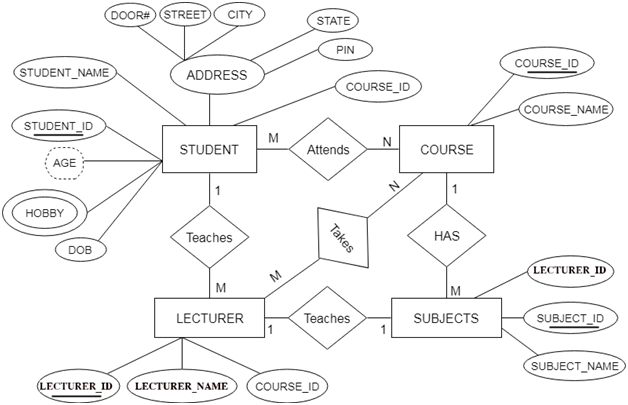

DBMS Reduction of ER diagram to Table

There are some points for converting the ER diagram to the table:

  • Entity type becomes a table.

In the given ER diagram, LECTURE, STUDENT, SUBJECT and COURSE forms individual tables.

  • All single-valued attribute becomes a column for the table.

In the STUDENT entity, STUDENT_NAME and STUDENT_ID form the column of STUDENT table. Similarly, COURSE_NAME and COURSE_ID form the column of COURSE table and so on.

  • A key attribute of the entity type represented by the primary key.

In the given ER diagram, COURSE_ID, STUDENT_ID, SUBJECT_ID, and LECTURE_ID are the key attribute of the entity.

  • The multivalued attribute is represented by a separate table.

In the student table, a hobby is a multivalued attribute. So it is not possible to represent multiple values in a single column of STUDENT table. Hence we create a table STUD_HOBBY with column name STUDENT_ID and HOBBY. Using both the column, we create a composite key.

  • Composite attribute represented by components.

In the given ER diagram, student address is a composite attribute. It contains CITY, PIN, DOOR#, STREET, and STATE. In the STUDENT table, these attributes can merge as an individual column.

  • Derived attributes are not considered in the table.

In the STUDENT table, Age is the derived attribute. It can be calculated at any point of time by calculating the difference between current date and Date of Birth.

Using these rules, you can convert the ER diagram to tables and columns and assign the mapping between the tables. Table structure for the given ER diagram is as below:
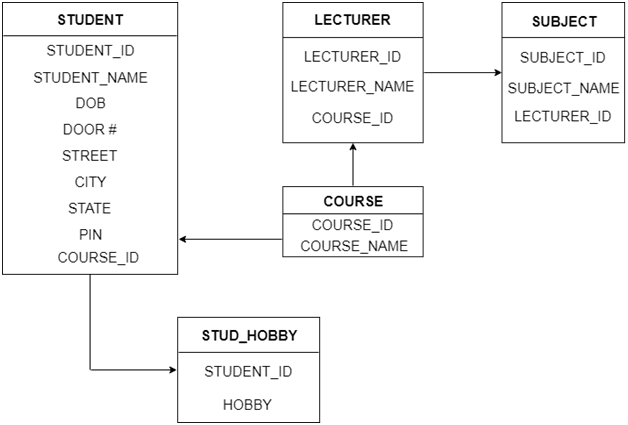

DBMS Reduction of ER diagram to Table

Figure: Table structure
Read More
  • Share This:  
  •  Facebook
  •  Twitter
  •  Google+
  •  Stumble
  •  Digg

Aggregation

 Programing Coderfunda     April 04, 2022     No comments   

Aggregation

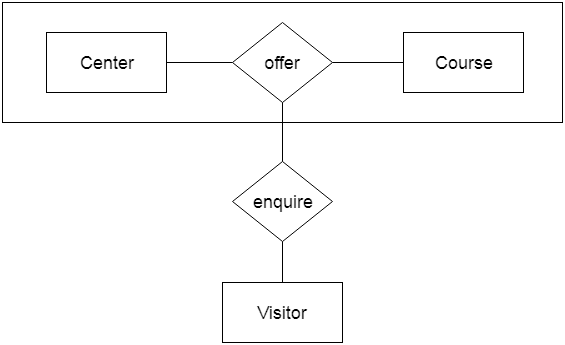
In aggregation, the relation between two entities is treated as a single entity. In aggregation, the higher-level relationship with its corresponding entities is aggregated into a higher-level entity.

For example, the Center entity offers the Course entity to act as a single entity in the relationship which is in relationship with another entity visitor. In the real world, if a visitor visits a coaching center then he will never inquire about the Course only or just about the Center instead he will ask inquiry about both.


DBMS Aggregation

Read More
  • Share This:  
  •  Facebook
  •  Twitter
  •  Google+
  •  Stumble
  •  Digg

Specialization

 Programing Coderfunda     April 04, 2022     DBMS     No comments   


Specialization

  • Specialization is a top-down approach, and it is opposite to Generalization. In specialization, one higher level entity can be broken down into two lower level entities.
  • Specialization is used to identify the subset of an entity set that shares some distinguishing characteristics.
  • Normally, the superclass is defined first, the subclass and its related attributes are defined next, and relationship set are then added.

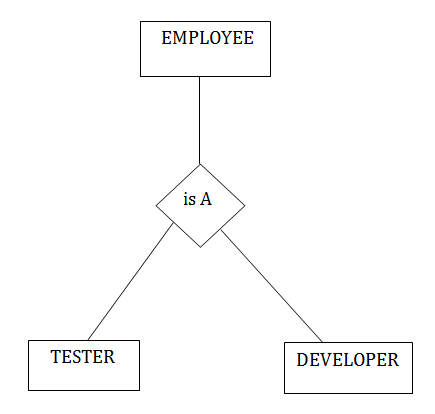
For example: In an Employee management system, EMPLOYEE entity can be specialized as TESTER or DEVELOPER based on what role they play in the company.


DBMS Specialization
Read More
  • Share This:  
  •  Facebook
  •  Twitter
  •  Google+
  •  Stumble
  •  Digg

Generalization

 Programing Coderfunda     April 04, 2022     DBMS     No comments   

Generalization

  • Generalization is like a bottom-up approach in which two or more entities of lower-level levels combine to form a higher-level entity if they have some attributes in common.
  • In generalization, an entity of a higher level can also combine with the lower level entities to form a further higher-level entity.
  • Generalization is more like a subclass and superclass system, but the only difference is the approach. Generalization uses the bottom-up approach.
  • In generalization, entities are combined to form a more generalized entity, i.e., subclasses are combined to make a superclass.

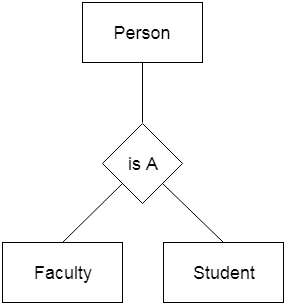
For example, Faculty and Student entities can be generalized and create a higher level entity Person.


DBMS Generalization

Read More
  • Share This:  
  •  Facebook
  •  Twitter
  •  Google+
  •  Stumble
  •  Digg

DBMS Keys

 Programing Coderfunda     April 04, 2022     DBMS     No comments   

Keys

  • Keys play an important role in the relational database.
  • It is used to uniquely identify any record or row of data from the table. It is also used to establish and identify relationships between tables.

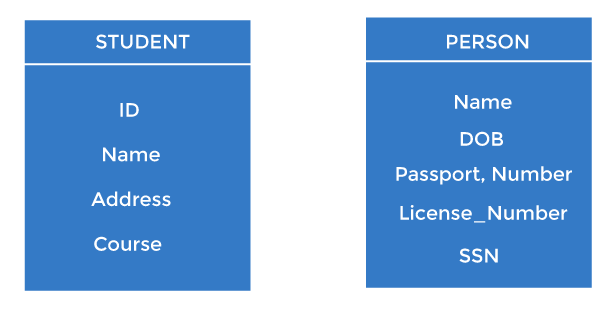
For example, ID is used as a key in the Student table because it is unique for each student. In the PERSON table, passport_number, license_number, and SSNand are keys since they are unique for each person.

DBMS Keys

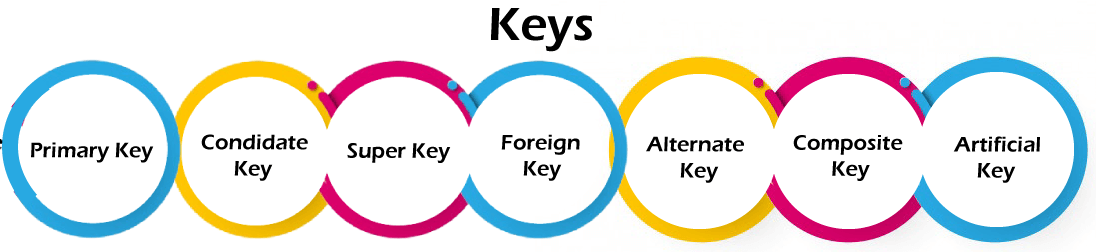
Types of keys:

DBMS Keys

1. Primary key

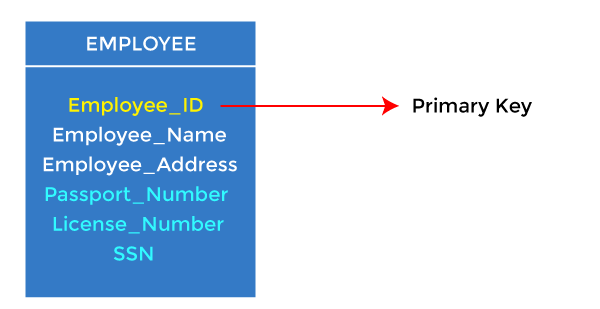
  • It is the first key used to identify one and only one instance of an entity uniquely. An entity can contain multiple keys, as we saw in the PERSON table. The key which is most suitable from those lists becomes the primary key.
  • In the EMPLOYEE table, ID can be the primary key since it is unique for each employee. In the EMPLOYEE table, we can even select License_Number and Passport_Number as primary keys since they are also unique.
  • For each entity, the primary key selection is based on requirements and developers.
DBMS Keys

2. Candidate key

  • A candidate key is an attribute or set of attributes that can uniquely identify a tuple.
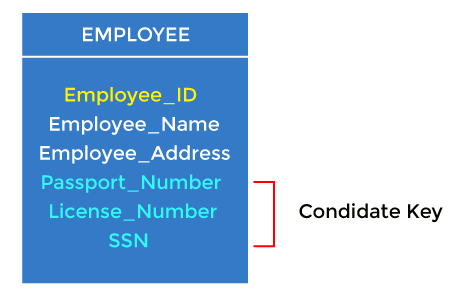
  • Except for the primary key, the remaining attributes are considered candidate keys. The candidate keys are as strong as the primary key.

For example: In the EMPLOYEE table, id is best suited for the primary key. The rest of the attributes, like SSN, Passport_Number, License_Number, etc., are considered candidate keys.

DBMS Keys

3. Super Key

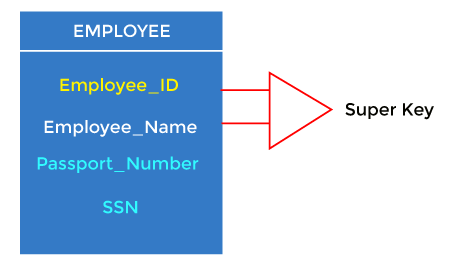
A super key is an attribute set that can uniquely identify a tuple. A super key is a superset of a candidate key.

DBMS Keys

For example: In the above EMPLOYEE table, for(EMPLOEE_ID, EMPLOYEE_NAME), the name of two employees can be the same, but their EMPLYEE_ID can't be the same. Hence, this combination can also be a key.

The super key would be EMPLOYEE-ID (EMPLOYEE_ID, EMPLOYEE-NAME), etc.

4. Foreign key

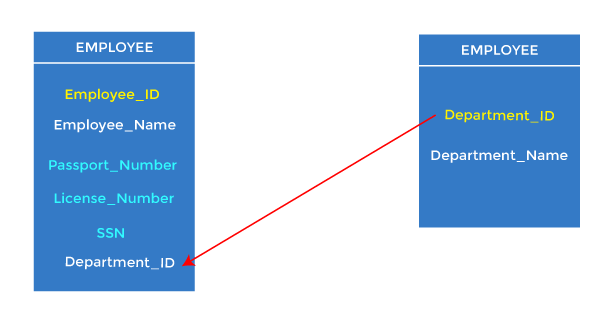
  • Foreign keys are the column of the table used to point to the primary key of another table.
  • Every employee works in a specific department in a company, and employee and department are two different entities. So we can't store the department's information on the employee table. That's why we link these two tables through the primary key of one table.
  • We add the primary key of the DEPARTMENT table, Department_Id, as a new attribute in the EMPLOYEE table.
  • In the EMPLOYEE table, Department_Id is the foreign key, and both the tables are related.
DBMS Keys

5. Alternate key

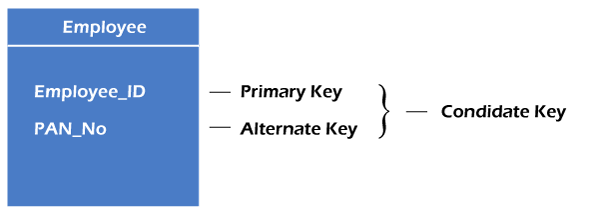
There may be one or more attributes or a combination of attributes that uniquely identify each tuple in a relation. These attributes or combinations of the attributes are called the candidate keys. One key is chosen as the primary key from these candidate keys, and the remaining candidate key, if it exists, is termed the alternate key. In other words, the total number of alternate keys is the total number of candidate keys minus the primary key. The alternate key may or may not exist. If there is only one candidate key in a relation, it does not have an alternate key.

For example, employee relation has two attributes, Employee_Id and PAN_No, that act as candidate keys. In this relation, Employee_Id is chosen as the primary key, so the other candidate key, PAN_No, acts as the Alternate key.

DBMS Keys

6. Composite key

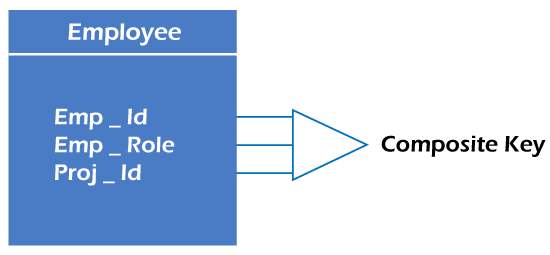
Whenever a primary key consists of more than one attribute, it is known as a composite key. This key is also known as Concatenated Key.

DBMS Keys

For example, in employee relations, we assume that an employee may be assigned multiple roles, and an employee may work on multiple projects simultaneously. So the primary key will be composed of all three attributes, namely Emp_ID, Emp_role, and Proj_ID in combination. So these attributes act as a composite key since the primary key comprises more than one attribute.

DBMS Keys

7. Artificial key

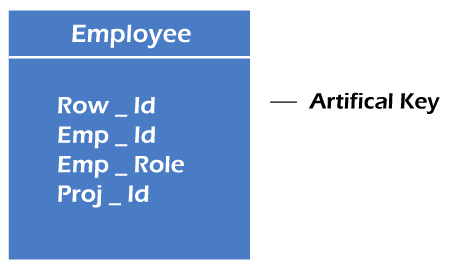
The key created using arbitrarily assigned data are known as artificial keys. These keys are created when a primary key is large and complex and has no relationship with many other relations. The data values of the artificial keys are usually numbered in a serial order.

For example, the primary key, which is composed of Emp_ID, Emp_role, and Proj_ID, is large in employee relations. So it would be better to add a new virtual attribute to identify each tuple in the relation uniquely.

Read More
  • Share This:  
  •  Facebook
  •  Twitter
  •  Google+
  •  Stumble
  •  Digg

Mapping Constraints

 Programing Coderfunda     April 04, 2022     DBMS     No comments   


Mapping Constraints

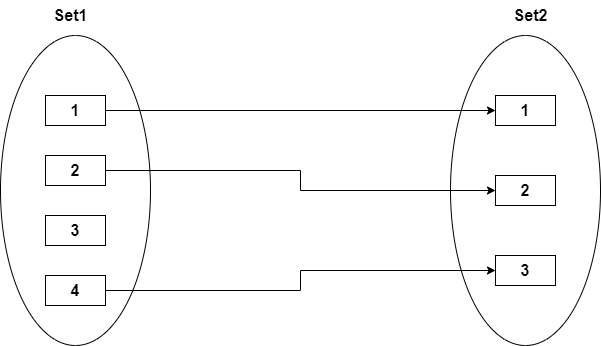
  • A mapping constraint is a data constraint that expresses the number of entities to which another entity can be related via a relationship set.
  • It is most useful in describing the relationship sets that involve more than two entity sets.
  • For binary relationship set R on an entity set A and B, there are four possible mapping cardinalities. These are as follows:
    1. One to one (1:1)
    2. One to many (1:M)
    3. Many to one (M:1)
    4. Many to many (M:M)

One-to-one

In one-to-one mapping, an entity in E1 is associated with at most one entity in E2, and an entity in E2 is associated with at most one entity in E1.


DBMS Mapping Constraints

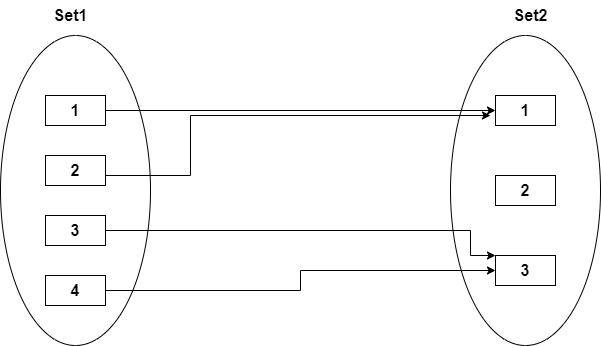
One-to-many

In one-to-many mapping, an entity in E1 is associated with any number of entities in E2, and an entity in E2 is associated with at most one entity in E1.


DBMS Mapping Constraints

Many-to-one

In one-to-many mapping, an entity in E1 is associated with at most one entity in E2, and an entity in E2 is associated with any number of entities in E1.


DBMS Mapping Constraints

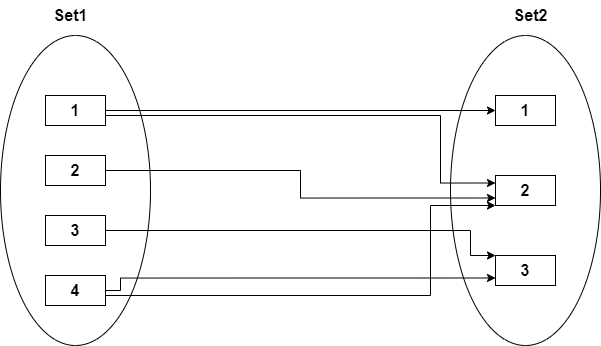
Many-to-many

In many-to-many mapping, an entity in E1 is associated with any number of entities in E2, and an entity in E2 is associated with any number of entities in E1.


DBMS Mapping Constraints
Read More
  • Share This:  
  •  Facebook
  •  Twitter
  •  Google+
  •  Stumble
  •  Digg

ER Design Issues

 Programing Coderfunda     April 04, 2022     DBMS     No comments   


ER Design Issues

In the previous sections of the data modeling, we learned to design an ER diagram. We also discussed different ways of defining entity sets and relationships among them. We also understood the various designing shapes that represent a relationship, an entity, and its attributes. However, users often mislead the concept of the elements and the design process of the ER diagram. Thus, it leads to a complex structure of the ER diagram and certain issues that does not meet the characteristics of the real-world enterprise model.

Here, we will discuss the basic design issues of an ER database schema in the following points:

1) Use of Entity Set vs Attributes

The use of an entity set or attribute depends on the structure of the real-world enterprise that is being modelled and the semantics associated with its attributes. It leads to a mistake when the user use the primary key of an entity set as an attribute of another entity set. Instead, he should use the relationship to do so. Also, the primary key attributes are implicit in the relationship set, but we designate it in the relationship sets.

2) Use of Entity Set vs. Relationship Sets

It is difficult to examine if an object can be best expressed by an entity set or relationship set. To understand and determine the right use, the user need to designate a relationship set for describing an action that occurs in-between the entities. If there is a requirement of representing the object as a relationship set, then its better not to mix it with the entity set.

3) Use of Binary vs n-ary Relationship Sets

Generally, the relationships described in the databases are binary relationships. However, non-binary relationships can be represented by several binary relationships. For example, we can create and represent a ternary relationship 'parent' that may relate to a child, his father, as well as his mother. Such relationship can also be represented by two binary relationships i.e, mother and father, that may relate to their child. Thus, it is possible to represent a non-binary relationship by a set of distinct binary relationships.

4) Placing Relationship Attributes

The cardinality ratios can become an affective measure in the placement of the relationship attributes. So, it is better to associate the attributes of one-to-one or one-to-many relationship sets with any participating entity sets, instead of any relationship set. The decision of placing the specified attribute as a relationship or entity attribute should possess the charactestics of the real world enterprise that is being modelled.

For example, if there is an entity which can be determined by the combination of participating entity sets, instead of determing it as a separate entity. Such type of attribute must be associated with the many-to-many relationship sets.

Thus, it requires the overall knowledge of each part that is involved inb desgining and modelling an ER diagram. The basic requirement is to analyse the real-world enterprise and the connectivity of one entity or attribute with other.


Read More
  • Share This:  
  •  Facebook
  •  Twitter
  •  Google+
  •  Stumble
  •  Digg

DBMS Notation of ER diagram

 Programing Coderfunda     April 04, 2022     DBMS     No comments   


Notation of ER diagram

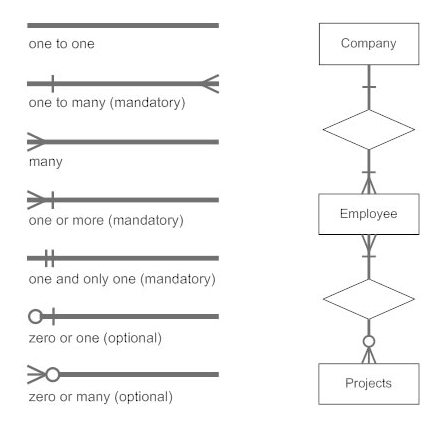
Database can be represented using the notations. In ER diagram, many notations are used to express the cardinality. These notations are as follows:


DBMS Notation of ER diagram

Fig: Notations of ER diagram


Read More
  • Share This:  
  •  Facebook
  •  Twitter
  •  Google+
  •  Stumble
  •  Digg

DBMS ER Model Concept

 Programing Coderfunda     April 04, 2022     DBMS     No comments   

ER model

  • ER model stands for an Entity-Relationship model. It is a high-level data model. This model is used to define the data elements and relationship for a specified system.
  • It develops a conceptual design for the database. It also develops a very simple and easy to design view of data.
  • In ER modeling, the database structure is portrayed as a diagram called an entity-relationship diagram.

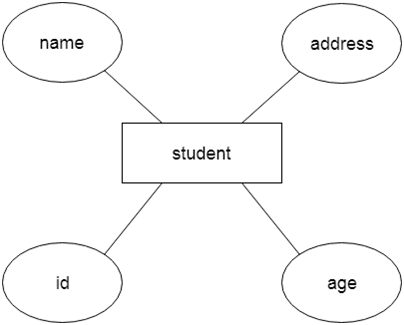
For example, Suppose we design a school database. In this database, the student will be an entity with attributes like address, name, id, age, etc. The address can be another entity with attributes like city, street name, pin code, etc and there will be a relationship between them.


DBMS ER model concept

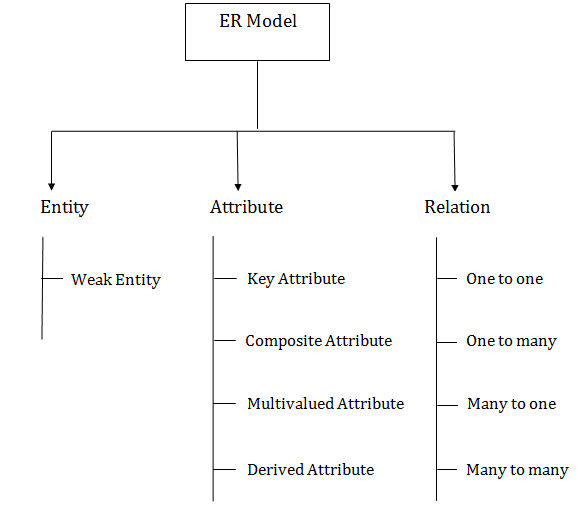
Component of ER Diagram


DBMS ER model concept

1. Entity:

An entity may be any object, class, person or place. In the ER diagram, an entity can be represented as rectangles.

Consider an organization as an example- manager, product, employee, department etc. can be taken as an entity.


DBMS ER model concept

a. Weak Entity

An entity that depends on another entity called a weak entity. The weak entity doesn't contain any key attribute of its own. The weak entity is represented by a double rectangle.


DBMS ER model concept

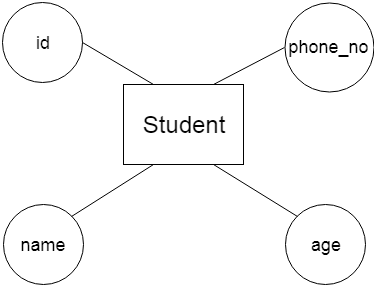
2. Attribute

The attribute is used to describe the property of an entity. Eclipse is used to represent an attribute.

For example, id, age, contact number, name, etc. can be attributes of a student.


DBMS ER model concept

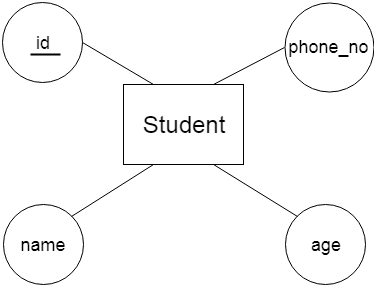
a. Key Attribute

The key attribute is used to represent the main characteristics of an entity. It represents a primary key. The key attribute is represented by an ellipse with the text underlined.


DBMS ER model concept

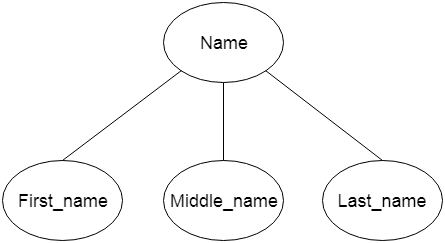
b. Composite Attribute

An attribute that composed of many other attributes is known as a composite attribute. The composite attribute is represented by an ellipse, and those ellipses are connected with an ellipse.


DBMS ER model concept

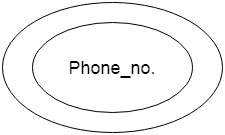
c. Multivalued Attribute

An attribute can have more than one value. These attributes are known as a multivalued attribute. The double oval is used to represent multivalued attribute.

For example, a student can have more than one phone number.


DBMS ER model concept

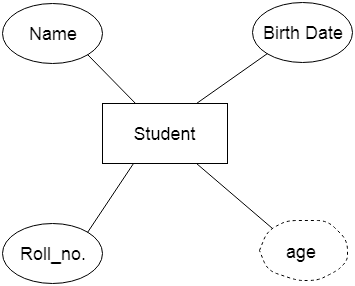
d. Derived Attribute

An attribute that can be derived from other attribute is known as a derived attribute. It can be represented by a dashed ellipse.

For example, A person's age changes over time and can be derived from another attribute like Date of birth.


DBMS ER model concept

3. Relationship

A relationship is used to describe the relation between entities. Diamond or rhombus is used to represent the relationship.


DBMS ER model concept

Types of relationship are as follows:

a. One-to-One Relationship

When only one instance of an entity is associated with the relationship, then it is known as one to one relationship.

For example, A female can marry to one male, and a male can marry to one female.


DBMS ER model concept

b. One-to-many relationship

When only one instance of the entity on the left, and more than one instance of an entity on the right associates with the relationship then this is known as a one-to-many relationship.

For example, Scientist can invent many inventions, but the invention is done by the only specific scientist.


DBMS ER model concept

c. Many-to-one relationship

When more than one instance of the entity on the left, and only one instance of an entity on the right associates with the relationship then it is known as a many-to-one relationship.

For example, Student enrolls for only one course, but a course can have many students.


DBMS ER model concept

d. Many-to-many relationship

When more than one instance of the entity on the left, and more than one instance of an entity on the right associates with the relationship then it is known as a many-to-many relationship.

For example, Employee can assign by many projects and project can have many employees.


DBMS ER model concept
Read More
  • Share This:  
  •  Facebook
  •  Twitter
  •  Google+
  •  Stumble
  •  Digg

ACID Properties in DBMS

 Programing Coderfunda     April 04, 2022     DBMS     No comments   


ACID Properties in DBMS

DBMS is the management of data that should remain integrated when any changes are done in it. It is because if the integrity of the data is affected, the whole data will get disturbed and corrupted. Therefore, to maintain the integrity of the data, there are four properties described in the database management system, which are known as the ACID properties. The ACID properties are meant for a transaction that goes through a different group of tasks, and there we come to see the role of the ACID properties.

In this section, we will learn and understand the ACID properties. We will learn what these properties stand for and what does each property is used for. We will also understand the ACID properties with the help of some examples.

ACID Properties

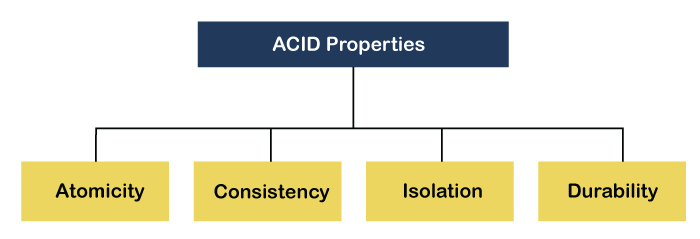
The expansion of the term ACID defines:

ACID Properties in DBMS

1) Atomicity: The term atomicity defines that the data remains atomic. It means if any operation is performed on the data, either it should be performed or executed completely or should not be executed at all. It further means that the operation should not break in between or execute partially. In the case of executing operations on the transaction, the operation should be completely executed and not partially.

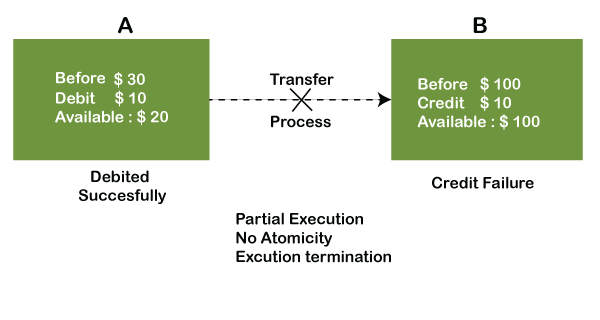
Example: If Remo has account A having $30 in his account from which he wishes to send $10 to Sheero's account, which is B. In account B, a sum of $ 100 is already present. When $10 will be transferred to account B, the sum will become $110. Now, there will be two operations that will take place. One is that the amount of $10 that Remo wants to transfer will be debited from his account A, and the same amount will get credited to account B, i.e., into Sheero's account. Now, what happens - the first operation of debit executes successfully, but the credit operation, however, fails. Thus, in Remo's account A, the value becomes $20, and in that of Sheero's account, it remains $100 as it was previously present.

ACID Properties in DBMS

In the above diagram, it can be seen that after crediting $10, the amount is still $100 in account B. So, it is not an atomic transaction.

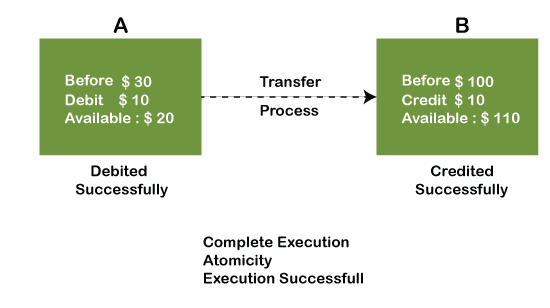
The below image shows that both debit and credit operations are done successfully. Thus the transaction is atomic.

ACID Properties in DBMS

Thus, when the amount loses atomicity, then in the bank systems, this becomes a huge issue, and so the atomicity is the main focus in the bank systems.

2) Consistency: The word consistency means that the value should remain preserved always. In DBMS, the integrity of the data should be maintained, which means if a change in the database is made, it should remain preserved always. In the case of transactions, the integrity of the data is very essential so that the database remains consistent before and after the transaction. The data should always be correct.

Example:

ACID Properties in DBMS

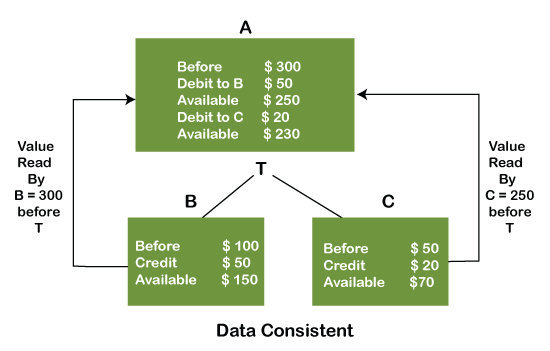
In the above figure, there are three accounts, A, B, and C, where A is making a transaction T one by one to both B & C. Two operations take place, i.e., Debit and Credit. Account A firstly debits $50 to account B, and the amount in account A is read as $300 by B before the transaction. After the successful transaction T, the available amount in B becomes $150. Now, A debits $20 to account C, and at that time, the value read by C is $250 (that is correct as a debit of $50 has been successfully done to B). The debit and credit operation from account A to C has been done successfully. We can see that the transaction is done successfully, and the value is also read correctly. Thus, the data is consistent. In case the value read by B and C is $300, which means that data is inconsistent because when the debit operation executes, it will not be consistent.

4) Isolation: The term 'isolation' means separation. In DBMS, Isolation is the property of a database where no data should affect the other one and may occur concurrently. In short, the operation on one database should begin when the operation on the first database gets complete. It means if two operations are being performed on two different databases, they may not affect the value of one another. In the case of transactions, when two or more transactions occur simultaneously, the consistency should remain maintained. Any changes that occur in any particular transaction will not be seen by other transactions until the change is not committed in the memory.

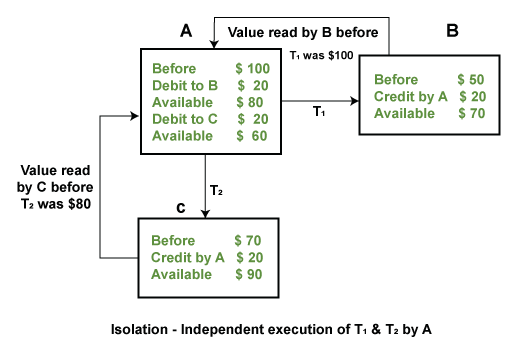
Example: If two operations are concurrently running on two different accounts, then the value of both accounts should not get affected. The value should remain persistent. As you can see in the below diagram, account A is making T1 and T2 transactions to accounts B and C, but both are executing independently without affecting each other. It is known as Isolation.

ACID Properties in DBMS

4) Durability: Durability ensures the permanency of something. In DBMS, the term durability ensures that the data after the successful execution of the operation becomes permanent in the database. The durability of the data should be so perfect that even if the system fails or leads to a crash, the database still survives. However, it gets lost, and it becomes the responsibility of the recovery manager for ensuring the durability of the database. For committing the values, the COMMIT command must be used every time we make changes.

Therefore, the ACID property of DBMS plays a vital role in maintaining the consistency and availability of data in the database.

Thus, it was a precise introduction to ACID properties in DBMS. We have discussed these properties in the transaction section also.


Read More
  • Share This:  
  •  Facebook
  •  Twitter
  •  Google+
  •  Stumble
  •  Digg
Newer Posts Older Posts Home

Meta

Popular Posts

  • Generate Migrations from an Existing Database With the Migration Generator Package
    Laravel Migration Generator Migration Generator for Laravel is a package by Bennett Treptow to generate migrations from existing database ...
  • Search Through Models with Laravel Searchable
      Laravel Searchable   is a package by   Spatie   to search through models and other sources pragmatically. Using this package, you can get ...
  • Laravel Razorpay Integration | Payment gateway integration Laravel in 30 mins | Laravel Razorpay
    1 Integration of Razorpay with Laravel. In this tutorial, I have taught how to integrate payment gateway with laravel with mini-project. If...
  • .Net 8 XUnit: Use an In-Memory DBConnection for testing as a replacement for the real MySqlConnection
    I'm creating tests for my .Net 8 API, and as I want to test with fake self created data (instead of using the real MySql connection) I...
  • Vue.js Render functions
        Vue.js Render functions Vue.js recommends us to use templates to build HTML. Here, we can use the render function as a closer-to-the-co...

Categories

  • Ajax (26)
  • Bootstrap (30)
  • DBMS (42)
  • HTML (12)
  • HTML5 (45)
  • JavaScript (10)
  • Jquery (34)
  • Jquery UI (2)
  • JqueryUI (32)
  • Laravel (1017)
  • Laravel Tutorials (23)
  • Laravel-Question (6)
  • Magento (9)
  • Magento 2 (95)
  • MariaDB (1)
  • MySql Tutorial (2)
  • PHP-Interview-Questions (3)
  • Php Question (13)
  • Python (36)
  • RDBMS (13)
  • SQL Tutorial (79)
  • Vue.js Tutorial (69)
  • Wordpress (150)
  • Wordpress Theme (3)
  • codeigniter (108)
  • oops (4)
  • php (853)

Social Media Links

  • Follow on Twitter
  • Like on Facebook
  • Subscribe on Youtube
  • Follow on Instagram

Pages

  • Home
  • Contact Us
  • Privacy Policy
  • About us

Blog Archive

  • ▼  2026 (12)
    • ▼  07/26 - 08/02 (11)
      • 'The Odyssey' crosses USD 639.6 million globally
      • 'Ramayana' to have 'Baahubali'-style cliffhanger e...
      • Kim Kardashian remember late granny on 92nd heaven...
      • Emma Roberts weds Cody John in intimate Idaho cere...
      • 'Jana Nayagan' BO day 4: Film crosses Rs 100 Cr Net
      • 'Chennai Love Story' BO jumps 11.1%
      • China’s new hybrid rice can preserve its high-yiel...
      • Quote of the day by Thucydides: 'Self-control is t...
      • Quote of the day by Slavoj Žižek: 'The problem for...
      • A stormwater pond in Calgary appears filled with P...
      • Inside Kriti Sanon's duplex sea-facing penthouse w...
    • ►  06/28 - 07/05 (1)
  • ►  2025 (4)
    • ►  07/06 - 07/13 (2)
    • ►  06/29 - 07/06 (2)
  • ►  2024 (486)
    • ►  09/15 - 09/22 (30)
    • ►  09/08 - 09/15 (35)
    • ►  09/01 - 09/08 (35)
    • ►  08/11 - 08/18 (2)
    • ►  08/04 - 08/11 (33)
    • ►  07/28 - 08/04 (30)
    • ►  07/07 - 07/14 (11)
    • ►  06/30 - 07/07 (35)
    • ►  06/23 - 06/30 (5)
    • ►  06/02 - 06/09 (31)
    • ►  05/26 - 06/02 (20)
    • ►  05/05 - 05/12 (29)
    • ►  04/28 - 05/05 (26)
    • ►  04/07 - 04/14 (10)
    • ►  03/31 - 04/07 (34)
    • ►  03/24 - 03/31 (10)
    • ►  03/03 - 03/10 (35)
    • ►  02/25 - 03/03 (15)
    • ►  02/04 - 02/11 (22)
    • ►  01/28 - 02/04 (30)
    • ►  01/07 - 01/14 (8)
  • ►  2023 (484)
    • ►  12/31 - 01/07 (35)
    • ►  12/24 - 12/31 (10)
    • ►  12/03 - 12/10 (33)
    • ►  11/26 - 12/03 (20)
    • ►  11/05 - 11/12 (35)
    • ►  10/29 - 11/05 (20)
    • ►  10/22 - 10/29 (9)
    • ►  10/15 - 10/22 (7)
    • ►  10/08 - 10/15 (9)
    • ►  10/01 - 10/08 (10)
    • ►  09/24 - 10/01 (9)
    • ►  09/17 - 09/24 (9)
    • ►  09/10 - 09/17 (7)
    • ►  09/03 - 09/10 (9)
    • ►  08/27 - 09/03 (9)
    • ►  08/20 - 08/27 (8)
    • ►  08/13 - 08/20 (8)
    • ►  08/06 - 08/13 (8)
    • ►  07/30 - 08/06 (8)
    • ►  07/23 - 07/30 (7)
    • ►  07/16 - 07/23 (8)
    • ►  07/09 - 07/16 (7)
    • ►  07/02 - 07/09 (8)
    • ►  06/25 - 07/02 (7)
    • ►  06/18 - 06/25 (7)
    • ►  06/11 - 06/18 (7)
    • ►  06/04 - 06/11 (11)
    • ►  05/28 - 06/04 (7)
    • ►  05/21 - 05/28 (8)
    • ►  05/14 - 05/21 (11)
    • ►  05/07 - 05/14 (7)
    • ►  04/30 - 05/07 (7)
    • ►  04/23 - 04/30 (8)
    • ►  04/16 - 04/23 (9)
    • ►  04/09 - 04/16 (7)
    • ►  04/02 - 04/09 (4)
    • ►  03/26 - 04/02 (21)
    • ►  03/19 - 03/26 (2)
    • ►  03/12 - 03/19 (9)
    • ►  03/05 - 03/12 (26)
    • ►  02/26 - 03/05 (25)
    • ►  01/15 - 01/22 (7)
    • ►  01/08 - 01/15 (1)
  • ►  2022 (1037)
    • ►  12/11 - 12/18 (13)
    • ►  12/04 - 12/11 (1)
    • ►  11/27 - 12/04 (40)
    • ►  11/06 - 11/13 (1)
    • ►  10/16 - 10/23 (13)
    • ►  09/04 - 09/11 (5)
    • ►  08/21 - 08/28 (24)
    • ►  08/14 - 08/21 (24)
    • ►  07/03 - 07/10 (9)
    • ►  06/19 - 06/26 (3)
    • ►  05/29 - 06/05 (3)
    • ►  05/22 - 05/29 (3)
    • ►  05/15 - 05/22 (109)
    • ►  05/01 - 05/08 (7)
    • ►  04/24 - 05/01 (7)
    • ►  04/17 - 04/24 (64)
    • ►  04/10 - 04/17 (115)
    • ►  04/03 - 04/10 (73)
    • ►  03/27 - 04/03 (77)
    • ►  03/13 - 03/20 (2)
    • ►  03/06 - 03/13 (25)
    • ►  02/27 - 03/06 (18)
    • ►  02/20 - 02/27 (153)
    • ►  02/13 - 02/20 (187)
    • ►  01/30 - 02/06 (45)
    • ►  01/23 - 01/30 (15)
    • ►  01/16 - 01/23 (1)
  • ►  2021 (412)
    • ►  10/24 - 10/31 (2)
    • ►  07/25 - 08/01 (1)
    • ►  07/11 - 07/18 (10)
    • ►  06/13 - 06/20 (29)
    • ►  05/23 - 05/30 (1)
    • ►  05/02 - 05/09 (24)
    • ►  04/25 - 05/02 (24)
    • ►  04/18 - 04/25 (112)
    • ►  04/11 - 04/18 (1)
    • ►  04/04 - 04/11 (6)
    • ►  03/28 - 04/04 (86)
    • ►  03/21 - 03/28 (19)
    • ►  03/14 - 03/21 (2)
    • ►  03/07 - 03/14 (10)
    • ►  02/28 - 03/07 (1)
    • ►  02/21 - 02/28 (29)
    • ►  02/14 - 02/21 (13)
    • ►  02/07 - 02/14 (12)
    • ►  01/31 - 02/07 (6)
    • ►  01/17 - 01/24 (2)
    • ►  01/10 - 01/17 (8)
    • ►  01/03 - 01/10 (14)
  • ►  2020 (376)
    • ►  12/27 - 01/03 (37)
    • ►  12/20 - 12/27 (92)
    • ►  12/13 - 12/20 (29)
    • ►  12/06 - 12/13 (37)
    • ►  11/29 - 12/06 (4)
    • ►  11/15 - 11/22 (14)
    • ►  11/08 - 11/15 (8)
    • ►  11/01 - 11/08 (2)
    • ►  10/18 - 10/25 (14)
    • ►  10/11 - 10/18 (16)
    • ►  10/04 - 10/11 (10)
    • ►  09/20 - 09/27 (10)
    • ►  09/06 - 09/13 (19)
    • ►  08/30 - 09/06 (26)
    • ►  08/23 - 08/30 (4)
    • ►  08/16 - 08/23 (2)
    • ►  07/12 - 07/19 (48)
    • ►  05/17 - 05/24 (2)
    • ►  01/05 - 01/12 (2)
  • ►  2019 (74)
    • ►  07/07 - 07/14 (6)
    • ►  06/16 - 06/23 (6)
    • ►  02/10 - 02/17 (17)
    • ►  01/13 - 01/20 (37)
    • ►  01/06 - 01/13 (8)
  • ►  2018 (376)
    • ►  12/30 - 01/06 (24)
    • ►  12/16 - 12/23 (8)
    • ►  12/09 - 12/16 (98)
    • ►  12/02 - 12/09 (16)
    • ►  11/18 - 11/25 (36)
    • ►  11/04 - 11/11 (18)
    • ►  10/28 - 11/04 (10)
    • ►  10/21 - 10/28 (26)
    • ►  10/14 - 10/21 (52)
    • ►  10/07 - 10/14 (4)
    • ►  09/30 - 10/07 (2)
    • ►  09/23 - 09/30 (68)
    • ►  09/16 - 09/23 (4)
    • ►  09/09 - 09/16 (4)
    • ►  08/26 - 09/02 (6)

Data Publish News

Loading...

Al Jazeera – Breaking News, World News and Video from Al Jazeera

Loading...

Laravel News

Loading...

Copyright © CoderFunda | Powered by Blogger
Design by Coderfunda | Blogger Theme by Coderfunda | Distributed By Coderfunda