CoderFunda
  • Home
  • About us
    • Contact Us
    • Disclaimer
    • Privacy Policy
    • About us
  • Home
  • Php
  • HTML
  • CSS
  • JavaScript
    • JavaScript
    • Jquery
    • JqueryUI
    • Stock
  • SQL
  • Vue.Js
  • Python
  • Wordpress
  • C++
    • C++
    • C
  • Laravel
    • Laravel
      • Overview
      • Namespaces
      • Middleware
      • Routing
      • Configuration
      • Application Structure
      • Installation
    • Overview
  • DBMS
    • DBMS
      • PL/SQL
      • SQLite
      • MongoDB
      • Cassandra
      • MySQL
      • Oracle
      • CouchDB
      • Neo4j
      • DB2
      • Quiz
    • Overview
  • Entertainment
    • TV Series Update
    • Movie Review
    • Movie Review
  • More
    • Vue. Js
    • Php Question
    • Php Interview Question
    • Laravel Interview Question
    • SQL Interview Question
    • IAS Interview Question
    • PCS Interview Question
    • Technology
    • Other

11 April, 2022

Python While loop

 Programing Coderfunda     April 11, 2022     Python     No comments   

Python While loop

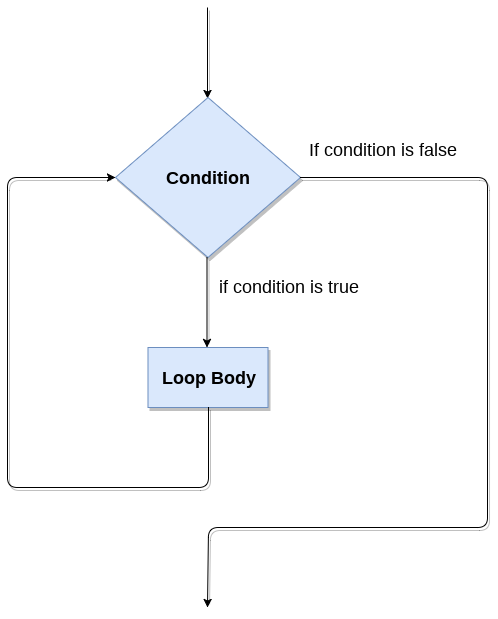
The Python while loop allows a part of the code to be executed until the given condition returns false. It is also known as a pre-tested loop.

It can be viewed as a repeating if statement. When we don't know the number of iterations then the while loop is the most effective to use.

The syntax is given below.

  1. while expression:    
  2.     statements    

Here, the statements can be a single statement or a group of statements. The expression should be any valid Python expression resulting in true or false. The true is any non-zero value and the false is 0.

While loop Flowchart
Python While loop

Loop Control Statements

We can change the normal sequence of the while loop's execution using the loop control statement. When the while loop's execution is completed, all automatic objects defined in that scope are demolished. Python offers the following control statement to use within the while loop.

1. Continue Statement - When the continue statement is encountered, the control transfer to the beginning of the loop. Let's understand the following example.

Example:

  1. # prints all letters except 'a' and 't'   
  2. i = 0  
  3. str1 = 'javatpoint'  
  4.   
  5. while i < len(str1):   
  6.     if str1[i] == 'a' or str1[i] == 't':   
  7.         i += 1  
  8.         continue  
  9.     print('Current Letter :', a[i])   
  10.     i += 1  

Output:

Current Letter: j
Current Letter: v
Current Letter : p
Current Letter: o
Current Letter: i
Current Letter: n

2. Break Statement - When the break statement is encountered, it brings control out of the loop.

Example:

  1. # The control transfer is transfered  
  2. # when break statement soon it sees t  
  3. i = 0  
  4. str1 = 'javatpoint'  
  5.   
  6. while i < len(str1):   
  7.     if str1[i] == 't':   
  8.         i += 1  
  9.         break  
  10.     print('Current Letter :', str1[i])   
  11.     i += 1  

Output:

Current Letter: j
Current Letter : a
Current Letter : v
Current Letter : a

3. Pass Statement - The pass statement is used to declare the empty loop. It is also used to define empty class, function, and control statement. Let's understand the following example.

Example -

  1. # An empty loop   
  2. str1 = 'javatpoint'  
  3. i = 0  
  4.   
  5. while i < len(str1):   
  6.     i += 1  
  7.     pass  
  8. print('Value of i :', i)  

Output:

Value of i : 10

Example-1: Program to print 1 to 10 using while loop

  1. i=1  
  2. #The while loop will iterate until condition becomes false.  
  3. While(i<=10):    
  4.     print(i)   
  5.     i=i+1   

Output:

1
2
3
4
5
6
7
8
9
10

Example -2: Program to print table of given numbers.

  1. i=1    
  2. number=0    
  3. b=9    
  4. number = int(input("Enter the number:"))    
  5. while i<=10:    
  6.     print("%d X %d = %d \n"%(number,i,number*i))    
  7.     i = i+1    

Output:

Enter the number:10
10 X 1 = 10 

10 X 2 = 20 

10 X 3 = 30 

10 X 4 = 40 

10 X 5 = 50 

10 X 6 = 60 

10 X 7 = 70 

10 X 8 = 80 

10 X 9 = 90 

10 X 10 = 100 

Infinite while loop

If the condition is given in the while loop never becomes false, then the while loop will never terminate, and it turns into the infinite while loop.

Any non-zero value in the while loop indicates an always-true condition, whereas zero indicates the always-false condition. This type of approach is useful if we want our program to run continuously in the loop without any disturbance.

Example 1

  1. while (1):    
  2.     print("Hi! we are inside the infinite while loop")  

Output:

Hi! we are inside the infinite while loop

Example 2

  1. var = 1    
  2. while(var != 2):    
  3.     i = int(input("Enter the number:"))    
  4.     print("Entered value is %d"%(i))    

Output:

Enter the number:10
Entered value is 10
Enter the number:10
Entered value is 10
Enter the number:10
Entered value is 10
Infinite time

Using else with while loop

Python allows us to use the else statement with the while loop also. The else block is executed when the condition given in the while statement becomes false. Like for loop, if the while loop is broken using break statement, then the else block will not be executed, and the statement present after else block will be executed. The else statement is optional to use with the while loop. Consider the following example.

Example 1

  1. i=1   
  2. while(i<=5):    
  3.     print(i)    
  4.     i=i+1    
  5. else:  
  6.     print("The while loop exhausted")    

Example 2

  1. i=1    
  2. while(i<=5):    
  3.     print(i)    
  4.     i=i+1    
  5.     if(i==3):    
  6.         break   
  7. else:  
  8.     print("The while loop exhausted")  

Output:

1
2

In the above code, when the break statement encountered, then while loop stopped its execution and skipped the else statement.

Example-3 Program to print Fibonacci numbers to given limit

  1. terms = int(input("Enter the terms "))  
  2. # first two intial terms  
  3. a = 0  
  4. b = 1  
  5. count = 0  
  6.   
  7. # check if the number of terms is Zero or negative  
  8. if (terms <= 0):  
  9.    print("Please enter a valid integer")  
  10. elif (terms == 1):  
  11.    print("Fibonacci sequence upto",limit,":")  
  12.    print(a)  
  13. else:  
  14.    print("Fibonacci sequence:")  
  15.    while (count < terms) :  
  16.        print(a, end = ' ')  
  17.        c = a + b  
  18.        # updateing values  
  19.        a = b  
  20.        b = c  
  21.      
  22.     count += 1  

Output:

Enter the terms 10
Fibonacci sequence:
0 1 1 2 3 5 8 13 21 34 
Read More
  • Share This:  
  •  Facebook
  •  Twitter
  •  Google+
  •  Stumble
  •  Digg

Python for loop

 Programing Coderfunda     April 11, 2022     Python     No comments   

Python for loop

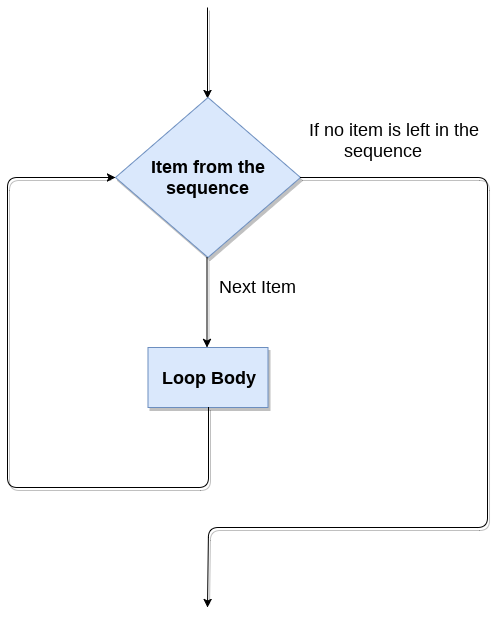
The for loop in Python is used to iterate the statements or a part of the program several times. It is frequently used to traverse the data structures like list, tuple, or dictionary.

The syntax of for loop in python is given below.

  1. for iterating_var in sequence:    
  2.     statement(s)    

The for loop flowchart

Python for loop

For loop Using Sequence

Example-1: Iterating string using for loop

  1. str = "Python"  
  2. for i in str:  
  3.     print(i)  

Output:

P
y
t
h
o
n

Example- 2: Program to print the table of the given number .

  1. list = [1,2,3,4,5,6,7,8,9,10]  
  2. n = 5  
  3. for i in list:  
  4.     c = n*i  
  5.     print(c)  

Output:

5
10
15
20
25
30
35
40
45
50s

Example-4: Program to print the sum of the given list.

  1. list = [10,30,23,43,65,12]  
  2. sum = 0  
  3. for i in list:  
  4.     sum = sum+i  
  5. print("The sum is:",sum)  

Output:

The sum is: 183

For loop Using range() function

The range() function

The range() function is used to generate the sequence of the numbers. If we pass the range(10), it will generate the numbers from 0 to 9. The syntax of the range() function is given below.

Syntax:

  1. range(start,stop,step size)  
  • The start represents the beginning of the iteration.
  • The stop represents that the loop will iterate till stop-1. The range(1,5) will generate numbers 1 to 4 iterations. It is optional.
  • The step size is used to skip the specific numbers from the iteration. It is optional to use. By default, the step size is 1. It is optional.

Consider the following examples:

Example-1: Program to print numbers in sequence.

  1. for i in range(10):  
  2.     print(i,end = ' ')  

Output:

0 1 2 3 4 5 6 7 8 9 

Example - 2: Program to print table of given number.

  1. n = int(input("Enter the number "))  
  2. for i in range(1,11):  
  3.     c = n*i  
  4.     print(n,"*",i,"=",c)  

Output:

Enter the number 10
10 * 1 = 10
10 * 2 = 20
10 * 3 = 30
10 * 4 = 40
10 * 5 = 50
10 * 6 = 60
10 * 7 = 70
10 * 8 = 80
10 * 9 = 90
10 * 10 = 100

Example-3: Program to print even number using step size in range().

  1. n = int(input("Enter the number "))  
  2. for i in range(2,n,2):  
  3.     print(i)  

Output:

Enter the number 20
2
4
6
8
10
12
14
16
18

We can also use the range() function with sequence of numbers. The len() function is combined with range() function which iterate through a sequence using indexing. Consider the following example.

  1. list = ['Peter','Joseph','Ricky','Devansh']  
  2. for i in range(len(list)):  
  3.     print("Hello",list[i])  

Output:

Hello Peter
Hello Joseph
Hello Ricky
Hello Devansh

Nested for loop in python

Python allows us to nest any number of for loops inside a for loop. The inner loop is executed n number of times for every iteration of the outer loop. The syntax is given below.

Syntax

  1. for iterating_var1 in sequence:  #outer loop  
  2.     for iterating_var2 in sequence:  #inner loop  
  3.         #block of statements     
  4. #Other statements    

Example- 1: Nested for loop

  1. # User input for number of rows  
  2. rows = int(input("Enter the rows:"))  
  3. # Outer loop will print number of rows  
  4. for i in range(0,rows+1):  
  5. # Inner loop will print number of Astrisk  
  6.     for j in range(i):  
  7.         print("*",end = '')  
  8.     print()  

Output:

Enter the rows:5
*
**
***
****
*****

Example-2: Program to number pyramid.

  1. rows = int(input("Enter the rows"))  
  2. for i in range(0,rows+1):  
  3.     for j in range(i):  
  4.         print(i,end = '')  
  5.     print()  

Output:

1
22
333
4444
55555

Using else statement with for loop

Unlike other languages like C, C++, or Java, Python allows us to use the else statement with the for loop which can be executed only when all the iterations are exhausted. Here, we must notice that if the loop contains any of the break statement then the else statement will not be executed.

Example 1

  1. for i in range(0,5):    
  2.     print(i)    
  3. else:  
  4.     print("for loop completely exhausted, since there is no break.")  

Output:

0
1
2
3
4
for loop completely exhausted, since there is no break.

The for loop completely exhausted, since there is no break.

Example 2

  1. for i in range(0,5):    
  2.     print(i)    
  3.     break;    
  4. else:print("for loop is exhausted");    
  5. print("The loop is broken due to break statement...came out of the loop")    

In the above example, the loop is broken due to the break statement; therefore, the else statement will not be executed. The statement present immediate next to else block will be executed.

Output:

0

The loop is broken due to the break statement...came out of the loop. We will learn more about the break statement in next tutorial.


Read More
  • Share This:  
  •  Facebook
  •  Twitter
  •  Google+
  •  Stumble
  •  Digg

08 April, 2022

Python Loops

 Programing Coderfunda     April 08, 2022     Python     No comments   

Python Loops

The flow of the programs written in any programming language is sequential by default. Sometimes we may need to alter the flow of the program. The execution of a specific code may need to be repeated several numbers of times.

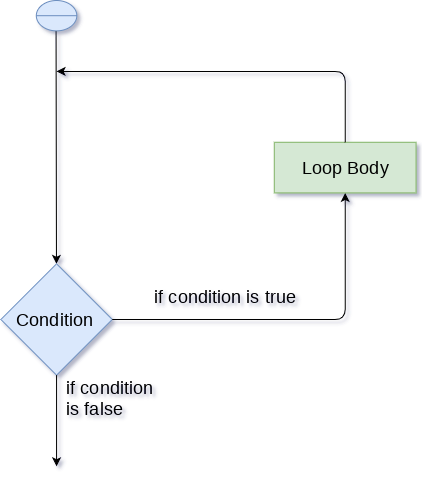
For this purpose, The programming languages provide various types of loops which are capable of repeating some specific code several numbers of times. Consider the following diagram to understand the working of a loop statement.

Python Loops

Why we use loops in python?

The looping simplifies the complex problems into the easy ones. It enables us to alter the flow of the program so that instead of writing the same code again and again, we can repeat the same code for a finite number of times. For example, if we need to print the first 10 natural numbers then, instead of using the print statement 10 times, we can print inside a loop which runs up to 10 iterations.

Advantages of loops

There are the following advantages of loops in Python.

  1. It provides code re-usability.
  2. Using loops, we do not need to write the same code again and again.
  3. Using loops, we can traverse over the elements of data structures (array or linked lists).

There are the following loop statements in Python.

Loop StatementDescription
for loopThe for loop is used in the case where we need to execute some part of the code until the given condition is satisfied. The for loop is also called as a per-tested loop. It is better to use for loop if the number of iteration is known in advance.
while loopThe while loop is to be used in the scenario where we don't know the number of iterations in advance. The block of statements is executed in the while loop until the condition specified in the while loop is satisfied. It is also called a pre-tested loop.
do-while loopThe do-while loop continues until a given condition satisfies. It is also called post tested loop. It is used when it is necessary to execute the loop at least once (mostly menu driven programs).
Read More
  • Share This:  
  •  Facebook
  •  Twitter
  •  Google+
  •  Stumble
  •  Digg
Newer Posts Older Posts Home

Meta

Popular Posts

  • Generate Migrations from an Existing Database With the Migration Generator Package
    Laravel Migration Generator Migration Generator for Laravel is a package by Bennett Treptow to generate migrations from existing database ...
  • Tailwindcss best practices for responsive design
    Tailwind CSS provides powerful utilities for responsive design out of the box. To use it effectively and maintain clean, scalable code, here...
  • Search Through Models with Laravel Searchable
      Laravel Searchable   is a package by   Spatie   to search through models and other sources pragmatically. Using this package, you can get ...
  • Laravel Razorpay Integration | Payment gateway integration Laravel in 30 mins | Laravel Razorpay
    1 Integration of Razorpay with Laravel. In this tutorial, I have taught how to integrate payment gateway with laravel with mini-project. If...
  • Vue.js Render functions
        Vue.js Render functions Vue.js recommends us to use templates to build HTML. Here, we can use the render function as a closer-to-the-co...

Categories

  • Ajax (26)
  • Bootstrap (30)
  • DBMS (42)
  • HTML (12)
  • HTML5 (45)
  • JavaScript (10)
  • Jquery (34)
  • Jquery UI (2)
  • JqueryUI (32)
  • Laravel (1017)
  • Laravel Tutorials (23)
  • Laravel-Question (6)
  • Magento (9)
  • Magento 2 (95)
  • MariaDB (1)
  • MySql Tutorial (2)
  • PHP-Interview-Questions (3)
  • Php Question (13)
  • Python (36)
  • RDBMS (13)
  • SQL Tutorial (79)
  • Vue.js Tutorial (69)
  • Wordpress (150)
  • Wordpress Theme (3)
  • codeigniter (108)
  • oops (4)
  • php (853)

Social Media Links

  • Follow on Twitter
  • Like on Facebook
  • Subscribe on Youtube
  • Follow on Instagram

Pages

  • Home
  • Contact Us
  • Privacy Policy
  • About us

Blog Archive

  • ▼  2026 (3)
    • ▼  07/26 - 08/02 (2)
      • A stormwater pond in Calgary appears filled with P...
      • Inside Kriti Sanon's duplex sea-facing penthouse w...
    • ►  06/28 - 07/05 (1)
  • ►  2025 (4)
    • ►  07/06 - 07/13 (2)
    • ►  06/29 - 07/06 (2)
  • ►  2024 (486)
    • ►  09/15 - 09/22 (30)
    • ►  09/08 - 09/15 (35)
    • ►  09/01 - 09/08 (35)
    • ►  08/11 - 08/18 (2)
    • ►  08/04 - 08/11 (33)
    • ►  07/28 - 08/04 (30)
    • ►  07/07 - 07/14 (11)
    • ►  06/30 - 07/07 (35)
    • ►  06/23 - 06/30 (5)
    • ►  06/02 - 06/09 (31)
    • ►  05/26 - 06/02 (20)
    • ►  05/05 - 05/12 (29)
    • ►  04/28 - 05/05 (26)
    • ►  04/07 - 04/14 (10)
    • ►  03/31 - 04/07 (34)
    • ►  03/24 - 03/31 (10)
    • ►  03/03 - 03/10 (35)
    • ►  02/25 - 03/03 (15)
    • ►  02/04 - 02/11 (22)
    • ►  01/28 - 02/04 (30)
    • ►  01/07 - 01/14 (8)
  • ►  2023 (484)
    • ►  12/31 - 01/07 (35)
    • ►  12/24 - 12/31 (10)
    • ►  12/03 - 12/10 (33)
    • ►  11/26 - 12/03 (20)
    • ►  11/05 - 11/12 (35)
    • ►  10/29 - 11/05 (20)
    • ►  10/22 - 10/29 (9)
    • ►  10/15 - 10/22 (7)
    • ►  10/08 - 10/15 (9)
    • ►  10/01 - 10/08 (10)
    • ►  09/24 - 10/01 (9)
    • ►  09/17 - 09/24 (9)
    • ►  09/10 - 09/17 (7)
    • ►  09/03 - 09/10 (9)
    • ►  08/27 - 09/03 (9)
    • ►  08/20 - 08/27 (8)
    • ►  08/13 - 08/20 (8)
    • ►  08/06 - 08/13 (8)
    • ►  07/30 - 08/06 (8)
    • ►  07/23 - 07/30 (7)
    • ►  07/16 - 07/23 (8)
    • ►  07/09 - 07/16 (7)
    • ►  07/02 - 07/09 (8)
    • ►  06/25 - 07/02 (7)
    • ►  06/18 - 06/25 (7)
    • ►  06/11 - 06/18 (7)
    • ►  06/04 - 06/11 (11)
    • ►  05/28 - 06/04 (7)
    • ►  05/21 - 05/28 (8)
    • ►  05/14 - 05/21 (11)
    • ►  05/07 - 05/14 (7)
    • ►  04/30 - 05/07 (7)
    • ►  04/23 - 04/30 (8)
    • ►  04/16 - 04/23 (9)
    • ►  04/09 - 04/16 (7)
    • ►  04/02 - 04/09 (4)
    • ►  03/26 - 04/02 (21)
    • ►  03/19 - 03/26 (2)
    • ►  03/12 - 03/19 (9)
    • ►  03/05 - 03/12 (26)
    • ►  02/26 - 03/05 (25)
    • ►  01/15 - 01/22 (7)
    • ►  01/08 - 01/15 (1)
  • ►  2022 (1037)
    • ►  12/11 - 12/18 (13)
    • ►  12/04 - 12/11 (1)
    • ►  11/27 - 12/04 (40)
    • ►  11/06 - 11/13 (1)
    • ►  10/16 - 10/23 (13)
    • ►  09/04 - 09/11 (5)
    • ►  08/21 - 08/28 (24)
    • ►  08/14 - 08/21 (24)
    • ►  07/03 - 07/10 (9)
    • ►  06/19 - 06/26 (3)
    • ►  05/29 - 06/05 (3)
    • ►  05/22 - 05/29 (3)
    • ►  05/15 - 05/22 (109)
    • ►  05/01 - 05/08 (7)
    • ►  04/24 - 05/01 (7)
    • ►  04/17 - 04/24 (64)
    • ►  04/10 - 04/17 (115)
    • ►  04/03 - 04/10 (73)
    • ►  03/27 - 04/03 (77)
    • ►  03/13 - 03/20 (2)
    • ►  03/06 - 03/13 (25)
    • ►  02/27 - 03/06 (18)
    • ►  02/20 - 02/27 (153)
    • ►  02/13 - 02/20 (187)
    • ►  01/30 - 02/06 (45)
    • ►  01/23 - 01/30 (15)
    • ►  01/16 - 01/23 (1)
  • ►  2021 (412)
    • ►  10/24 - 10/31 (2)
    • ►  07/25 - 08/01 (1)
    • ►  07/11 - 07/18 (10)
    • ►  06/13 - 06/20 (29)
    • ►  05/23 - 05/30 (1)
    • ►  05/02 - 05/09 (24)
    • ►  04/25 - 05/02 (24)
    • ►  04/18 - 04/25 (112)
    • ►  04/11 - 04/18 (1)
    • ►  04/04 - 04/11 (6)
    • ►  03/28 - 04/04 (86)
    • ►  03/21 - 03/28 (19)
    • ►  03/14 - 03/21 (2)
    • ►  03/07 - 03/14 (10)
    • ►  02/28 - 03/07 (1)
    • ►  02/21 - 02/28 (29)
    • ►  02/14 - 02/21 (13)
    • ►  02/07 - 02/14 (12)
    • ►  01/31 - 02/07 (6)
    • ►  01/17 - 01/24 (2)
    • ►  01/10 - 01/17 (8)
    • ►  01/03 - 01/10 (14)
  • ►  2020 (376)
    • ►  12/27 - 01/03 (37)
    • ►  12/20 - 12/27 (92)
    • ►  12/13 - 12/20 (29)
    • ►  12/06 - 12/13 (37)
    • ►  11/29 - 12/06 (4)
    • ►  11/15 - 11/22 (14)
    • ►  11/08 - 11/15 (8)
    • ►  11/01 - 11/08 (2)
    • ►  10/18 - 10/25 (14)
    • ►  10/11 - 10/18 (16)
    • ►  10/04 - 10/11 (10)
    • ►  09/20 - 09/27 (10)
    • ►  09/06 - 09/13 (19)
    • ►  08/30 - 09/06 (26)
    • ►  08/23 - 08/30 (4)
    • ►  08/16 - 08/23 (2)
    • ►  07/12 - 07/19 (48)
    • ►  05/17 - 05/24 (2)
    • ►  01/05 - 01/12 (2)
  • ►  2019 (74)
    • ►  07/07 - 07/14 (6)
    • ►  06/16 - 06/23 (6)
    • ►  02/10 - 02/17 (17)
    • ►  01/13 - 01/20 (37)
    • ►  01/06 - 01/13 (8)
  • ►  2018 (376)
    • ►  12/30 - 01/06 (24)
    • ►  12/16 - 12/23 (8)
    • ►  12/09 - 12/16 (98)
    • ►  12/02 - 12/09 (16)
    • ►  11/18 - 11/25 (36)
    • ►  11/04 - 11/11 (18)
    • ►  10/28 - 11/04 (10)
    • ►  10/21 - 10/28 (26)
    • ►  10/14 - 10/21 (52)
    • ►  10/07 - 10/14 (4)
    • ►  09/30 - 10/07 (2)
    • ►  09/23 - 09/30 (68)
    • ►  09/16 - 09/23 (4)
    • ►  09/09 - 09/16 (4)
    • ►  08/26 - 09/02 (6)

Data Publish News

Loading...

Al Jazeera – Breaking News, World News and Video from Al Jazeera

Loading...

Laravel News

Loading...

Copyright © CoderFunda | Powered by Blogger
Design by Coderfunda | Blogger Theme by Coderfunda | Distributed By Coderfunda