CoderFunda
  • Home
  • About us
    • Contact Us
    • Disclaimer
    • Privacy Policy
    • About us
  • Home
  • Php
  • HTML
  • CSS
  • JavaScript
    • JavaScript
    • Jquery
    • JqueryUI
    • Stock
  • SQL
  • Vue.Js
  • Python
  • Wordpress
  • C++
    • C++
    • C
  • Laravel
    • Laravel
      • Overview
      • Namespaces
      • Middleware
      • Routing
      • Configuration
      • Application Structure
      • Installation
    • Overview
  • DBMS
    • DBMS
      • PL/SQL
      • SQLite
      • MongoDB
      • Cassandra
      • MySQL
      • Oracle
      • CouchDB
      • Neo4j
      • DB2
      • Quiz
    • Overview
  • Entertainment
    • TV Series Update
    • Movie Review
    • Movie Review
  • More
    • Vue. Js
    • Php Question
    • Php Interview Question
    • Laravel Interview Question
    • SQL Interview Question
    • IAS Interview Question
    • PCS Interview Question
    • Technology
    • Other

11 December, 2018

CodeIgniter - MVC Framework

 Programing Coderfunda     December 11, 2018     codeigniter, CodeIgniter MVC Framework     No comments   

CodeIgniter is based on the Model-View-Controller (MVC) development pattern. MVC is a software approach that separates application logic from presentation. In practice, it permits your web pages to contain minimal scripting since the presentation is separate from the PHP scripting.
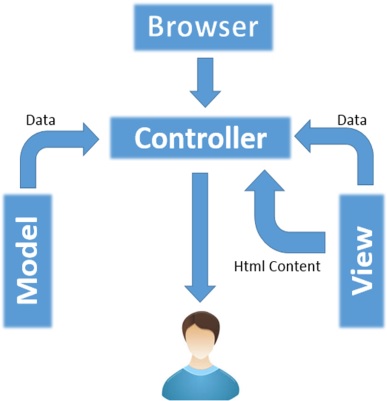
MVC Framework
  • The Model represents your data structures. Typically, your model classes will contain functions that help you retrieve, insert and update information in your database.
  • The View is information that is being presented to a user. A View will normally be a web page, but in CodeIgniter, a view can also be a page fragment like a header or footer. It can also be an RSS page, or any other type of “page”.
  • The Controller serves as an intermediary between the Model, the View, and any other resources needed to process the HTTP request and generate a web page.
Read More
  • Share This:  
  •  Facebook
  •  Twitter
  •  Google+
  •  Stumble
  •  Digg

CodeIgniter - Application Architecture

 Programing Coderfunda     December 11, 2018     Application Architecture, codeigniter     No comments   

CodeIgniter - Application Architecture


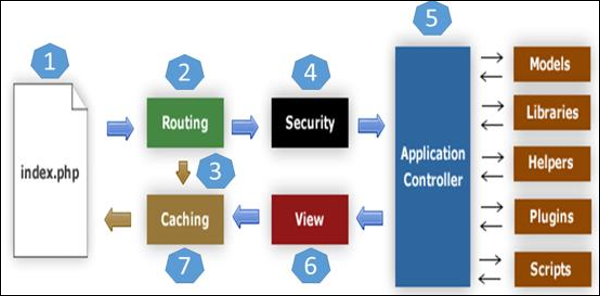
The architecture of CodeIgniter application is shown below.
Architecture of CodeIgniter
  • As shown in the figure, whenever a request comes to CodeIgniter, it will first go to index.php page.
  • In the second step, Routing will decide whether to pass this request to step-3 for caching or to pass this request to step-4 for security check.
  • If the requested page is already in Caching, then Routing will pass the request to step-3 and the response will go back to the user.
  • If the requested page does not exist in Caching, then Routing will pass the requested page to step-4 for Security checks.
  • Before passing the request to Application Controller, the Securityof the submitted data is checked. After the Security check, the Application Controller loads necessary Models, Libraries, Helpers, Plugins and Scripts and pass it on to View.
  • The View will render the page with available data and pass it on for Caching. As the requested page was not cached before so this time it will be cached in Caching, to process this page quickly for future requests.

Directory Structure

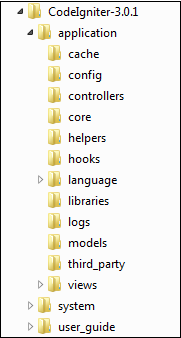
The image given below shows the directory structure of the CodeIgniter.
Directory Structure
CodeIgniter directory structure is divided into 3 folders −
  • Application
  • System
  • User_guide

Application

As the name indicates the Application folder contains all the code of your application that you are building. This is the folder where you will develop your project. The Application folder contains several other folders, which are explained below −
  • Cache − This folder contains all the cached pages of your application. These cached pages will increase the overall speed of accessing the pages.
  • Config − This folder contains various files to configure the application. With the help of config.php file, user can configure the application. Using database.php file, user can configure the database of the application.
  • Controllers − This folder holds the controllers of your application. It is the basic part of your application.
  • Core − This folder will contain base class of your application.
  • Helpers − In this folder, you can put helper class of your application.
  • Hooks − The files in this folder provide a means to tap into and modify the inner workings of the framework without hacking the core files.
  • Language − This folder contains language related files.
  • Libraries − This folder contains files of the libraries developed for your application.
  • Logs − This folder contains files related to the log of the system.
  • Models − The database login will be placed in this folder.
  • Third_party − In this folder, you can place any plugins, which will be used for your application.
  • Views − Application’s HTML files will be placed in this folder.

System

This folder contains CodeIgniter core codes, libraries, helpers and other files, which help make the coding easy. These libraries and helpers are loaded and used in web app development.
This folder contains all the CodeIgniter code of consequence, organized into various folders −
  • Core − This folder contains CodeIgniter’s core class. Do not modify anything here. All of your work will take place in the application folder. Even if your intent is to extend the CodeIgniter core, you have to do it with hooks, and hooks live in the application folder.
  • Database − The database folder contains core database drivers and other database utilities.
  • Fonts − The fonts folder contains font related information and utilities.
  • Helpers − The helpers folder contains standard CodeIgniter helpers (such as date, cookie, and URL helpers).
  • Language − The language folder contains language files. You can ignore it for now.
  • Libraries − The libraries folder contains standard CodeIgniter libraries (to help you with e-mail, calendars, file uploads, and more). You can create your own libraries or extend (and even replace) standard ones, but those will be saved in the application/libraries directory to keep them separate from the standard CodeIgniter libraries saved in this particular folder.

User_guide

This is your user guide to CodeIgniter. It is basically, the offline version of user guide on CodeIgniter website. Using this, one can learn the functions of various libraries, helpers and classes. It is recommended to go through this user guide before building your first web app in CodeIgniter.
Beside these three folders, there is one more important file named “index.php”. In this file, we can set the application environment and error level and we can define system and application folder name. It is recommended, not to edit these settings if you do not have enough knowledge about what you are going to do.
Read More
  • Share This:  
  •  Facebook
  •  Twitter
  •  Google+
  •  Stumble
  •  Digg

CodeIgniter - MVC Framework

 Programing Coderfunda     December 11, 2018     codeigniter, CodeIgniter MVC Framework     No comments   

CodeIgniter is based on the Model-View-Controller (MVC) development pattern. MVC is a software approach that separates application logic from presentation. In practice, it permits your web pages to contain minimal scripting since the presentation is separate from the PHP scripting.
MVC Framework
  • The Model represents your data structures. Typically, your model classes will contain functions that help you retrieve, insert and update information in your database.
  • The View is information that is being presented to a user. A View will normally be a web page, but in CodeIgniter, a view can also be a page fragment like a header or footer. It can also be an RSS page, or any other type of “page”.
  • The Controller serves as an intermediary between the Model, the View, and any other resources needed to process the HTTP request and generate a web page.
Read More
  • Share This:  
  •  Facebook
  •  Twitter
  •  Google+
  •  Stumble
  •  Digg

CodeIgniter - Application Architecture

 Programing Coderfunda     December 11, 2018     Application Architecture, codeigniter     No comments   

CodeIgniter - Application Architecture


The architecture of CodeIgniter application is shown below.
Architecture of CodeIgniter
  • As shown in the figure, whenever a request comes to CodeIgniter, it will first go to index.php page.
  • In the second step, Routing will decide whether to pass this request to step-3 for caching or to pass this request to step-4 for security check.
  • If the requested page is already in Caching, then Routing will pass the request to step-3 and the response will go back to the user.
  • If the requested page does not exist in Caching, then Routing will pass the requested page to step-4 for Security checks.
  • Before passing the request to Application Controller, the Securityof the submitted data is checked. After the Security check, the Application Controller loads necessary Models, Libraries, Helpers, Plugins and Scripts and pass it on to View.
  • The View will render the page with available data and pass it on for Caching. As the requested page was not cached before so this time it will be cached in Caching, to process this page quickly for future requests.

Directory Structure

The image given below shows the directory structure of the CodeIgniter.
Directory Structure
CodeIgniter directory structure is divided into 3 folders −
  • Application
  • System
  • User_guide

Application

As the name indicates the Application folder contains all the code of your application that you are building. This is the folder where you will develop your project. The Application folder contains several other folders, which are explained below −
  • Cache − This folder contains all the cached pages of your application. These cached pages will increase the overall speed of accessing the pages.
  • Config − This folder contains various files to configure the application. With the help of config.php file, user can configure the application. Using database.php file, user can configure the database of the application.
  • Controllers − This folder holds the controllers of your application. It is the basic part of your application.
  • Core − This folder will contain base class of your application.
  • Helpers − In this folder, you can put helper class of your application.
  • Hooks − The files in this folder provide a means to tap into and modify the inner workings of the framework without hacking the core files.
  • Language − This folder contains language related files.
  • Libraries − This folder contains files of the libraries developed for your application.
  • Logs − This folder contains files related to the log of the system.
  • Models − The database login will be placed in this folder.
  • Third_party − In this folder, you can place any plugins, which will be used for your application.
  • Views − Application’s HTML files will be placed in this folder.

System

This folder contains CodeIgniter core codes, libraries, helpers and other files, which help make the coding easy. These libraries and helpers are loaded and used in web app development.
This folder contains all the CodeIgniter code of consequence, organized into various folders −
  • Core − This folder contains CodeIgniter’s core class. Do not modify anything here. All of your work will take place in the application folder. Even if your intent is to extend the CodeIgniter core, you have to do it with hooks, and hooks live in the application folder.
  • Database − The database folder contains core database drivers and other database utilities.
  • Fonts − The fonts folder contains font related information and utilities.
  • Helpers − The helpers folder contains standard CodeIgniter helpers (such as date, cookie, and URL helpers).
  • Language − The language folder contains language files. You can ignore it for now.
  • Libraries − The libraries folder contains standard CodeIgniter libraries (to help you with e-mail, calendars, file uploads, and more). You can create your own libraries or extend (and even replace) standard ones, but those will be saved in the application/libraries directory to keep them separate from the standard CodeIgniter libraries saved in this particular folder.

User_guide

This is your user guide to CodeIgniter. It is basically, the offline version of user guide on CodeIgniter website. Using this, one can learn the functions of various libraries, helpers and classes. It is recommended to go through this user guide before building your first web app in CodeIgniter.
Beside these three folders, there is one more important file named “index.php”. In this file, we can set the application environment and error level and we can define system and application folder name. It is recommended, not to edit these settings if you do not have enough knowledge about what you are going to do.
Read More
  • Share This:  
  •  Facebook
  •  Twitter
  •  Google+
  •  Stumble
  •  Digg

CodeIgniter - Overview

 Programing Coderfunda     December 11, 2018     CodeIgniter - Overview     No comments   

CodeIgniter - Overview


CodeIgniter is an application development framework, which can be used to develop websites, using PHP. It is an Open Source framework. It has a very rich set of functionality, which will increase the speed of website development work.
If you know PHP well, then CodeIgniter will make your task easier. It has a very rich set of libraries and helpers. By using CodeIgniter, you will save a lot of time, if you are developing a website from scratch. Not only that, a website built in CodeIgniter is secure too, as it has the ability to prevent various attacks that take place through websites.

CodeIgniter Features

Some of the important features of CodeIgniter are listed below −
  • Model-View-Controller Based System
  • Extremely Light Weight
  • Full Featured database classes with support for several platforms.
  • Query Builder Database Support
  • Form and Data Validation
  • Security and XSS Filtering
  • Session Management
  • Email Sending Class. Supports Attachments, HTML/Text email, multiple protocols (sendmail, SMTP, and Mail) and more.
  • Image Manipulation Library (cropping, resizing, rotating, etc.). Supports GD, ImageMagick, and NetPBM
  • File Uploading Class
  • FTP Class
  • Localization
  • Pagination
  • Data Encryption
  • Benchmarking
  • Full Page Caching
  • Error Logging
  • Application Profiling
  • Calendaring Class
  • User Agent Class
  • Zip Encoding Class
  • Template Engine Class
  • Trackback Class
  • XML-RPC Library
  • Unit Testing Class
  • Search-engine Friendly URLs
  • Flexible URI Routing
  • Support for Hooks and Class Extensions
  • Large library of “helper” functions

Read More
  • Share This:  
  •  Facebook
  •  Twitter
  •  Google+
  •  Stumble
  •  Digg

CodeIgniter - Overview

 Programing Coderfunda     December 11, 2018     CodeIgniter - Overview     No comments   

CodeIgniter - Overview


CodeIgniter is an application development framework, which can be used to develop websites, using PHP. It is an Open Source framework. It has a very rich set of functionality, which will increase the speed of website development work.
If you know PHP well, then CodeIgniter will make your task easier. It has a very rich set of libraries and helpers. By using CodeIgniter, you will save a lot of time, if you are developing a website from scratch. Not only that, a website built in CodeIgniter is secure too, as it has the ability to prevent various attacks that take place through websites.

CodeIgniter Features

Some of the important features of CodeIgniter are listed below −
  • Model-View-Controller Based System
  • Extremely Light Weight
  • Full Featured database classes with support for several platforms.
  • Query Builder Database Support
  • Form and Data Validation
  • Security and XSS Filtering
  • Session Management
  • Email Sending Class. Supports Attachments, HTML/Text email, multiple protocols (sendmail, SMTP, and Mail) and more.
  • Image Manipulation Library (cropping, resizing, rotating, etc.). Supports GD, ImageMagick, and NetPBM
  • File Uploading Class
  • FTP Class
  • Localization
  • Pagination
  • Data Encryption
  • Benchmarking
  • Full Page Caching
  • Error Logging
  • Application Profiling
  • Calendaring Class
  • User Agent Class
  • Zip Encoding Class
  • Template Engine Class
  • Trackback Class
  • XML-RPC Library
  • Unit Testing Class
  • Search-engine Friendly URLs
  • Flexible URI Routing
  • Support for Hooks and Class Extensions
  • Large library of “helper” functions

Read More
  • Share This:  
  •  Facebook
  •  Twitter
  •  Google+
  •  Stumble
  •  Digg

CodeIgniter Tutorial

 Programing Coderfunda     December 11, 2018     codeigniter     No comments   

CodeIgniter Tutorial


CodeIgniter is a powerful PHP framework with a very small footprint, built for developers who need a simple and elegant toolkit to create full-featured web applications. CodeIgniter was created by EllisLab, and is now a project of the British Columbia Institute of Technology.

Audience

This tutorial has been prepared for developers who would like to learn the art of developing websites using CodeIgniter. It provides a complete understanding of this framework.

Prerequisites

Before you start proceeding with this tutorial, we assume that you are already exposed to HTML, Core PHP, and Advance PHP. We have used CodeIgniter version 3.0.1 in all the examples.
Read More
  • Share This:  
  •  Facebook
  •  Twitter
  •  Google+
  •  Stumble
  •  Digg

CodeIgniter Tutorial

 Programing Coderfunda     December 11, 2018     codeigniter     No comments   

CodeIgniter Tutorial


CodeIgniter is a powerful PHP framework with a very small footprint, built for developers who need a simple and elegant toolkit to create full-featured web applications. CodeIgniter was created by EllisLab, and is now a project of the British Columbia Institute of Technology.

Audience

This tutorial has been prepared for developers who would like to learn the art of developing websites using CodeIgniter. It provides a complete understanding of this framework.

Prerequisites

Before you start proceeding with this tutorial, we assume that you are already exposed to HTML, Core PHP, and Advance PHP. We have used CodeIgniter version 3.0.1 in all the examples.
Read More
  • Share This:  
  •  Facebook
  •  Twitter
  •  Google+
  •  Stumble
  •  Digg
Newer Posts Older Posts Home

Meta

Popular Posts

  • Generate Migrations from an Existing Database With the Migration Generator Package
    Laravel Migration Generator Migration Generator for Laravel is a package by Bennett Treptow to generate migrations from existing database ...
  • Tailwindcss best practices for responsive design
    Tailwind CSS provides powerful utilities for responsive design out of the box. To use it effectively and maintain clean, scalable code, here...
  • Search Through Models with Laravel Searchable
      Laravel Searchable   is a package by   Spatie   to search through models and other sources pragmatically. Using this package, you can get ...
  • Laravel Razorpay Integration | Payment gateway integration Laravel in 30 mins | Laravel Razorpay
    1 Integration of Razorpay with Laravel. In this tutorial, I have taught how to integrate payment gateway with laravel with mini-project. If...
  • Vue.js Render functions
        Vue.js Render functions Vue.js recommends us to use templates to build HTML. Here, we can use the render function as a closer-to-the-co...

Categories

  • Ajax (26)
  • Bootstrap (30)
  • DBMS (42)
  • HTML (12)
  • HTML5 (45)
  • JavaScript (10)
  • Jquery (34)
  • Jquery UI (2)
  • JqueryUI (32)
  • Laravel (1017)
  • Laravel Tutorials (23)
  • Laravel-Question (6)
  • Magento (9)
  • Magento 2 (95)
  • MariaDB (1)
  • MySql Tutorial (2)
  • PHP-Interview-Questions (3)
  • Php Question (13)
  • Python (36)
  • RDBMS (13)
  • SQL Tutorial (79)
  • Vue.js Tutorial (69)
  • Wordpress (150)
  • Wordpress Theme (3)
  • codeigniter (108)
  • oops (4)
  • php (853)

Social Media Links

  • Follow on Twitter
  • Like on Facebook
  • Subscribe on Youtube
  • Follow on Instagram

Pages

  • Home
  • Contact Us
  • Privacy Policy
  • About us

Blog Archive

  • ▼  2026 (3)
    • ▼  07/26 - 08/02 (2)
      • A stormwater pond in Calgary appears filled with P...
      • Inside Kriti Sanon's duplex sea-facing penthouse w...
    • ►  06/28 - 07/05 (1)
  • ►  2025 (4)
    • ►  07/06 - 07/13 (2)
    • ►  06/29 - 07/06 (2)
  • ►  2024 (486)
    • ►  09/15 - 09/22 (30)
    • ►  09/08 - 09/15 (35)
    • ►  09/01 - 09/08 (35)
    • ►  08/11 - 08/18 (2)
    • ►  08/04 - 08/11 (33)
    • ►  07/28 - 08/04 (30)
    • ►  07/07 - 07/14 (11)
    • ►  06/30 - 07/07 (35)
    • ►  06/23 - 06/30 (5)
    • ►  06/02 - 06/09 (31)
    • ►  05/26 - 06/02 (20)
    • ►  05/05 - 05/12 (29)
    • ►  04/28 - 05/05 (26)
    • ►  04/07 - 04/14 (10)
    • ►  03/31 - 04/07 (34)
    • ►  03/24 - 03/31 (10)
    • ►  03/03 - 03/10 (35)
    • ►  02/25 - 03/03 (15)
    • ►  02/04 - 02/11 (22)
    • ►  01/28 - 02/04 (30)
    • ►  01/07 - 01/14 (8)
  • ►  2023 (484)
    • ►  12/31 - 01/07 (35)
    • ►  12/24 - 12/31 (10)
    • ►  12/03 - 12/10 (33)
    • ►  11/26 - 12/03 (20)
    • ►  11/05 - 11/12 (35)
    • ►  10/29 - 11/05 (20)
    • ►  10/22 - 10/29 (9)
    • ►  10/15 - 10/22 (7)
    • ►  10/08 - 10/15 (9)
    • ►  10/01 - 10/08 (10)
    • ►  09/24 - 10/01 (9)
    • ►  09/17 - 09/24 (9)
    • ►  09/10 - 09/17 (7)
    • ►  09/03 - 09/10 (9)
    • ►  08/27 - 09/03 (9)
    • ►  08/20 - 08/27 (8)
    • ►  08/13 - 08/20 (8)
    • ►  08/06 - 08/13 (8)
    • ►  07/30 - 08/06 (8)
    • ►  07/23 - 07/30 (7)
    • ►  07/16 - 07/23 (8)
    • ►  07/09 - 07/16 (7)
    • ►  07/02 - 07/09 (8)
    • ►  06/25 - 07/02 (7)
    • ►  06/18 - 06/25 (7)
    • ►  06/11 - 06/18 (7)
    • ►  06/04 - 06/11 (11)
    • ►  05/28 - 06/04 (7)
    • ►  05/21 - 05/28 (8)
    • ►  05/14 - 05/21 (11)
    • ►  05/07 - 05/14 (7)
    • ►  04/30 - 05/07 (7)
    • ►  04/23 - 04/30 (8)
    • ►  04/16 - 04/23 (9)
    • ►  04/09 - 04/16 (7)
    • ►  04/02 - 04/09 (4)
    • ►  03/26 - 04/02 (21)
    • ►  03/19 - 03/26 (2)
    • ►  03/12 - 03/19 (9)
    • ►  03/05 - 03/12 (26)
    • ►  02/26 - 03/05 (25)
    • ►  01/15 - 01/22 (7)
    • ►  01/08 - 01/15 (1)
  • ►  2022 (1037)
    • ►  12/11 - 12/18 (13)
    • ►  12/04 - 12/11 (1)
    • ►  11/27 - 12/04 (40)
    • ►  11/06 - 11/13 (1)
    • ►  10/16 - 10/23 (13)
    • ►  09/04 - 09/11 (5)
    • ►  08/21 - 08/28 (24)
    • ►  08/14 - 08/21 (24)
    • ►  07/03 - 07/10 (9)
    • ►  06/19 - 06/26 (3)
    • ►  05/29 - 06/05 (3)
    • ►  05/22 - 05/29 (3)
    • ►  05/15 - 05/22 (109)
    • ►  05/01 - 05/08 (7)
    • ►  04/24 - 05/01 (7)
    • ►  04/17 - 04/24 (64)
    • ►  04/10 - 04/17 (115)
    • ►  04/03 - 04/10 (73)
    • ►  03/27 - 04/03 (77)
    • ►  03/13 - 03/20 (2)
    • ►  03/06 - 03/13 (25)
    • ►  02/27 - 03/06 (18)
    • ►  02/20 - 02/27 (153)
    • ►  02/13 - 02/20 (187)
    • ►  01/30 - 02/06 (45)
    • ►  01/23 - 01/30 (15)
    • ►  01/16 - 01/23 (1)
  • ►  2021 (412)
    • ►  10/24 - 10/31 (2)
    • ►  07/25 - 08/01 (1)
    • ►  07/11 - 07/18 (10)
    • ►  06/13 - 06/20 (29)
    • ►  05/23 - 05/30 (1)
    • ►  05/02 - 05/09 (24)
    • ►  04/25 - 05/02 (24)
    • ►  04/18 - 04/25 (112)
    • ►  04/11 - 04/18 (1)
    • ►  04/04 - 04/11 (6)
    • ►  03/28 - 04/04 (86)
    • ►  03/21 - 03/28 (19)
    • ►  03/14 - 03/21 (2)
    • ►  03/07 - 03/14 (10)
    • ►  02/28 - 03/07 (1)
    • ►  02/21 - 02/28 (29)
    • ►  02/14 - 02/21 (13)
    • ►  02/07 - 02/14 (12)
    • ►  01/31 - 02/07 (6)
    • ►  01/17 - 01/24 (2)
    • ►  01/10 - 01/17 (8)
    • ►  01/03 - 01/10 (14)
  • ►  2020 (376)
    • ►  12/27 - 01/03 (37)
    • ►  12/20 - 12/27 (92)
    • ►  12/13 - 12/20 (29)
    • ►  12/06 - 12/13 (37)
    • ►  11/29 - 12/06 (4)
    • ►  11/15 - 11/22 (14)
    • ►  11/08 - 11/15 (8)
    • ►  11/01 - 11/08 (2)
    • ►  10/18 - 10/25 (14)
    • ►  10/11 - 10/18 (16)
    • ►  10/04 - 10/11 (10)
    • ►  09/20 - 09/27 (10)
    • ►  09/06 - 09/13 (19)
    • ►  08/30 - 09/06 (26)
    • ►  08/23 - 08/30 (4)
    • ►  08/16 - 08/23 (2)
    • ►  07/12 - 07/19 (48)
    • ►  05/17 - 05/24 (2)
    • ►  01/05 - 01/12 (2)
  • ►  2019 (74)
    • ►  07/07 - 07/14 (6)
    • ►  06/16 - 06/23 (6)
    • ►  02/10 - 02/17 (17)
    • ►  01/13 - 01/20 (37)
    • ►  01/06 - 01/13 (8)
  • ►  2018 (376)
    • ►  12/30 - 01/06 (24)
    • ►  12/16 - 12/23 (8)
    • ►  12/09 - 12/16 (98)
    • ►  12/02 - 12/09 (16)
    • ►  11/18 - 11/25 (36)
    • ►  11/04 - 11/11 (18)
    • ►  10/28 - 11/04 (10)
    • ►  10/21 - 10/28 (26)
    • ►  10/14 - 10/21 (52)
    • ►  10/07 - 10/14 (4)
    • ►  09/30 - 10/07 (2)
    • ►  09/23 - 09/30 (68)
    • ►  09/16 - 09/23 (4)
    • ►  09/09 - 09/16 (4)
    • ►  08/26 - 09/02 (6)

Data Publish News

Loading...

Al Jazeera – Breaking News, World News and Video from Al Jazeera

Loading...

Laravel News

Loading...

Copyright © CoderFunda | Powered by Blogger
Design by Coderfunda | Blogger Theme by Coderfunda | Distributed By Coderfunda