CoderFunda
  • Home
  • About us
    • Contact Us
    • Disclaimer
    • Privacy Policy
    • About us
  • Home
  • Php
  • HTML
  • CSS
  • JavaScript
    • JavaScript
    • Jquery
    • JqueryUI
    • Stock
  • SQL
  • Vue.Js
  • Python
  • Wordpress
  • C++
    • C++
    • C
  • Laravel
    • Laravel
      • Overview
      • Namespaces
      • Middleware
      • Routing
      • Configuration
      • Application Structure
      • Installation
    • Overview
  • DBMS
    • DBMS
      • PL/SQL
      • SQLite
      • MongoDB
      • Cassandra
      • MySQL
      • Oracle
      • CouchDB
      • Neo4j
      • DB2
      • Quiz
    • Overview
  • Entertainment
    • TV Series Update
    • Movie Review
    • Movie Review
  • More
    • Vue. Js
    • Php Question
    • Php Interview Question
    • Laravel Interview Question
    • SQL Interview Question
    • IAS Interview Question
    • PCS Interview Question
    • Technology
    • Other

08 April, 2022

Python Loops

 Programing Coderfunda     April 08, 2022     Python     No comments   

Python Loops

The flow of the programs written in any programming language is sequential by default. Sometimes we may need to alter the flow of the program. The execution of a specific code may need to be repeated several numbers of times.

For this purpose, The programming languages provide various types of loops which are capable of repeating some specific code several numbers of times. Consider the following diagram to understand the working of a loop statement.
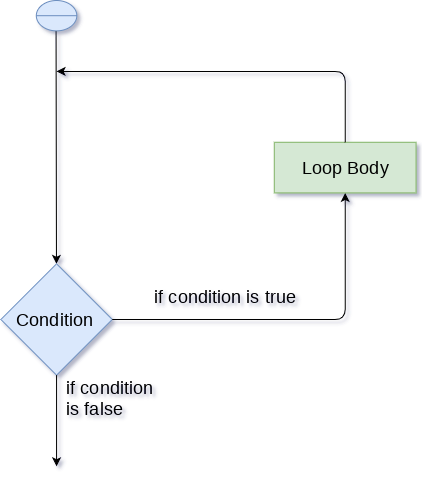
Python Loops

Why we use loops in python?

The looping simplifies the complex problems into the easy ones. It enables us to alter the flow of the program so that instead of writing the same code again and again, we can repeat the same code for a finite number of times. For example, if we need to print the first 10 natural numbers then, instead of using the print statement 10 times, we can print inside a loop which runs up to 10 iterations.

Advantages of loops

There are the following advantages of loops in Python.

  1. It provides code re-usability.
  2. Using loops, we do not need to write the same code again and again.
  3. Using loops, we can traverse over the elements of data structures (array or linked lists).

There are the following loop statements in Python.

Loop StatementDescription
for loopThe for loop is used in the case where we need to execute some part of the code until the given condition is satisfied. The for loop is also called as a per-tested loop. It is better to use for loop if the number of iteration is known in advance.
while loopThe while loop is to be used in the scenario where we don't know the number of iterations in advance. The block of statements is executed in the while loop until the condition specified in the while loop is satisfied. It is also called a pre-tested loop.
do-while loopThe do-while loop continues until a given condition satisfies. It is also called post tested loop. It is used when it is necessary to execute the loop at least once (mostly menu driven programs).
  • Share This:  
  •  Facebook
  •  Twitter
  •  Google+
  •  Stumble
  •  Digg
Email ThisBlogThis!Share to XShare to Facebook
Newer Post Older Post Home

0 comments:

Post a Comment

Thanks

Meta

Popular Posts

  • Crawl and Index Your Website with Laravel Site Search
      Laravel Site Search   is a package by Spatie to create a full-text search index by crawling your site. You can think of it as a private Go...
  • JqueryUI - Show
    JqueryUI - Show, JqueryUI,  This chapter will discuss the show() method, which is one of the methods used to manage jQueryUI visual effe...
  • Tailwindcss best practices for responsive design
    Tailwind CSS provides powerful utilities for responsive design out of the box. To use it effectively and maintain clean, scalable code, here...
  • Sitaare Zameen Par Full Movie Review
     Here’s a  complete Vue.js tutorial for beginners to master level , structured in a progressive and simple way. It covers all essential topi...
  • WordPress Table
    WordPress Table WordPress table is an easy way to show the data in the table format. In the past, we had used the HTML code or table plugin ...

Categories

  • Ajax (26)
  • Bootstrap (30)
  • DBMS (42)
  • HTML (12)
  • HTML5 (45)
  • JavaScript (10)
  • Jquery (34)
  • Jquery UI (2)
  • JqueryUI (32)
  • Laravel (1017)
  • Laravel Tutorials (23)
  • Laravel-Question (6)
  • Magento (9)
  • Magento 2 (95)
  • MariaDB (1)
  • MySql Tutorial (2)
  • PHP-Interview-Questions (3)
  • Php Question (13)
  • Python (36)
  • RDBMS (13)
  • SQL Tutorial (79)
  • Vue.js Tutorial (69)
  • Wordpress (150)
  • Wordpress Theme (3)
  • codeigniter (108)
  • oops (4)
  • php (853)

Social Media Links

  • Follow on Twitter
  • Like on Facebook
  • Subscribe on Youtube
  • Follow on Instagram

Pages

  • Home
  • Contact Us
  • Privacy Policy
  • About us

Blog Archive

  • July (4)
  • September (100)
  • August (50)
  • July (56)
  • June (46)
  • May (59)
  • April (50)
  • March (60)
  • February (42)
  • January (53)
  • December (58)
  • November (61)
  • October (39)
  • September (36)
  • August (36)
  • July (34)
  • June (34)
  • May (36)
  • April (29)
  • March (82)
  • February (1)
  • January (8)
  • December (14)
  • November (41)
  • October (13)
  • September (5)
  • August (48)
  • July (9)
  • June (6)
  • May (119)
  • April (259)
  • March (122)
  • February (368)
  • January (33)
  • October (2)
  • July (11)
  • June (29)
  • May (25)
  • April (168)
  • March (93)
  • February (60)
  • January (28)
  • December (195)
  • November (24)
  • October (40)
  • September (55)
  • August (6)
  • July (48)
  • May (2)
  • January (2)
  • July (6)
  • June (6)
  • February (17)
  • January (69)
  • December (122)
  • November (56)
  • October (92)
  • September (76)
  • August (6)

Loading...

Laravel News

Loading...

Copyright © CoderFunda | Powered by Blogger
Design by Coderfunda | Blogger Theme by Coderfunda | Distributed By Coderfunda