CoderFunda
  • Home
  • About us
    • Contact Us
    • Disclaimer
    • Privacy Policy
    • About us
  • Home
  • Php
  • HTML
  • CSS
  • JavaScript
    • JavaScript
    • Jquery
    • JqueryUI
    • Stock
  • SQL
  • Vue.Js
  • Python
  • Wordpress
  • C++
    • C++
    • C
  • Laravel
    • Laravel
      • Overview
      • Namespaces
      • Middleware
      • Routing
      • Configuration
      • Application Structure
      • Installation
    • Overview
  • DBMS
    • DBMS
      • PL/SQL
      • SQLite
      • MongoDB
      • Cassandra
      • MySQL
      • Oracle
      • CouchDB
      • Neo4j
      • DB2
      • Quiz
    • Overview
  • Entertainment
    • TV Series Update
    • Movie Review
    • Movie Review
  • More
    • Vue. Js
    • Php Question
    • Php Interview Question
    • Laravel Interview Question
    • SQL Interview Question
    • IAS Interview Question
    • PCS Interview Question
    • Technology
    • Other

28 December, 2020

Vue.js Declarative Rendering

 Programing Coderfunda     December 28, 2020     Vue.js Tutorial     No comments   

Vue.js Declarative Rendering

In Vue.js, there is a system in the core that enables us to declaratively render data to the DOM using simple, straightforward template syntax.

Syntax:

HTML:

  1. <div id="app">  
  2.   {{ message }}  
  3. </div>  

JS:

  1. var app = new Vue({  
  2.   el: '#app',  
  3.   data: {  
  4.     message: 'This is a simple Vue.js Declarative Rendering example!'  
  5.   }  
  6. })  

As we know that Vue.js facilitates us to extend HTML with HTML attributes called directives that are used to offer functionality to HTML applications.

There are two types of directives in Vue.js: built-in directives and user-defined directives. Vue.js uses double braces {{ }} as place-holders for data, and the Vue.js directives are HTML attributes that use a v- prefix.

Let's see a simple Declarative Rendering example that uses text interpolation.

Example 1:

Index.html file:

  1. <html>  
  2.     <head>  
  3.         <link rel="stylesheet" href="index.css">  
  4.         <script src="https://cdn.jsdelivr.net/npm/vue/dist/vue.js"></script>  
  5.     </head>  
  6.     <body>          
  7.         <div id="app">  
  8.             {{ message }}  
  9.         </div>          
  10.         <script src="index.js"></script>  
  11.     </body>  
  12. </html>  

Index.js file:

  1. var app = new Vue({   
  2.     el: '#app',  
  3.     data: {  
  4.           message: 'This is a simple Vue.js Declarative Rendering example!'  
  5.     }  
  6. });  

Output:

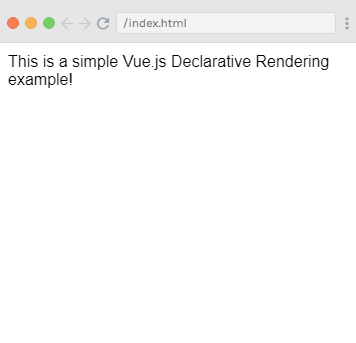
This is a simple Vue.js Declarative Rendering example!
Vue.js Declarative Rendering

The above example is similar to rendering a string template, as we have already done in the very first Vue.js example. Now, the data and the DOM are linked, and everything is now reactive. You can check it on your browser's JavaScript console. Set app.message to a different value, and you will see the rendered example above update accordingly.

Now, we no longer have to interact with the HTML directly. A Vue app attaches itself to a single DOM element and fully controls it. In the above example case, it is #app. Now, HTML is only the entry point, and everything else happens within the newly created Vue instance.

Let's see an example where we deploy the binding of element attributes.

Example 2:

Index.html file:

  1. <html>  
  2.     <head>  
  3.         <link rel="stylesheet" href="index.css">  
  4.         <script src="https://cdn.jsdelivr.net/npm/vue/dist/vue.js"></script>  
  5.     </head>  
  6.     <body>         
  7.         <div id="app-2">  
  8.   <span v-bind:title="message">  
  9.     Hover mouse over me for a few seconds  
  10.     and see a dynamically bound title which I have set!  
  11.   </span>  
  12. </div>          
  13. <script src="index.js"></script>  
  14.     </body>  
  15. </html>  

Index.js file:

  1. var app2 = new Vue({  
  2.   el: '#app-2',  
  3.   data: {  
  4.     message: 'You loaded this page on ' + new Date().toLocaleString()  
  5.   }  
  6. })  

Output:

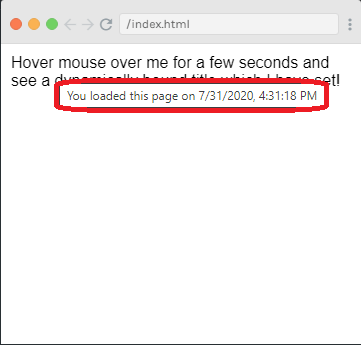
Hover mouse over me for a few seconds and see a dynamically bound title which I have set!

Vue.js Declarative Rendering

In the above example, a new v-bind attribute you are seeing is called a directive. Directives are used with a prefix v- to indicate that they are unique attributes provided by Vue, and they are used to apply a special reactive behavior to the rendered DOM.
Read More
  • Share This:  
  •  Facebook
  •  Twitter
  •  Google+
  •  Stumble
  •  Digg

Getting started with Vue.js

 Programing Coderfunda     December 28, 2020     Vue.js Tutorial     No comments   

 Getting started with Vue.js

In the previous chapter, we have seen several ways to use and install Vue.js in your project. In this article, we shall see how to check the version of the Vue.js, the advantages and disadvantages of using Vue.js in your project, the first example and the explanation of all the general points related to the example.

Advantages of using Vue.js

Vue.js is one of the newest software technologies widely used for web development and building single-page applications. As you can guess by its name, it is used primarily for UI or view side of the project. It is a JavaScript based framework developed by Evan You (a former Google employee who was then working on Angular) for building the rich client-side application using JavaScript. Let's see the advantages of using Vue.js in your project:

Following is the list of advantages of using Vue.js:

Very Small in Size

One of Vue.js' biggest advantages is that it is very small in size. The success of a JavaScript framework very much depends on its size and this exciting JavaScript plug-in is only 18-21KB, so you can download and use it very easily in no time.

Easy to Understand and Code

The Vue.js framework has a very simple structure and very easy to understand. It is one of the reasons for the popularity of this framework. If you are familiar with HTML and JavaScript, you can easily code in Vue.js. The users can easily add Vue.js to their web project because of its simple structure and develop applications.

Simple Integration with Existing Applications

Vue.js has a lot of components for everything and can be integrated with the existing applications very quickly. You can integrate it with any application that is written in JavaScript.

Flexible in nature

Vue.js's flexible nature also makes it easy to understand for the developers of React.js, Angular.js, and any other new JavaScript framework. It provides a lot of flexibility to use virtual nodes to write HTML files, JavaScript files, and pure JavaScript files.

Components

You can create reusable custom elements in Vue.js applications.

Easy, comprehensive & detailed documentation

Vue.js provides very easy, comprehensive, and detailed documentation, so the developers who have little idea about HTML and JavaScript can use it to code.

Virtual DOM

Vue.js uses virtual DOM similar to other existing frameworks such as ReactJS, Ember, etc. Virtual DOM is a light-weight in-memory tree representation of the original HTML DOM and updated without affecting the initial DOM.

Two-Way Communication

Vue.js provides two-way communications with its MVVM architecture that makes it very easy to handle HTML blocks.

Companies which are using Vue.js

Vue.js has started gaining popularity day by day because famous companies have already started using it in real-time. There are several companies which are successfully using Vue.js in the real scenario. Let's see some example:

Facebook: The biggest successful company which is using Vue.js in their real-life project is Facebook. Facebook is using this framework for the marketing side of their Newsfeed.

Adobe: Adobe is using Vue.js for its product called Portfolio. Using the Vue.js framework's easy integration advantage, the company has already migrated their existing codebase to the Vue.

Xiaomi: Xiaomi is also using Vue.js to build their products catalog to provide users a reactive experience.

Alibaba: One of the most significant public companies in China has used Vue.js.

Some other notable companies which are using Vue.js in their project are:

  • Grammarly
  • Netflix
  • Laracast
  • Behance
  • Gitlab
  • Euronews
  • Codeship
  • Livestorm
  • Wizzair etc.

Check the version of your installed Vue.js

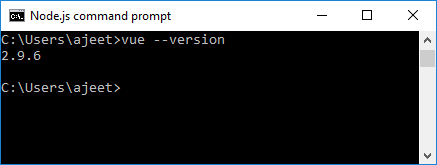
If you are already familiar with Node.js and have installed Vue.js CLI on your system, you can check the version of your installed Vue.js using the following command on your Node.js command prompt:

  • Open the Node.js command prompt and run the following command:
  1. vue --version  

Getting started with Vue.js
  • If it responds well, go ahead to the next step to create your new project. In the above example, you can see that Vue.js version 2.9.6 is installed successfully. Now, run the following command to create a new project:

Syntax:

  1. vue create <YourAppName>  
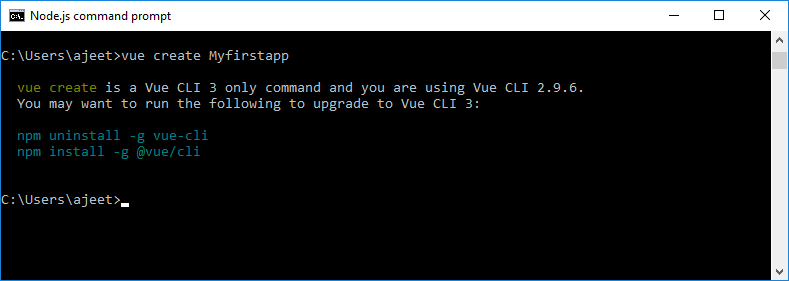
  • Run the vue create myfirstapp command to create an app named
Getting started with Vue.js
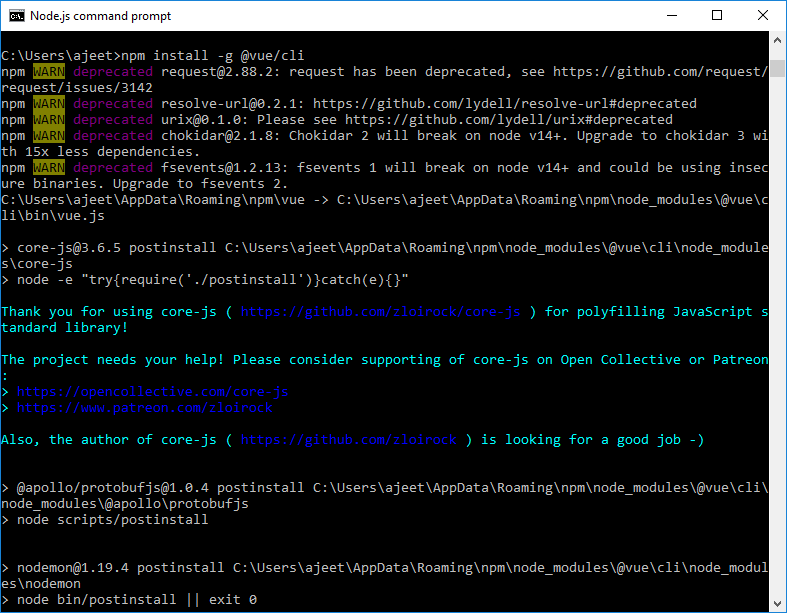
  • You have seen an error that vue create command works only with Vue CLI 3, and you are using an older version. Now, use the following command to uninstall the older version and install the new one.
  1. npm uninstall -g vue-cli  
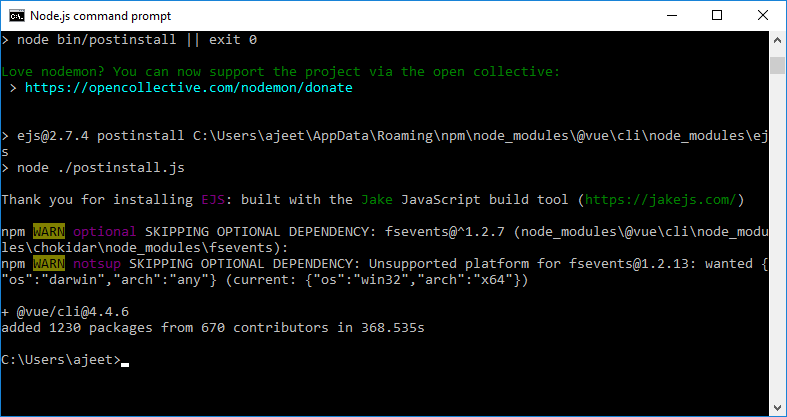
  2. npm install -g @vue/cli  

Getting started with Vue.js
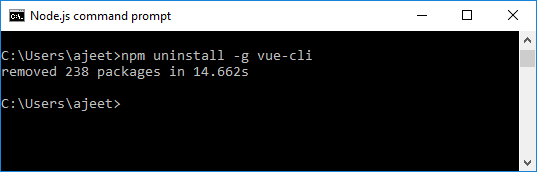
  • You can see that the older version of Vue.js is uninstalled. Now, install the newer version.
Getting started with Vue.js
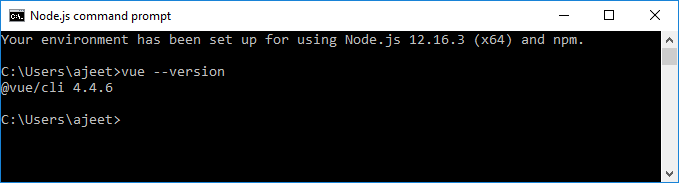
  • Now, the newer version of Vue CLI is installed. You can check the Vue CLI version by using the vue --version
Getting started with Vue.js
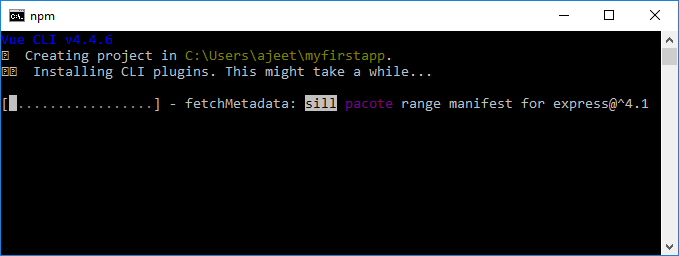
  • You can see that the latest Vue CLI version is installed. Now, run the vue create myfirstapp command to create an app named

Create Vue.js first app (Using vue create command)

  • Run the vue create myfirstapp command on Node.js command prompt.
Getting started with Vue.js
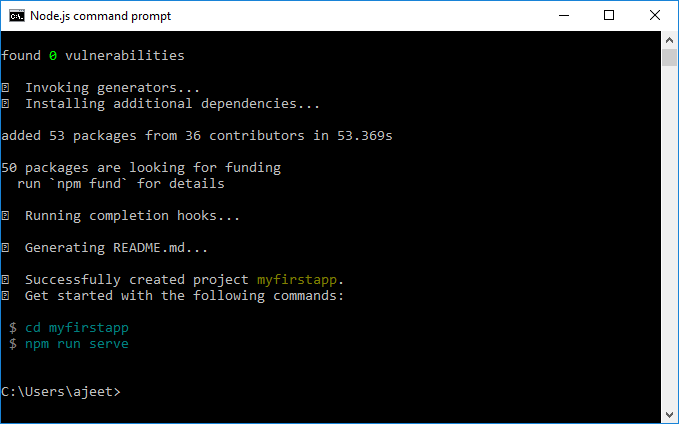
  • This process may take some time. Wait until the creating app process is completed. After the successful completion, you will get a message on the command line that the project is successfully created.
Getting started with Vue.js
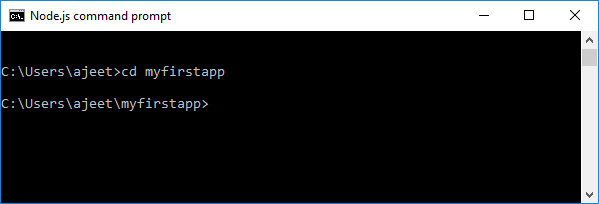
  • Now, go to your application's location by executing the following command.
  1. cd myfirstapp  

Getting started with Vue.js
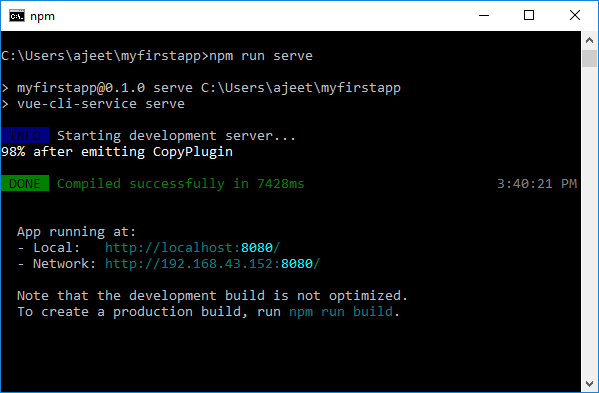
  • Execute the following command to run your Vue.js app on the browser.
  1. npm run serve  

Getting started with Vue.js
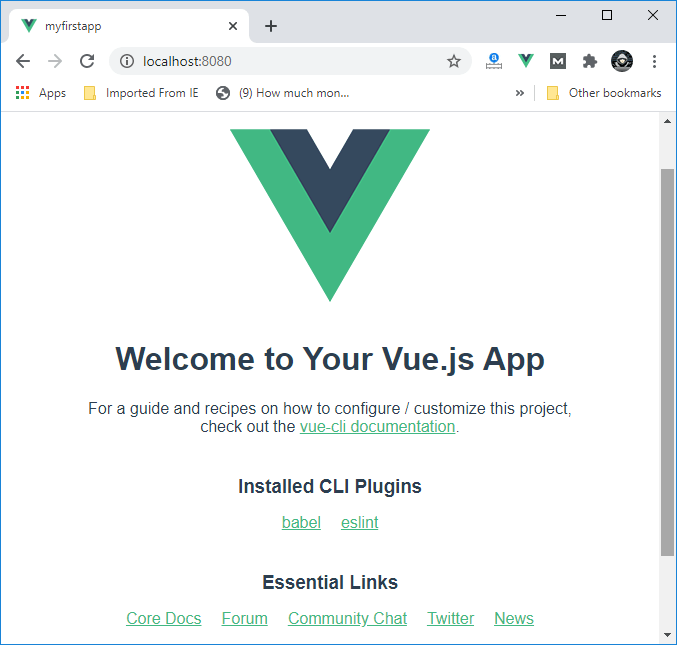
  • Here, you can see that your app is compiled successfully, and the development server is started. Copy the local address and paste it on your Google Chrome browser to open the app.
Getting started with Vue.js

Explore Folder structure of Vue Application

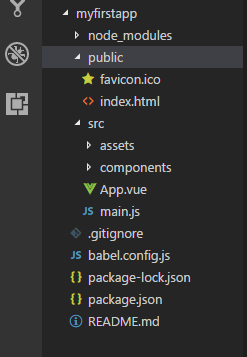
You have already executed your app on the web browser. Now, it's time to explore the complete files and folders of your project. You can select any IDE of your choice. Here, we have chosen Visual Studio Code IDE for deploying our application.

Open the Visual Studio Code and load your project in the IDE. After loading your project, click on the public folder as well as the src folder. These two folders contain the most important files of your project.

Getting started with Vue.js

Package.json: The Package.json folder contains all configuration of your app. You don't need to touch that folder.

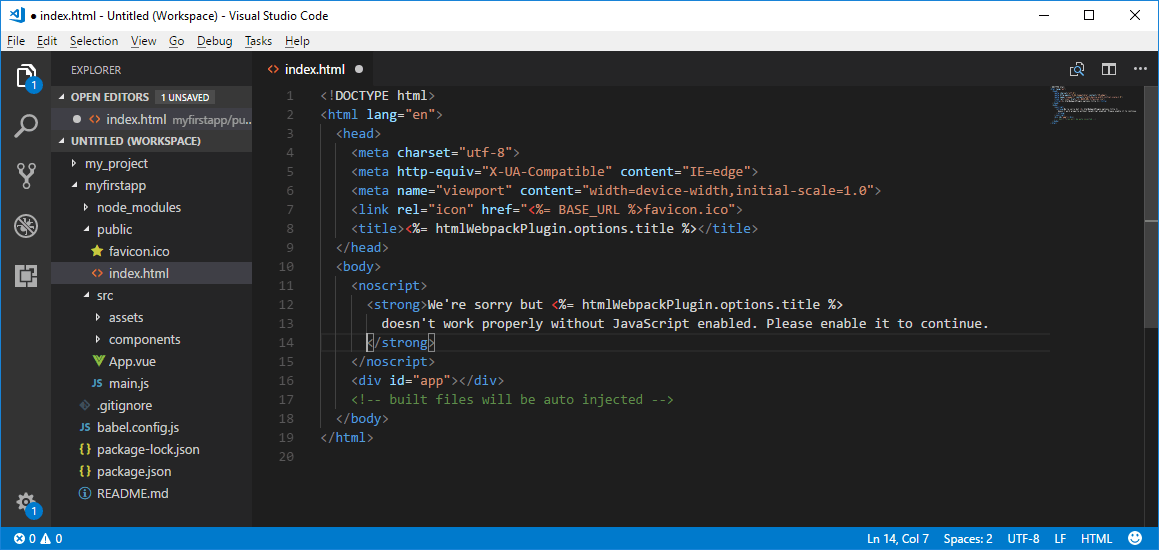
Index.html: The most important file of your app is index.html file. It contains all the data that is appeared on the UI of your app. This is the only one div element which Vue will use to attach the DOM. See the index.html file:

  1. <!DOCTYPE html>  
  2. <html lang="en">  
  3.   <head>  
  4.     <meta charset="utf-8">  
  5.     <meta http-equiv="X-UA-Compatible" content="IE=edge">  
  6.     <meta name="viewport" content="width=device-width,initial-scale=1.0">  
  7.     <link rel="icon" href="<%= BASE_URL %>favicon.ico">  
  8.     <title><%= htmlWebpackPlugin.options.title %></title>  
  9.   </head>  
  10.   <body>  
  11.     <noscript>  
  12.       <strong>We're sorry but <%= htmlWebpackPlugin.options.title %> doesn't work properly without JavaScript enabled. Please enable it to continue.</strong>  
  13.     </noscript>  
  14.     <div id="app"></div>  
  15.     <!-- built files will be auto injected -->  
  16.   </body>  
  17. </html>  

Getting started with Vue.js

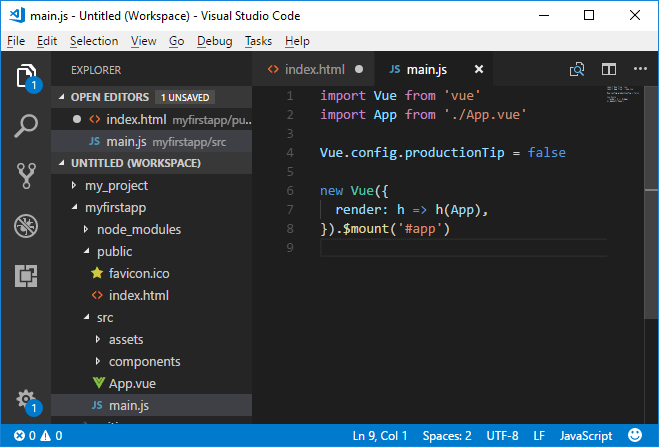
Src/main.js: main.js is the main JavaScript file which is used to drive your app.

  1. import Vue from 'vue'  
  2. import App from './App.vue'  
  3. Vue.config.productionTip = false  
  4. new Vue({  
  5.   render: h => h(App),  
  6. }).$mount('#app')  

Getting started with Vue.js

In the above code of main.js, the first line specifies the import of the Vue library, and the second line is used to import the App Component from app.vue. The productionTip is set to false to avoid the message "you're in development mode" in the console. After that, Vue instance is created by assigning it to DOM element #app, which has already been defined in index.html file and specified to use the App component.

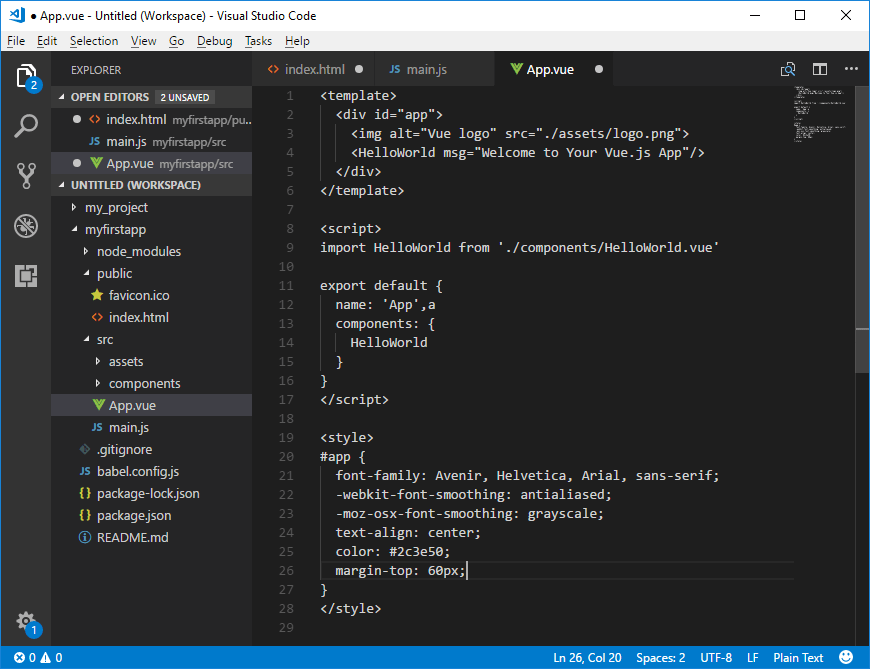
Src/App.vue: The App.vue is single file component that contains three parts: HTML, CSS and JAVASCRIPT. It is used to manage the single file components of your app.

  1. <template>  
  2.   <div id="app">  
  3.     <img alt="Vue logo" src="./assets/logo.png">  
  4.     <HelloWorld msg="Welcome to Your Vue.js App"/>  
  5.   </div>  
  6. </template>  
  7. <script>  
  8. import HelloWorld from './components/HelloWorld.vue'  
  9.   
  10. export default {  
  11.   name: 'App',a  
  12.   components: {  
  13.     HelloWorld  
  14.   }  
  15. }  
  16. </script>  
  17. <style>  
  18. #app {  
  19.   font-family: Avenir, Helvetica, Arial, sans-serif;  
  20.   -webkit-font-smoothing: antialiased;  
  21.   -moz-osx-font-smoothing: grayscale;  
  22.   text-align: center;  
  23.   color: #2c3e50;  
  24.   margin-top: 60px;  
  25. }  
  26. </style>  

Getting started with Vue.js

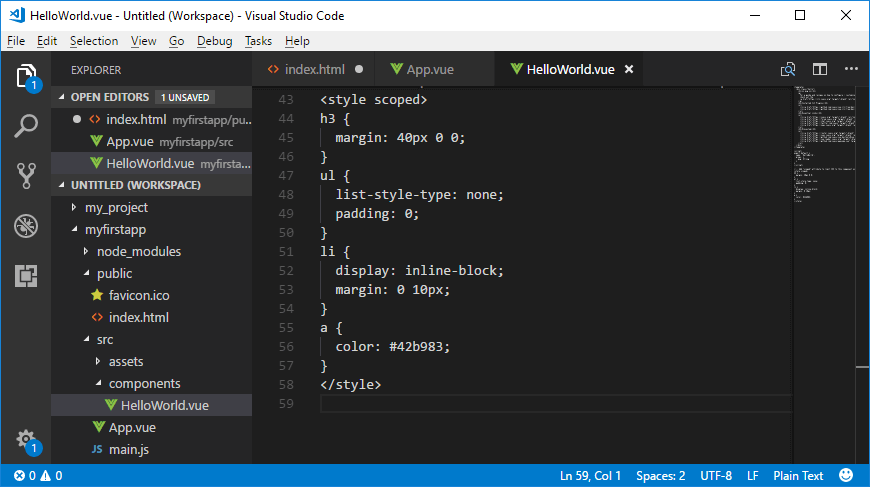
Src/component/HelloWorldComponent: This file is included in HelloWorld.vue file. This file contains all the style and HTML which you see when you open your app in the browser.

  1. <style scoped>  
  2. h3 {  
  3.   margin: 40px 0 0;  
  4. }  
  5. ul {  
  6.   list-style-type: none;  
  7.   padding: 0;  
  8. }  
  9. li {  
  10.   display: inline-block;  
  11.   margin: 0 10px;  
  12. }  
  13. a {  
  14.   color: #42b983;  
  15. }  
  16. </style>  

The <style scoped> attribute is used here to limit the above CSS to this component only. After using the <style scoped> attribute, your CSS would not be leaked to another part.

Getting started with Vue.js

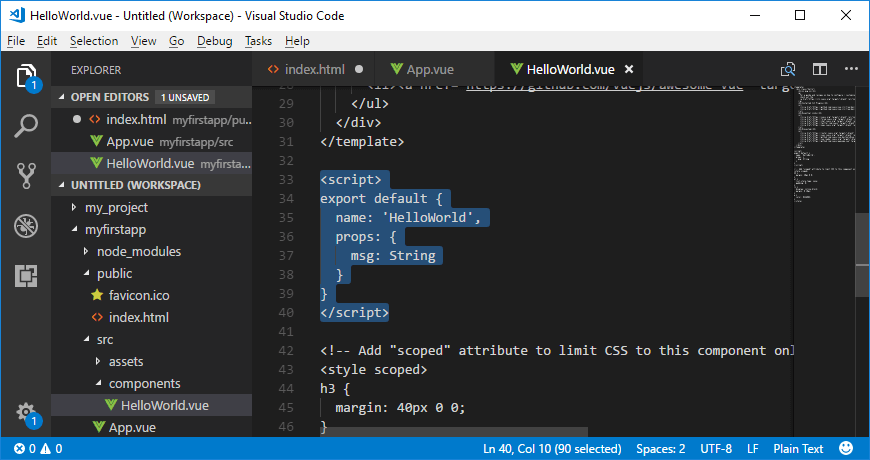
The <script> part: This part is exported with the name 'HelloWorld' and the data which will be displayed in the output is stored in "msg" variable.

  1. <script>  
  2. export default {  
  3.   name: 'HelloWorld',  
  4.   props: {  
  5.     msg: String  
  6.   }  
  7. }  
  8. </script>  

Getting started with Vue.js

This is all about the file and folder structure of a Vue.js app. It is essential to know before start developing apps in Vue.js.


Source by : Javatpoint.com
Read More
  • Share This:  
  •  Facebook
  •  Twitter
  •  Google+
  •  Stumble
  •  Digg
Newer Posts Older Posts Home

Meta

Popular Posts

  • Generate Migrations from an Existing Database With the Migration Generator Package
    Laravel Migration Generator Migration Generator for Laravel is a package by Bennett Treptow to generate migrations from existing database ...
  • Tailwindcss best practices for responsive design
    Tailwind CSS provides powerful utilities for responsive design out of the box. To use it effectively and maintain clean, scalable code, here...
  • Search Through Models with Laravel Searchable
      Laravel Searchable   is a package by   Spatie   to search through models and other sources pragmatically. Using this package, you can get ...
  • Laravel Razorpay Integration | Payment gateway integration Laravel in 30 mins | Laravel Razorpay
    1 Integration of Razorpay with Laravel. In this tutorial, I have taught how to integrate payment gateway with laravel with mini-project. If...
  • Vue.js Render functions
        Vue.js Render functions Vue.js recommends us to use templates to build HTML. Here, we can use the render function as a closer-to-the-co...

Categories

  • Ajax (26)
  • Bootstrap (30)
  • DBMS (42)
  • HTML (12)
  • HTML5 (45)
  • JavaScript (10)
  • Jquery (34)
  • Jquery UI (2)
  • JqueryUI (32)
  • Laravel (1017)
  • Laravel Tutorials (23)
  • Laravel-Question (6)
  • Magento (9)
  • Magento 2 (95)
  • MariaDB (1)
  • MySql Tutorial (2)
  • PHP-Interview-Questions (3)
  • Php Question (13)
  • Python (36)
  • RDBMS (13)
  • SQL Tutorial (79)
  • Vue.js Tutorial (69)
  • Wordpress (150)
  • Wordpress Theme (3)
  • codeigniter (108)
  • oops (4)
  • php (853)

Social Media Links

  • Follow on Twitter
  • Like on Facebook
  • Subscribe on Youtube
  • Follow on Instagram

Pages

  • Home
  • Contact Us
  • Privacy Policy
  • About us

Blog Archive

  • ▼  2026 (3)
    • ▼  07/26 - 08/02 (2)
      • A stormwater pond in Calgary appears filled with P...
      • Inside Kriti Sanon's duplex sea-facing penthouse w...
    • ►  06/28 - 07/05 (1)
  • ►  2025 (4)
    • ►  07/06 - 07/13 (2)
    • ►  06/29 - 07/06 (2)
  • ►  2024 (486)
    • ►  09/15 - 09/22 (30)
    • ►  09/08 - 09/15 (35)
    • ►  09/01 - 09/08 (35)
    • ►  08/11 - 08/18 (2)
    • ►  08/04 - 08/11 (33)
    • ►  07/28 - 08/04 (30)
    • ►  07/07 - 07/14 (11)
    • ►  06/30 - 07/07 (35)
    • ►  06/23 - 06/30 (5)
    • ►  06/02 - 06/09 (31)
    • ►  05/26 - 06/02 (20)
    • ►  05/05 - 05/12 (29)
    • ►  04/28 - 05/05 (26)
    • ►  04/07 - 04/14 (10)
    • ►  03/31 - 04/07 (34)
    • ►  03/24 - 03/31 (10)
    • ►  03/03 - 03/10 (35)
    • ►  02/25 - 03/03 (15)
    • ►  02/04 - 02/11 (22)
    • ►  01/28 - 02/04 (30)
    • ►  01/07 - 01/14 (8)
  • ►  2023 (484)
    • ►  12/31 - 01/07 (35)
    • ►  12/24 - 12/31 (10)
    • ►  12/03 - 12/10 (33)
    • ►  11/26 - 12/03 (20)
    • ►  11/05 - 11/12 (35)
    • ►  10/29 - 11/05 (20)
    • ►  10/22 - 10/29 (9)
    • ►  10/15 - 10/22 (7)
    • ►  10/08 - 10/15 (9)
    • ►  10/01 - 10/08 (10)
    • ►  09/24 - 10/01 (9)
    • ►  09/17 - 09/24 (9)
    • ►  09/10 - 09/17 (7)
    • ►  09/03 - 09/10 (9)
    • ►  08/27 - 09/03 (9)
    • ►  08/20 - 08/27 (8)
    • ►  08/13 - 08/20 (8)
    • ►  08/06 - 08/13 (8)
    • ►  07/30 - 08/06 (8)
    • ►  07/23 - 07/30 (7)
    • ►  07/16 - 07/23 (8)
    • ►  07/09 - 07/16 (7)
    • ►  07/02 - 07/09 (8)
    • ►  06/25 - 07/02 (7)
    • ►  06/18 - 06/25 (7)
    • ►  06/11 - 06/18 (7)
    • ►  06/04 - 06/11 (11)
    • ►  05/28 - 06/04 (7)
    • ►  05/21 - 05/28 (8)
    • ►  05/14 - 05/21 (11)
    • ►  05/07 - 05/14 (7)
    • ►  04/30 - 05/07 (7)
    • ►  04/23 - 04/30 (8)
    • ►  04/16 - 04/23 (9)
    • ►  04/09 - 04/16 (7)
    • ►  04/02 - 04/09 (4)
    • ►  03/26 - 04/02 (21)
    • ►  03/19 - 03/26 (2)
    • ►  03/12 - 03/19 (9)
    • ►  03/05 - 03/12 (26)
    • ►  02/26 - 03/05 (25)
    • ►  01/15 - 01/22 (7)
    • ►  01/08 - 01/15 (1)
  • ►  2022 (1037)
    • ►  12/11 - 12/18 (13)
    • ►  12/04 - 12/11 (1)
    • ►  11/27 - 12/04 (40)
    • ►  11/06 - 11/13 (1)
    • ►  10/16 - 10/23 (13)
    • ►  09/04 - 09/11 (5)
    • ►  08/21 - 08/28 (24)
    • ►  08/14 - 08/21 (24)
    • ►  07/03 - 07/10 (9)
    • ►  06/19 - 06/26 (3)
    • ►  05/29 - 06/05 (3)
    • ►  05/22 - 05/29 (3)
    • ►  05/15 - 05/22 (109)
    • ►  05/01 - 05/08 (7)
    • ►  04/24 - 05/01 (7)
    • ►  04/17 - 04/24 (64)
    • ►  04/10 - 04/17 (115)
    • ►  04/03 - 04/10 (73)
    • ►  03/27 - 04/03 (77)
    • ►  03/13 - 03/20 (2)
    • ►  03/06 - 03/13 (25)
    • ►  02/27 - 03/06 (18)
    • ►  02/20 - 02/27 (153)
    • ►  02/13 - 02/20 (187)
    • ►  01/30 - 02/06 (45)
    • ►  01/23 - 01/30 (15)
    • ►  01/16 - 01/23 (1)
  • ►  2021 (412)
    • ►  10/24 - 10/31 (2)
    • ►  07/25 - 08/01 (1)
    • ►  07/11 - 07/18 (10)
    • ►  06/13 - 06/20 (29)
    • ►  05/23 - 05/30 (1)
    • ►  05/02 - 05/09 (24)
    • ►  04/25 - 05/02 (24)
    • ►  04/18 - 04/25 (112)
    • ►  04/11 - 04/18 (1)
    • ►  04/04 - 04/11 (6)
    • ►  03/28 - 04/04 (86)
    • ►  03/21 - 03/28 (19)
    • ►  03/14 - 03/21 (2)
    • ►  03/07 - 03/14 (10)
    • ►  02/28 - 03/07 (1)
    • ►  02/21 - 02/28 (29)
    • ►  02/14 - 02/21 (13)
    • ►  02/07 - 02/14 (12)
    • ►  01/31 - 02/07 (6)
    • ►  01/17 - 01/24 (2)
    • ►  01/10 - 01/17 (8)
    • ►  01/03 - 01/10 (14)
  • ►  2020 (376)
    • ►  12/27 - 01/03 (37)
    • ►  12/20 - 12/27 (92)
    • ►  12/13 - 12/20 (29)
    • ►  12/06 - 12/13 (37)
    • ►  11/29 - 12/06 (4)
    • ►  11/15 - 11/22 (14)
    • ►  11/08 - 11/15 (8)
    • ►  11/01 - 11/08 (2)
    • ►  10/18 - 10/25 (14)
    • ►  10/11 - 10/18 (16)
    • ►  10/04 - 10/11 (10)
    • ►  09/20 - 09/27 (10)
    • ►  09/06 - 09/13 (19)
    • ►  08/30 - 09/06 (26)
    • ►  08/23 - 08/30 (4)
    • ►  08/16 - 08/23 (2)
    • ►  07/12 - 07/19 (48)
    • ►  05/17 - 05/24 (2)
    • ►  01/05 - 01/12 (2)
  • ►  2019 (74)
    • ►  07/07 - 07/14 (6)
    • ►  06/16 - 06/23 (6)
    • ►  02/10 - 02/17 (17)
    • ►  01/13 - 01/20 (37)
    • ►  01/06 - 01/13 (8)
  • ►  2018 (376)
    • ►  12/30 - 01/06 (24)
    • ►  12/16 - 12/23 (8)
    • ►  12/09 - 12/16 (98)
    • ►  12/02 - 12/09 (16)
    • ►  11/18 - 11/25 (36)
    • ►  11/04 - 11/11 (18)
    • ►  10/28 - 11/04 (10)
    • ►  10/21 - 10/28 (26)
    • ►  10/14 - 10/21 (52)
    • ►  10/07 - 10/14 (4)
    • ►  09/30 - 10/07 (2)
    • ►  09/23 - 09/30 (68)
    • ►  09/16 - 09/23 (4)
    • ►  09/09 - 09/16 (4)
    • ►  08/26 - 09/02 (6)

Data Publish News

Loading...

Al Jazeera – Breaking News, World News and Video from Al Jazeera

Loading...

Laravel News

Loading...

Copyright © CoderFunda | Powered by Blogger
Design by Coderfunda | Blogger Theme by Coderfunda | Distributed By Coderfunda