CoderFunda
  • Home
  • About us
    • Contact Us
    • Disclaimer
    • Privacy Policy
    • About us
  • Home
  • Php
  • HTML
  • CSS
  • JavaScript
    • JavaScript
    • Jquery
    • JqueryUI
    • Stock
  • SQL
  • Vue.Js
  • Python
  • Wordpress
  • C++
    • C++
    • C
  • Laravel
    • Laravel
      • Overview
      • Namespaces
      • Middleware
      • Routing
      • Configuration
      • Application Structure
      • Installation
    • Overview
  • DBMS
    • DBMS
      • PL/SQL
      • SQLite
      • MongoDB
      • Cassandra
      • MySQL
      • Oracle
      • CouchDB
      • Neo4j
      • DB2
      • Quiz
    • Overview
  • Entertainment
    • TV Series Update
    • Movie Review
    • Movie Review
  • More
    • Vue. Js
    • Php Question
    • Php Interview Question
    • Laravel Interview Question
    • SQL Interview Question
    • IAS Interview Question
    • PCS Interview Question
    • Technology
    • Other

24 April, 2021

Beautiful PHP CLI Menus for Laravel Artisan Commands

 Programing Coderfunda     April 24, 2021     Packages, php     No comments   

Beautiful PHP CLI Menus for Laravel Artisan Commands


Nuno Maduro, author of Laravel Zero and Collision (which ships with Laravel 5.6 as a dev dependency) is up to his command line dominance with a new package called nunomaduro/laravel-console-menu.

Check out how beautiful the console menu looks:

Laravel Artisan Command Menu

Laravel Console Menu is a wrapper for php-school/cli-menu made for Artisan commands.

Here’s a quick usage example from the project’s readme:

class MenuCommand extends Command
{
/**
* Execute the console command.
*
* @return void
*/
public function handle()
{
$option = $this->menu('Pizza menu', [
'Freshly baked muffins',
'Freshly baked croissants',
'Turnovers, crumb cake, cinnamon buns, scones',
])->open();

$this->info("You have chosen the option number #$option");
}
}

Here’s how you can change the appearance of the menu with a fluent API:

$this->menu($title, $options)
->setForegroundColour('green')
->setBackgroundColour('black')
->setWidth(200)
->setPadding(10)
->setMargin(5)
->setExitButtonText("Abort")
// remove exit button with
// ->disableDefaultItems()
->setUnselectedMarker('❅')
->setSelectedMarker('✏')
->setTitleSeparator('*-')
->addLineBreak('<3', 2)
->addStaticItem('AREA 2')
->open();

Thanks to Laravel package discovery, all you have to do to start using the Laravel Artisan Commands package is install it via Composer:

composer require nunomaduro/laravel-console-menu

To learn more about the project and complete installation and documentation, check out the GitHub repository. You can also follow @enunomaduro on Twitter to see what he’s up to with Laravel Zero, Collision, and any other number of Laravel things he’s working on!

P.S. We also caught word that he will be doing a new series on YouTube (in English) soon!

Read More
  • Share This:  
  •  Facebook
  •  Twitter
  •  Google+
  •  Stumble
  •  Digg

Under Construction Package

 Programing Coderfunda     April 24, 2021     Packages, php     No comments   


Under Construction Package

This Laravel package by Lars Janssen, allows you to put your application in an “Under Construction” mode and then only users with the correct 4 digit code can access your site.

After you install it usage is pretty simple. Register your secret four digit number:

php artisan code:set 1234

Then, add the middleware to a route you want to restrict:

Route::group(['middleware' => 'under-construction'], function () {
Route::get('/live-site', function() {
echo 'content!';
});
});

This is a pretty cool package for those times when you want to share a site with clients and friends and for times when using a local share is not ideal.

Read More
  • Share This:  
  •  Facebook
  •  Twitter
  •  Google+
  •  Stumble
  •  Digg

Laravel Model Caching Package: Model-caching made easy

 Programing Coderfunda     April 24, 2021     Packages, php     No comments   


Laravel Model Caching Package: Model-caching made easy

he Laravel Model caching is a package by Mike Bronner that adds Model caching to model queries automatically. Here are the main highlight features from the package’s readme:

  • Automatic, self-invalidating relationship (both eager- and lazy-loaded) caching.
  • Automatic, self-invalidating model query caching.
  • Automatic use of cache tags for cache providers that support them (will flush entire cache for providers that don’t).

The readme also outlines the inspiration and reason Mike created the package in the first place:

I created this package in response to a client project that had complex, nested forms with many <select>’s that resulted in over 700 database queries on one page. I needed a package that abstracted the caching process out of the model for me, and one that would let me cache custom queries, as well as cache model relationships. This package is the attempt to address those requirements.

For the best performance, you should use a “taggable” cache provider like Redis or Memcached. With all model queries and relationships cached, you will see a nice performance boost. Your mileage will vary on performance based on your use-case.

Read More
  • Share This:  
  •  Facebook
  •  Twitter
  •  Google+
  •  Stumble
  •  Digg

Add a Check For Pwned Passwords In Your Laravel Form Validation

 Programing Coderfunda     April 24, 2021     Packages, php     No comments   

Add a Check For Pwned Passwords In Your Laravel Form Validation


Have I been pwned? is a service created by Troy Hunt that aims to archive all data breaches and then allow you to check and see if your email or username has been included in any breaches. It’s a super helpful service and with 4,948,721,769, at the time of this writing, pwned accounts included it’s one of the most comprehensive lists around.

To go along with this check for email/username the service also allows you to search passwords and see if they’ve been breached. This recently received a huge upgrade that makes available half a billion passwords and available through an API.

Stephen Rees-Carter has built a Laravel package that hooks into this for form validation so you can now ensure your users aren’t using pwned passwords.

After you install the package, the pwned validator will be available for use directly in your validation rules like this:

'password' => 'pwned',

Another new feature in the version 2 of Pwned Passwords is the ability to see how many times a password has been used. Stephen hooked into this with so you could have a minimum check in place.

For example, password has been pwned 3,303,003 times, however P@ssword! has only been pwned 118 times. If we wanted to block password but not P@ssword!, we can specify the minimum number as 150 like this:

'password' => 'required|string|min:6|pwned:150',

When working with something security will be of the utmost importance and here is how it works:

This uses the ranged search feature of the Pwned Passwords API, which uses k-anonymity to significantly reduce the risk of any information leakage when accessing the API. For most systems, this should be more than secure enough, although you should definitely decide for yourself if it’s suitable for your app.

Read More
  • Share This:  
  •  Facebook
  •  Twitter
  •  Google+
  •  Stumble
  •  Digg

Guzzle Advanced Throttling Middleware and Laravel Package

 Programing Coderfunda     April 24, 2021     Packages, php     No comments   

Guzzle Advanced Throttling Middleware and Laravel Package


Full stack developer Timo Prüße has created a Guzzle middleware that helps you set up advanced API request throttling within your Guzzle handler stack.

Here’s the description from the GitHub repository about what guzzle-advanced-throttle can do for external APIs that you are using that might have rate limits:

A Guzzle middleware that can throttle requests according to (multiple) defined rules. It is also possible to define a caching strategy, e.g. get the response from cache when the rate limit is exceeded or always get a cached value to spare your rate limits.

Guzzle Middlware Package

If you need to use the middleware directly outside of a Laravel project, you configure your rules as follows, which shows how flexible the middleware can be:

use hamburgscleanest\GuzzleAdvancedThrottle\RequestLimitRuleset;

$rules = new RequestLimitRuleset([
[
'host' => 'https://www.google.com',
'max_requests' => 20,
'request_interval' => 1
],
[
'host' => 'https://www.google.com',
'max_requests' => 100,
'request_interval' => 120
]
]);

And here’s how you add the middleware to your handler stack within Guzzle:

$stack = new HandlerStack();
$stack->setHandler(new CurlHandler());
$stack->push((new ThrottleMiddleware($rules))->handle());

// Pass the stack to the client
$client = new Client([
'base_uri' => 'https://www.google.com',
'handler' => $stack
]);

Laravel Package

Timo has a Laravel Wrapper package for this Guzzle middleware, which makes it easy to configure the cache and rules for use within a Laravel application.

You can use the GuzzleThrottle facade in your Laravel projects to get a new Guzzle client instance with the Guzzle rate limit caching Handler stack:

$client = GuzzleThrottle::client([
'base_uri' => 'https://www.google.com'
]);

And here’s what the example configuration looks like from the project’s README:

return [
'cache' => [
// Name of the configured driver in the Laravel cache config file / Also needs to be set when "no-cache" is set! Because it's used for the internal timers
'driver' => 'default',
// Cache strategy: no-cache, cache, force-cache
'strategy' => 'cache',
// TTL in minutes
'ttl' => 900
],
'rules' => [
[
// host (including scheme)
'host' => 'https://www.google.com',
// maximum number of requests in the given interval
'max_requests' => 20,
// interval in seconds till the limit is reset
'request_interval' => 1
],
[
// host (including scheme)
'host' => 'https://www.google.com',
// maximum number of requests in the given interval
'max_requests' => 100,
// interval in seconds till the limit is reset
'request_interval' => 120
]
]
];

Read More
  • Share This:  
  •  Facebook
  •  Twitter
  •  Google+
  •  Stumble
  •  Digg

Laravel Excel 3.0

 Programing Coderfunda     April 24, 2021     Packages, php     No comments   


Laravel Excel 3.0

Laravel Excel is a package by Maatwebsite that makes working with spreadsheets easy. It’s been out since 2013 and just recently released version 3.0 with some important breaking changes.

In their lessons learned post they go through the history of the project and why they have decided to make v3.0 a major breaking change from previous releases:

My goal for Laravel Excel 3.0 is to cater our own needs first and only add convenience methods that we need and would use ourselves, instead of re-inventing the PhpSpreadsheet “wheel”. The less code to solve the problem, the easier it should be to maintain.

The post is worth checking out specifically to look at opensource from the maintainer’s point of view and how it’s easy to let people change your goals to suit them. This quote is so perfect:

Laravel Excel used to be an opinionated PHPExcel but became an un-opinionated Excel for Laravel.

Laravel Excel 3.0 is now released and this version mainly focuses on exports and making it as simple as possible and is a complete break from previous versions. Here are some of the highlights from this release:

  • Easily export collections to Excel
  • Export queries with automatic chunking for better performance
  • Queue exports for better performance
  • Easily export Blade views to Excel

To give you an example of exporting in 3.0, take a look at this quick example taken from their documentation.

First, create an InvoicesExport class:

namespace App\Exports;

class InvoicesExport implements FromCollection
{
public function collection()
{
return Invoice::all();
}
}

Next, from your controller initialize the download:

public function export()
{
return Excel::download(new InvoicesExport, 'invoices.xlsx');
}

Or get fancy and store it to S3:

public function storeExcel()
{
return Excel::store(new InvoicesExport, 'invoices.xlsx', 's3');
}
Read More
  • Share This:  
  •  Facebook
  •  Twitter
  •  Google+
  •  Stumble
  •  Digg

PHPUnit Pretty Result Printer Package

 Programing Coderfunda     April 24, 2021     Packages, php     No comments   

PHPUnit Pretty Result Printer Package


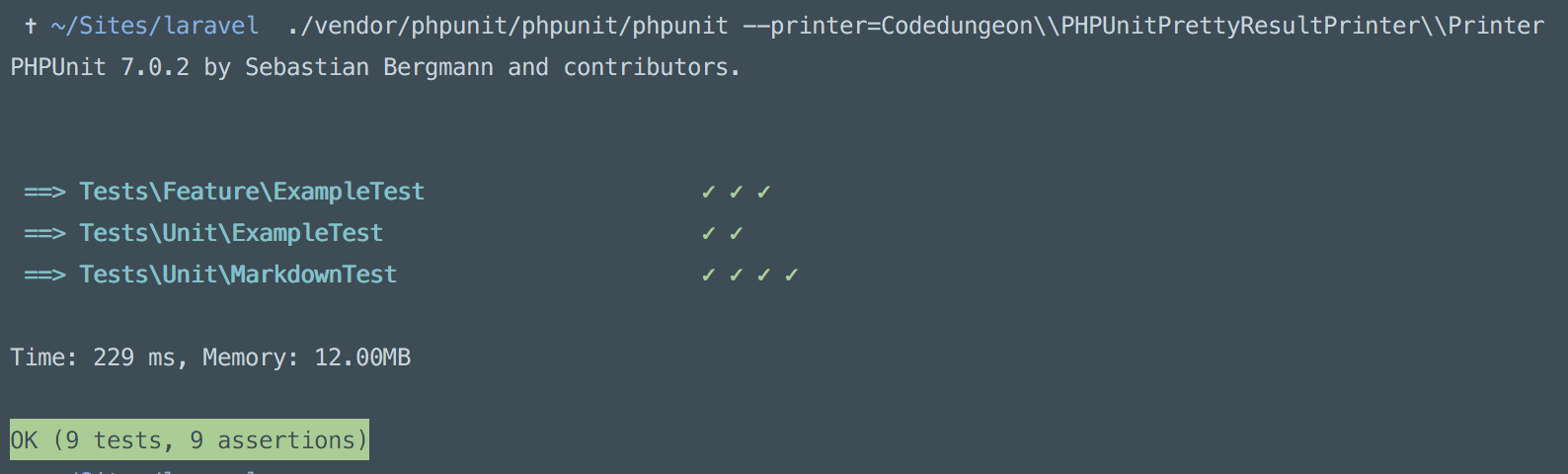
PHPUnit is the workhorse for PHP developers everywhere, it’s a tool we all use and use constantly. Because of this shouldn’t we want the output to visually appealing and look awesome? Mike Erickson thought so and created a Pretty Result Printer package that extends the default PHPUnit Result Printer to make it look better. Here is an example:

If you’d like to try this out installation is simple, just require the package:

composer require --dev codedungeon/phpunit-result-printer

Add this to your PHPUnit configuration XML:

<?xml version="1.0" encoding="UTF-8"?>
<phpunit printerClass="Codedungeon\PHPUnitPrettyResultPrinter\Printer">
// ....
</phpunit>

Or run PHPUnit with the printer argument:

phpunit --printer=Codedungeon\\PHPUnitPrettyResultPrinter\\Printer

I know all design is subjective but I personally love the results of this, especially when you are in a code base with a lot of tests. Check it out on Github for more information and happy testing!

Read More
  • Share This:  
  •  Facebook
  •  Twitter
  •  Google+
  •  Stumble
  •  Digg

23 April, 2021

Laravel Log Enhancer Package

 Programing Coderfunda     April 23, 2021     Packages, php     No comments   

Laravel Log Enhancer Package


The Laravel Log Enhancer is a package for Laravel 5.6 adds additional data to your Laravel logs. Thanks to Laravel’s logging updates that ship with Laravel 5.6, this package utilizes the features to extend logging and add data like request headers, memory usage, and session data, among other data.

You configure this package by adding the LogEnhancer to the tap option in your log channel in config/logging.php:

'production_stack' => [
'driver' => 'stack',
'tap' => [Freshbitsweb\LaravelLogEnhancer\LogEnhancer::class],
'channels' => ['daily', 'slack'],
],

After configuring the logging channel, here’s an example log entry with the additional default information:

[2018-03-30 05:07:23] local.INFO: Testing log {"inputs":[],"session":{"_token":"bZXCPViCzmaULIO6GsdLBbveC1yd3BbyH31zfT8c","_previous":{"url":"http://log-enhancer-demo.test"},"_flash":{"old":[],"new":[]}},"url":"/","ip":"127.0.0.1","http_method":"GET","server":"","referrer":null}

Here are the options (also showing you the additional data that’s enabled by default) you can configure for enhanced logging:

<?php

return [
'log_request_details' => true,
'log_input_data' => true,
'log_request_headers' => false,
'log_session_data' => true,
'log_memory_usage' => false,
'log_git_data' => false,
// You can specify the inputs from the user that should not be logged
'ignore_input_fields' => ['password', 'confirm_password']
];

Take note of the ignore_input_fields to avoid accidentally logging sensitive user data like passwords or credit cards. Take extra care that private data doesn’t end up in your logs!

To customize the log enhancer, run artisan vendor:publish to interactively install the configuration file or run:

php artisan vendor:publish --tag=laravel-log-enhancer-config

You can install this package with composer by run the following command in a Laravel 5.6 project:

composer require freshbitsweb/laravel-log-enhancer

Thanks to Laravel’s automatic package discovery all you need to do is install the package and optionally configure it for your application.

Read More
  • Share This:  
  •  Facebook
  •  Twitter
  •  Google+
  •  Stumble
  •  Digg
Newer Posts Older Posts Home

Meta

Popular Posts

  • Sitaare Zameen Par Full Movie Review
     Here’s a  complete Vue.js tutorial for beginners to master level , structured in a progressive and simple way. It covers all essential topi...
  • Tailwindcss best practices for responsive design
    Tailwind CSS provides powerful utilities for responsive design out of the box. To use it effectively and maintain clean, scalable code, here...
  • Crawl and Index Your Website with Laravel Site Search
      Laravel Site Search   is a package by Spatie to create a full-text search index by crawling your site. You can think of it as a private Go...
  • Tailwind CSS Tutorial (Beginner to Master)
    Here's a simple and complete Tailwind CSS tutorial designed for students and beginners , progressing step-by-step from beginner to mast...
  • Is there a way to write a JavaScript program that enables you to Search Words in Multiple PDF Files?
    I need to create a simple program/system/application using JavaScript that enables a user to search a certain word in multiple scanned PDF f...

Categories

  • Ajax (26)
  • Bootstrap (30)
  • DBMS (42)
  • HTML (12)
  • HTML5 (45)
  • JavaScript (10)
  • Jquery (34)
  • Jquery UI (2)
  • JqueryUI (32)
  • Laravel (1017)
  • Laravel Tutorials (23)
  • Laravel-Question (6)
  • Magento (9)
  • Magento 2 (95)
  • MariaDB (1)
  • MySql Tutorial (2)
  • PHP-Interview-Questions (3)
  • Php Question (13)
  • Python (36)
  • RDBMS (13)
  • SQL Tutorial (79)
  • Vue.js Tutorial (69)
  • Wordpress (150)
  • Wordpress Theme (3)
  • codeigniter (108)
  • oops (4)
  • php (853)

Social Media Links

  • Follow on Twitter
  • Like on Facebook
  • Subscribe on Youtube
  • Follow on Instagram

Pages

  • Home
  • Contact Us
  • Privacy Policy
  • About us

Blog Archive

  • July (4)
  • September (100)
  • August (50)
  • July (56)
  • June (46)
  • May (59)
  • April (50)
  • March (60)
  • February (42)
  • January (53)
  • December (58)
  • November (61)
  • October (39)
  • September (36)
  • August (36)
  • July (34)
  • June (34)
  • May (36)
  • April (29)
  • March (82)
  • February (1)
  • January (8)
  • December (14)
  • November (41)
  • October (13)
  • September (5)
  • August (48)
  • July (9)
  • June (6)
  • May (119)
  • April (259)
  • March (122)
  • February (368)
  • January (33)
  • October (2)
  • July (11)
  • June (29)
  • May (25)
  • April (168)
  • March (93)
  • February (60)
  • January (28)
  • December (195)
  • November (24)
  • October (40)
  • September (55)
  • August (6)
  • July (48)
  • May (2)
  • January (2)
  • July (6)
  • June (6)
  • February (17)
  • January (69)
  • December (122)
  • November (56)
  • October (92)
  • September (76)
  • August (6)

Loading...

Laravel News

Loading...

Copyright © CoderFunda | Powered by Blogger
Design by Coderfunda | Blogger Theme by Coderfunda | Distributed By Coderfunda