CoderFunda
  • Home
  • About us
    • Contact Us
    • Disclaimer
    • Privacy Policy
    • About us
  • Home
  • Php
  • HTML
  • CSS
  • JavaScript
    • JavaScript
    • Jquery
    • JqueryUI
    • Stock
  • SQL
  • Vue.Js
  • Python
  • Wordpress
  • C++
    • C++
    • C
  • Laravel
    • Laravel
      • Overview
      • Namespaces
      • Middleware
      • Routing
      • Configuration
      • Application Structure
      • Installation
    • Overview
  • DBMS
    • DBMS
      • PL/SQL
      • SQLite
      • MongoDB
      • Cassandra
      • MySQL
      • Oracle
      • CouchDB
      • Neo4j
      • DB2
      • Quiz
    • Overview
  • Entertainment
    • TV Series Update
    • Movie Review
    • Movie Review
  • More
    • Vue. Js
    • Php Question
    • Php Interview Question
    • Laravel Interview Question
    • SQL Interview Question
    • IAS Interview Question
    • PCS Interview Question
    • Technology
    • Other

24 April, 2021

Laravel Decomposer – List your dependencies and environment for tech support

 Programing Coderfunda     April 24, 2021     Packages, php     No comments   


Laravel Decomposer – List your dependencies and environment for tech support

When working with Laravel apps, sometimes you encounter problems related to your application environment; a required PHP extension is missing, the storage directory is not writable, or there are Composer packages conflicts.
Of course, you could look for these problems manually or run composer show --tree in the terminal to list the installed dependencies. Laravel Decomposer is a third party package that offers an alternative way to view information about your environment details and installed dependencies through the browser.

Let’s take a look at how this package can be set up and used.

Installation

First, install Laravel Decomposer through Composer:

composer require lubusin/laravel-decomposer

Next, open your config/app.php and add Laravel Decomposer service provider:

'providers' => [
...
Lubusin\Decomposer\DecomposerServiceProvider::class,

Finally, add the following route to routes/web.php file:

Route::group(['middleware' => 'auth'], function () {
Route::get('decompose','\Lubusin\Decomposer\Controllers\DecomposerController@index');
});

NOTE: Because this exposes parts of your environment we recommend you hide it behind authentication.

Now, let’s access that route through the browser. Open http://your-app.dev/decompose and you will see a page like the following:

Laravel Decomposer – List your dependencies and environment for tech support

Overview

The Laravel Decomposer page provides information about your app in three different categories:

Installed Packages and Their Dependencies

In this section, you will see a list of your installed packages and their versions. It also shows you the dependencies of each package.

Laravel Decomposer – List your dependencies and environment for tech support

Laravel Environment

This provides information about your app like whether the debug mode is active, or whether storage and cache directories are writable or not.

Laravel Decomposer – List your dependencies and environment for tech support

Server Environment

This displays server environment details so you know if Laravel framework requirements (PHP version and extensions) are satisfied.

Laravel Decomposer – List your dependencies and environment for tech support

One nice feature of Laravel Decomposer is allowing you to generate a system report which provides Laravel, server environment, and installed packages details in markdown format. It allows you to easily report issues by providing package maintainers the information needed to resolve them.
Laravel Decomposer – List your dependencies and environment for tech support


That’s it; give Laravel Decomposer a try if you are looking for a way to view your environment details and installed dependencies through the browser.

Read More
  • Share This:  
  •  Facebook
  •  Twitter
  •  Google+
  •  Stumble
  •  Digg

Laravel Package To Login As Other Users During Development

 Programing Coderfunda     April 24, 2021     Packages, php     No comments   


Laravel Package To Login As Other Users During Development

For websites with advanced ACL functionality, developers often find themselves manually logging in as a different user, then switching back to their own account. This can prove to be a tedious process, especially when trying to debug a problem.

Digital agency VIA Creative aims to solve that problem with its latest package: Sudo Su.

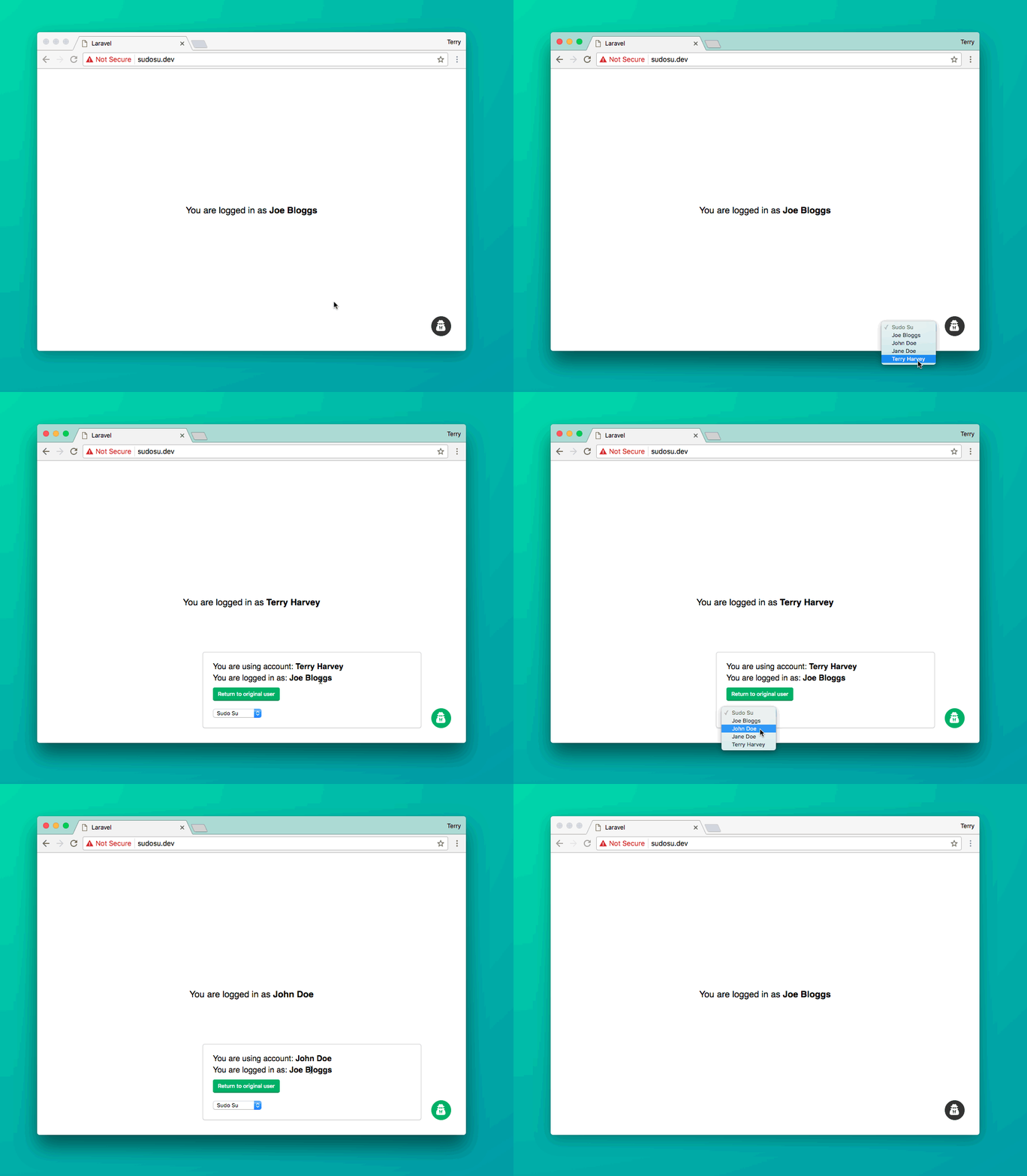
Sudo Su injects a small button into the corner of every page which, when clicked, reveals a list of users.

Selecting a user from this list will automatically log you in as that user, while also preserving the original user ID in the session. This feature allows you to quickly switch back to the original account at the click of a button.

Once you have logged in, the button will turn green to indicate it has been activated. By clicking again, you can immediately revert to your original user account.

Here is an animated Gif showing this in action:

Laravel Package To Login As Other Users During Development

The package can be installed in three easy steps:

1. Pull the package in via Composer.

composer require viacreative/sudo-su

2. Register the service provider.

class AppServiceProvider extends ServiceProvider
{
public function register()
{
if (env('APP_DEBUG')) {
$this->app->register('VIACreative\SudoSu\ServiceProvider');
}
}
}

⚠️ Warning: you should not register the provider globally like usual in the config/app.php file.

3. Publish the package’s config file (the package won’t work without it).

php artisan vendor:publish

⚠️ Warning!

This package can pose a serious security issue if used incorrectly, as anyone will be able to take control of any user’s account. Please ensure the service provider is only registered when the app is in a debug/local environment.

By default, the package will disable itself on any domains that don’t have a TLD of .dev or .local. This is a security measure to reduce the risk of accidentally enabling the package in production. If you have a different TLD in development, you can edit the config option sudosu.allowed_tlds.


Read More
  • Share This:  
  •  Facebook
  •  Twitter
  •  Google+
  •  Stumble
  •  Digg

Laravel OPcache Package

 Programing Coderfunda     April 24, 2021     Packages, php     No comments   


Laravel OPcache Package

PHP, since version 5.5, comes bundled with OPcache which improves performance. Here is how PHP documentation explains it:

OPcache improves PHP performance by storing precompiled script bytecode in shared memory, thereby removing the need for PHP to load and parse scripts on each request.

One of the drawbacks to implementing OPcache is that you have to clear the cache every time you change any PHP code. Because of this, the team at Appstract has created a Laravel Artisan package that gives you quick and easy commands for OPcache. Here are a few usage examples:

Clear OPcache:

php artisan opcache:clear

Show OPcache config:

php artisan opcache:config

Show OPcache status:

php artisan opcache:status

Pre-compile your application code (experimental, test before you deploy):

php artisan opcache:optimize

To learn more about this package check out the GitHub Repository which includes all the instructions and everything you’ll need to get started.

Read More
  • Share This:  
  •  Facebook
  •  Twitter
  •  Google+
  •  Stumble
  •  Digg

LaraCSV – Generate CSV files from your Eloquent models

 Programing Coderfunda     April 24, 2021     Packages, php     No comments   


LaraCSV – Generate CSV files from your Eloquent models


LaraCSV is a new package from Muhammad Usman that allows you to fluently generate CSV files from your Eloquent Models.

Here is a code sample to show how simple it is to get started:

$users = User::get(); // All users
$csvExporter = new \Laracsv\Export();
$csvExporter->build($users, ['email', 'name'])->download();

If you run this a CSV file will be downloaded with the user information:

email,name
eric@example.com,"Eric L. Barnes"
john@example.com,"John Smith"
bob@example.com,"Bob Jones"

Outside of these basic options it also includes some more powerful features:

Changing a field value

$csvExporter = new \Laracsv\Export();
$users = User::get();

// Register the hook before building
$csvExporter->beforeEach(function ($user) {
$user->created_at = date('f', strtotime($user->created_at));
});

$csvExporter->build($users, ['email', 'name' => 'Full Name', 'created_at' => 'Joined']);

Adding a new column

// The notes field doesn't exist so values for this field will be blank by default
$csvExporter->beforeEach(function ($user) {
// Now notes field will have this value
$user->notes = 'Add your notes';
});

$csvExporter->build($users, ['email', 'notes']);

Eloquent Relationships

This will get the product title and the related category’s title, a one to one relationship:

$products = Products::with('category')->get();
$csvExporter->build($products, ['title', 'category.title']);

See the project on Github and check out its readme for documentation and more examples.


Read More
  • Share This:  
  •  Facebook
  •  Twitter
  •  Google+
  •  Stumble
  •  Digg

Interactive Make Command

 Programing Coderfunda     April 24, 2021     Packages, php     No comments   

Interactive Make Command


 Doorman is a Laravel package that allows you to limit access to your Laravel applications by using invite codes.

Once installed you can generate and redeem invites through the Doorman facade and it includes support for Form Request validation.

You can generate new invites like this:

// Generate a single invite
Doorman::generate()->make();

// Generate five invites
Doorman::generate()->times(5)->make();

// Make an invite that expires on a specific date.
$date = Carbon::now('UTC')->addDays(7);
Doorman::generate()->expiresOn($date)->make();

// Make an invite that expires in 14 days.
Doorman::generate()->expiresIn(14)->make();

// Or even bind it to a specific person
Doorman::generate()->for('me@example.org')->make();

Redeeming is just as simple:

Doorman::redeem('ABCDE');
// or
Doorman::redeem('ABCDE', 'me@example.org');

If you’d like to start a private invite system to your app check out the Doorman package on Github.


Read More
  • Share This:  
  •  Facebook
  •  Twitter
  •  Google+
  •  Stumble
  •  Digg

Laravel Language Manager

 Programing Coderfunda     April 24, 2021     Packages, php     No comments   


Laravel Language Manager

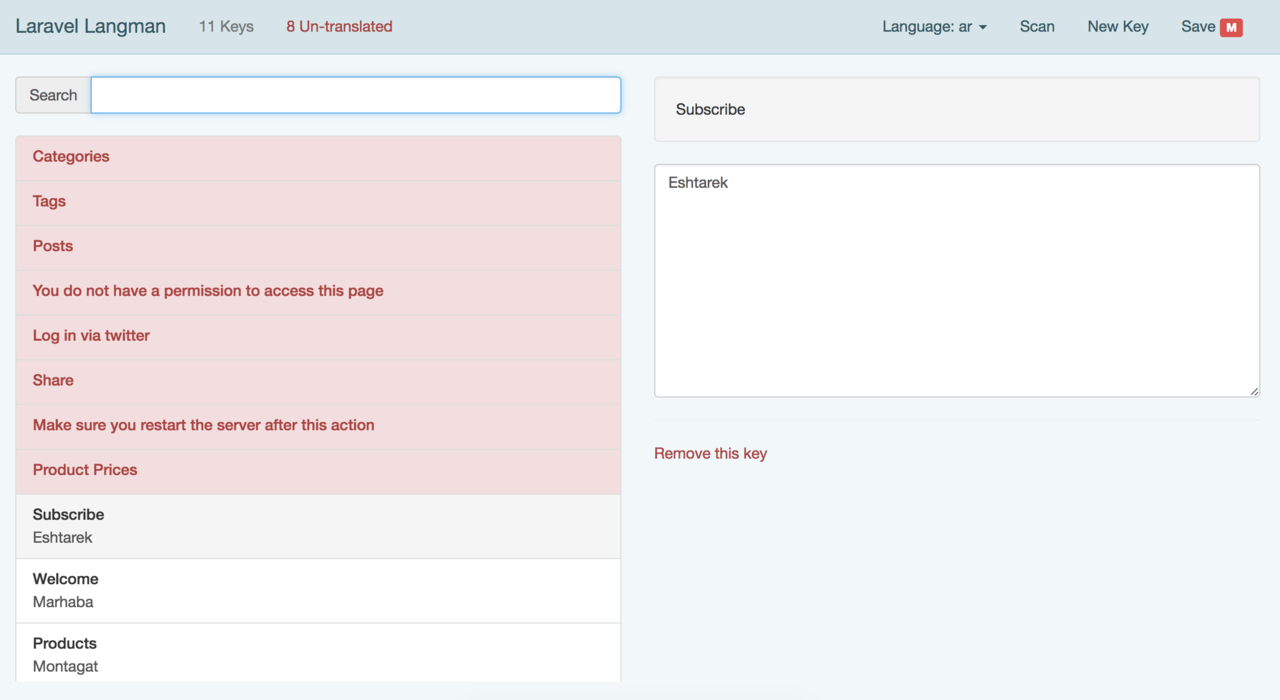
Laravel Langman, created by Mohamed Said, is a GUI for managing your JSON language files in a Laravel project.

Langman is installed just like any traditional package and after you’ve added the Service Provider, just point your browser to http://project.dev/langman, to open the GUI. Using this interface you’ll be able to browse translation keys in different languages, add/remove keys, scan your project files for missing translations, and finally save your changes to the language JSON files.

You can find all the details on the project page and it’s designed to work with the JSON language files that was added in Laravel 5.4. If you are still using the array-based files you can check out Mohamed’s other package that is an Artisan command to manage those.

Read More
  • Share This:  
  •  Facebook
  •  Twitter
  •  Google+
  •  Stumble
  •  Digg

Interactive Make Command

 Programing Coderfunda     April 24, 2021     Packages, php     No comments   

Interactive Make Command


The Interactive Make Command is a new package by Laracademy that allows you to get interactive questions after running php artisan make.

On the project page they have created this animated Gif which gives a great overview of how the package works:

For more information check out the project page on Github and you can install it easily through composer:

composer require laracademy/interactive-make

Then add its service provider to the config/app.php:

Laracademy\Commands\MakeServiceProvider::class,

Finally, run php artisan make to get a list of the commands available.


Read More
  • Share This:  
  •  Facebook
  •  Twitter
  •  Google+
  •  Stumble
  •  Digg

Laravel Sketchpad

 Programing Coderfunda     April 24, 2021     Packages, php     No comments   


Laravel Sketchpad

Sketchpad is a new project, by Dave Stewart, that is an innovative live-coding, development and admin environment for your existing Laravel site.

It provides automatic routing, UI, and tooling around your controllers and methods, allowing you to write and run code without any glue.

Setup and usage are extremely flexible; install per user or per site, use it as a live-coding, live-documentation, admin area, or even your main site.

Take a look at the live video demo to get a better idea how it works:

Some of the uses of this project include:

  • Test out new coding ideas
  • Develop tools and utilities for everyday work
  • Debug applications in the same environment they’re running in
  • Practice with new libraries or APIs with your existing code
  • Give new hires a place to get up to speed with the codebase
  • Double check how that rarely-used function actually works
  • Give all that “secret” or commented-out code somewhere to live
  • Live-document existing features and tools
  • Generate and manage reports

It’s an interesting project, and you can find more information about it on GitHub or take a look at the live demo.

Read More
  • Share This:  
  •  Facebook
  •  Twitter
  •  Google+
  •  Stumble
  •  Digg
Newer Posts Older Posts Home

Meta

Popular Posts

  • Sitaare Zameen Par Full Movie Review
     Here’s a  complete Vue.js tutorial for beginners to master level , structured in a progressive and simple way. It covers all essential topi...
  • Tailwindcss best practices for responsive design
    Tailwind CSS provides powerful utilities for responsive design out of the box. To use it effectively and maintain clean, scalable code, here...
  • Crawl and Index Your Website with Laravel Site Search
      Laravel Site Search   is a package by Spatie to create a full-text search index by crawling your site. You can think of it as a private Go...
  • Tailwind CSS Tutorial (Beginner to Master)
    Here's a simple and complete Tailwind CSS tutorial designed for students and beginners , progressing step-by-step from beginner to mast...
  • Is there a way to write a JavaScript program that enables you to Search Words in Multiple PDF Files?
    I need to create a simple program/system/application using JavaScript that enables a user to search a certain word in multiple scanned PDF f...

Categories

  • Ajax (26)
  • Bootstrap (30)
  • DBMS (42)
  • HTML (12)
  • HTML5 (45)
  • JavaScript (10)
  • Jquery (34)
  • Jquery UI (2)
  • JqueryUI (32)
  • Laravel (1017)
  • Laravel Tutorials (23)
  • Laravel-Question (6)
  • Magento (9)
  • Magento 2 (95)
  • MariaDB (1)
  • MySql Tutorial (2)
  • PHP-Interview-Questions (3)
  • Php Question (13)
  • Python (36)
  • RDBMS (13)
  • SQL Tutorial (79)
  • Vue.js Tutorial (69)
  • Wordpress (150)
  • Wordpress Theme (3)
  • codeigniter (108)
  • oops (4)
  • php (853)

Social Media Links

  • Follow on Twitter
  • Like on Facebook
  • Subscribe on Youtube
  • Follow on Instagram

Pages

  • Home
  • Contact Us
  • Privacy Policy
  • About us

Blog Archive

  • July (4)
  • September (100)
  • August (50)
  • July (56)
  • June (46)
  • May (59)
  • April (50)
  • March (60)
  • February (42)
  • January (53)
  • December (58)
  • November (61)
  • October (39)
  • September (36)
  • August (36)
  • July (34)
  • June (34)
  • May (36)
  • April (29)
  • March (82)
  • February (1)
  • January (8)
  • December (14)
  • November (41)
  • October (13)
  • September (5)
  • August (48)
  • July (9)
  • June (6)
  • May (119)
  • April (259)
  • March (122)
  • February (368)
  • January (33)
  • October (2)
  • July (11)
  • June (29)
  • May (25)
  • April (168)
  • March (93)
  • February (60)
  • January (28)
  • December (195)
  • November (24)
  • October (40)
  • September (55)
  • August (6)
  • July (48)
  • May (2)
  • January (2)
  • July (6)
  • June (6)
  • February (17)
  • January (69)
  • December (122)
  • November (56)
  • October (92)
  • September (76)
  • August (6)

Loading...

Laravel News

Loading...

Copyright © CoderFunda | Powered by Blogger
Design by Coderfunda | Blogger Theme by Coderfunda | Distributed By Coderfunda