CoderFunda
  • Home
  • About us
    • Contact Us
    • Disclaimer
    • Privacy Policy
    • About us
  • Home
  • Php
  • HTML
  • CSS
  • JavaScript
    • JavaScript
    • Jquery
    • JqueryUI
    • Stock
  • SQL
  • Vue.Js
  • Python
  • Wordpress
  • C++
    • C++
    • C
  • Laravel
    • Laravel
      • Overview
      • Namespaces
      • Middleware
      • Routing
      • Configuration
      • Application Structure
      • Installation
    • Overview
  • DBMS
    • DBMS
      • PL/SQL
      • SQLite
      • MongoDB
      • Cassandra
      • MySQL
      • Oracle
      • CouchDB
      • Neo4j
      • DB2
      • Quiz
    • Overview
  • Entertainment
    • TV Series Update
    • Movie Review
    • Movie Review
  • More
    • Vue. Js
    • Php Question
    • Php Interview Question
    • Laravel Interview Question
    • SQL Interview Question
    • IAS Interview Question
    • PCS Interview Question
    • Technology
    • Other

16 March, 2022

Create Tree View and Get category and subcategory in php

 Programing Coderfunda     March 16, 2022     php     No comments   


Create Tree View and Get category and subcategory in php


Create categories table


CREATE TABLE `categories` (
`id` int(11) NOT NULL,
`parent_id` int(11) NOT NULL,
`category_name` varchar(100) DEFAULT NULL,
`is_active` tinyint(1) NOT NULL,
`created_at` datetime NOT NULL
) ENGINE=InnoDB DEFAULT CHARSET=latin1;
Copy

Database connection

Create function dbconnect()


<?php
function dbconnect(){
	$host = "localhost";
	$dbuser = "root";
	$dbpass = "";
	$dbname = "corephp";

	$conn = new mysqli($host, $dbuser, $dbpass, $dbname);

	if($conn->connect_error){
		die("Connection failed: ".$conn->connect_error);
	}
	
	return $conn;
}
?>
Copy

Create function categories

Get all parent categories


<?php 
function categories()
{
	$conn = dbconnect();
	
	$sql = "SELECT * FROM categories WHERE parent_id=0";
	$result = $conn->query($sql);
	
	$categories = array();
	
	while($row = $result->fetch_assoc())
	{
		$categories[] = array(
			'id' => $row['id'],
			'parent_id' => $row['parent_id'],
			'category_name' => $row['category_name'],
			'subcategory' => sub_categories($row['id']),
		);
	}
	
	return $categories;
}
?>
Copy

Create function sub categories

Get all sub categories


function sub_categories($id)
{	
	$conn = dbconnect();
	
	$sql = "SELECT * FROM categories WHERE parent_id=$id";
	$result = $conn->query($sql);
	
	$categories = array();
	
	while($row = $result->fetch_assoc())
	{
		$categories[] = array(
			'id' => $row['id'],
			'parent_id' => $row['parent_id'],
			'category_name' => $row['category_name'],
			'subcategory' => sub_categories($row['id']),
		);
	}
	return $categories;
}
Copy

Create viewsubcat function

Get all sub categories for view


<?php
function viewsubcat($categories)
{
	$html = '<ul class="sub-category">';
	foreach($categories as $category){

		$html .= '<li>'.$category['category_name'].'</li>';
		
		if( ! empty($category['subcategory'])){
			$html .= viewsubcat($category['subcategory']);
		}
	}
	$html .= '</ul>';
	
	return $html;
}
?>
Copy

Create view file

Get all categories and sub categories


<?php $categories = categories(); ?>
<?php foreach($categories as $category){ ?>
		<ul class="category">
			<li><?php echo $category['category_name'] ?></li>
		<?php 
			if( ! empty($category['subcategory'])){
				echo viewsubcat($category['subcategory']);
			} 
		?>
	</ul>
<?php } ?>
Copy

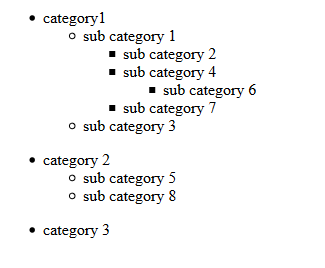
Output

Dynamic MenuTree ViewTree View in PHP
Read More
  • Share This:  
  •  Facebook
  •  Twitter
  •  Google+
  •  Stumble
  •  Digg

10 March, 2022

6 Steps to Install Magento 2.4.2 on XAMPP Windows Using

 Programing Coderfunda     March 10, 2022     Magento 2, MAGENTO TUTORIALS     No comments   


Install Magento 2.4 in Windows 10 using composer and command line with Elasticsearch


In this post we will learn, download the Magento 2.4 using composer and install the Magento 2.4 software from the command line on localhost windows 10.

Prerequisites

Before you continue, you must do the following:

  • System Requirements.
  • Install Composer
  • Get authentication keys for the Magento code repository.

PHP Configuration

Edit php.ini file for increase memory limit and enable required extensions. You can required extensions from this link System Requirements. In xampp server maximum extensions enable.

Also need to change below in php.ini:

Increase memory limit

memory_limit=2G

Enable below extensions by remove semicolon(;) from begining of the line.

extension=intl
extension=soap
extension=sockets
extension=xsl


Get Authentication Keys

Get authentication keys form Magento officeal website after login. After login you can get Access Keys, public key and private key. Public key is username and private key is password. We will use this creadentials for download Magento using composer.

Install Composer

Download compser version 1.10.20 from this link Install Composer. After download composer.phar file paste there you want download Magento.

For example, we can paste composer.phar file in c:\xampp\htdocs

Download Magento 2.4 Using Compser

Now download Magento 2.4 using composer using below command.


php composer.phar create-project --repository-url=https://repo.magento.com/ magento/project-community-edition <project-folder-name>
Copy

For example


C:\xampp\htdocs>php composer.phar create-project --repository-url=https://repo.magento.com/ magento/project-community-edition magento241
Copy

Note: After download magento create zip file for creating next project or reintall magento. Because Magento download via composer is taking 15-20 min.

Install Elasticsearch

Download Elasticsearch according your operating system. In this lesson we have used Windows 10. After download Elasticsearch zip file and paste in C drive and unzip this zip file. And run below command.


c:\elasticsearch-7.10.2>bin\elasticsearch.bat
Copy

After run Elasticsearch, we can check url http://localhost:9200 in browser then we can see output like below.


Create Database

Create database for your project. In this lesson we have created database magento241

Install Magento 2.4 via Command Line

Now we will install Magento 2.4 via command line on windows localhost. If you want to install Magento on localhost then need to changes in file vendor\magento\framework\Image\Adapter\Gd2.php like below code.


private function validateURLScheme(string $filename) : bool
{
	$allowed_schemes = ['ftp', 'ftps', 'http', 'https'];
	$url = parse_url($filename);
	if ($url && isset($url['scheme']) && !in_array($url['scheme'], $allowed_schemes)) {
		return false;
	}

	return true;
}
Copy

Replace with


private function validateURLScheme(string $filename) : bool
{
	$allowed_schemes = ['ftp', 'ftps', 'http', 'https'];
	$url = parse_url($filename);
	if ($url && isset($url['scheme']) && !in_array($url['scheme'], $allowed_schemes) && !file_exists($filename)) {
		return false;
	}

	return true;
}
Copy

After above changes then run below command for install Magento 2.4

php bin/magento setup:install --base-url=http://localhost/magento241/ --db-host=localhost --db-name=magento241 --db-user=root --db-password= --admin-firstname=Amit --admin-lastname=Kumar --admin-email=user@example.com --admin-user=admin --admin-password=admin123 --language=en_US --currency=USD --timezone=America/Chicago --use-rewrites=1 --search-engine=elasticsearch7 --elasticsearch-host=localhost --elasticsearch-port=9200


Fixed Admin Login Issue

After installatin if showing black page on admin login page then need changes in file vendor\magento\framework\View\Element\Template\File\Validator.php like below code.


protected function isPathInDirectories($path, $directories)
{
    if (!is_array($directories)) {
        $directories = (array)$directories;
    }
    $realPath = $this->fileDriver->getRealPath($path);
    foreach ($directories as $directory) {
        if (0 === strpos($realPath, $directory)) {
            return true;
        }
    }
    return false;
}
Copy

Replace with


protected function isPathInDirectories($path, $directories)
{
    if (!is_array($directories)) {
        $directories = (array)$directories;
    }
    $realPath = $this->fileDriver->getRealPath($path);
    foreach ($directories as $directory) {
      // add below line for fix this issue
      $directory = $this->fileDriver->getRealPath($directory);
        if (0 === strpos($realPath, $directory)) {
            return true;
        }
    }
    return false;
}
Copy

Disable TwoFactorAuth Module

In localhost you can disable module Magento_TwoFactorAuth via running below command.


php bin/magento module:disable Magento_TwoFactorAuth
Copy

Fixed Icon and Images Loading Issue

If images and icons is not loading then run below commands


php bin/magento setup:static-content:deploy -f
php bin/magento indexer:reindex
php bin/magento cache:flush
Copy

I hope after follow the above steps, Magento 2.4 installation will be success!!

Read More
  • Share This:  
  •  Facebook
  •  Twitter
  •  Google+
  •  Stumble
  •  Digg

How to get single record from collection in Magento 2

 Programing Coderfunda     March 10, 2022     Magento 2, MAGENTO TUTORIALS     No comments   


How to get single record from collection in Magento 2


Create View.php Controller Action

Rsgitech\News\Controller\Index\View.php


<?php
namespace Rsgitech\News\Controller\Index;

class View extends \Magento\Framework\App\Action\Action
{
	protected $pageFactory;
	
	public function __construct(
		\Magento\Framework\App\Action\Context $context,
		\Magento\Framework\View\Result\PageFactory $pageFactory)
	{
		$this->pageFactory = $pageFactory;
		return parent::__construct($context);
	}

	public function execute()
	{
		return $this->pageFactory->create();
	}
}
?>
Copy

Create ViewNews.php Block

Rsgitech\News\Block\ViewNews.php


<?php
namespace Rsgitech\News\Block;

Class ViewNews extends \Magento\Framework\View\Element\Template
{
	protected $allNewsFactory;
	
	public function __construct(
		\Magento\Framework\View\Element\Template\Context $context,
		\Rsgitech\News\Model\AllnewsFactory $allNewsFactory
	){
		parent::__construct($context);
		$this->allNewsFactory = $allNewsFactory;
	}
	
	public function getNews()
	{
		$id = $this->getRequest()->getParam('id');
		$news = $this->allNewsFactory->create()->load($id);
		
		return $news;
	}
	
	protected function _prepareLayout(){
		
		parent::_prepareLayout();
		
		$news = $this->getNews();
		$this->pageConfig->getTitle()->set($news->getTitle());
		
        return $this;
	}
}
?>
Copy

Create news_index_view.xml Layout

Rsgitech\News\view\frontend\layout\news_index_view.xml


<?xml version="1.0"?>

<page xmlns:xsi="http://www.w3.org/2001/XMLSchema-instance" xsi:noNamespaceSchemaLocation="urn:magento:framework:View/Layout/etc/page_configuration.xsd">
    <head>
		<css src="Rsgitech_News::css/rsgitech.news.css" />
	</head>
	<body>
        <referenceContainer name="content">
            <block class="Rsgitech\News\Block\ViewNews" name="view_news" template="Rsgitech_News::view.phtml" />
        </referenceContainer>
    </body>
</page>
Copy

Create Template view.phtml File

Rsgitech\News\view\frontend\templates\view.phtml


<div class="rsgitech-news">
	<?php $news = $this->getNews() ?>
	<div class="rsg-news-time"><?php echo $news->getCreatedAt() ?></div>
	<div class="rsg-news-desc"><?php echo $news->getDescription() ?></div>
</div>
Copy

Then run below commands


php bin/magento setup:upgrade
php bin/magetno setup:static-content:deploy
php bin/magento cache:flush
Copy

Read More
  • Share This:  
  •  Facebook
  •  Twitter
  •  Google+
  •  Stumble
  •  Digg
Newer Posts Older Posts Home

Meta

Popular Posts

  • Generate Migrations from an Existing Database With the Migration Generator Package
    Laravel Migration Generator Migration Generator for Laravel is a package by Bennett Treptow to generate migrations from existing database ...
  • Tailwindcss best practices for responsive design
    Tailwind CSS provides powerful utilities for responsive design out of the box. To use it effectively and maintain clean, scalable code, here...
  • Search Through Models with Laravel Searchable
      Laravel Searchable   is a package by   Spatie   to search through models and other sources pragmatically. Using this package, you can get ...
  • Laravel Razorpay Integration | Payment gateway integration Laravel in 30 mins | Laravel Razorpay
    1 Integration of Razorpay with Laravel. In this tutorial, I have taught how to integrate payment gateway with laravel with mini-project. If...
  • Vue.js Render functions
        Vue.js Render functions Vue.js recommends us to use templates to build HTML. Here, we can use the render function as a closer-to-the-co...

Categories

  • Ajax (26)
  • Bootstrap (30)
  • DBMS (42)
  • HTML (12)
  • HTML5 (45)
  • JavaScript (10)
  • Jquery (34)
  • Jquery UI (2)
  • JqueryUI (32)
  • Laravel (1017)
  • Laravel Tutorials (23)
  • Laravel-Question (6)
  • Magento (9)
  • Magento 2 (95)
  • MariaDB (1)
  • MySql Tutorial (2)
  • PHP-Interview-Questions (3)
  • Php Question (13)
  • Python (36)
  • RDBMS (13)
  • SQL Tutorial (79)
  • Vue.js Tutorial (69)
  • Wordpress (150)
  • Wordpress Theme (3)
  • codeigniter (108)
  • oops (4)
  • php (853)

Social Media Links

  • Follow on Twitter
  • Like on Facebook
  • Subscribe on Youtube
  • Follow on Instagram

Pages

  • Home
  • Contact Us
  • Privacy Policy
  • About us

Blog Archive

  • ▼  2026 (3)
    • ▼  07/26 - 08/02 (2)
      • A stormwater pond in Calgary appears filled with P...
      • Inside Kriti Sanon's duplex sea-facing penthouse w...
    • ►  06/28 - 07/05 (1)
  • ►  2025 (4)
    • ►  07/06 - 07/13 (2)
    • ►  06/29 - 07/06 (2)
  • ►  2024 (486)
    • ►  09/15 - 09/22 (30)
    • ►  09/08 - 09/15 (35)
    • ►  09/01 - 09/08 (35)
    • ►  08/11 - 08/18 (2)
    • ►  08/04 - 08/11 (33)
    • ►  07/28 - 08/04 (30)
    • ►  07/07 - 07/14 (11)
    • ►  06/30 - 07/07 (35)
    • ►  06/23 - 06/30 (5)
    • ►  06/02 - 06/09 (31)
    • ►  05/26 - 06/02 (20)
    • ►  05/05 - 05/12 (29)
    • ►  04/28 - 05/05 (26)
    • ►  04/07 - 04/14 (10)
    • ►  03/31 - 04/07 (34)
    • ►  03/24 - 03/31 (10)
    • ►  03/03 - 03/10 (35)
    • ►  02/25 - 03/03 (15)
    • ►  02/04 - 02/11 (22)
    • ►  01/28 - 02/04 (30)
    • ►  01/07 - 01/14 (8)
  • ►  2023 (484)
    • ►  12/31 - 01/07 (35)
    • ►  12/24 - 12/31 (10)
    • ►  12/03 - 12/10 (33)
    • ►  11/26 - 12/03 (20)
    • ►  11/05 - 11/12 (35)
    • ►  10/29 - 11/05 (20)
    • ►  10/22 - 10/29 (9)
    • ►  10/15 - 10/22 (7)
    • ►  10/08 - 10/15 (9)
    • ►  10/01 - 10/08 (10)
    • ►  09/24 - 10/01 (9)
    • ►  09/17 - 09/24 (9)
    • ►  09/10 - 09/17 (7)
    • ►  09/03 - 09/10 (9)
    • ►  08/27 - 09/03 (9)
    • ►  08/20 - 08/27 (8)
    • ►  08/13 - 08/20 (8)
    • ►  08/06 - 08/13 (8)
    • ►  07/30 - 08/06 (8)
    • ►  07/23 - 07/30 (7)
    • ►  07/16 - 07/23 (8)
    • ►  07/09 - 07/16 (7)
    • ►  07/02 - 07/09 (8)
    • ►  06/25 - 07/02 (7)
    • ►  06/18 - 06/25 (7)
    • ►  06/11 - 06/18 (7)
    • ►  06/04 - 06/11 (11)
    • ►  05/28 - 06/04 (7)
    • ►  05/21 - 05/28 (8)
    • ►  05/14 - 05/21 (11)
    • ►  05/07 - 05/14 (7)
    • ►  04/30 - 05/07 (7)
    • ►  04/23 - 04/30 (8)
    • ►  04/16 - 04/23 (9)
    • ►  04/09 - 04/16 (7)
    • ►  04/02 - 04/09 (4)
    • ►  03/26 - 04/02 (21)
    • ►  03/19 - 03/26 (2)
    • ►  03/12 - 03/19 (9)
    • ►  03/05 - 03/12 (26)
    • ►  02/26 - 03/05 (25)
    • ►  01/15 - 01/22 (7)
    • ►  01/08 - 01/15 (1)
  • ►  2022 (1037)
    • ►  12/11 - 12/18 (13)
    • ►  12/04 - 12/11 (1)
    • ►  11/27 - 12/04 (40)
    • ►  11/06 - 11/13 (1)
    • ►  10/16 - 10/23 (13)
    • ►  09/04 - 09/11 (5)
    • ►  08/21 - 08/28 (24)
    • ►  08/14 - 08/21 (24)
    • ►  07/03 - 07/10 (9)
    • ►  06/19 - 06/26 (3)
    • ►  05/29 - 06/05 (3)
    • ►  05/22 - 05/29 (3)
    • ►  05/15 - 05/22 (109)
    • ►  05/01 - 05/08 (7)
    • ►  04/24 - 05/01 (7)
    • ►  04/17 - 04/24 (64)
    • ►  04/10 - 04/17 (115)
    • ►  04/03 - 04/10 (73)
    • ►  03/27 - 04/03 (77)
    • ►  03/13 - 03/20 (2)
    • ►  03/06 - 03/13 (25)
    • ►  02/27 - 03/06 (18)
    • ►  02/20 - 02/27 (153)
    • ►  02/13 - 02/20 (187)
    • ►  01/30 - 02/06 (45)
    • ►  01/23 - 01/30 (15)
    • ►  01/16 - 01/23 (1)
  • ►  2021 (412)
    • ►  10/24 - 10/31 (2)
    • ►  07/25 - 08/01 (1)
    • ►  07/11 - 07/18 (10)
    • ►  06/13 - 06/20 (29)
    • ►  05/23 - 05/30 (1)
    • ►  05/02 - 05/09 (24)
    • ►  04/25 - 05/02 (24)
    • ►  04/18 - 04/25 (112)
    • ►  04/11 - 04/18 (1)
    • ►  04/04 - 04/11 (6)
    • ►  03/28 - 04/04 (86)
    • ►  03/21 - 03/28 (19)
    • ►  03/14 - 03/21 (2)
    • ►  03/07 - 03/14 (10)
    • ►  02/28 - 03/07 (1)
    • ►  02/21 - 02/28 (29)
    • ►  02/14 - 02/21 (13)
    • ►  02/07 - 02/14 (12)
    • ►  01/31 - 02/07 (6)
    • ►  01/17 - 01/24 (2)
    • ►  01/10 - 01/17 (8)
    • ►  01/03 - 01/10 (14)
  • ►  2020 (376)
    • ►  12/27 - 01/03 (37)
    • ►  12/20 - 12/27 (92)
    • ►  12/13 - 12/20 (29)
    • ►  12/06 - 12/13 (37)
    • ►  11/29 - 12/06 (4)
    • ►  11/15 - 11/22 (14)
    • ►  11/08 - 11/15 (8)
    • ►  11/01 - 11/08 (2)
    • ►  10/18 - 10/25 (14)
    • ►  10/11 - 10/18 (16)
    • ►  10/04 - 10/11 (10)
    • ►  09/20 - 09/27 (10)
    • ►  09/06 - 09/13 (19)
    • ►  08/30 - 09/06 (26)
    • ►  08/23 - 08/30 (4)
    • ►  08/16 - 08/23 (2)
    • ►  07/12 - 07/19 (48)
    • ►  05/17 - 05/24 (2)
    • ►  01/05 - 01/12 (2)
  • ►  2019 (74)
    • ►  07/07 - 07/14 (6)
    • ►  06/16 - 06/23 (6)
    • ►  02/10 - 02/17 (17)
    • ►  01/13 - 01/20 (37)
    • ►  01/06 - 01/13 (8)
  • ►  2018 (376)
    • ►  12/30 - 01/06 (24)
    • ►  12/16 - 12/23 (8)
    • ►  12/09 - 12/16 (98)
    • ►  12/02 - 12/09 (16)
    • ►  11/18 - 11/25 (36)
    • ►  11/04 - 11/11 (18)
    • ►  10/28 - 11/04 (10)
    • ►  10/21 - 10/28 (26)
    • ►  10/14 - 10/21 (52)
    • ►  10/07 - 10/14 (4)
    • ►  09/30 - 10/07 (2)
    • ►  09/23 - 09/30 (68)
    • ►  09/16 - 09/23 (4)
    • ►  09/09 - 09/16 (4)
    • ►  08/26 - 09/02 (6)

Data Publish News

Loading...

Al Jazeera – Breaking News, World News and Video from Al Jazeera

Loading...

Laravel News

Loading...

Copyright © CoderFunda | Powered by Blogger
Design by Coderfunda | Blogger Theme by Coderfunda | Distributed By Coderfunda