WordPress Interview Questions
A list of top frequently asked WordPress interview questions and answers are given below.
1) What is WordPress?
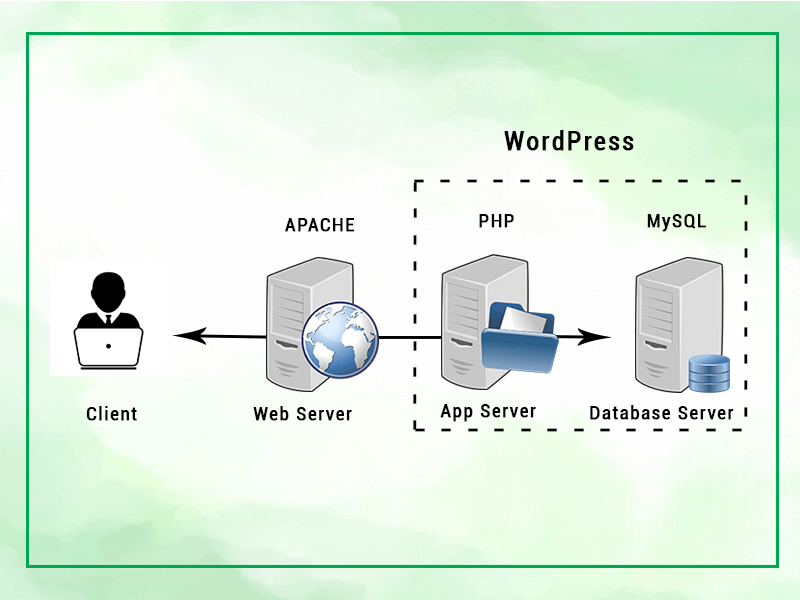
WordPress is an Open Source Content Management System (CMS) and a blogging tool, based on PHP and MySQL. It is free of cost, and you can use it for any personal and commercial website.
Wordpress is the most popular blogging system and used for more than 60 million websites. It is licensed under GPL.
2) Is a website on WordPress safe and secure?
WordPress is safe and secure to operate. You need not worry about anything but, still, it is suggested to update your site with latest WordPress version to avoid hacking.
3) Is there any limitation for WordPress website?
WordPress can be used for e-commerce sites, membership sites, photo galleries and any other type of site you can think. Following are some disadvantages of WordPress:
- Using several plugins can make the website heavy to load and run.
- PHP knowledge is required to make modifications or changes in the WordPress website.
- Sometimes software needs to be updated to keep the WordPress up-to-date with the current browsers and mobile devices. Updating WordPress version leads to loss of data, so a backup copy of the website is required.
- Modifying and formatting the graphic images and tables is difficult.
4) When was the Wordpress released initially? When is it announced as open source software?
WordPress was initially released on 27th May 2003 by Matt Mullenweg and Mike Little. WordPress was announced as open source in October 2009.
5) What is the latest version of WordPress?
The latest version of WordPress is 4.9.8 released on Aug 02, 2018.
6) What are the system requirements for installing WordPress?
Database - MySQL 5.0 +
- Web Server -
- WAMP (Windows)
- LAMP (Linux)
- XAMP (Multi-platform)
- MAMP (Macintosh)
- Operating System - Cross-platform
- Browser Support - IE (Internet Explorer 8+), Firefox, Google Chrome, Safari, Opera
- PHP Compatibility - PHP 5.2+
7) What are the steps should be followed for installing WordPress?
- Download Wordpress from www.wordpress.org
- Extract the downloaded files and upload it on your web server or localhost.
- Open your web browser and navigate to the WordPress file path. Then you see the first screen of the WordPress installer.
- In the next step, please select your preferred language.
- In the next step, you see the information needed for the database before proceeding the WordPress installation.
- enter the details of your Mysql database.
- Wordpress checks the details provided by you and gives you a confirmation screen.
- In the next step, you have to enter the administration details.
- After entering the administration details, click on "Install WordPress" button.
- After successful installation, you get a screen stating "success." You can see the username and the password on this screen.
- Enter your username and password on the next screen and click 'login.'
8) Explain the components shown on the Home screen of WordPress.
- Dashboard menu: This component of home screen provides the navigation menu options for posts, media library, pages, and comments on the left side of the screen.
- Screen options: This component of the home screen display different types of widgets which can be shown or hidden on some screen. This component also contains the checkboxes to show or hide different screen options and also allow to customize sections on the admin screen.
- Welcome: This component of the home page help us to customize WordPress theme by clicking on the customize your site button. Also, the center column provides some of the useful links such as creating a page and view the front end of your web page, creating a blog post. Moreover, the last column contains links to the menus, widgets, settings related to comments.
- Quick Draft: This component of the home screen includes a mini post editor which is used to write, save, and publish the post from the admin dashboard. This include title of the draft followed by some notes about the draft and save it as a draft.
- Wordpress news: This component of home screen displays the latest news regarding the latest software update of WordPress.
- Activity: This component of the home screen shows the latest comments, recent posts published. It also allows you to reply, edit, delete, approve, or disapprove the comments. You can also move comments to spam.
- At a Glance: This component of home screen displays an overview of your blog?s posts, number of published posts and pages, and number of comments.
9) Is it possible to SEO a WordPress site to show it on Google first page?
WordPress has an inbuilt SEO search engine benefit. You can also have an additional plug-in in WordPress to help with SEO and rank on a favorite search engine like Google.
10) What is the difference between character 23 and x23?
Here 23 specifies the octal 23 and x23 determine the hex 23.
11) What are the hooks? Define different types of hooks in WordPress.
Hooks enable users to create WordPress themes or plug-ins with shortcode without changing the original files.
There are two types of hooks:
Action hooks: Action hooks facilitate you to insert an additional code from an outside resource.
Filter hooks: Filter hooks facilitate you to add content or text at the end of the post.
12) What are the most exciting and useful features of WordPress?
These are the features which make WordPress very popular:
- Easy to install and upgrade
- In-built SEO engine
- Free and easy theme selection
- Flexibility
- Multilingual- available in more than 70 languages
- Own data- no unwanted advert on your website
- Flexibility and Easy publishing option
13) Why does WordPress use MySQL?
Following are the reasons to use MySQL with WordPress:
- Open source
- Extremely fast
- A widely available database server
- Supported by low-cost Linux hosting
14) How many tables are there in WordPress by default?
At present version, there are about 11 tables in WordPress by default. You can check the number of tables in WordPress by phpMyAdmin.
- wp_commentmeta
- wp_comments
- wp_links
- wp_options
- wp_postmeta
- wp_posts
- wp_terms
- wp_term_relationships
- wp_term_taxonomy
- wp_usermeta
- wp_users
Note: The number of tables may be changed with successive releases.
15) What is by default prefix of WordPress tables?
The wp_ is by default prefix of WordPress tables.
16) In WordPress, objects are passed by value or by reference.
In WordPress, all objects are passed by value.
17) How can you call a constructor for a parent class?
You can call a constructor for a parent class by this way:
Parents:: constructor($value)
More details...18) In which cases, WordPress is not suitable for a website?
These are some situations when WordPress is not recommended:
- If the client is working on the non-CMS based project.
- For sophisticated and innovative e-commerce sites.
- Sites which require custom scripting solutions.
19) Is WordPress the best CMS or any other CMS is better than WordPress?
No doubt WordPress is good CMS, but Drupal and Joomla are considered better CMS than WordPress to work.
More details...20) Which is considered more secured wordpress.com or wordpress.org?
Wordpress.com is relatively more secure than wordpress.org because they limit the themes and does not allow plugin's installation. However, security depends on the hosting company of your website and also what steps they are taking to prevent the security problems.
21) Explain posts in WordPress.
Posts allow you to write a blog and post it on your site. They are listed in reverse chronological order on the front page of your blog.
22) Explain pages in WordPress.
Pages are different from posts. They are static, and they do not change often. You can add pages containing information about you and your site.
More details...23) What is the difference between WordPress posts and pages?
WordPress posts are content published on a site with an exact date and time. They can be categorized systematically by category and tags. They are listed in reverse chronological order on a website.
WordPress pages are static and do not frequently change such as contact us, about us, privacy policy. They don?t have a date and time published. However, the database stores their published date and time.
More details...24) What is a loop in WordPress?
WordPress uses PHP codes to display posts. This PHP code is known as a loop.
More details...25) How can you disable WordPress comment?
You can disable the WordPress comment on the dashboard. On the panel, under the options- discussion you find "Allow people to post the comment." Uncheck this to disable comment.
More details...26) How can you edit a WordPress comment?
You can edit WordPress comment using the dashboard. From the panel, under the Comments option, select edit to edit a comment.
27) Explain moderate comment in WordPress.
Comments by visitors on a post are not published directly unless the admin provides it. It is called moderation. To change comment moderation setting, select Settings option from the dashboard and check the option "Comment must be manually approved."
More details...28) How to allow only registered users to comment on WordPress?
If you don't want a comment from a new user on your blog, check the option "Users must be registered and logged in to comment" from Discussions under the Settings option.
More details...29) Explain Avatar and Gravatar in WordPress.
Word Avatar is used for a user's profile image in online communications. Gravatar is a web-based service which allows its users to use the Avatar image.
More details...30) How can you handle the situation if your WordPress site is hacked?
You should follow these steps:
- Install security plugins like WP security
- Re-install the latest version of WordPress
- Change password and user-ids for all your users
- Check your themes and plug-ins are up to date
31) Explain Categories in WordPress.
Categories allow a user to divide its content into different sections. Different topics publishing on a single website can be divided into different groups. It tells a reader what a post is about and they can easily find their content from a lot.
More details...32) How to convert a category into the tag?
WordPress provides you an option to change category into tag and tag into a category. For this, you need to install Categories and Tags Converter from Import option under Tools section.
More details...33) Explain Tags in WordPress.
With the help of tags, similar posts can be grouped. Hence, it makes more comfortable for the users to search for a particular post. Tags are similar to categories but still different.
More details...34) Explain the difference between WordPress Categories and Tags.
WordPress Categories are broad-ranging. It helps a user to identify about a blog. It is possible for a post to have more than one category. A post must have at least one category.
WordPress Tags are like categories, but they are used to describe a post more specifically. Tags are not necessary for every post.
35) How many types of users WordPress have?
WordPress user role determines access permission to the users of a WordPress site.
- Administrator: They have full rights over a site.
- Editor: They deal with the content section of a website.
- Author: They only deal with their posts. They can delete their post even after publishing.
- Contributor: A contributor doesn't have the right to publish their post or page. They need to send it to the administrator for review.
- Subscriber: Users who are subscribed to your site can log in and update their profile.
- Follower: They don't have any right. They can only read and comment on your post.
- Viewer: They can only read and comment on a post.
36) What are WordPress Themes?
With the help of a WordPress theme, you can design the layout and appearance of your website in the front-end.
More details...37) How will you select a WordPress theme?
WordPress theme should complement your site. It can be either free or paid. An ideal theme should have qualities like simple, responsive, supports plugins, SEO friendly.
38) What is the difference between custom themes and normal themes?
Custom themes are very straightforward to format. You don't need much technical knowledge to change in the coding part. The custom theme allows for SEO search, but with an SEO plugin available it would not make much difference to a normal theme.
39) What is the difference between free and paid WordPress theme?
Free and premium WordPress themes are different in many ways. With free themes, you have to compromise with the quality as many other sites using the same theme. Problems in premium themes solved more quickly than in free themes.
More details...40) What are WordPress Plugins?
WordPress plugins are programs written in PHP scripting language that extends the functionality or add some new features to a WordPress site. They provide additional functions to an application.
More details...41) When will you not be able to see the plugin menu on a WordPress site?
When a site is hosted on free wrodpress.com, plugin menu will not appear. Also if you don't have an account for the administrator level, you can't see the plugin menu.
More details...42) What are the plugins you can use to create a contact form in WordPress?
You can use a plug-in like Gravity forms or a free plugin contact form 7 to create a contact form in WordPress.
More details...43) Explain the difference between WordPress Themes and Plugins.
A theme is an external effect of a website's presentation and designing. Whereas, a plugin is an interior effect which adds or remove some functions to a site.
You can customize some functionality in themes instead of installing the plugin, but plugins can't replace themes.
More details...44) How to update a WordPress site?
You should always update your site to the latest version of WordPress. Whenever there is a new WordPress version, you receive an update message on your admin screen.
There are two methods to update a WordPress site:
- One-click update
- Manually update
45) How to improve security on a WordPress site.
Security in a WordPress site is essential as these websites are favorite targets for hackers. A site can't be perfectly secured, but one can at least reduce the risk by applying different security measures.
Some of the measures to secure a WordPress site are given below:
- Choosing a host
- Strong password
- 2 step login authentication
- Limit number of login attempts
- Use SSL
- Keep site updated
46) How to reset password in WordPress?
If you forget or lost the password of your account, WordPress gives you an option to reset it through different methods.
There are four ways to reset WordPress password:
- Change password from the dashboard
- Reset password via email
- Manually reset the password through database via PhpMyAdmin
- Using emergency password reset script
47) How to optimize WordPress site performance?
Optimization increases the speed of your site and gives the best possible outcome. It improves the ranking of a website.
There are many tricks to optimize a WordPress site. Some of them are given below:
- Use CDN
- Use a caching plugin
- Use a simple theme/framework
- Keep site updated
- Split long posts into smaller pages
48) What are template tags in WordPress?
Template tags are used within themes to retrieve content from your database. It is a piece of code that tells WordPress to get something from the database.
49) What are meta-tags in WordPress?
Meta-tags are keyword and description used to display website or page information.
50) What are custom fields in WordPress?
Custom fields are also called post meta. It is a feature through which users can add arbitrary information when writing a post. These metadata can be displayed using template tags in WordPress themes.
51) How to take the backup of a WordPress site?
A backup is just the copy of your original site through which you can restore your original site if anything goes wrong. Keeping a backup on the safe side is always advisable.
A site is generally made up of two parts. One is all the installed themes/plugins, media and other is Database which stores all your blogs, posts, and comments. Without files, there is no site, and without the database, there is no data. Hence both of them is important and need a backup.
52) Why is Backup important?
Backup allows you to retrieve your site back if something goes wrong or if your site breaks. There could be many reasons for this like external attack, hacking, server down.
You can lose everything from data to all the posts on your site. The backup is essential to avoid it.
Securing your backup is also an important issue. Make sure to update your plugins and themes regularly or in a specified interval. Use strong Username and Password. Database name should also be uncommon.
53) How to Backup WordPress root Files?
There are many files in your WordPress directory. These files can be downloaded back from wordpress.org site. Some of them can be retrieved back but some can't.
The wp-content directory contains all your installed themes and plugins including all your media files like images, audio or video files which you uploaded on your site. Hence, it makes it personal and unique.
The wp-config.php file consists of your Database and other personnel options which make it also a unique file.
Both the above files can't be replaced by other default files. Hence, they need to be backed up.
54) Explain the steps involved in the backup of the database.
In the database, all your posts, media files, comments, and metadata stored. It also contains user's information and all your plugin settings. All these information are personal and unique. If you lose them, they are gone permanently. Select your WordPress database (which you created during the installation of WordPress).
- Click on Export.
- Quick is used when the database is small. Custom is used when the database is large. Suppose we are choosing Custom.
- After choosing Custom, a table appears. Select all the tables.
- Now come to the Output section.
- Choose SQL from the Format drop-down menu.
- Check "Add drop table." It is useful for overwriting an existing table.
- Check "If not exists." It prevents errors when tables are already there.
- Now click Go. Your data will be saved in your system.
55)Which licensing authority is responsible for WordPress?
WordPress is licensed under GPLv2 (GNU General Public License) which makes it free and open-source software. Each copy of WordPress has a licensed copy with it.
56) What is GNU?
The GNU General Public License is called GPL in short. It has some terms and conditions to copy, modify and distribute the software licensed under its name.
GNU makes sure that any software source-code licensed under it has to make originating source code open and freely available to all its users. Here, freely doesn't mean by cost but it says that it is freely available to users to distribute and modify the code, but they can't impose any restrictions on further distribution, the source code has to be made available.