CoderFunda
  • Home
  • About us
    • Contact Us
    • Disclaimer
    • Privacy Policy
    • About us
  • Home
  • Php
  • HTML
  • CSS
  • JavaScript
    • JavaScript
    • Jquery
    • JqueryUI
    • Stock
  • SQL
  • Vue.Js
  • Python
  • Wordpress
  • C++
    • C++
    • C
  • Laravel
    • Laravel
      • Overview
      • Namespaces
      • Middleware
      • Routing
      • Configuration
      • Application Structure
      • Installation
    • Overview
  • DBMS
    • DBMS
      • PL/SQL
      • SQLite
      • MongoDB
      • Cassandra
      • MySQL
      • Oracle
      • CouchDB
      • Neo4j
      • DB2
      • Quiz
    • Overview
  • Entertainment
    • TV Series Update
    • Movie Review
    • Movie Review
  • More
    • Vue. Js
    • Php Question
    • Php Interview Question
    • Laravel Interview Question
    • SQL Interview Question
    • IAS Interview Question
    • PCS Interview Question
    • Technology
    • Other

02 September, 2020

Laravel 7: Adding where clause to a join condition

 Programing Coderfunda     September 02, 2020     No comments   


if you want add more condition on a join add more $join->on or $join->orOn.


if you want to add a condition to your first select, add it outside join function.
DB::table('users')
->join('contacts', function($join)
{
    $date = date('Y-m-d');
    $join->on('users.id', '=', 'contacts.user_id');
})
->where('contacts.effective_date', '>=', $date);
->get();

 DB::table('users')
            ->join('contacts', function($join)
            {
                $current_date = date('Y-m-d');
                $join->on('users.id', '=', 'contacts.user_id')
                     ->where('contacts.effective_date', '>', $current_date)
             ->where('contacts.effective_date', '=', $current_date);

            })
            ->get();

$current_date = date('Y-m-d');
DB::table('users')
->join('contacts', function($join) use ($current_date)
{
  $join->on('users.id', '=', 'contacts.user_id')
      ->where('contacts.effective_date', '>=', $current_date);
})
->get();
Read More
  • Share This:  
  •  Facebook
  •  Twitter
  •  Google+
  •  Stumble
  •  Digg

Advance Laravel Keep Route Best Way

 Programing Coderfunda     September 02, 2020     Laravel     No comments   

<?php

use Illuminate\Support\Facades\Route;

/*
|--------------------------------------------------------------------------
| Web Routes
|--------------------------------------------------------------------------
|
| Here is where you can register web routes for your application. These
| routes are loaded by the RouteServiceProvider within a group which
| contains the "web" middleware group. Now create something great!
|
*/

/*--------------------- admin panel -------------------------------*/
Route::match(['get','post'],'/','backEnd\AuthController@login');
Route::match(['get','post'],'/admin','backEnd\AuthController@login');
Route::match(['get','post'],'/admin/login','backEnd\AuthController@login');
Route::match(['get','post'],'/admin/forgot-password','backEnd\AuthController@forgot_password');
Route::match(['get','post'],'/admin/set-password/{admin_id}/{security_code}','backEnd\AuthController@set_password');

Route::group(['prefix'=>'admin','middleware'=>'CheckAdminAuth'],function(){
Route::match(['get','post'],'/dashboard','backEnd\DashboardController@index');
Route::get('/logout','backEnd\AuthController@logout');
Route::match(['get','post'],'/profile','backEnd\ProfileController@index');
Route::match(['get','post'],'/change-password','backEnd\ProfileController@change_password');

// user management
Route::get('/restraunts','backEnd\userManagement\RestrauntController@index');
Route::post('/data/restraunts','backEnd\userManagement\RestrauntController@restrauntList');
Route::post('/data/restraunts/category/{rest_id}','backEnd\userManagement\RestrauntController@categoryListData');
Route::match(['get','post'],'/restraunt/add','backEnd\userManagement\RestrauntController@add');
Route::match(['get','post'],'/restraunt/edit/{rest_id}','backEnd\userManagement\RestrauntController@edit');
Route::match(['get','post'],'/restraunt/delete/{rest_id}','backEnd\userManagement\RestrauntController@delete');
Route::match(['get','post'],'/validate/restraunt-email','backEnd\AuthController@check_admin_email');
Route::match(['get','post'],'/validate/restraunt-contact','backEnd\AuthController@check_admin_contact');
Route::get('/restaurant/send-credentials/{admin_id}','backEnd\userManagement\RestrauntController@sendCredentialEmail');

// restaurant category
Route::match(['get','post'],'/restraunt/category/add/{rest_id}','backEnd\userManagement\RestrauntController@categoryData');
Route::match(['get','post'],'/restraunt/category/view/{rest_id}','backEnd\userManagement\RestrauntController@categoryViewList');


// Content management || cusisine
Route::get('/cuisines','backEnd\contentManagement\CuisinesController@index');
Route::post('/data/cuisines','backEnd\contentManagement\CuisinesController@cuisinesList');
Route::match(['get','post'],'/cuisine/add','backEnd\contentManagement\CuisinesController@add');
Route::match(['get','post'],'/cuisine/edit/{cuisine_id}','backEnd\contentManagement\CuisinesController@edit');
//soft-delete of cusisine
Route::match(['get','post'],'/cuisine/delete/{cuisine_id}','backEnd\contentManagement\CuisinesController@delete');

// Content management || categories categories
Route::get('/categories','backEnd\contentManagement\CategoriesController@index');
Route::post('/data/categories','backEnd\contentManagement\CategoriesController@catergoriesList');
Route::match(['get','post'],'/category/add','backEnd\contentManagement\CategoriesController@add');
Route::match(['get','post'],'/category/edit/{category_id}','backEnd\contentManagement\CategoriesController@edit');
//soft-delete of cusisine
Route::match(['get','post'],'/category/delete/{category_id}','backEnd\contentManagement\CategoriesController@delete');


});


define('PROJECT_NAME','QuickTapp');
define('AdminProfileBasePath', 'storage/app/public/profile/admin/');
define('RestrauntsProfileBasePath', 'storage/app/public/profile/restraunt/');
define('ContentCategoriesBasePath', 'storage/app/public/categories/');

define('AdminProfileImgPath', asset('storage/app/public/profile/admin/'));
define('RestrauntsProfileImgPath', asset('storage/app/public/profile/restraunt/'));
define('ContentCategoriesImgPath', asset('storage/app/public/categories/'));
define('DefaultImgPath', asset('storage/app/public/system/default.jpg'));

define('SystemImgPath',asset('storage/app/public/system/'));
define('SYSTEM_IMG_PATH',asset('storage/app/public/system/'));
define('BACKEND_CSS_PATH',asset('public/backEnd/css'));
define('BACKEND_JS_PATH',asset('public/backEnd/js'));
Read More
  • Share This:  
  •  Facebook
  •  Twitter
  •  Google+
  •  Stumble
  •  Digg

Advance Laravel Keep Route Best Way

 Programing Coderfunda     September 02, 2020     Laravel     No comments   

<?php

use Illuminate\Support\Facades\Route;

/*
|--------------------------------------------------------------------------
| Web Routes
|--------------------------------------------------------------------------
|
| Here is where you can register web routes for your application. These
| routes are loaded by the RouteServiceProvider within a group which
| contains the "web" middleware group. Now create something great!
|
*/

/*--------------------- admin panel -------------------------------*/
Route::match(['get','post'],'/','backEnd\AuthController@login');
Route::match(['get','post'],'/admin','backEnd\AuthController@login');
Route::match(['get','post'],'/admin/login','backEnd\AuthController@login');
Route::match(['get','post'],'/admin/forgot-password','backEnd\AuthController@forgot_password');
Route::match(['get','post'],'/admin/set-password/{admin_id}/{security_code}','backEnd\AuthController@set_password');

Route::group(['prefix'=>'admin','middleware'=>'CheckAdminAuth'],function(){
Route::match(['get','post'],'/dashboard','backEnd\DashboardController@index');
Route::get('/logout','backEnd\AuthController@logout');
Route::match(['get','post'],'/profile','backEnd\ProfileController@index');
Route::match(['get','post'],'/change-password','backEnd\ProfileController@change_password');

// user management
Route::get('/restraunts','backEnd\userManagement\RestrauntController@index');
Route::post('/data/restraunts','backEnd\userManagement\RestrauntController@restrauntList');
Route::post('/data/restraunts/category/{rest_id}','backEnd\userManagement\RestrauntController@categoryListData');
Route::match(['get','post'],'/restraunt/add','backEnd\userManagement\RestrauntController@add');
Route::match(['get','post'],'/restraunt/edit/{rest_id}','backEnd\userManagement\RestrauntController@edit');
Route::match(['get','post'],'/restraunt/delete/{rest_id}','backEnd\userManagement\RestrauntController@delete');
Route::match(['get','post'],'/validate/restraunt-email','backEnd\AuthController@check_admin_email');
Route::match(['get','post'],'/validate/restraunt-contact','backEnd\AuthController@check_admin_contact');
Route::get('/restaurant/send-credentials/{admin_id}','backEnd\userManagement\RestrauntController@sendCredentialEmail');

// restaurant category
Route::match(['get','post'],'/restraunt/category/add/{rest_id}','backEnd\userManagement\RestrauntController@categoryData');
Route::match(['get','post'],'/restraunt/category/view/{rest_id}','backEnd\userManagement\RestrauntController@categoryViewList');


// Content management || cusisine
Route::get('/cuisines','backEnd\contentManagement\CuisinesController@index');
Route::post('/data/cuisines','backEnd\contentManagement\CuisinesController@cuisinesList');
Route::match(['get','post'],'/cuisine/add','backEnd\contentManagement\CuisinesController@add');
Route::match(['get','post'],'/cuisine/edit/{cuisine_id}','backEnd\contentManagement\CuisinesController@edit');
//soft-delete of cusisine
Route::match(['get','post'],'/cuisine/delete/{cuisine_id}','backEnd\contentManagement\CuisinesController@delete');

// Content management || categories categories
Route::get('/categories','backEnd\contentManagement\CategoriesController@index');
Route::post('/data/categories','backEnd\contentManagement\CategoriesController@catergoriesList');
Route::match(['get','post'],'/category/add','backEnd\contentManagement\CategoriesController@add');
Route::match(['get','post'],'/category/edit/{category_id}','backEnd\contentManagement\CategoriesController@edit');
//soft-delete of cusisine
Route::match(['get','post'],'/category/delete/{category_id}','backEnd\contentManagement\CategoriesController@delete');


});


define('PROJECT_NAME','QuickTapp');
define('AdminProfileBasePath', 'storage/app/public/profile/admin/');
define('RestrauntsProfileBasePath', 'storage/app/public/profile/restraunt/');
define('ContentCategoriesBasePath', 'storage/app/public/categories/');

define('AdminProfileImgPath', asset('storage/app/public/profile/admin/'));
define('RestrauntsProfileImgPath', asset('storage/app/public/profile/restraunt/'));
define('ContentCategoriesImgPath', asset('storage/app/public/categories/'));
define('DefaultImgPath', asset('storage/app/public/system/default.jpg'));

define('SystemImgPath',asset('storage/app/public/system/'));
define('SYSTEM_IMG_PATH',asset('storage/app/public/system/'));
define('BACKEND_CSS_PATH',asset('public/backEnd/css'));
define('BACKEND_JS_PATH',asset('public/backEnd/js'));
Read More
  • Share This:  
  •  Facebook
  •  Twitter
  •  Google+
  •  Stumble
  •  Digg

Get data array in array laravel

 Programing Coderfunda     September 02, 2020     No comments   

Array
(
    [0] => Array
        (
            [id] => 8
            [restaurant_id] => 5
            [category_id] => 1
            [deleted_at] =>
            [created_at] => 2020-08-31T08:40:58.000000Z
            [updated_at] => 2020-08-31T08:40:58.000000Z
            [categorylistdd] => Array
                (
                    [id] => 1
                    [name] => Burger
                    [image] => Burger.svg
                    [banner] =>
                    [deleted_at] =>
                    [created_at] =>
                    [updated_at] =>
                )

        )

    [1] => Array
        (
            [id] => 9
            [restaurant_id] => 5
            [category_id] => 2
            [deleted_at] =>
            [created_at] => 2020-08-31T08:44:40.000000Z
            [updated_at] => 2020-08-31T08:44:40.000000Z
            [categorylistdd] => Array
                (
                    [id] => 2
                    [name] => Desert
                    [image] => Dessert.svg
                    [banner] =>
                    [deleted_at] =>
                    [created_at] =>
                    [updated_at] =>
                )

        )


Answer : $value['categorylistdd']['name'],

you can use Also pluck in laravel 

Note: by use get->()->plucke(' Desert ')->addArray();
You will get all data of Name, Image , banner check top On
Read More
  • Share This:  
  •  Facebook
  •  Twitter
  •  Google+
  •  Stumble
  •  Digg

Get data array in array laravel

 Programing Coderfunda     September 02, 2020     No comments   

Array
(
    [0] => Array
        (
            [id] => 8
            [restaurant_id] => 5
            [category_id] => 1
            [deleted_at] =>
            [created_at] => 2020-08-31T08:40:58.000000Z
            [updated_at] => 2020-08-31T08:40:58.000000Z
            [categorylistdd] => Array
                (
                    [id] => 1
                    [name] => Burger
                    [image] => Burger.svg
                    [banner] =>
                    [deleted_at] =>
                    [created_at] =>
                    [updated_at] =>
                )

        )

    [1] => Array
        (
            [id] => 9
            [restaurant_id] => 5
            [category_id] => 2
            [deleted_at] =>
            [created_at] => 2020-08-31T08:44:40.000000Z
            [updated_at] => 2020-08-31T08:44:40.000000Z
            [categorylistdd] => Array
                (
                    [id] => 2
                    [name] => Desert
                    [image] => Dessert.svg
                    [banner] =>
                    [deleted_at] =>
                    [created_at] =>
                    [updated_at] =>
                )

        )


Answer : $value['categorylistdd']['name'],

you can use Also pluck in laravel 

Note: by use get->()->plucke(' Desert ')->addArray();
You will get all data of Name, Image , banner check top On
Read More
  • Share This:  
  •  Facebook
  •  Twitter
  •  Google+
  •  Stumble
  •  Digg

Push array or inArray check id

 Programing Coderfunda     September 02, 2020     No comments   

In Controller :: 

$service_names = array();

                if(!empty($services_total)){
                    foreach ($services_total as $value) {
                        $service_names[] .= $value['name'];
                    }
                }
                $service_names = implode(",",$service_names);

In Blade Page :

@foreach($categories as $value)
<input  type="checkbox" name="category_id[]" value="{{$value['id']}}" <?php if(in_array($value['id'], $restaurant_ids)){
echo "checked";
} ?>> {{ ucfirst($value['name']) }}<br>
@endforeach
Read More
  • Share This:  
  •  Facebook
  •  Twitter
  •  Google+
  •  Stumble
  •  Digg

Push array or inArray check id

 Programing Coderfunda     September 02, 2020     No comments   

In Controller :: 

$service_names = array();

                if(!empty($services_total)){
                    foreach ($services_total as $value) {
                        $service_names[] .= $value['name'];
                    }
                }
                $service_names = implode(",",$service_names);

In Blade Page :

@foreach($categories as $value)
<input  type="checkbox" name="category_id[]" value="{{$value['id']}}" <?php if(in_array($value['id'], $restaurant_ids)){
echo "checked";
} ?>> {{ ucfirst($value['name']) }}<br>
@endforeach
Read More
  • Share This:  
  •  Facebook
  •  Twitter
  •  Google+
  •  Stumble
  •  Digg

Regex pattern validation in laravel

 Programing Coderfunda     September 02, 2020     No comments   


Regex pattern validation in laravel


'name' => ['required', 'regex:^[A-ZÀÂÇÉÈÊËÎÏÔÛÙÜŸÑÆŒa-zàâçéèêëîïôûùüÿñæœ0-9_.,()]+$^']


'name' => ['required', 'regex:/^[A-ZÀÂÇÉÈÊËÎÏÔÛÙÜŸÑÆŒa-zàâçéèêëîïôûùüÿñæœ0-9_.,() ]+$/']address:{                minlength:2,                maxlength:500,                regex:/^[a-zA-z,-/_=. #]+$/,            },


protected static $rules = [ 'zip_code' => 'required|regex:/\b\d{5}\b/'];x

Read More
  • Share This:  
  •  Facebook
  •  Twitter
  •  Google+
  •  Stumble
  •  Digg

Regex pattern validation in laravel

 Programing Coderfunda     September 02, 2020     No comments   


Regex pattern validation in laravel


'name' => ['required', 'regex:^[A-ZÀÂÇÉÈÊËÎÏÔÛÙÜŸÑÆŒa-zàâçéèêëîïôûùüÿñæœ0-9_.,()]+$^']


'name' => ['required', 'regex:/^[A-ZÀÂÇÉÈÊËÎÏÔÛÙÜŸÑÆŒa-zàâçéèêëîïôûùüÿñæœ0-9_.,() ]+$/'] address:{                minlength:2,                maxlength:500,                regex:/^[a-zA-z,-/_=. #]+$/,            },


protected static $rules = [ 'zip_code' => 'required|regex:/\b\d{5}\b/'];x

Read More
  • Share This:  
  •  Facebook
  •  Twitter
  •  Google+
  •  Stumble
  •  Digg

Validation Rule in jquery and laravel

 Programing Coderfunda     September 02, 2020     No comments   

Laravel:

$validatedData = $request->validate
    ([
    'name'=> ['required', 'regex:^[A-ZÀÂÇÉÈÊËÎÏÔÛÙÜŸÑÆŒa-zàâçéèêëîïôûùüÿñæœ0-9_.,()]+$^'],
    ]);

Jquery

<script>
    // Basic Example with form
    var form = $("#example-form");
    form.validate({
        errorPlacement: function errorPlacement(error, element) { element.after(error); },
        rules: {
            first_name:{
                required:true,
                minlength:2,
                maxlength:100,
                regex:/^[a-zA-z ]+$/,
            },
            last_name:{
                required:true,
                minlength:2,
                maxlength:100,
                regex:/^[a-zA-z ]+$/,
            },
            email:{
                required:true,
                email:true
            },
            address:{
                minlength:2,
                maxlength:500,
                regex:/^[a-zA-z,-/_=. #]+$/,
            },
            shipping_days:{
                required:true,
                digits:true,
                min:1,
                max:90
            },
            return_days:{
                required:true,
                digits:true,
                min:1,
                max:90
            },
           
        },
        last_name:{
            first_name:{
                regex:"*First name can only consist letters"
            },
            first_name:{
                regex:"*First name can only consist letters"
            }
        }
    });

</script>
Read More
  • Share This:  
  •  Facebook
  •  Twitter
  •  Google+
  •  Stumble
  •  Digg

Validation Rule in jquery and laravel

 Programing Coderfunda     September 02, 2020     No comments   

Laravel:

$validatedData = $request->validate
    ([
    'name'=> ['required', 'regex:^[A-ZÀÂÇÉÈÊËÎÏÔÛÙÜŸÑÆŒa-zàâçéèêëîïôûùüÿñæœ0-9_.,()]+$^'],
    ]);

Jquery

<script>
    // Basic Example with form
    var form = $("#example-form");
    form.validate({
        errorPlacement: function errorPlacement(error, element) { element.after(error); },
        rules: {
            first_name:{
                required:true,
                minlength:2,
                maxlength:100,
                regex:/^[a-zA-z ]+$/,
            },
            last_name:{
                required:true,
                minlength:2,
                maxlength:100,
                regex:/^[a-zA-z ]+$/,
            },
            email:{
                required:true,
                email:true
            },
            address:{
                minlength:2,
                maxlength:500,
                regex:/^[a-zA-z,-/_=. #]+$/,
            },
            shipping_days:{
                required:true,
                digits:true,
                min:1,
                max:90
            },
            return_days:{
                required:true,
                digits:true,
                min:1,
                max:90
            },
           
        },
        last_name:{
            first_name:{
                regex:"*First name can only consist letters"
            },
            first_name:{
                regex:"*First name can only consist letters"
            }
        }
    });

</script>
Read More
  • Share This:  
  •  Facebook
  •  Twitter
  •  Google+
  •  Stumble
  •  Digg

24 August, 2020

start xampp in ubuntu

 Programing Coderfunda     August 24, 2020     No comments   

To start XAMPP run the following and the command will return a list of running services:
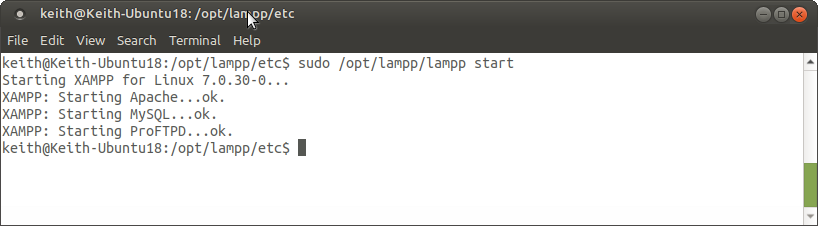
sudo /opt/lampp/lampp start
Start XAMPP
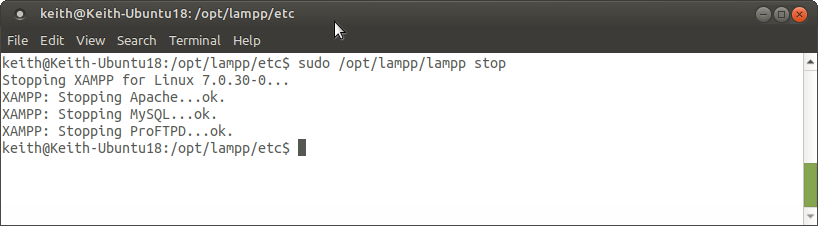
To stop XAMPP run the command below and it will return a list of the stopped services.
sudo /opt/lampp/lampp stop
Stop XAMPP
You can also stop/start/restart individual services by appending “apache”, “mysql” or “ftp” to the end.
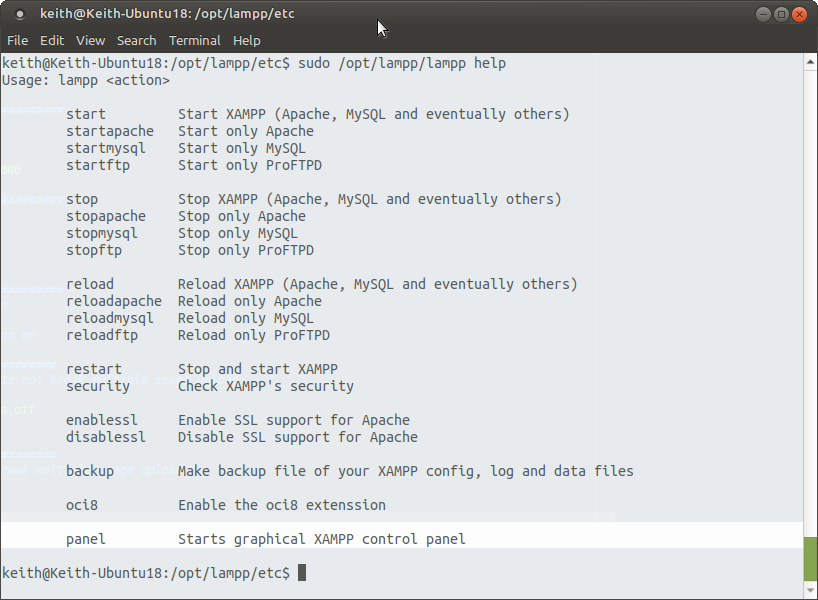
Ubuntu Help screen for XAMPP

Starting

start – Start XAMPP (Apache, MySQL and eventually others)
startapache – Start only Apache
startmysql – Start only MySQL
startftp – Start only ProFTPD

Stopping

stop – Stop XAMPP (Apache, MySQL and eventually others)
stopapache – Stop only Apache
stopmysql – Stop only MySQL
stopftp – Stop only ProFTPD

Restart

reload – Reload XAMPP (Apache, MySQL and eventually others)
reloadapache – Reload only Apache
reloadmysql – Reload only MySQL
reloadftp – Reload only ProFTPD
restart – Stop and start XAMPP

SSL & Security

security – Check XAMPP’s security
enablessl – Enable SSL support for Apache
disablessl – Disable SSL support for Apache

Config

backup – Make backup file of your XAMPP config, log and data files
oci8 – Enable the oci8 extenssion

GUI Panel

panel – Starts graphical XAMPP control panel
Read More
  • Share This:  
  •  Facebook
  •  Twitter
  •  Google+
  •  Stumble
  •  Digg

start xampp in ubuntu

 Programing Coderfunda     August 24, 2020     No comments   

To start XAMPP run the following and the command will return a list of running services:
sudo /opt/lampp/lampp start
Start XAMPP
To stop XAMPP run the command below and it will return a list of the stopped services.
sudo /opt/lampp/lampp stop
Stop XAMPP
You can also stop/start/restart individual services by appending “apache”, “mysql” or “ftp” to the end.
Ubuntu Help screen for XAMPP

Starting

start – Start XAMPP (Apache, MySQL and eventually others)
startapache – Start only Apache
startmysql – Start only MySQL
startftp – Start only ProFTPD

Stopping

stop – Stop XAMPP (Apache, MySQL and eventually others)
stopapache – Stop only Apache
stopmysql – Stop only MySQL
stopftp – Stop only ProFTPD

Restart

reload – Reload XAMPP (Apache, MySQL and eventually others)
reloadapache – Reload only Apache
reloadmysql – Reload only MySQL
reloadftp – Reload only ProFTPD
restart – Stop and start XAMPP

SSL & Security

security – Check XAMPP’s security
enablessl – Enable SSL support for Apache
disablessl – Disable SSL support for Apache

Config

backup – Make backup file of your XAMPP config, log and data files
oci8 – Enable the oci8 extenssion

GUI Panel

panel – Starts graphical XAMPP control panel
Read More
  • Share This:  
  •  Facebook
  •  Twitter
  •  Google+
  •  Stumble
  •  Digg

Running XAMPP on Ubuntu using Terminal

 Programing Coderfunda     August 24, 2020     No comments   

To start XAMPP run the following and the command will return a list of running services:
sudo /opt/lampp/lampp start
Start XAMPP
To stop XAMPP run the command below and it will return a list of the stopped services.
sudo /opt/lampp/lampp stop
Stop XAMPP
You can also stop/start/restart individual services by appending “apache”, “mysql” or “ftp” to the end.
Ubuntu Help screen for XAMPP

Starting

start – Start XAMPP (Apache, MySQL and eventually others)
startapache – Start only Apache
startmysql – Start only MySQL
startftp – Start only ProFTPD

Stopping

stop – Stop XAMPP (Apache, MySQL and eventually others)
stopapache – Stop only Apache
stopmysql – Stop only MySQL
stopftp – Stop only ProFTPD

Restart

reload – Reload XAMPP (Apache, MySQL and eventually others)
reloadapache – Reload only Apache
reloadmysql – Reload only MySQL
reloadftp – Reload only ProFTPD
restart – Stop and start XAMPP

SSL & Security

security – Check XAMPP’s security
enablessl – Enable SSL support for Apache
disablessl – Disable SSL support for Apache

Config

backup – Make backup file of your XAMPP config, log and data files
oci8 – Enable the oci8 extenssion

GUI Panel

panel – Starts graphical XAMPP control panel
Read More
  • Share This:  
  •  Facebook
  •  Twitter
  •  Google+
  •  Stumble
  •  Digg

Running XAMPP on Ubuntu using Terminal

 Programing Coderfunda     August 24, 2020     No comments   

To start XAMPP run the following and the command will return a list of running services:
sudo /opt/lampp/lampp start
Start XAMPP
To stop XAMPP run the command below and it will return a list of the stopped services.
sudo /opt/lampp/lampp stop
Stop XAMPP
You can also stop/start/restart individual services by appending “apache”, “mysql” or “ftp” to the end.
Ubuntu Help screen for XAMPP

Starting

start – Start XAMPP (Apache, MySQL and eventually others)
startapache – Start only Apache
startmysql – Start only MySQL
startftp – Start only ProFTPD

Stopping

stop – Stop XAMPP (Apache, MySQL and eventually others)
stopapache – Stop only Apache
stopmysql – Stop only MySQL
stopftp – Stop only ProFTPD

Restart

reload – Reload XAMPP (Apache, MySQL and eventually others)
reloadapache – Reload only Apache
reloadmysql – Reload only MySQL
reloadftp – Reload only ProFTPD
restart – Stop and start XAMPP

SSL & Security

security – Check XAMPP’s security
enablessl – Enable SSL support for Apache
disablessl – Disable SSL support for Apache

Config

backup – Make backup file of your XAMPP config, log and data files
oci8 – Enable the oci8 extenssion

GUI Panel

panel – Starts graphical XAMPP control panel
Read More
  • Share This:  
  •  Facebook
  •  Twitter
  •  Google+
  •  Stumble
  •  Digg
Newer Posts Older Posts Home

Meta

Popular Posts

  • Generate Migrations from an Existing Database With the Migration Generator Package
    Laravel Migration Generator Migration Generator for Laravel is a package by Bennett Treptow to generate migrations from existing database ...
  • Tailwindcss best practices for responsive design
    Tailwind CSS provides powerful utilities for responsive design out of the box. To use it effectively and maintain clean, scalable code, here...
  • Search Through Models with Laravel Searchable
      Laravel Searchable   is a package by   Spatie   to search through models and other sources pragmatically. Using this package, you can get ...
  • Laravel Razorpay Integration | Payment gateway integration Laravel in 30 mins | Laravel Razorpay
    1 Integration of Razorpay with Laravel. In this tutorial, I have taught how to integrate payment gateway with laravel with mini-project. If...
  • Vue.js Render functions
        Vue.js Render functions Vue.js recommends us to use templates to build HTML. Here, we can use the render function as a closer-to-the-co...

Categories

  • Ajax (26)
  • Bootstrap (30)
  • DBMS (42)
  • HTML (12)
  • HTML5 (45)
  • JavaScript (10)
  • Jquery (34)
  • Jquery UI (2)
  • JqueryUI (32)
  • Laravel (1017)
  • Laravel Tutorials (23)
  • Laravel-Question (6)
  • Magento (9)
  • Magento 2 (95)
  • MariaDB (1)
  • MySql Tutorial (2)
  • PHP-Interview-Questions (3)
  • Php Question (13)
  • Python (36)
  • RDBMS (13)
  • SQL Tutorial (79)
  • Vue.js Tutorial (69)
  • Wordpress (150)
  • Wordpress Theme (3)
  • codeigniter (108)
  • oops (4)
  • php (853)

Social Media Links

  • Follow on Twitter
  • Like on Facebook
  • Subscribe on Youtube
  • Follow on Instagram

Pages

  • Home
  • Contact Us
  • Privacy Policy
  • About us

Blog Archive

  • ▼  2026 (3)
    • ▼  07/26 - 08/02 (2)
      • A stormwater pond in Calgary appears filled with P...
      • Inside Kriti Sanon's duplex sea-facing penthouse w...
    • ►  06/28 - 07/05 (1)
  • ►  2025 (4)
    • ►  07/06 - 07/13 (2)
    • ►  06/29 - 07/06 (2)
  • ►  2024 (486)
    • ►  09/15 - 09/22 (30)
    • ►  09/08 - 09/15 (35)
    • ►  09/01 - 09/08 (35)
    • ►  08/11 - 08/18 (2)
    • ►  08/04 - 08/11 (33)
    • ►  07/28 - 08/04 (30)
    • ►  07/07 - 07/14 (11)
    • ►  06/30 - 07/07 (35)
    • ►  06/23 - 06/30 (5)
    • ►  06/02 - 06/09 (31)
    • ►  05/26 - 06/02 (20)
    • ►  05/05 - 05/12 (29)
    • ►  04/28 - 05/05 (26)
    • ►  04/07 - 04/14 (10)
    • ►  03/31 - 04/07 (34)
    • ►  03/24 - 03/31 (10)
    • ►  03/03 - 03/10 (35)
    • ►  02/25 - 03/03 (15)
    • ►  02/04 - 02/11 (22)
    • ►  01/28 - 02/04 (30)
    • ►  01/07 - 01/14 (8)
  • ►  2023 (484)
    • ►  12/31 - 01/07 (35)
    • ►  12/24 - 12/31 (10)
    • ►  12/03 - 12/10 (33)
    • ►  11/26 - 12/03 (20)
    • ►  11/05 - 11/12 (35)
    • ►  10/29 - 11/05 (20)
    • ►  10/22 - 10/29 (9)
    • ►  10/15 - 10/22 (7)
    • ►  10/08 - 10/15 (9)
    • ►  10/01 - 10/08 (10)
    • ►  09/24 - 10/01 (9)
    • ►  09/17 - 09/24 (9)
    • ►  09/10 - 09/17 (7)
    • ►  09/03 - 09/10 (9)
    • ►  08/27 - 09/03 (9)
    • ►  08/20 - 08/27 (8)
    • ►  08/13 - 08/20 (8)
    • ►  08/06 - 08/13 (8)
    • ►  07/30 - 08/06 (8)
    • ►  07/23 - 07/30 (7)
    • ►  07/16 - 07/23 (8)
    • ►  07/09 - 07/16 (7)
    • ►  07/02 - 07/09 (8)
    • ►  06/25 - 07/02 (7)
    • ►  06/18 - 06/25 (7)
    • ►  06/11 - 06/18 (7)
    • ►  06/04 - 06/11 (11)
    • ►  05/28 - 06/04 (7)
    • ►  05/21 - 05/28 (8)
    • ►  05/14 - 05/21 (11)
    • ►  05/07 - 05/14 (7)
    • ►  04/30 - 05/07 (7)
    • ►  04/23 - 04/30 (8)
    • ►  04/16 - 04/23 (9)
    • ►  04/09 - 04/16 (7)
    • ►  04/02 - 04/09 (4)
    • ►  03/26 - 04/02 (21)
    • ►  03/19 - 03/26 (2)
    • ►  03/12 - 03/19 (9)
    • ►  03/05 - 03/12 (26)
    • ►  02/26 - 03/05 (25)
    • ►  01/15 - 01/22 (7)
    • ►  01/08 - 01/15 (1)
  • ►  2022 (1037)
    • ►  12/11 - 12/18 (13)
    • ►  12/04 - 12/11 (1)
    • ►  11/27 - 12/04 (40)
    • ►  11/06 - 11/13 (1)
    • ►  10/16 - 10/23 (13)
    • ►  09/04 - 09/11 (5)
    • ►  08/21 - 08/28 (24)
    • ►  08/14 - 08/21 (24)
    • ►  07/03 - 07/10 (9)
    • ►  06/19 - 06/26 (3)
    • ►  05/29 - 06/05 (3)
    • ►  05/22 - 05/29 (3)
    • ►  05/15 - 05/22 (109)
    • ►  05/01 - 05/08 (7)
    • ►  04/24 - 05/01 (7)
    • ►  04/17 - 04/24 (64)
    • ►  04/10 - 04/17 (115)
    • ►  04/03 - 04/10 (73)
    • ►  03/27 - 04/03 (77)
    • ►  03/13 - 03/20 (2)
    • ►  03/06 - 03/13 (25)
    • ►  02/27 - 03/06 (18)
    • ►  02/20 - 02/27 (153)
    • ►  02/13 - 02/20 (187)
    • ►  01/30 - 02/06 (45)
    • ►  01/23 - 01/30 (15)
    • ►  01/16 - 01/23 (1)
  • ►  2021 (412)
    • ►  10/24 - 10/31 (2)
    • ►  07/25 - 08/01 (1)
    • ►  07/11 - 07/18 (10)
    • ►  06/13 - 06/20 (29)
    • ►  05/23 - 05/30 (1)
    • ►  05/02 - 05/09 (24)
    • ►  04/25 - 05/02 (24)
    • ►  04/18 - 04/25 (112)
    • ►  04/11 - 04/18 (1)
    • ►  04/04 - 04/11 (6)
    • ►  03/28 - 04/04 (86)
    • ►  03/21 - 03/28 (19)
    • ►  03/14 - 03/21 (2)
    • ►  03/07 - 03/14 (10)
    • ►  02/28 - 03/07 (1)
    • ►  02/21 - 02/28 (29)
    • ►  02/14 - 02/21 (13)
    • ►  02/07 - 02/14 (12)
    • ►  01/31 - 02/07 (6)
    • ►  01/17 - 01/24 (2)
    • ►  01/10 - 01/17 (8)
    • ►  01/03 - 01/10 (14)
  • ►  2020 (376)
    • ►  12/27 - 01/03 (37)
    • ►  12/20 - 12/27 (92)
    • ►  12/13 - 12/20 (29)
    • ►  12/06 - 12/13 (37)
    • ►  11/29 - 12/06 (4)
    • ►  11/15 - 11/22 (14)
    • ►  11/08 - 11/15 (8)
    • ►  11/01 - 11/08 (2)
    • ►  10/18 - 10/25 (14)
    • ►  10/11 - 10/18 (16)
    • ►  10/04 - 10/11 (10)
    • ►  09/20 - 09/27 (10)
    • ►  09/06 - 09/13 (19)
    • ►  08/30 - 09/06 (26)
    • ►  08/23 - 08/30 (4)
    • ►  08/16 - 08/23 (2)
    • ►  07/12 - 07/19 (48)
    • ►  05/17 - 05/24 (2)
    • ►  01/05 - 01/12 (2)
  • ►  2019 (74)
    • ►  07/07 - 07/14 (6)
    • ►  06/16 - 06/23 (6)
    • ►  02/10 - 02/17 (17)
    • ►  01/13 - 01/20 (37)
    • ►  01/06 - 01/13 (8)
  • ►  2018 (376)
    • ►  12/30 - 01/06 (24)
    • ►  12/16 - 12/23 (8)
    • ►  12/09 - 12/16 (98)
    • ►  12/02 - 12/09 (16)
    • ►  11/18 - 11/25 (36)
    • ►  11/04 - 11/11 (18)
    • ►  10/28 - 11/04 (10)
    • ►  10/21 - 10/28 (26)
    • ►  10/14 - 10/21 (52)
    • ►  10/07 - 10/14 (4)
    • ►  09/30 - 10/07 (2)
    • ►  09/23 - 09/30 (68)
    • ►  09/16 - 09/23 (4)
    • ►  09/09 - 09/16 (4)
    • ►  08/26 - 09/02 (6)

Data Publish News

Loading...

Al Jazeera – Breaking News, World News and Video from Al Jazeera

Loading...

Laravel News

Loading...

Copyright © CoderFunda | Powered by Blogger
Design by Coderfunda | Blogger Theme by Coderfunda | Distributed By Coderfunda