CoderFunda
  • Home
  • About us
    • Contact Us
    • Disclaimer
    • Privacy Policy
    • About us
  • Home
  • Php
  • HTML
  • CSS
  • JavaScript
    • JavaScript
    • Jquery
    • JqueryUI
    • Stock
  • SQL
  • Vue.Js
  • Python
  • Wordpress
  • C++
    • C++
    • C
  • Laravel
    • Laravel
      • Overview
      • Namespaces
      • Middleware
      • Routing
      • Configuration
      • Application Structure
      • Installation
    • Overview
  • DBMS
    • DBMS
      • PL/SQL
      • SQLite
      • MongoDB
      • Cassandra
      • MySQL
      • Oracle
      • CouchDB
      • Neo4j
      • DB2
      • Quiz
    • Overview
  • Entertainment
    • TV Series Update
    • Movie Review
    • Movie Review
  • More
    • Vue. Js
    • Php Question
    • Php Interview Question
    • Laravel Interview Question
    • SQL Interview Question
    • IAS Interview Question
    • PCS Interview Question
    • Technology
    • Other

01 February, 2022

How to Add Featured Products to Homepage in Magento 2

 Programing Coderfunda     February 01, 2022     MAGENTO TUTORIALS     No comments   


How to Add Featured Products to Homepage in Magento 2


Magento featured products

Showing featured products on your Magento homepage is a great way to cross-sell and up-sell your products. These highlighted items on the front page help ease customer’s choices. A huge number of products can be overwhelming and cause a visitor to leave your site without buying anything. But with a list of products worth their consideration (new, on sale, best-selling,..), you can effortlessly encourage more sales while saving your customers’ time and efforts in finding desired items.
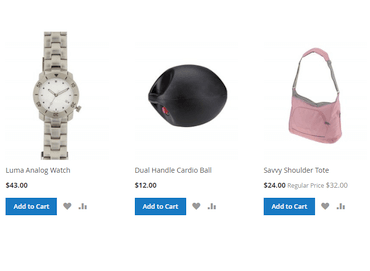
featured products in magento 2

Add featured products in Magento 2

To highlight any products in your Magento 2 frontend, you can add a widget for your featured products and show it on your page using the following steps:

1. Log in to your account, then go to Stores > Attributes > Products.

2. Click on Add New Attribute.
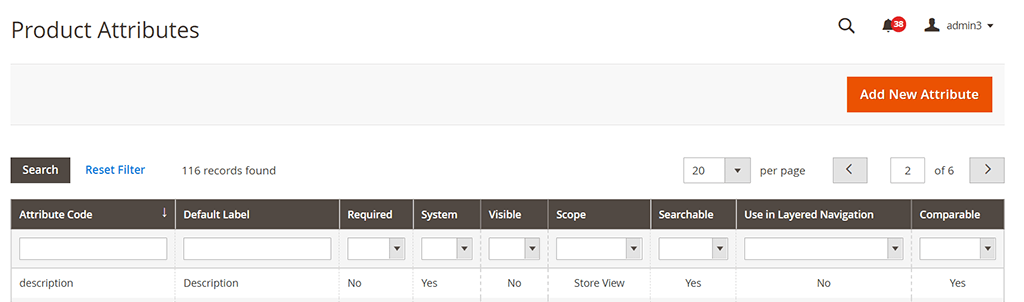
Product attributes

3. Set the Default Label as Featured.
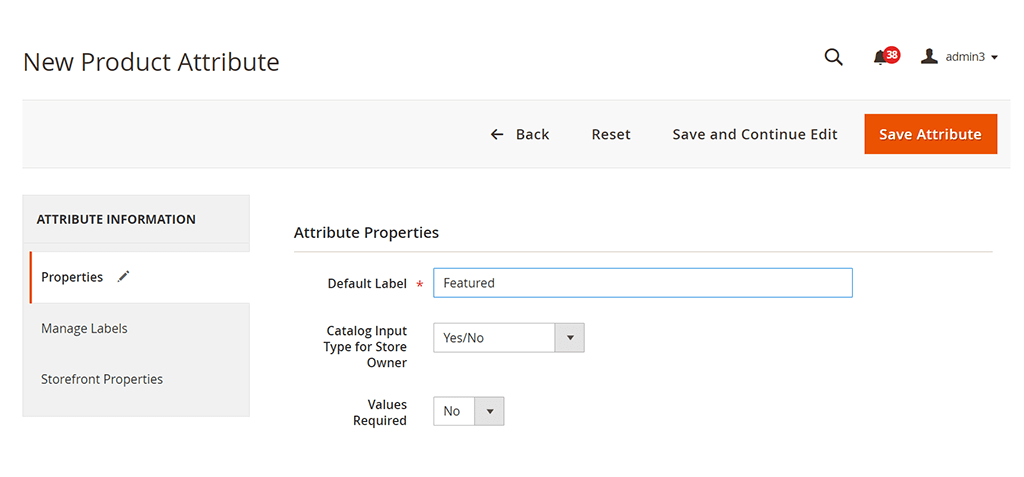
Label attribute as Featured

Then click Save Attribute.

4. From the Admin panel, navigate to Stores > Attributes > Attribute Set.

From the list of attribute sets, choose Default.
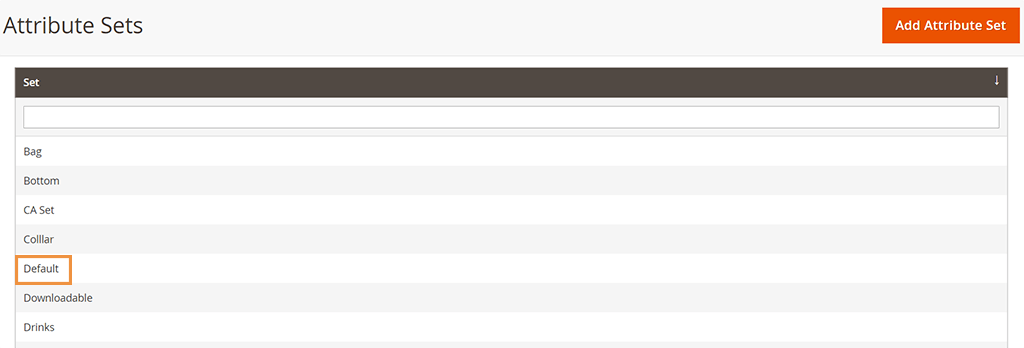
Choose Default Set

5. Find the Featured attribute under Unassigned attributes and move it to Product details in Assigned attributes.
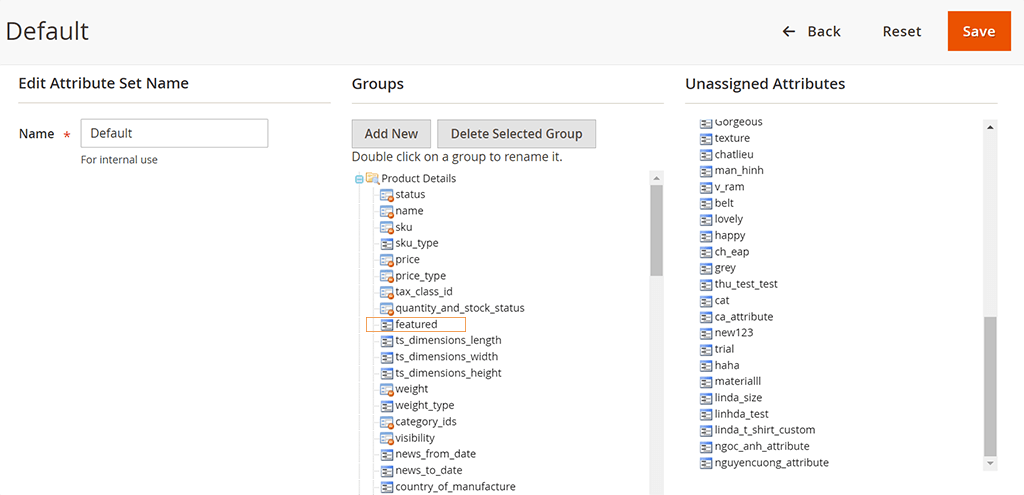
Move Featured to Groups

6. From the Admin panel, choose Catalog > Products.

Choose the product you want to feature, click Edit.

From the dropdown menu of Attribute Set, choose Default.
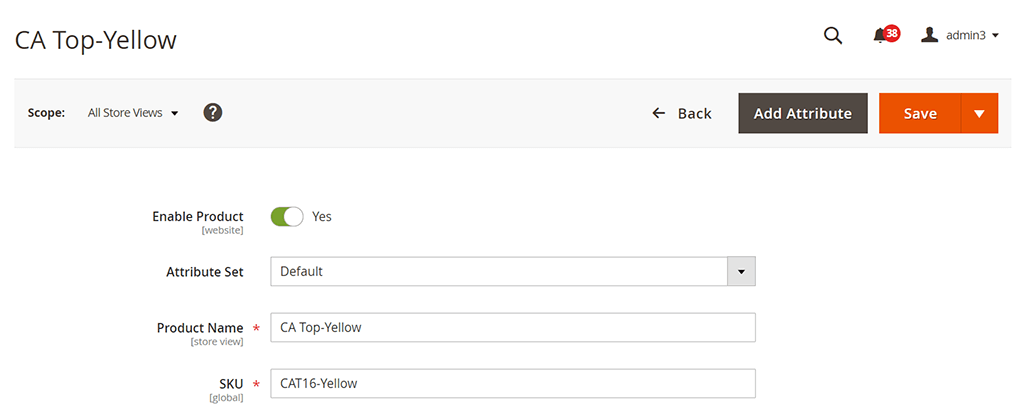
Edit product

7. Then scroll down until you see the Featured filed, set it to Yes.
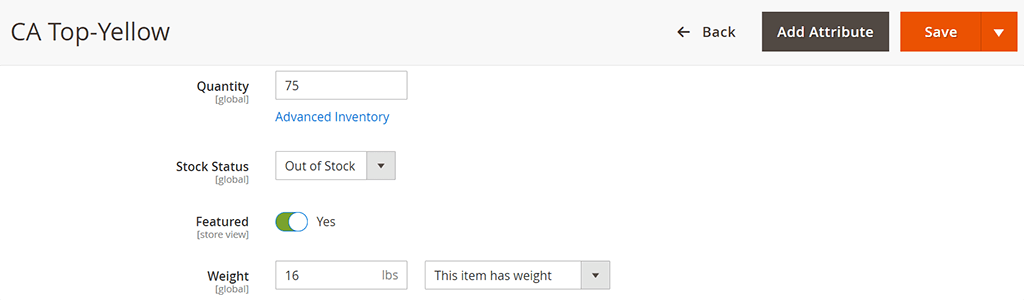
Set Featured to Yes

8. Next, on the Admin sidebar, go to Content. Under Elements, choose Pages.
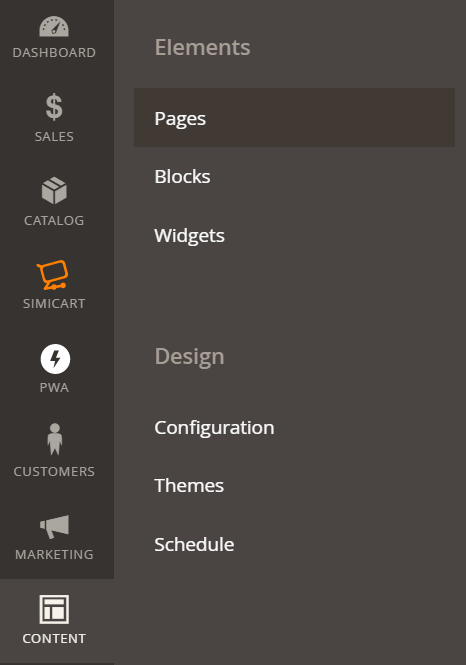
Content to Pages

9.  In the list of your store’s pages, find the page you want to add feature products and click the Select option to Edit your page.
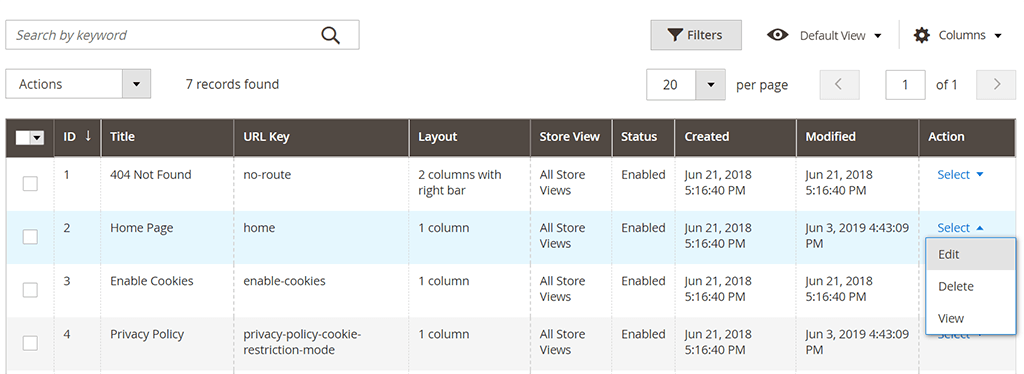
Choose Homepage to edit

10. In the Page Information tab, fill the Page Title, URL Key, Store View and Status of the page.
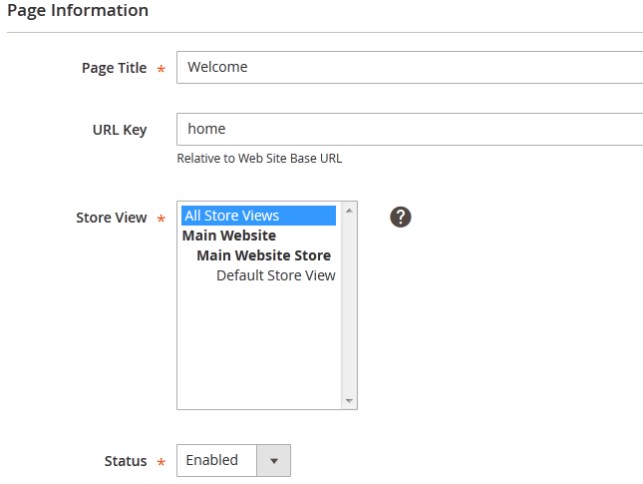
page information magento 2

11. Move to the Content tab and click on the insert widget button to add a widget for this page.
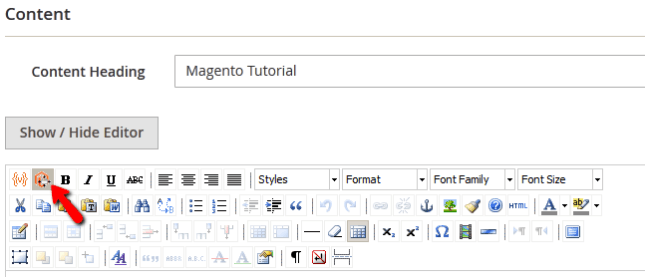
Page content magento 2

12. Now you can choose among available widget types. 

In Widget Type, choose Catalog product List. Configure the Conditions so that products with the Featured attributes are chosen to display.

You can also select the number of products shown as well as how they are displayed.
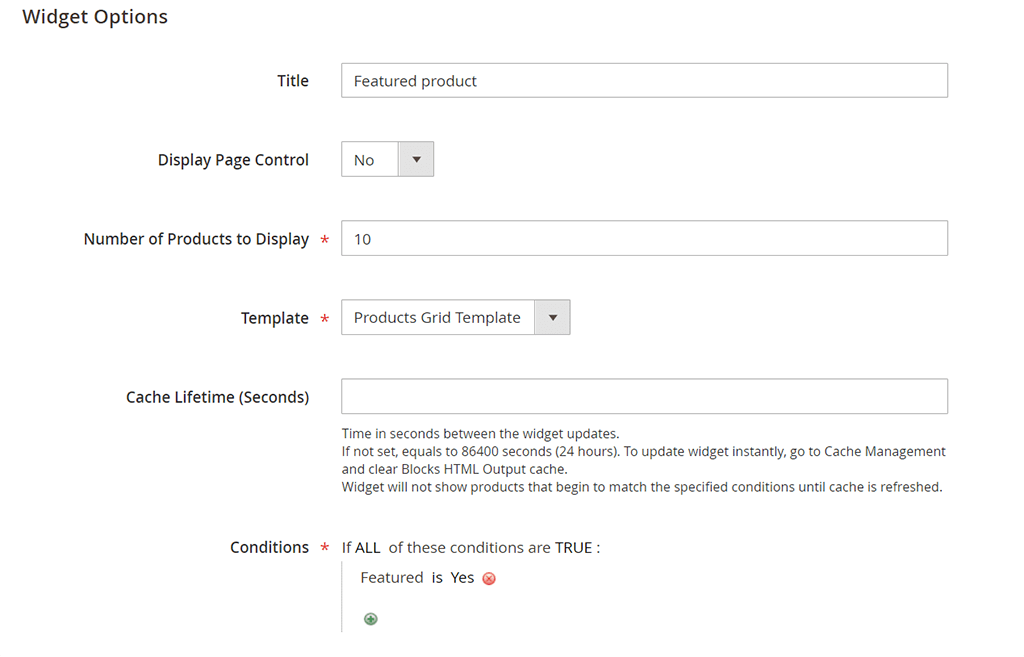
Configure widget

13. When you are done get back to the Content tab by clicking on the Insert Widget button and then click the Save Page button to apply the changes to the page.
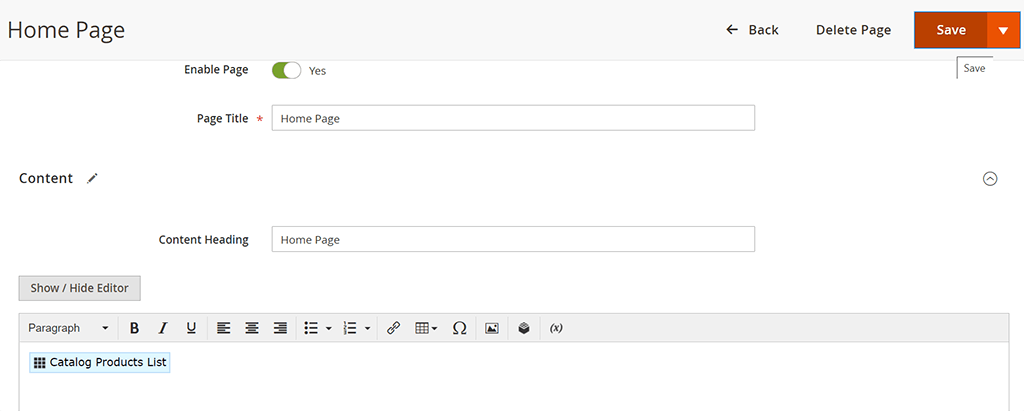
Click Save

Now the list of featured products will be visible to visitors on your store’s home page.


By simicart . com

Read More
  • Share This:  
  •  Facebook
  •  Twitter
  •  Google+
  •  Stumble
  •  Digg

31 January, 2022

Real-Time Chat Package for Laravel

 Programing Coderfunda     January 31, 2022     Laravel, Packages, php     No comments   


Chatify is a Laravel package by Munaf Aqeel Mahdi that adds a complete real-time chat system to your application without any additional code:

Chatify uses Laravel’s Pusher integration for chat functionality, with the following features:

  • Users / groups (soon) chat system.
  • Real-time contacts list updates.
  • Favorites contacts list (Like stories style) and “add to favorites” button.
  • Saved Messages to save your messages online like Telegram messenger app.
  • Search functionality.
  • Contact item’s last message indicator (e.g. You: ….).
  • Real-time user’s active status.
  • Real-time typing indicator.
  • Real-time seen messages indicator.
  • Real-time internet connection status.
  • Upload attachments (Photo/File).
  • Shared photos, delete conversation.. (User’s info right side).
  • Responsive design with all devices.
  • User settings and chat customization : user’s profile photo, dark mode and chat color. with simple and wonderful UI design.
Read More
  • Share This:  
  •  Facebook
  •  Twitter
  •  Google+
  •  Stumble
  •  Digg

Real-Time Chat Package for Laravel

 Programing Coderfunda     January 31, 2022     Laravel, Packages, php     No comments   

Chatify is a Laravel package by Munaf Aqeel Mahdi that adds a complete real-time chat system to your application without any additional code:

Chatify uses Laravel’s Pusher integration for chat functionality, with the following features:

  • Users / groups (soon) chat system.
  • Real-time contacts list updates.
  • Favorites contacts list (Like stories style) and “add to favorites” button.
  • Saved Messages to save your messages online like Telegram messenger app.
  • Search functionality.
  • Contact item’s last message indicator (e.g. You: ….).
  • Real-time user’s active status.
  • Real-time typing indicator.
  • Real-time seen messages indicator.
  • Real-time internet connection status.
  • Upload attachments (Photo/File).
  • Shared photos, delete conversation.. (User’s info right side).
  • Responsive design with all devices.
  • User settings and chat customization : user’s profile photo, dark mode and chat color. with simple and wonderful UI design.
Read More
  • Share This:  
  •  Facebook
  •  Twitter
  •  Google+
  •  Stumble
  •  Digg

PHP Progress Library to Track User Progress

 Programing Coderfunda     January 31, 2022     Laravel, Packages, php     No comments   


Progress is a PHP package to determine steps and progress with an expressive, object-oriented API:

This progress package is a simple way of taking multiple steps in a process and using them to create a progression system. You can define your steps through an expressive and simple API and let this package handle the heavy lifting. The result is a delightfully easy to use steps-and-progression system.

This library works by creating a Progress instance with all the steps required to reach 100% progression. This library then asserts which steps are completed and returns the results:

use Mtownsend\Progress\Progress;
use Mtownsend\Progress\Step;
 
$step1 = (new Step('https://marktownsend.rocks', 'Portfolio Site'))->url();
$step2 = (new Step(4, 'Bronze Level Developer'))->integer()->between(1, 5);
$progress = (new Progress($step1, $step2));
 
var_dump($progress->get());
 
/*
array(7) {
'total_steps' => int(2)
'percentage_complete' => double(100)
'percentage_incomplete' => double(0)
'steps_complete' => int(2)
'steps_incomplete' => int(0)
'complete_step_names' => array(2) {
[0] =>
string(14) "Portfolio Site"
[1] =>
string(22) "Bronze Level Developer"
}
'incomplete_step_names' => array(0) {}
}
*/

As you can see, the above example’s progress is 100% because all of the data passed to each Step passes the assertion test.

Let’s say the user hadn’t reached “Bronze Level Developer” yet; you might dynamically generate the progress instance like so:

use Mtownsend\Progress\Progress;
use Mtownsend\Progress\Step;
 
$developerLevel = 0;
 
$step1 = (new Step('https://marktownsend.rocks', 'Portfolio Site'))->url();
$step2 = (new Step($developerLevel, 'Bronze Level Developer'))->integer()->between(1, 5);
 
$progress = (new Progress($step1, $step2));
 
var_dump($progress->get());
 
/*
array(7) {
'total_steps' => int(2)
'percentage_complete' => double(50)
'percentage_incomplete' => double(50)
'steps_complete' => int(1)
'steps_incomplete' => int(1)
'complete_step_names' => array(1) {
[0] => string(14) "Portfolio Site"
}
'incomplete_step_names' => array(1) {
[1] => string(22) "Bronze Level Developer"
}
}
*/

The Progress library uses beberlei/assert under the hood. Thus you have full access to the assert library methods. In the above example, step two must be an integer between one and five, for example.

You can also assert if an individual step passes using the passed() method:

<br></br>// Failing example
$developerLevel = 0;
 
$step2 = (new Step($developerLevel, 'Bronze Level Developer'))->integer()->between(1, 5);
 
var_dump($step2->passed()); // bool(false)
 
// Passing
$developerLevel = 1;
 
$step2 = (new Step($developerLevel, 'Bronze Level Developer'))->integer()->between(1, 5);
 
var_dump($step2->passed());
// bool(true)

You can learn more about this package, get full installation instructions, and view the source code on GitHub at mtownsend5512/progress.

Read More
  • Share This:  
  •  Facebook
  •  Twitter
  •  Google+
  •  Stumble
  •  Digg

Generate and Extract Random Data with RandoPHP

 Programing Coderfunda     January 31, 2022     Laravel, Packages, php     No comments   

RandoPHP is a package by Roberto Butti that implements random generators (Integer, Char, Byte, etc.) and takes random samples from arrays. This package can be broken down into two distinct types of operations: generating things and drawing from existing arrays.

RandoPHP provides a fluent interface to generate integers, dates, floats, etc. to help you generate data:

// Generate char
Randomize::char()->numeric()->generate();
Randomize::char()->alpha()->generate();
Randomize::char()->alphanumeric()->generate();
 
// Generate a boolean (flip a coin)
Randomize::boolean()->generate();
 
// Generate floats and integers
$randomFloat = Randomize::float()->generate();
$randomFloat = Randomize::float()->min(0)->max(90)->generate();
$randomNumber = Randomize::integer()->min(1)->max(6)->generate();
$randomNumber = Randomize::integer()->range(1,6)->generate();
 
// Generate sequences (i.e. roll the dice 15 times)
$randomRolls = Randomize::sequence()
->min(1)
->max(6)
->count(15)
->generate();
 
// Generate a random sequence of 10 alpha-numeric chars
Randomize::sequence()
->chars()
->alphanumeric()
->count(10)
->generate();

Secondly, you can draw random stuff from existing arrays using the Draw class:

<br></br>$array=["React.js", "Vue.js", "Svelte.js", "Angular.js" , "Alpine.js", "Vanilla js"];
 
// Draw one
$randomJs = Draw::sample($array)->extract();
 
// Draw three
$randomJs = Draw::sample($array)->count(3)->extract();
 
// Draw three, duplicates allowed
$randomJs = Draw::sample($array)
->count(3)
->allowDuplicates()
->extract();

The examples in this article were taken from the project’s readme, which has full details on usage. You can view this package’s source code on GitHub at Hi-Folks/rando-php.


Read More
  • Share This:  
  •  Facebook
  •  Twitter
  •  Google+
  •  Stumble
  •  Digg

Eloquent State Machines

 Programing Coderfunda     January 31, 2022     Laravel, Packages, php     No comments   


Eloquent State Machines is a package by Andrés Santibáñez that simplifies transitioning the states of Eloquent models:

During this weekend, I started working on a new package for @laravelphp to manage state machines for Eloquent models. Had so much fun and learned a ton in the process.

I've just tagged v1.0.0. Enjoy!https://t.co/9CrZ4azz3C

Feedback welcomed!

— Andrés Santibáñez (@asantibanez) December 7, 2020

Transitioning states is accomplished by defining the transition logic in a specific state machine. Here’s an example from the readme of a SalesOrder model:

// 'pending', 'approved', 'declined' or 'processed'
$salesOrder->status;
// null, 'pending', 'completed'
$salesOrder->fulfillment;
 
//
// Transition state examples
//
 
$salesOrder->status()->transitionTo('approved');
$salesOrder->fulfillment()->transitionTo('completed');
 
// Transition with custom properties
$salesOrder->status()->transitionTo('approved', [
'comments' => 'Customer has available credit',
]);

Here are some examples of checking the transition history:

$salesOrder->status()->was('approved');
$salesOrder->status()->timesWas('approved');
$salesOrder->status()->whenWas('approved');
$salesOrder->fulfillment()->snapshowWhen('completed');
$salesOrder->status()->history()->get();

Finally, here’s an example of how a model might consume this package:

namespace App\Models;
 
use App\StateMachines\SalesOrders\StatusStateMachine;
use Asantibanez\LaravelEloquentStateMachines\Traits\HasStateMachines;
use Illuminate\Database\Eloquent\Factories\HasFactory;
use Illuminate\Database\Eloquent\Model;
 
class SalesOrder extends Model
{
use HasFactory;
use HasStateMachines;
 
public $stateMachines = [
'status' => StatusStateMachine::class,
];
}

Andrés has a demo application available to demonstrate how to use this package with Laravel. You can learn more about this package, get full installation instructions, and view the source code on GitHub.

Read More
  • Share This:  
  •  Facebook
  •  Twitter
  •  Google+
  •  Stumble
  •  Digg

Fast Excel Package for Laravel

 Programing Coderfunda     January 31, 2022     Laravel, Packages, php     No comments   


Fast Excel is a Laravel package for importing and exporting spreadsheets. It provides an elegant wrapper around Spout—a PHP package to read and write spreadsheet files in a quick and scalable way. It is capable of processing large files, all while keeping the memory usage low.

Here’s an example of exporting models or collections to an Excel file:

use Rap2hpoutre\FastExcel\FastExcel;
use App\User;
 
// Export a User model
$users = User::all();
(new FastExcel($users))->export('file.xlsx');
 
// Export a collection Collection
$list = collect([
[ 'id' => 1, 'name' => 'Jane' ],
[ 'id' => 2, 'name' => 'John' ],
]);
 
(new FastExcel($list))->export('file.xlsx');

You can use the download method to force the user’s browser to download a file:

return (new FastExcel(User::all()))->download('file.xlsx');

You can also import and export multiple sheets:

$sheets = new SheetCollection([
User::all(),
Project::all()
]);
(new FastExcel($sheets))->export('file.xlsx');
Read More
  • Share This:  
  •  Facebook
  •  Twitter
  •  Google+
  •  Stumble
  •  Digg
Newer Posts Older Posts Home

Meta

Popular Posts

  • Generate Migrations from an Existing Database With the Migration Generator Package
    Laravel Migration Generator Migration Generator for Laravel is a package by Bennett Treptow to generate migrations from existing database ...
  • Tailwindcss best practices for responsive design
    Tailwind CSS provides powerful utilities for responsive design out of the box. To use it effectively and maintain clean, scalable code, here...
  • Search Through Models with Laravel Searchable
      Laravel Searchable   is a package by   Spatie   to search through models and other sources pragmatically. Using this package, you can get ...
  • Laravel Razorpay Integration | Payment gateway integration Laravel in 30 mins | Laravel Razorpay
    1 Integration of Razorpay with Laravel. In this tutorial, I have taught how to integrate payment gateway with laravel with mini-project. If...
  • Vue.js Render functions
        Vue.js Render functions Vue.js recommends us to use templates to build HTML. Here, we can use the render function as a closer-to-the-co...

Categories

  • Ajax (26)
  • Bootstrap (30)
  • DBMS (42)
  • HTML (12)
  • HTML5 (45)
  • JavaScript (10)
  • Jquery (34)
  • Jquery UI (2)
  • JqueryUI (32)
  • Laravel (1017)
  • Laravel Tutorials (23)
  • Laravel-Question (6)
  • Magento (9)
  • Magento 2 (95)
  • MariaDB (1)
  • MySql Tutorial (2)
  • PHP-Interview-Questions (3)
  • Php Question (13)
  • Python (36)
  • RDBMS (13)
  • SQL Tutorial (79)
  • Vue.js Tutorial (69)
  • Wordpress (150)
  • Wordpress Theme (3)
  • codeigniter (108)
  • oops (4)
  • php (853)

Social Media Links

  • Follow on Twitter
  • Like on Facebook
  • Subscribe on Youtube
  • Follow on Instagram

Pages

  • Home
  • Contact Us
  • Privacy Policy
  • About us

Blog Archive

  • ▼  2026 (3)
    • ▼  07/26 - 08/02 (2)
      • A stormwater pond in Calgary appears filled with P...
      • Inside Kriti Sanon's duplex sea-facing penthouse w...
    • ►  06/28 - 07/05 (1)
  • ►  2025 (4)
    • ►  07/06 - 07/13 (2)
    • ►  06/29 - 07/06 (2)
  • ►  2024 (486)
    • ►  09/15 - 09/22 (30)
    • ►  09/08 - 09/15 (35)
    • ►  09/01 - 09/08 (35)
    • ►  08/11 - 08/18 (2)
    • ►  08/04 - 08/11 (33)
    • ►  07/28 - 08/04 (30)
    • ►  07/07 - 07/14 (11)
    • ►  06/30 - 07/07 (35)
    • ►  06/23 - 06/30 (5)
    • ►  06/02 - 06/09 (31)
    • ►  05/26 - 06/02 (20)
    • ►  05/05 - 05/12 (29)
    • ►  04/28 - 05/05 (26)
    • ►  04/07 - 04/14 (10)
    • ►  03/31 - 04/07 (34)
    • ►  03/24 - 03/31 (10)
    • ►  03/03 - 03/10 (35)
    • ►  02/25 - 03/03 (15)
    • ►  02/04 - 02/11 (22)
    • ►  01/28 - 02/04 (30)
    • ►  01/07 - 01/14 (8)
  • ►  2023 (484)
    • ►  12/31 - 01/07 (35)
    • ►  12/24 - 12/31 (10)
    • ►  12/03 - 12/10 (33)
    • ►  11/26 - 12/03 (20)
    • ►  11/05 - 11/12 (35)
    • ►  10/29 - 11/05 (20)
    • ►  10/22 - 10/29 (9)
    • ►  10/15 - 10/22 (7)
    • ►  10/08 - 10/15 (9)
    • ►  10/01 - 10/08 (10)
    • ►  09/24 - 10/01 (9)
    • ►  09/17 - 09/24 (9)
    • ►  09/10 - 09/17 (7)
    • ►  09/03 - 09/10 (9)
    • ►  08/27 - 09/03 (9)
    • ►  08/20 - 08/27 (8)
    • ►  08/13 - 08/20 (8)
    • ►  08/06 - 08/13 (8)
    • ►  07/30 - 08/06 (8)
    • ►  07/23 - 07/30 (7)
    • ►  07/16 - 07/23 (8)
    • ►  07/09 - 07/16 (7)
    • ►  07/02 - 07/09 (8)
    • ►  06/25 - 07/02 (7)
    • ►  06/18 - 06/25 (7)
    • ►  06/11 - 06/18 (7)
    • ►  06/04 - 06/11 (11)
    • ►  05/28 - 06/04 (7)
    • ►  05/21 - 05/28 (8)
    • ►  05/14 - 05/21 (11)
    • ►  05/07 - 05/14 (7)
    • ►  04/30 - 05/07 (7)
    • ►  04/23 - 04/30 (8)
    • ►  04/16 - 04/23 (9)
    • ►  04/09 - 04/16 (7)
    • ►  04/02 - 04/09 (4)
    • ►  03/26 - 04/02 (21)
    • ►  03/19 - 03/26 (2)
    • ►  03/12 - 03/19 (9)
    • ►  03/05 - 03/12 (26)
    • ►  02/26 - 03/05 (25)
    • ►  01/15 - 01/22 (7)
    • ►  01/08 - 01/15 (1)
  • ►  2022 (1037)
    • ►  12/11 - 12/18 (13)
    • ►  12/04 - 12/11 (1)
    • ►  11/27 - 12/04 (40)
    • ►  11/06 - 11/13 (1)
    • ►  10/16 - 10/23 (13)
    • ►  09/04 - 09/11 (5)
    • ►  08/21 - 08/28 (24)
    • ►  08/14 - 08/21 (24)
    • ►  07/03 - 07/10 (9)
    • ►  06/19 - 06/26 (3)
    • ►  05/29 - 06/05 (3)
    • ►  05/22 - 05/29 (3)
    • ►  05/15 - 05/22 (109)
    • ►  05/01 - 05/08 (7)
    • ►  04/24 - 05/01 (7)
    • ►  04/17 - 04/24 (64)
    • ►  04/10 - 04/17 (115)
    • ►  04/03 - 04/10 (73)
    • ►  03/27 - 04/03 (77)
    • ►  03/13 - 03/20 (2)
    • ►  03/06 - 03/13 (25)
    • ►  02/27 - 03/06 (18)
    • ►  02/20 - 02/27 (153)
    • ►  02/13 - 02/20 (187)
    • ►  01/30 - 02/06 (45)
    • ►  01/23 - 01/30 (15)
    • ►  01/16 - 01/23 (1)
  • ►  2021 (412)
    • ►  10/24 - 10/31 (2)
    • ►  07/25 - 08/01 (1)
    • ►  07/11 - 07/18 (10)
    • ►  06/13 - 06/20 (29)
    • ►  05/23 - 05/30 (1)
    • ►  05/02 - 05/09 (24)
    • ►  04/25 - 05/02 (24)
    • ►  04/18 - 04/25 (112)
    • ►  04/11 - 04/18 (1)
    • ►  04/04 - 04/11 (6)
    • ►  03/28 - 04/04 (86)
    • ►  03/21 - 03/28 (19)
    • ►  03/14 - 03/21 (2)
    • ►  03/07 - 03/14 (10)
    • ►  02/28 - 03/07 (1)
    • ►  02/21 - 02/28 (29)
    • ►  02/14 - 02/21 (13)
    • ►  02/07 - 02/14 (12)
    • ►  01/31 - 02/07 (6)
    • ►  01/17 - 01/24 (2)
    • ►  01/10 - 01/17 (8)
    • ►  01/03 - 01/10 (14)
  • ►  2020 (376)
    • ►  12/27 - 01/03 (37)
    • ►  12/20 - 12/27 (92)
    • ►  12/13 - 12/20 (29)
    • ►  12/06 - 12/13 (37)
    • ►  11/29 - 12/06 (4)
    • ►  11/15 - 11/22 (14)
    • ►  11/08 - 11/15 (8)
    • ►  11/01 - 11/08 (2)
    • ►  10/18 - 10/25 (14)
    • ►  10/11 - 10/18 (16)
    • ►  10/04 - 10/11 (10)
    • ►  09/20 - 09/27 (10)
    • ►  09/06 - 09/13 (19)
    • ►  08/30 - 09/06 (26)
    • ►  08/23 - 08/30 (4)
    • ►  08/16 - 08/23 (2)
    • ►  07/12 - 07/19 (48)
    • ►  05/17 - 05/24 (2)
    • ►  01/05 - 01/12 (2)
  • ►  2019 (74)
    • ►  07/07 - 07/14 (6)
    • ►  06/16 - 06/23 (6)
    • ►  02/10 - 02/17 (17)
    • ►  01/13 - 01/20 (37)
    • ►  01/06 - 01/13 (8)
  • ►  2018 (376)
    • ►  12/30 - 01/06 (24)
    • ►  12/16 - 12/23 (8)
    • ►  12/09 - 12/16 (98)
    • ►  12/02 - 12/09 (16)
    • ►  11/18 - 11/25 (36)
    • ►  11/04 - 11/11 (18)
    • ►  10/28 - 11/04 (10)
    • ►  10/21 - 10/28 (26)
    • ►  10/14 - 10/21 (52)
    • ►  10/07 - 10/14 (4)
    • ►  09/30 - 10/07 (2)
    • ►  09/23 - 09/30 (68)
    • ►  09/16 - 09/23 (4)
    • ►  09/09 - 09/16 (4)
    • ►  08/26 - 09/02 (6)

Data Publish News

Loading...

Al Jazeera – Breaking News, World News and Video from Al Jazeera

Loading...

Laravel News

Loading...

Copyright © CoderFunda | Powered by Blogger
Design by Coderfunda | Blogger Theme by Coderfunda | Distributed By Coderfunda