CoderFunda
  • Home
  • About us
    • Contact Us
    • Disclaimer
    • Privacy Policy
    • About us
  • Home
  • Php
  • HTML
  • CSS
  • JavaScript
    • JavaScript
    • Jquery
    • JqueryUI
    • Stock
  • SQL
  • Vue.Js
  • Python
  • Wordpress
  • C++
    • C++
    • C
  • Laravel
    • Laravel
      • Overview
      • Namespaces
      • Middleware
      • Routing
      • Configuration
      • Application Structure
      • Installation
    • Overview
  • DBMS
    • DBMS
      • PL/SQL
      • SQLite
      • MongoDB
      • Cassandra
      • MySQL
      • Oracle
      • CouchDB
      • Neo4j
      • DB2
      • Quiz
    • Overview
  • Entertainment
    • TV Series Update
    • Movie Review
    • Movie Review
  • More
    • Vue. Js
    • Php Question
    • Php Interview Question
    • Laravel Interview Question
    • SQL Interview Question
    • IAS Interview Question
    • PCS Interview Question
    • Technology
    • Other

01 February, 2022

How to Import Configurable Products in Magento 2

 Programing Coderfunda     February 01, 2022     MAGENTO TUTORIALS     No comments   

How to Import Configurable Products in Magento 2


This guide will walk you through how to import configurable products in Magento 2 using CSV file.

Step 1: Prepare your CSV file

Go to your Magento Admin > System > Data Transfer > Import.

From the Entity Type drop-down selections, choose Products and make sure your File Format is CSV.
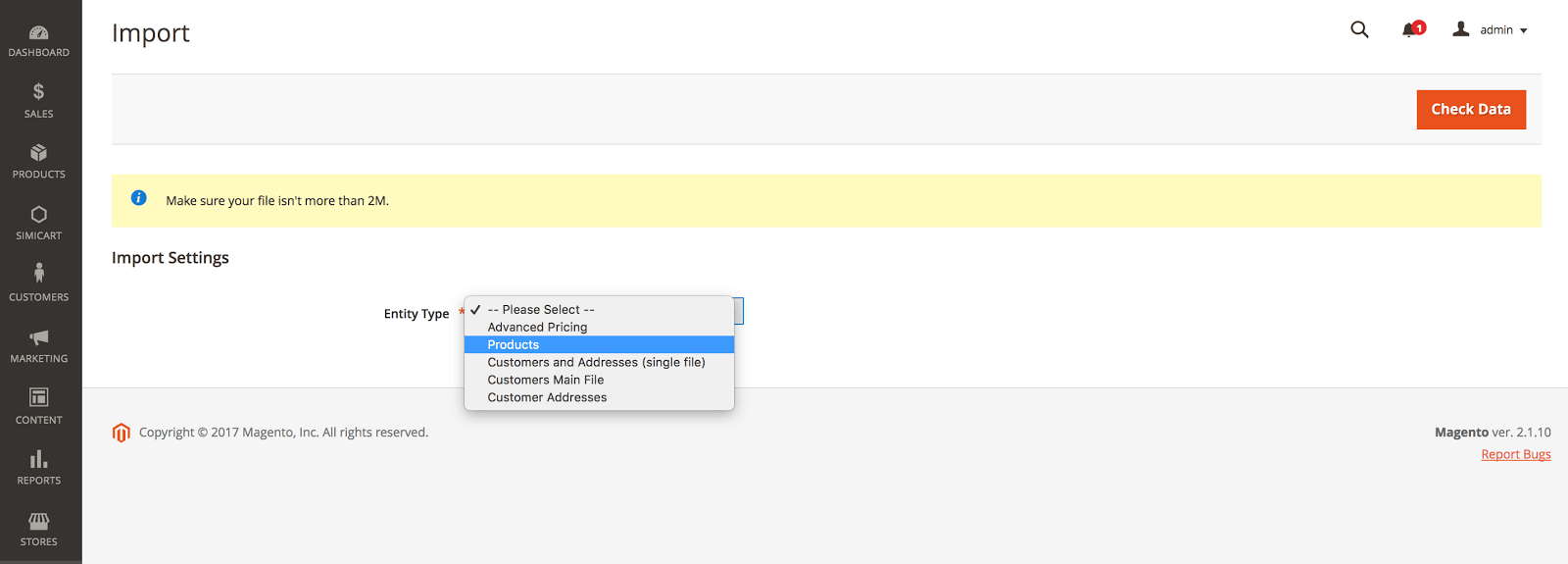
magento import configurable products

In Import Behavior, click and choose Add/Update.
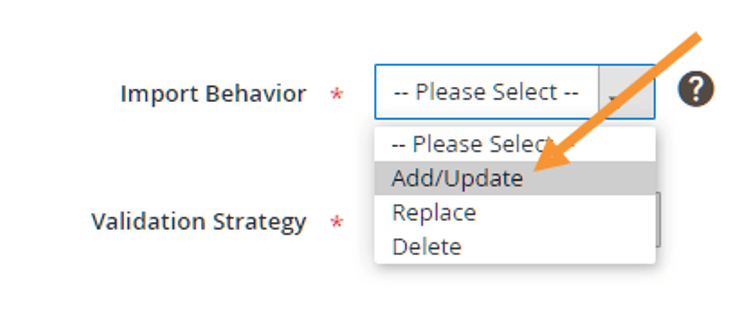
import behaviour

After which, click on the Download sample file and you’ll receive a .CSV file containing the products whose SKUs you just put down.

Step 2: Complete the CSV file

Open your downloaded CSV file.

magento sample file

You’ll see that other fields in the CSV import file of configurable products are the same as the file of simple products. Yet, with configurable products, you’ll need to add some fields and follow the instructions:

additional columns
  1. List children products before configurable ones
  2. Make sure the value in the ‘attribute_set_code’ column matches the name of the Attribute Set.
  3. Add the ‘additional_attributes’ column and enumerate all the attribute set values for each child product. Put the attributes in the format as attribute_label=atrribute_value, separated by a comma.
  4. Add the ‘configurable_variations’ column and fill in the set of SKU and Option (only for the parent products). Put the products in the format as SKU = child_sku, attribute_label=attribute_value, separate by ‘|”. The value attribute must correspond to the product value.
  5. Add and check the correlation between the Attribute Code and the Label name in the ‘configurable_variation_labels’ column (only for the parent products). Here you’ll declare an attribute in the format as attribute_code=attribute_label, separated by a comma.

Step 3: Import CSV file

Go back to your Magento backend, go to System > Data Transfer > Import.
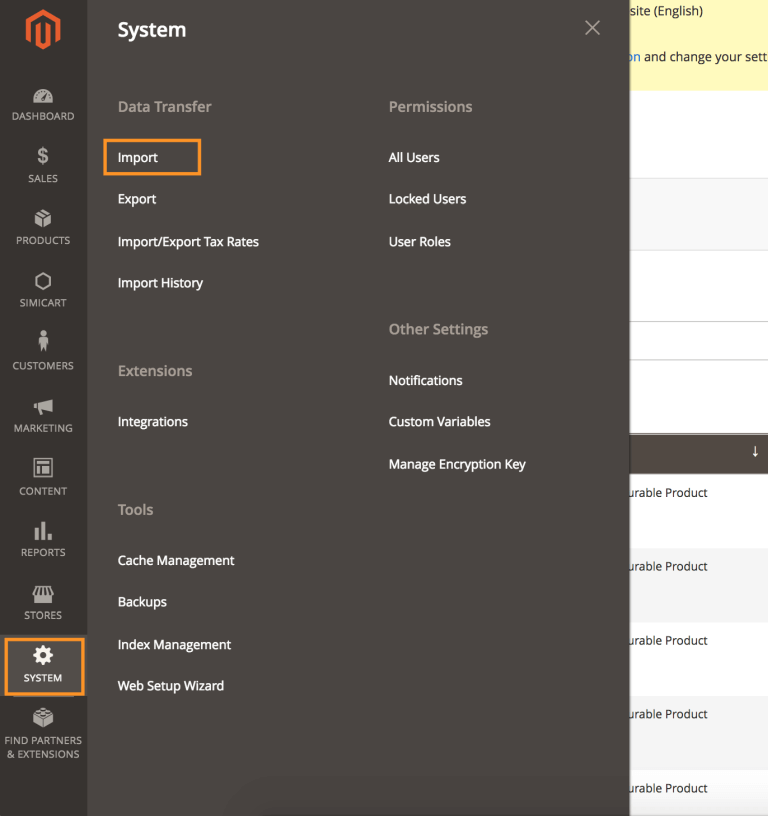
magento data import menu

Then go to File to Import > Select File to Import. Select the file you want to import into your Magento store system.
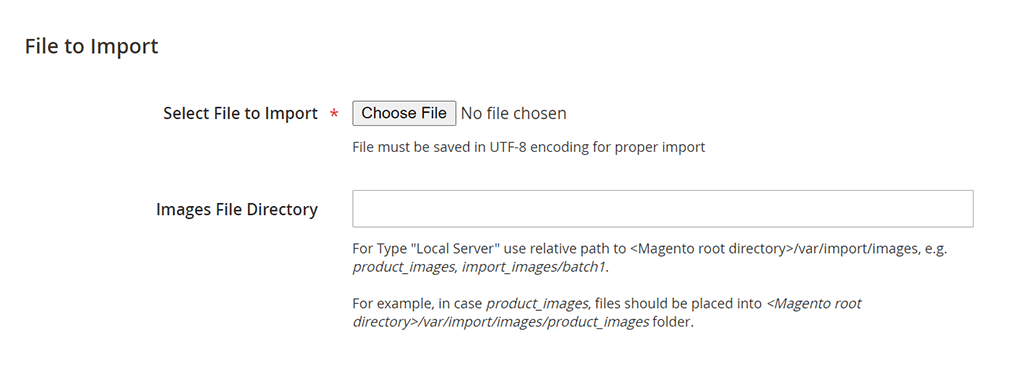
file to import

And click on Check Data on the right corner.
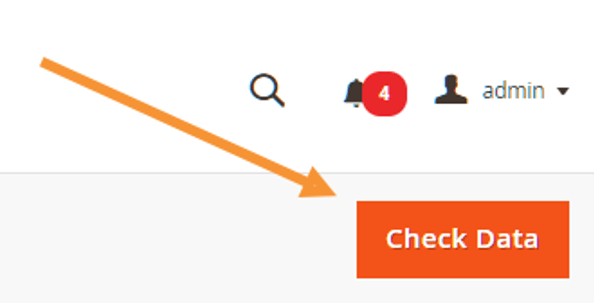
check data

You can leave other fields as they already are by default.

After the data checking process completes, you can proceed to import if the checking result is valid, else you need to edit your CSV file until it is free of error.
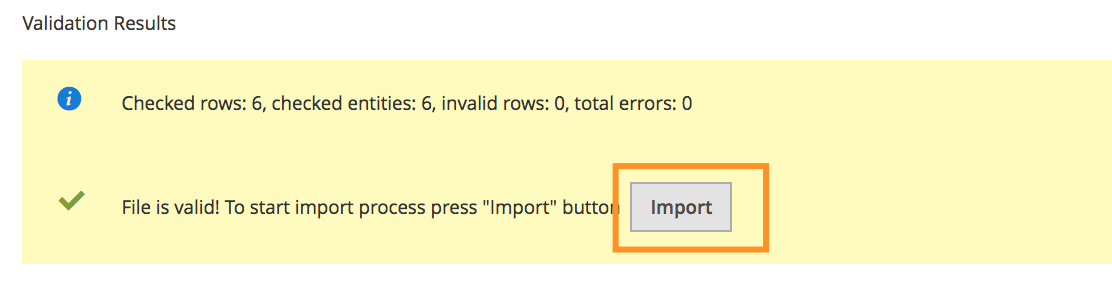
magento validation result

Click Import to start the import process. When everything’s done you will receive the below success message.
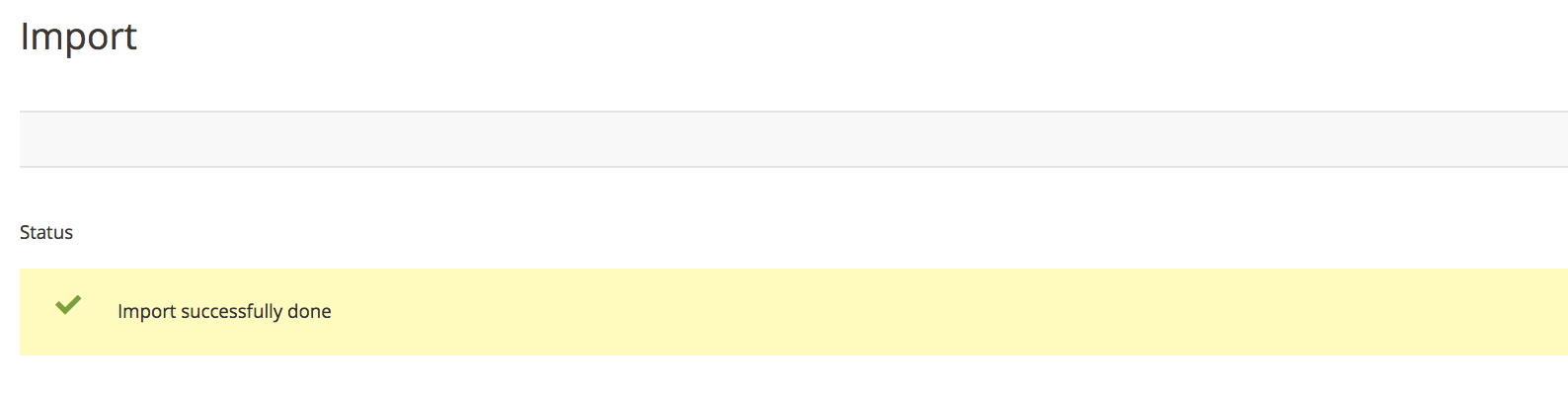
magento import success

Now you can go to your frontend to check the result.


By simicart . com

Read More
  • Share This:  
  •  Facebook
  •  Twitter
  •  Google+
  •  Stumble
  •  Digg

Magento PWA Studio: Useful Links and Resources

 Programing Coderfunda     February 01, 2022     MAGENTO TUTORIALS     No comments   


Magento PWA Studio: Useful Links and Resources


01/20/2022  3 MINS READ
Venia Demo storefront
SHARE

Table of contents

  • What is Magento PWA Studio?
  • Official PWA Studio resources from Magento
  • Magento 2 PWA Studio demo
  • Real-life Magento PWA examples
  • PWA Studio Tools & Extensions
  • Magento PWA Studio developer tutorials
  • Magento PWA Studio roadmap
  • PWA Studio Developer Community
  • List of current live Magento 2 PWA Studio websites
    • Fashion
    • Technology
    • Home & Garden
    • Health & Beauty
    • Food & Beverages
    • Other verticals
      • Vape
      • Skiing equipment
      • Gaming collections

Ever since Progressive Web Apps concept was introduced by Google back in 2015, it has been an on-going trend on the world wide web. It is a next-generation technology that is destined to replace the current web technology, and applicable to various industries including e-commerce.

What is Magento PWA Studio?

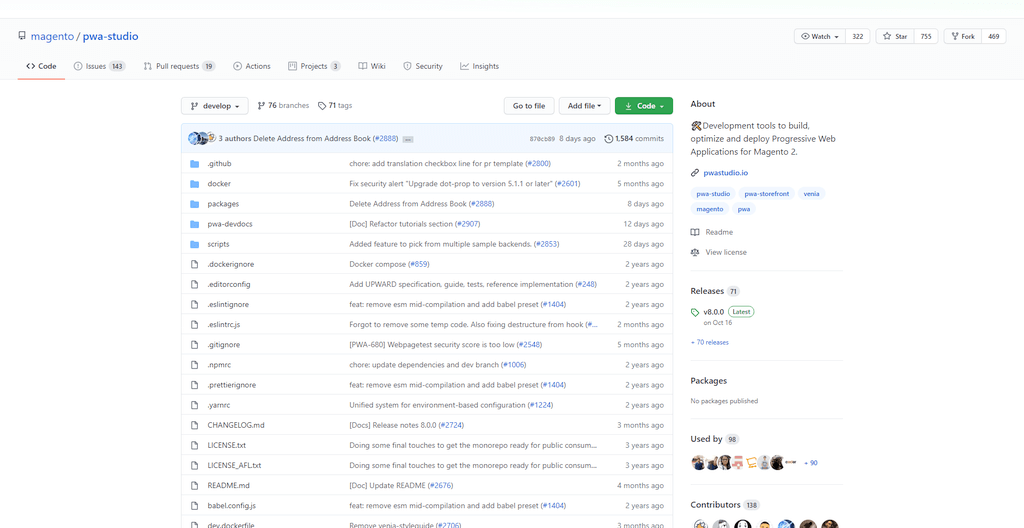
In September 2018, Magento introduced their PWA Studio project, and made available to the public via their GitHub repository https://github.com/magento/pwa-studio. Magento PWA Studio is a set of tools that allow developers to develop a Progressive Web App (PWA) storefront on top of Magento 2.

Magento PWA Studio vs Vue Storefront

Official PWA Studio resources from Magento

  • GitHub repository
Magento PWA Studio GitHub
PWA Studio GitHub repository


Latest PWA Studio version: 12.1.0

  • Official documentation
magento pwa documentation
Magento PWA Official Documentation

Magento 2 PWA Studio demo

Venia storefront

Official PWA Studio storefront demo: Venia

Additionally, there is a development version of Venia which reflects the latest progress of PWA Studio.

Real-life Magento PWA examples

Since its release, multiple developers and brands have adopted PWA Studio and use it to develop PWA storefront on top of Magento 2. Several of which have gone live into production and starting to see great results. Below are some of our hand-picked best Magento PWA examples:

  1. Shop Online Tanzania by SimiCart
  2. Tshirtideal by SimiCart
  3. Eleganza by Experius

More Magento PWA examples

PWA Studio Tools & Extensions

  • Free Magento PWA Theme
  • Magento PWA Studio Page Builder

Magento PWA Studio developer tutorials

Our PWA developers have composed several useful tutorials to help you get started on your journey of learning PWA Studio:

  • How to setup PWA Studio in Magento 2
  • Magento PWA Studio Tutorial: The Basics
  • How to Create a Magento PWA Studio Extension
  • How to Install Rendertron for Magento PWA Studio to Use SSR
  • SimiCart video tutorials on YouTube

Magento PWA Studio roadmap

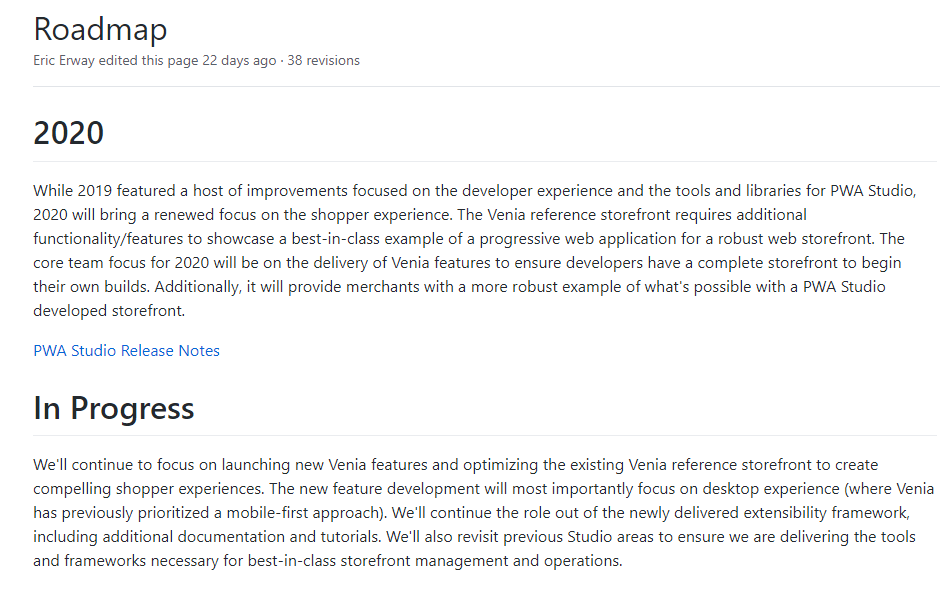
Started with a mobile-first approach, the core PWA Studio development team will now most importantly focus on desktop experience for Venia. Also, they will continue to work on launching new Venia features and optimizing the existing Venia reference storefront to create engaging shopper experiences.

  • Official PWA Studio roadmap
Magento PWA Studio roadmap
PWA Studio Roadmap

Currently the roadmap is set to cover until the end of 2021.

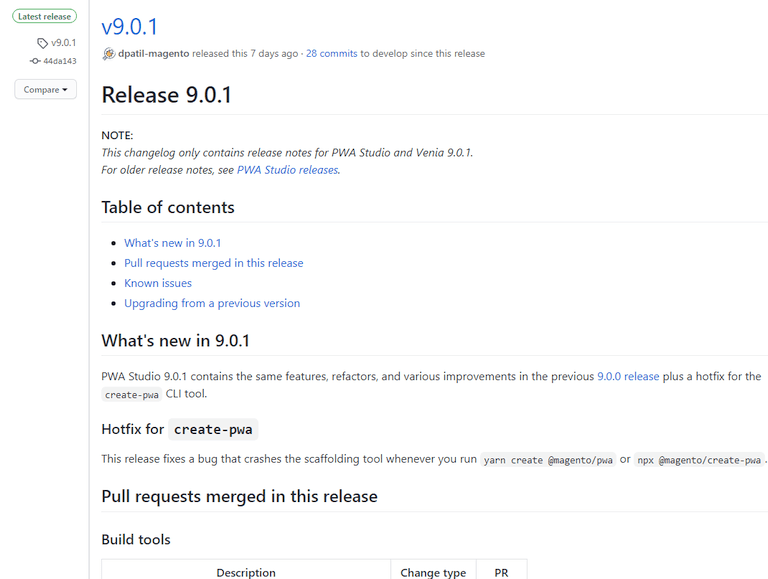
If you want to look into the past development changes of PWA Studio, there are detailed changelogs on GitHub you might be interested in:

  • PWA Studio release notes
Magento PWA Studio release notes
PWA Studio release notes

PWA Studio Developer Community

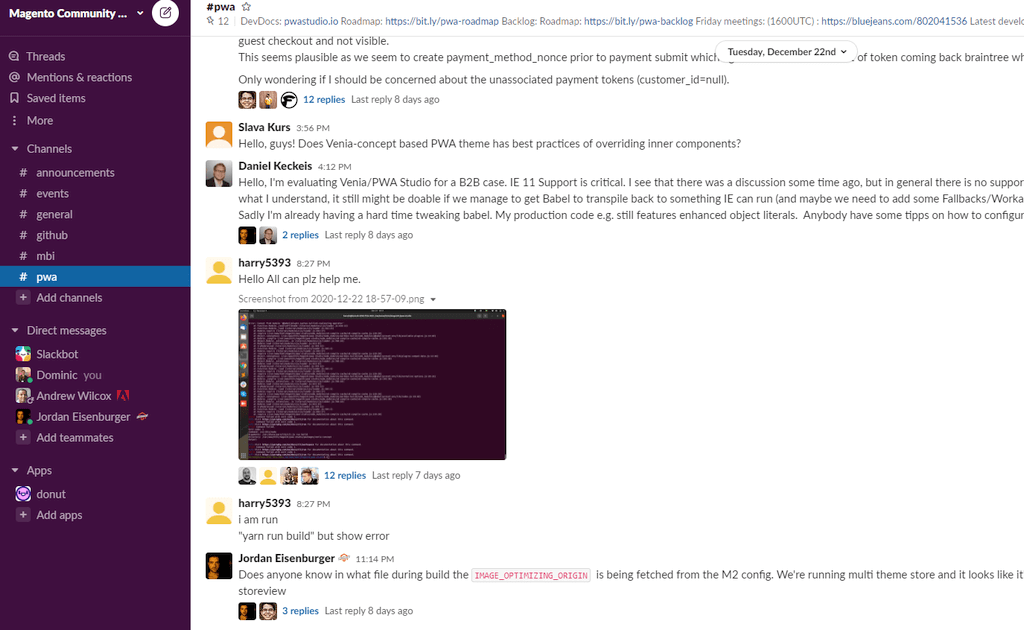
You can join 2,300+ community members in the official PWA Studio Slack channel #pwa to contribute ideas, or ask and answer PWA-related questions.

Magento PWA Slack channel

List of current live Magento 2 PWA Studio websites

Below is a non-complete list of current live websites that are built on PWA Studio that we’ve found and constantly updating. The websites are categorized into industry verticals.

Fashion

  • https://www.tshirtideal.ca/
  • https://www.castiron-clothing.com/
  • https://nymansur.com/
  • https://charmingchick.com/
  • https://kashiyama1927.com/
  • https://curnonwatch.com/
  • https://us.caiyx.com/
  • https://cloth-face-masks.com/
  • https://www.eleganza-shop.com/
  • https://www.roeckl.com/

Technology

  • https://www.neonet.pl/
  • https://www.neo24.pl/
  • https://www.bascom-cameras.co.uk/

Home & Garden

  • https://www.trailappliances.com/
  • https://www.opti-wohnwelt.de/
  • https://www.selcobw.com/
  • https://temoorst.com/
  • https://kniveksperten.no/

Health & Beauty

  • https://www.nutriciastore.com.au/
  • https://www.caddys.it/

Food & Beverages

  • https://www.thewhiskybarrel.com/

Other verticals

Vape

  • https://www.180smoke.ca/
  • https://coopvape.co.uk/

Skiing equipment

  • https://www.oberson.com/fr/

Gaming collections

  • https://eu.gear.cdprojektred.com/
Read More
  • Share This:  
  •  Facebook
  •  Twitter
  •  Google+
  •  Stumble
  •  Digg

How to Configure Magento CAPTCHA Settings for Admin and Customers

 Programing Coderfunda     February 01, 2022     No comments   


How to Configure Magento CAPTCHA Settings for Admin and Customers


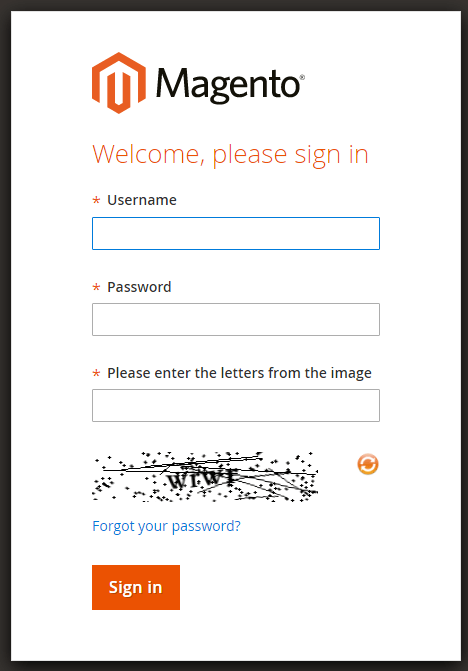
A CAPTCHA is a program that protects websites against bots by generating and grading tests that humans can pass but current computer programs cannot. The term “CAPTCHA” is an acronym for “Completely Automated Public Turing Test to Tell Computers and Humans Apart.”

magento captcha

In Magento, CAPTCHA can be used for both the Admin and customers. This tutorial will guide you to configure CAPTCHA for Admin and customers in Magento 2.

Configuring CAPTCHA for Admin in Magento 2

Before going into configuring CAPTCHA for your Magento store, first, you’ll need to have an API key pair (Google API website key & Google API secret key) for your website. This key pair is necessary for invoking Google’s reCAPTCHA service, as well as for verifying the user’s response.

Step 1: Go to Stores > Settings > Configuration in your Magento backend.

On the left side navigation panel, expand Advanced and choose Admin.

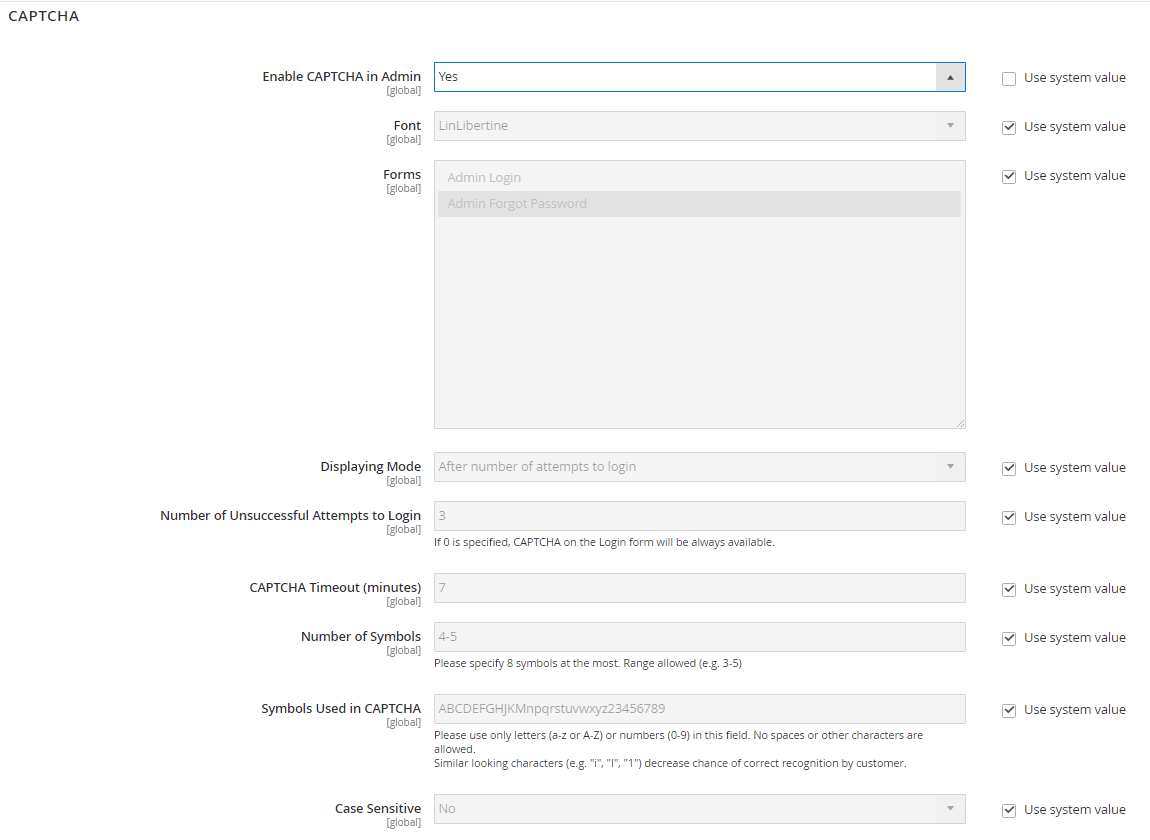
Go to CAPTCHA and you’ll see a section like below:

magento 2 captcha

Step 2: On the upper-left corner, set Store View to “Default Config”.

Step 3: Configure fields to your requirements

  • Enable CAPTCHA in Admin: choose Yes
  • Font: set the font for CAPTCHA (or tick on Use default value)
  • Forms: choose the forms in which the CAPTCHA is applicable. To choose multiple forms, hold the Ctrl key (PC) or Command key (Mac).
  • Displaying mode: choose either ‘Always’ or ‘After a number of attempts to login’
  • Number of unsuccessful attempts to login: enter the number of attempts before CAPTCHA appears. If the number is 0, CAPTCHA is always required.
  • CAPTCHA timeout: enter the minutes before a CAPTCHA expires. If the CAPTCHA is expired, the user needs to reload the page for a new one.
  • Number of symbols: fill in the number of symbols that appear in each CAPTCHA (up to 8). For a variable number of symbols that changes with each CAPTCHA, enter a range (such as 4-8).
  • Symbols used in CAPTCHA: specify the symbols that can be used in the CAPTCHA.
  • Case sensitive: Set to Yes if you want to require administrators to enter the characters in upper/ lowercase exactly as shown in the CAPTCHA.

Step 4: After you complete all the fields, click Save Config.

Enable CAPTCHA for customers

CAPTCHA for customers are usually required in these cases:

  • Customer sign up for an account
  • When they log in into their account
  • Forgot password 
  • Checkout as guest
  • Register during checkout

The steps to configure CAPTCHA for customers are quite similar to those for admin.

Step 1: Go to Stores > Settings > Configuration in your Magento backend.

On the left side navigation panel, expand Advanced and choose Customers > Customer configuration.

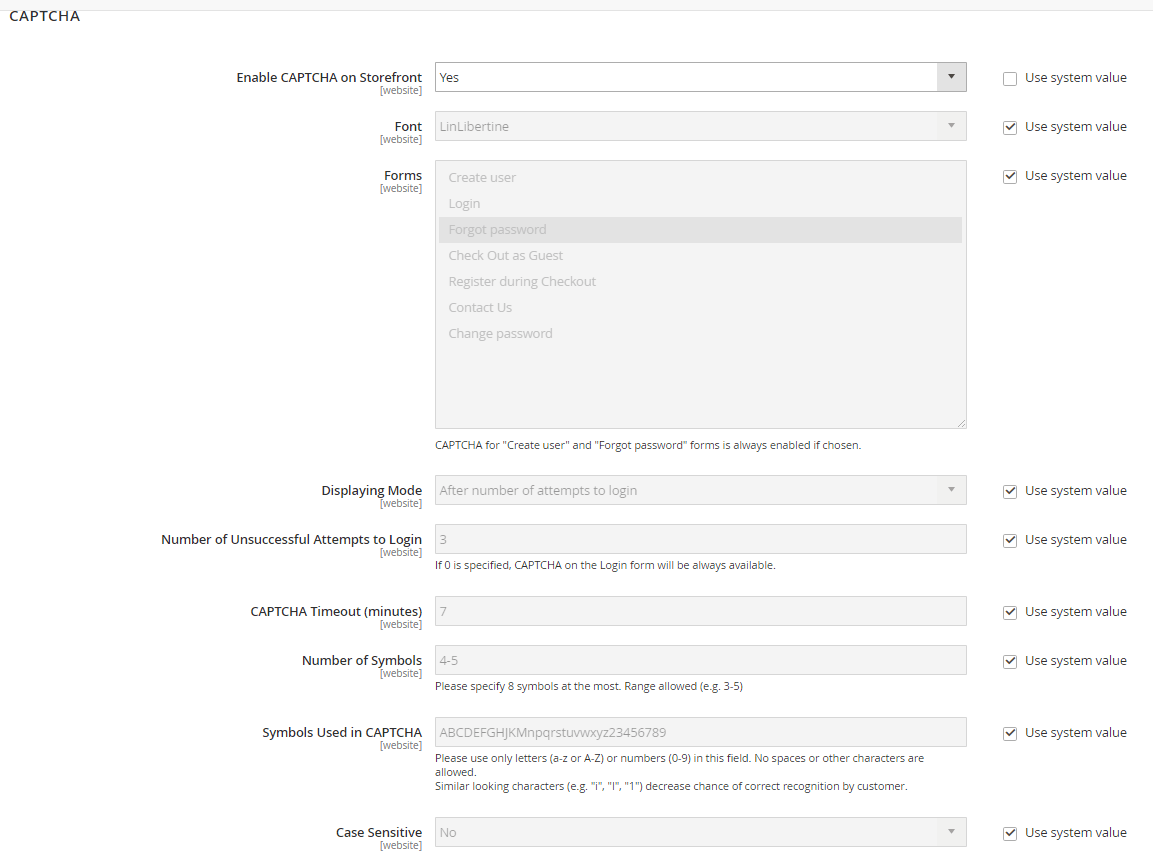
Go to the CAPTCHA section. 

magento 2 customer captcha

Step 2: Configure the fields in this CAPTCHA section (similar to configuring CAPTCHA for admin) :

  • Enable CAPTCHA on Storefront: change to Yes
  • Font
  • Forms: choose the cases that a CAPTCHA will appear – Checkout; Login; Forget password, etc. Hold the Ctrl key (PC) or Command key (Mac) and click to choose multiple options. 
  • Displaying mode
  • Number of unsuccessful attempts to login
  • CAPTCHA timeout
  • Number of symbols
  • Symbols used in CAPTCHA
  • Case sensitive

Step 3: When finished, click Save Config.

Read More
  • Share This:  
  •  Facebook
  •  Twitter
  •  Google+
  •  Stumble
  •  Digg
Newer Posts Older Posts Home

Meta

Popular Posts

  • Generate Migrations from an Existing Database With the Migration Generator Package
    Laravel Migration Generator Migration Generator for Laravel is a package by Bennett Treptow to generate migrations from existing database ...
  • Tailwindcss best practices for responsive design
    Tailwind CSS provides powerful utilities for responsive design out of the box. To use it effectively and maintain clean, scalable code, here...
  • Search Through Models with Laravel Searchable
      Laravel Searchable   is a package by   Spatie   to search through models and other sources pragmatically. Using this package, you can get ...
  • Laravel Razorpay Integration | Payment gateway integration Laravel in 30 mins | Laravel Razorpay
    1 Integration of Razorpay with Laravel. In this tutorial, I have taught how to integrate payment gateway with laravel with mini-project. If...
  • Vue.js Render functions
        Vue.js Render functions Vue.js recommends us to use templates to build HTML. Here, we can use the render function as a closer-to-the-co...

Categories

  • Ajax (26)
  • Bootstrap (30)
  • DBMS (42)
  • HTML (12)
  • HTML5 (45)
  • JavaScript (10)
  • Jquery (34)
  • Jquery UI (2)
  • JqueryUI (32)
  • Laravel (1017)
  • Laravel Tutorials (23)
  • Laravel-Question (6)
  • Magento (9)
  • Magento 2 (95)
  • MariaDB (1)
  • MySql Tutorial (2)
  • PHP-Interview-Questions (3)
  • Php Question (13)
  • Python (36)
  • RDBMS (13)
  • SQL Tutorial (79)
  • Vue.js Tutorial (69)
  • Wordpress (150)
  • Wordpress Theme (3)
  • codeigniter (108)
  • oops (4)
  • php (853)

Social Media Links

  • Follow on Twitter
  • Like on Facebook
  • Subscribe on Youtube
  • Follow on Instagram

Pages

  • Home
  • Contact Us
  • Privacy Policy
  • About us

Blog Archive

  • ▼  2026 (3)
    • ▼  07/26 - 08/02 (2)
      • A stormwater pond in Calgary appears filled with P...
      • Inside Kriti Sanon's duplex sea-facing penthouse w...
    • ►  06/28 - 07/05 (1)
  • ►  2025 (4)
    • ►  07/06 - 07/13 (2)
    • ►  06/29 - 07/06 (2)
  • ►  2024 (486)
    • ►  09/15 - 09/22 (30)
    • ►  09/08 - 09/15 (35)
    • ►  09/01 - 09/08 (35)
    • ►  08/11 - 08/18 (2)
    • ►  08/04 - 08/11 (33)
    • ►  07/28 - 08/04 (30)
    • ►  07/07 - 07/14 (11)
    • ►  06/30 - 07/07 (35)
    • ►  06/23 - 06/30 (5)
    • ►  06/02 - 06/09 (31)
    • ►  05/26 - 06/02 (20)
    • ►  05/05 - 05/12 (29)
    • ►  04/28 - 05/05 (26)
    • ►  04/07 - 04/14 (10)
    • ►  03/31 - 04/07 (34)
    • ►  03/24 - 03/31 (10)
    • ►  03/03 - 03/10 (35)
    • ►  02/25 - 03/03 (15)
    • ►  02/04 - 02/11 (22)
    • ►  01/28 - 02/04 (30)
    • ►  01/07 - 01/14 (8)
  • ►  2023 (484)
    • ►  12/31 - 01/07 (35)
    • ►  12/24 - 12/31 (10)
    • ►  12/03 - 12/10 (33)
    • ►  11/26 - 12/03 (20)
    • ►  11/05 - 11/12 (35)
    • ►  10/29 - 11/05 (20)
    • ►  10/22 - 10/29 (9)
    • ►  10/15 - 10/22 (7)
    • ►  10/08 - 10/15 (9)
    • ►  10/01 - 10/08 (10)
    • ►  09/24 - 10/01 (9)
    • ►  09/17 - 09/24 (9)
    • ►  09/10 - 09/17 (7)
    • ►  09/03 - 09/10 (9)
    • ►  08/27 - 09/03 (9)
    • ►  08/20 - 08/27 (8)
    • ►  08/13 - 08/20 (8)
    • ►  08/06 - 08/13 (8)
    • ►  07/30 - 08/06 (8)
    • ►  07/23 - 07/30 (7)
    • ►  07/16 - 07/23 (8)
    • ►  07/09 - 07/16 (7)
    • ►  07/02 - 07/09 (8)
    • ►  06/25 - 07/02 (7)
    • ►  06/18 - 06/25 (7)
    • ►  06/11 - 06/18 (7)
    • ►  06/04 - 06/11 (11)
    • ►  05/28 - 06/04 (7)
    • ►  05/21 - 05/28 (8)
    • ►  05/14 - 05/21 (11)
    • ►  05/07 - 05/14 (7)
    • ►  04/30 - 05/07 (7)
    • ►  04/23 - 04/30 (8)
    • ►  04/16 - 04/23 (9)
    • ►  04/09 - 04/16 (7)
    • ►  04/02 - 04/09 (4)
    • ►  03/26 - 04/02 (21)
    • ►  03/19 - 03/26 (2)
    • ►  03/12 - 03/19 (9)
    • ►  03/05 - 03/12 (26)
    • ►  02/26 - 03/05 (25)
    • ►  01/15 - 01/22 (7)
    • ►  01/08 - 01/15 (1)
  • ►  2022 (1037)
    • ►  12/11 - 12/18 (13)
    • ►  12/04 - 12/11 (1)
    • ►  11/27 - 12/04 (40)
    • ►  11/06 - 11/13 (1)
    • ►  10/16 - 10/23 (13)
    • ►  09/04 - 09/11 (5)
    • ►  08/21 - 08/28 (24)
    • ►  08/14 - 08/21 (24)
    • ►  07/03 - 07/10 (9)
    • ►  06/19 - 06/26 (3)
    • ►  05/29 - 06/05 (3)
    • ►  05/22 - 05/29 (3)
    • ►  05/15 - 05/22 (109)
    • ►  05/01 - 05/08 (7)
    • ►  04/24 - 05/01 (7)
    • ►  04/17 - 04/24 (64)
    • ►  04/10 - 04/17 (115)
    • ►  04/03 - 04/10 (73)
    • ►  03/27 - 04/03 (77)
    • ►  03/13 - 03/20 (2)
    • ►  03/06 - 03/13 (25)
    • ►  02/27 - 03/06 (18)
    • ►  02/20 - 02/27 (153)
    • ►  02/13 - 02/20 (187)
    • ►  01/30 - 02/06 (45)
    • ►  01/23 - 01/30 (15)
    • ►  01/16 - 01/23 (1)
  • ►  2021 (412)
    • ►  10/24 - 10/31 (2)
    • ►  07/25 - 08/01 (1)
    • ►  07/11 - 07/18 (10)
    • ►  06/13 - 06/20 (29)
    • ►  05/23 - 05/30 (1)
    • ►  05/02 - 05/09 (24)
    • ►  04/25 - 05/02 (24)
    • ►  04/18 - 04/25 (112)
    • ►  04/11 - 04/18 (1)
    • ►  04/04 - 04/11 (6)
    • ►  03/28 - 04/04 (86)
    • ►  03/21 - 03/28 (19)
    • ►  03/14 - 03/21 (2)
    • ►  03/07 - 03/14 (10)
    • ►  02/28 - 03/07 (1)
    • ►  02/21 - 02/28 (29)
    • ►  02/14 - 02/21 (13)
    • ►  02/07 - 02/14 (12)
    • ►  01/31 - 02/07 (6)
    • ►  01/17 - 01/24 (2)
    • ►  01/10 - 01/17 (8)
    • ►  01/03 - 01/10 (14)
  • ►  2020 (376)
    • ►  12/27 - 01/03 (37)
    • ►  12/20 - 12/27 (92)
    • ►  12/13 - 12/20 (29)
    • ►  12/06 - 12/13 (37)
    • ►  11/29 - 12/06 (4)
    • ►  11/15 - 11/22 (14)
    • ►  11/08 - 11/15 (8)
    • ►  11/01 - 11/08 (2)
    • ►  10/18 - 10/25 (14)
    • ►  10/11 - 10/18 (16)
    • ►  10/04 - 10/11 (10)
    • ►  09/20 - 09/27 (10)
    • ►  09/06 - 09/13 (19)
    • ►  08/30 - 09/06 (26)
    • ►  08/23 - 08/30 (4)
    • ►  08/16 - 08/23 (2)
    • ►  07/12 - 07/19 (48)
    • ►  05/17 - 05/24 (2)
    • ►  01/05 - 01/12 (2)
  • ►  2019 (74)
    • ►  07/07 - 07/14 (6)
    • ►  06/16 - 06/23 (6)
    • ►  02/10 - 02/17 (17)
    • ►  01/13 - 01/20 (37)
    • ►  01/06 - 01/13 (8)
  • ►  2018 (376)
    • ►  12/30 - 01/06 (24)
    • ►  12/16 - 12/23 (8)
    • ►  12/09 - 12/16 (98)
    • ►  12/02 - 12/09 (16)
    • ►  11/18 - 11/25 (36)
    • ►  11/04 - 11/11 (18)
    • ►  10/28 - 11/04 (10)
    • ►  10/21 - 10/28 (26)
    • ►  10/14 - 10/21 (52)
    • ►  10/07 - 10/14 (4)
    • ►  09/30 - 10/07 (2)
    • ►  09/23 - 09/30 (68)
    • ►  09/16 - 09/23 (4)
    • ►  09/09 - 09/16 (4)
    • ►  08/26 - 09/02 (6)

Data Publish News

Loading...

Al Jazeera – Breaking News, World News and Video from Al Jazeera

Loading...

Laravel News

Loading...

Copyright © CoderFunda | Powered by Blogger
Design by Coderfunda | Blogger Theme by Coderfunda | Distributed By Coderfunda