CoderFunda
  • Home
  • About us
    • Contact Us
    • Disclaimer
    • Privacy Policy
    • About us
  • Home
  • Php
  • HTML
  • CSS
  • JavaScript
    • JavaScript
    • Jquery
    • JqueryUI
    • Stock
  • SQL
  • Vue.Js
  • Python
  • Wordpress
  • C++
    • C++
    • C
  • Laravel
    • Laravel
      • Overview
      • Namespaces
      • Middleware
      • Routing
      • Configuration
      • Application Structure
      • Installation
    • Overview
  • DBMS
    • DBMS
      • PL/SQL
      • SQLite
      • MongoDB
      • Cassandra
      • MySQL
      • Oracle
      • CouchDB
      • Neo4j
      • DB2
      • Quiz
    • Overview
  • Entertainment
    • TV Series Update
    • Movie Review
    • Movie Review
  • More
    • Vue. Js
    • Php Question
    • Php Interview Question
    • Laravel Interview Question
    • SQL Interview Question
    • IAS Interview Question
    • PCS Interview Question
    • Technology
    • Other

29 November, 2022

Laravel Package to Help with Loading Files into MySQL Tables

 Programing Coderfunda     November 29, 2022     Laravel, laravel-packages, php     No comments   

 Laravel Load File is a package to help with loading files into MySQL tables. This uses MySQL's LOAD DATA statement to load text files quickly into your database. This is usually 20 times faster than using INSERT statements according to: https://dev.mysql.com/doc/refman/8.0/en/insert-optimization.html

Options

This library currently can handle any of the options in a normal LOAD DATA statement except for the partitioned table support. This will be included in a future release of the laravel-loadfile.

Installation

Requires > PHP 8.0 and > Laravel 8

composer require ellgreen/laravel-loadfile

Loading files

To use local files you will need to have local_infile enabled for the client and server. To do this on the Laravel side you will need to add the following to the options part of your database config:

'config' => [
    PDO::MYSQL_ATTR_LOCAL_INFILE => true,
],

Simple file import

use EllGreen\LaravelLoadFile\Laravel\Facades\LoadFile;

LoadFile::file('/path/to/employees.csv', $local = true)
    ->into('employees')
    ->columns(['forename', 'surname', 'employee_id'])
    ->load();

Ignoring header row

LoadFile::file('/path/to/employees.csv', $local = true)
    ->into('employees')
    ->columns(['forename', 'surname', 'employee_id'])
    ->ignoreLines(1)
    ->load();

Specifying field options

LoadFile::file('/path/to/employees.csv', $local = true)
    ->into('employees')
    ->columns(['forename', 'surname', 'employee_id'])
    // like this
    ->fieldsTerminatedBy(',')
    ->fieldsEscapedBy('\\\\')
    ->fieldsEnclosedBy('"')
    // or
    ->fields(',', '\\\\', '"')
    ->load();

Loading data into Eloquent Models

Simply add the LoadsFiles trait to your model like so:

use EllGreen\LaravelLoadFile\Laravel\Traits\LoadsFiles;

class User extends Model
{
    use LoadsFiles;
}

Then you can use the following method to load a file into that table:

User::loadFile('/path/to/users.csv', $local = true);

Need to specify options to load the file with?

Add the following method to your Model

class User extends Model
{
    use LoadsFiles;

    public function loadFileOptions(Builder $builder): void
    {
        $builder
            ->fieldsTerminatedBy(',')
            ->ignoreLines(1);
    }
}

Or you can get an instance of the query builder on the fly

User::loadFileBuilder($file, $local)
    ->replace()
    ->ignoreLines(1)
    ->load();

For more details, visit Github.
Read More
  • Share This:  
  •  Facebook
  •  Twitter
  •  Google+
  •  Stumble
  •  Digg

Use Flags For Countries & Languages in Laravel Blade Views

 Programing Coderfunda     November 29, 2022     Laravel, laravel-packages, php     No comments   

 Blade Flags is a package to efficiently use TwEmoji Countries & Languages Flags in your Laravel Blade views. You can use it easily to display countries & languages flags in your Laravel Blade views. For a complete list of available icons see the SVG directory or preview all the available flags, check the gallery.

Requirements

  • PHP 8.0 or higher
  • Laravel 9.0 or higher

Installation

You can install this package via composer by running this command in your terminal:

composer require outhebox/blade-flags

Blade Icons

Blade Flags uses Blade Icons under the hood. Please refer to the Blade Icons readme for additional functionality. We also recommend enabling icon caching with this library.

Configuration

Blade Flags also offers the ability to use features from Blade Icons like default classes, default attributes, etc. If you'd like to configure these, publish the blade-flags.php config file:

php artisan vendor:publish --tag=blade-flags-config

Usage

Icons can be used as self-closing Blade components which will be compiled into SVG icons:

<x-flag-country-br />
<x-flag-country-cn />
<x-flag-country-gb />
<x-flag-country-ru />
<x-flag-country-us />
<x-flag-language-en />
<x-flag-language-ar />
<x-flag-language-es />

You can also pass classes to your icon components:

<x-flag-country-us class="w-6 h-6"/>

Raw SVG Icons

If you want to use the raw SVG icons as assets, you can publish them using:

php artisan vendor:publish --tag=blade-flags --force

Then use them in your views like:

<img src="{{ asset('vendor/blade-flags/country-us.svg') }}" width="32" height="32"/>
<img src="{{ asset('vendor/blade-flags/language-en.svg') }}" width="32" height="32"/>

For more details about this package, You can visit Github.


Read More
  • Share This:  
  •  Facebook
  •  Twitter
  •  Google+
  •  Stumble
  •  Digg

Optimize & store images in multiple sizes easily in Laravel

 Programing Coderfunda     November 29, 2022     Laravel, laravel-packages, php     No comments   

 Laravel Image Handler is an awesome package that can be used to optimize and store images in multiple sizes easily.
Installationcomposer require codepane/laravel-image-handlerphp artisan vendor:publish --provider="codepane\LaravelImageHandler\ImageHandlerServiceProvider"UsageStore Imageuse ImageHandler;public function store() {// its takes the default file name as it is ImageHandler::store($request->file);// in 2nd argument you can pass your custom file name with or without the path ImageHandler::store($request->file, 'file_name_with_or_without_path');}use ImageHandler;public function get() {// this will return the original image ImageHandler::get('original_file_name');// pass dimension as the second argument to get a specific dimension of the file ImageHandler::get('original_file_name', 'sm');}use ImageHandler;public function delete() { ImageHandler::delete('original_file_name');}x
You can install this package via composer by running this command in terminal
Run this command too publish:
Configuration
After installation is done once you can see imagehandler.php under the config directory. You can update dimensions, format, and quality as per your need from a configuration file. You can also add a new dimension.
Let's deep dive into this package for how to use it
Get Image
Delete Image
For more details, please visit Github.
Closing Note
The team of Codebrisk Laravel developers is always ready to execute even your boldest ideas. Our expert team can design and develop any type of custom CRM solution, SAAS app, or e-commerce app to meet our customer's needs and transform our customer's experiences. Get in touch with our team to discuss your bespoke ideas and learn more about the next steps to launching cooperation.
Read More
  • Share This:  
  •  Facebook
  •  Twitter
  •  Google+
  •  Stumble
  •  Digg

Manage Your App Translations using a Friendly UI in Laravel

 Programing Coderfunda     November 29, 2022     Laravel, php     No comments   

 Laravel Translations UI provides a simple way to manage your app translations using a friendly UI, It allows you to add, edit, delete and export translations, and it also provides search functionality to find translations.

Features

  • View & Create & Delete Translations.
  • Manage your translation keys.
  • Filter by translation keys or values,
  • and more...

Installation

You may use the Composer package manager to install Laravel Translations UI into your Laravel project:

composer require outhebox/laravel-translations

After installing Laravel Translations UI, publish its assets using the following commands.

php artisan translations:install

Migrate your database before importing translations, you can use the following command.

php artisan migrate

Usage

Import your translations using the following command.

php artisan translations:import

If you want to import & overwrite all your previous translations, use the following command.

php artisan translations:import --fresh

Then you can access the translations UI, you can visit the /translations in your browser, but first you need to login to your application if it's a production environment, and you can define who can access the translations UI in the configuration file, see for more details Authorization.

Exporting Translations

You can export your translations using the following command.

php artisan translations:export

Authorization

The Translations UI dashboard may be accessed at the /translations route. By default, you will only be able to access this dashboard in the local environment. There is an authorization gate definition within your app/Providers/TranslationsServiceProvider.php file. This authorization gate controls access to Translations UI Dashboard in non-local environments. You are free to modify this gate as needed to restrict access to your Translations UI installation:

protected function gate()
{
    Gate::define('viewLaravelTranslationsUI', function ($user) {
        return in_array($user->email, [
            //
        ]);
    });
}

For more details, please visit Github.

Read More
  • Share This:  
  •  Facebook
  •  Twitter
  •  Google+
  •  Stumble
  •  Digg

Log activity in a Laravel app with Spatie/Laravel-Activitylog

 Programing Coderfunda     November 29, 2022     Laravel, Spatie     No comments   

 
Requirements

This package needs PHP 8.1+ and Laravel 9.0 or higher.
The latest version of this package needs PHP 8.2+ and Laravel 8 or higher. If you're employing an older version of the Laravel framework, Then you can utilize v3, v2, or v1 of this package.
Installation and Setup
For the installation purpose, you've to run this command:

composer require spatie/laravel-activitylogThe service provider will be automatically registered. If you need to store your activities in another database connection, you can specify ACTIVITY_LOGGER_DB_CONNECTION in your .env file.
After that, you've to clear the application config cache:php artisan config:clearYou've to publish the migration with this command:php artisan vendor:publish --provider="Spatie\Activitylog\ActivitylogServiceProvider" --tag="activitylog-migrations"Next, you've to generate the activity_log table by using this command:php artisan migrateUsage
Here's an example of how you can log some activity:activity()->log('Hey, I logged something');It will generate a record in the activity_log table. You can recover all activity utilizing the Spatie\Activitylog\Models\Activity model handed by the laravel-activitylog package.Activity::all();Here's another advanced way of doing this:activity() ->performedOn($anEloquentModel) ->causedBy($user) ->withProperties(['customProperty' => 'customValue']) ->log('Look mum, I logged something'); $lastLoggedActivity = Activity::all()->last(); $lastLoggedActivity->subject; //returns an instance of an eloquent model$lastLoggedActivity->causer; //returns an instance of your user model$lastLoggedActivity->getExtraProperty('customProperty'); //returns 'customValue'$lastLoggedActivity->description; //returns 'Look mum, I logged something'Automatic model event logging
This package is pretty cool, it can also automatically log model events. For Example:$newsItem->name = 'updated name';$newsItem->save(); //updating the newsItem will induce an activity being logged$activity = Activity::all()->last(); $activity->description; //returns 'updated'$activity->subject; //returns the instance of NewsItem that was generatedWhen you Call $activity->changes. It will return the following array:[ 'attributes' => [ 'name' => 'original name', 'text' => 'Lorum Ipsum', ], 'old' => [ 'name' => 'updated name', 'text' => 'Lorum Ipsum', ],];

Other  Or

By running the previous command, the activitilog.php file will be created where we can find different activity log Laravel configuration parameters. There are already several predefined parameters that can be very useful such as:

  • enabled – If set to false, no activities will be saved to the database.
    – This can be very useful if we want to disable the logging mechanism, for example in our local environment.
  • delete_records_older_than_days – a parameter used to automatically clean up older activity logs Laravel.
  • table_name – a parameter used to specify the activity Laravel log table
    – By default, this is set to activity_log
  • …

We can modify these parameters as we need or add additional based on the functionality we are building.

3 LOGGING MODEL EVENTS

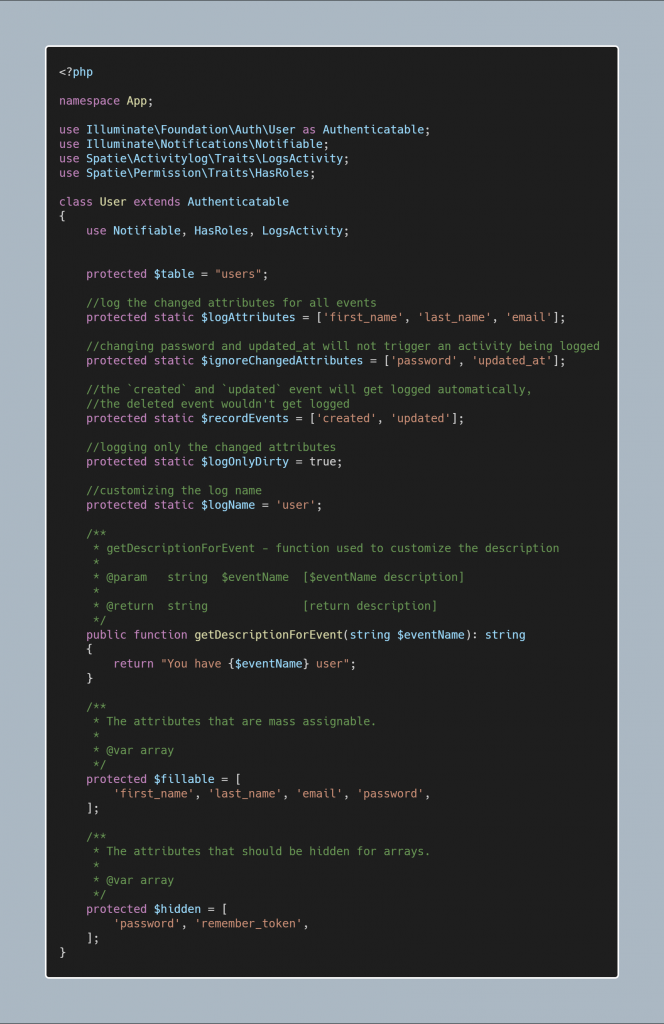
Laravel activity log package can automatically log events such as a Laravel model log that is created, updated or deleted. In our User.php model, we will use the Spatie LogsActivity trait. This trait is extremely simple and has the static boot function for any model, as well as for registering an event that we described. For each event, the related query is performed and it is logged inside the database.

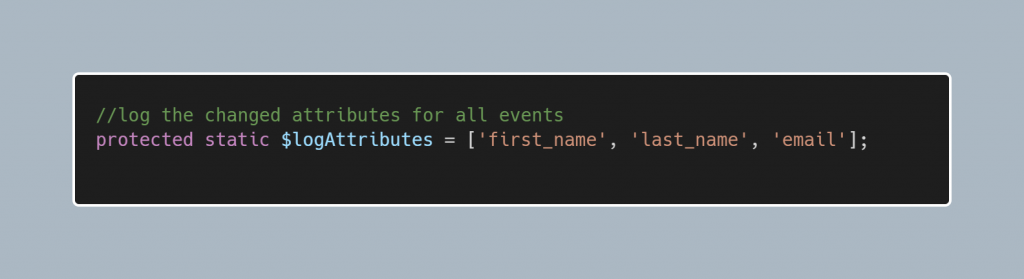
In our model we can set what attributes we will be logging by using:

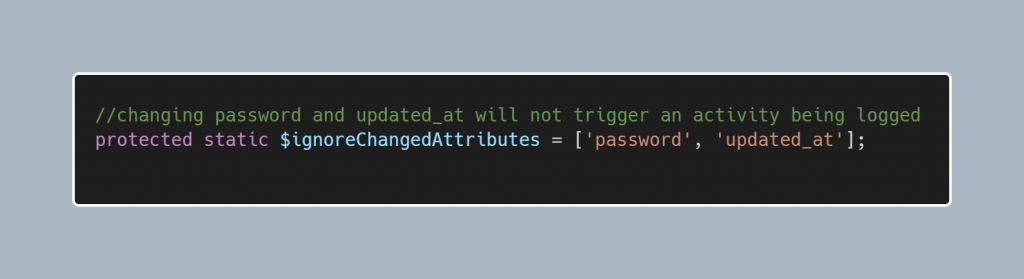
If our model contains attributes that we want to ignore on a trigger change, we can use:

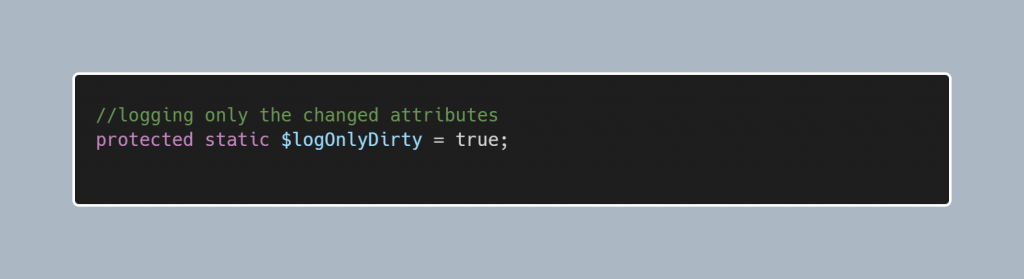
By default, this logger is configured to log every attribute of the model, but there is an easy way to change that. We can log only the changed attributes after the update by using the following configuration:

Customizing the events being logged

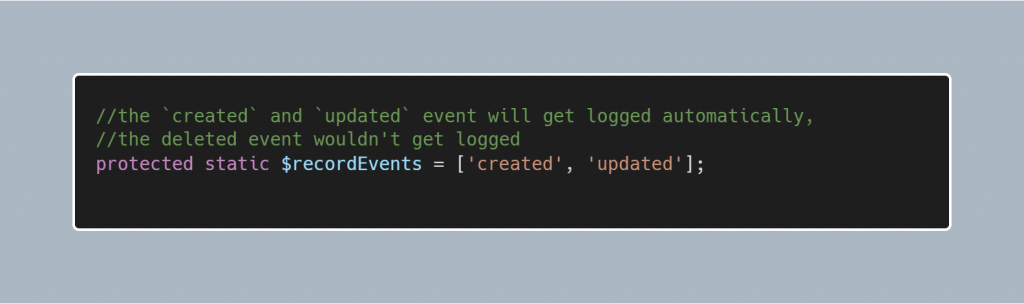
By default, the package will log the created, updated, deleted events, but we can customize with:

This image has an empty alt attribute; its file name is image-31.png

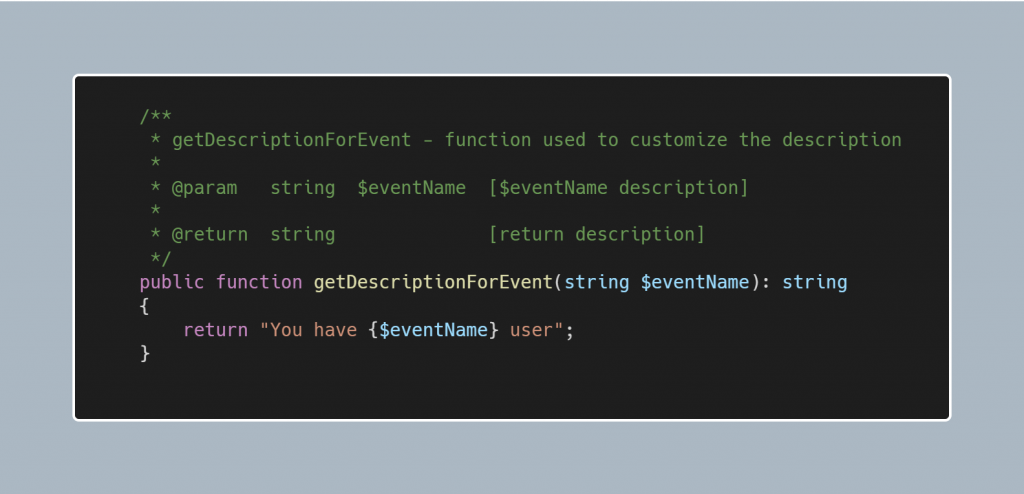
Customizing the description:

This image has an empty alt attribute; its file name is image-32.png

By setting the all attributes our User model looks like:

User model

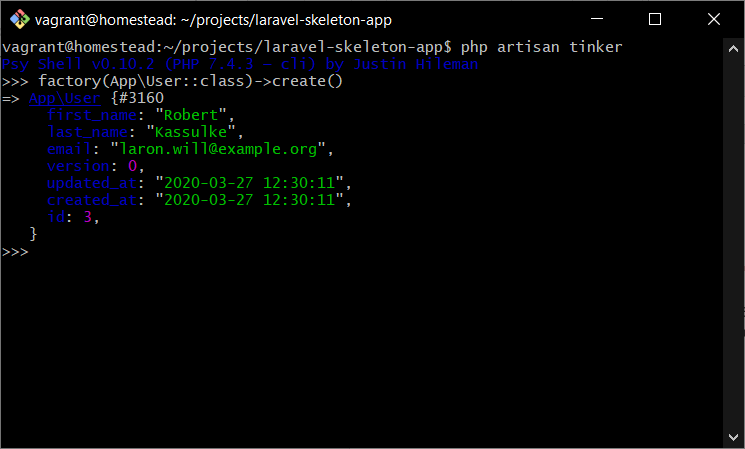
Our Laravel activity log installation, setup, and logging model events are completed and we can test it by creating, updating or deleting a user in our application.

Create a user:

creating a user

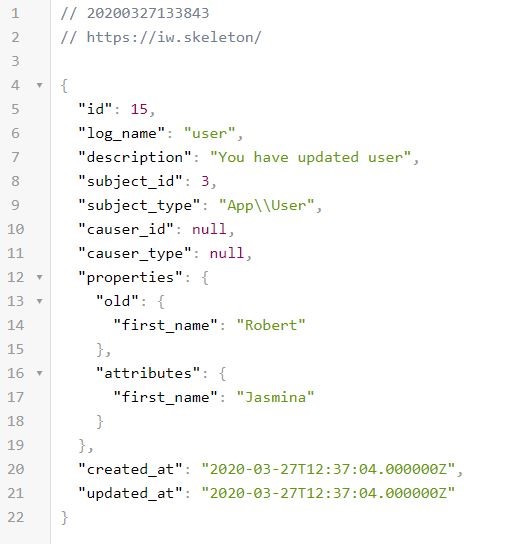
activity_log table:

activity_log table

Update user:

update user

activity_log table:

activity_log table
activity_log table

4 RECORDING LOGIN INFORMATION OF THE USERS

As we have already mentioned before, there are pre-defined Spatie logging events that are out of the box with this package. However, sometimes we want to log data on successful login or log out of the users in our application. This is also possible and easy to achieve and we need to follow the following steps:

  • Create an Event Listener
  • Map the Event Listener to the EventServiceProvider
4.1 Create an Event Listener

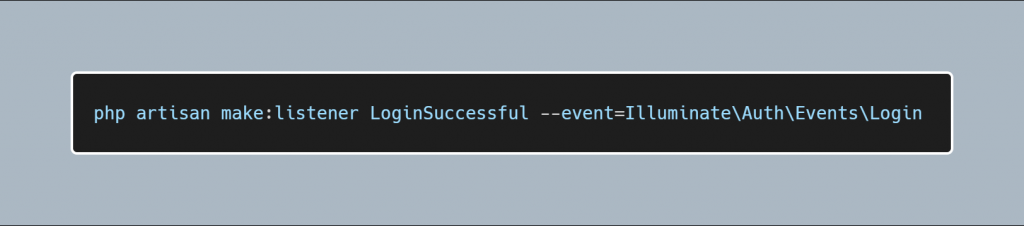
For creating an Event Listener, we need to run the following command:

Creating an Event Listener

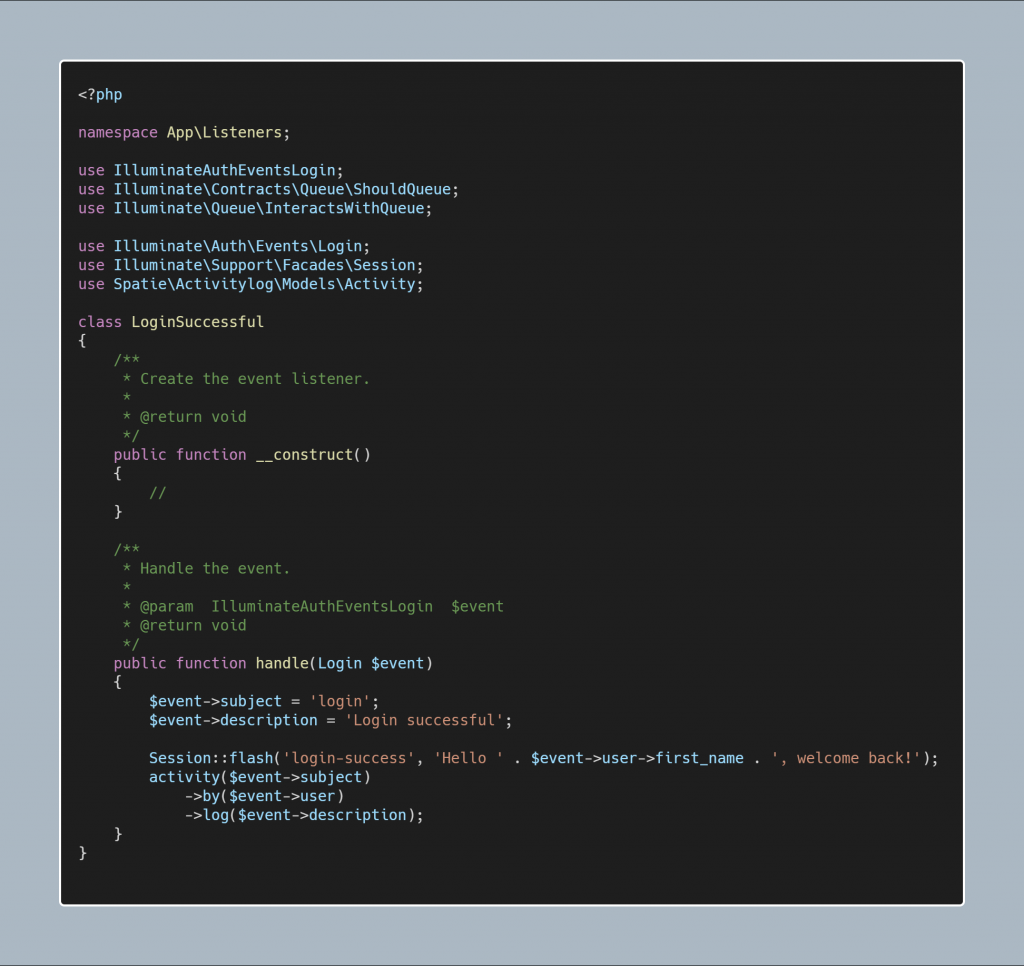
After the new Event Listener is created, insert the following code into the LoginSuccessful listener:

As we can see from the code above, we are going to simply provide the subject and the description of the Laravel log activity, and after that, we will simply flush the success message to the end-user and store the data into the activity_log table.

4.2 Map the Listener

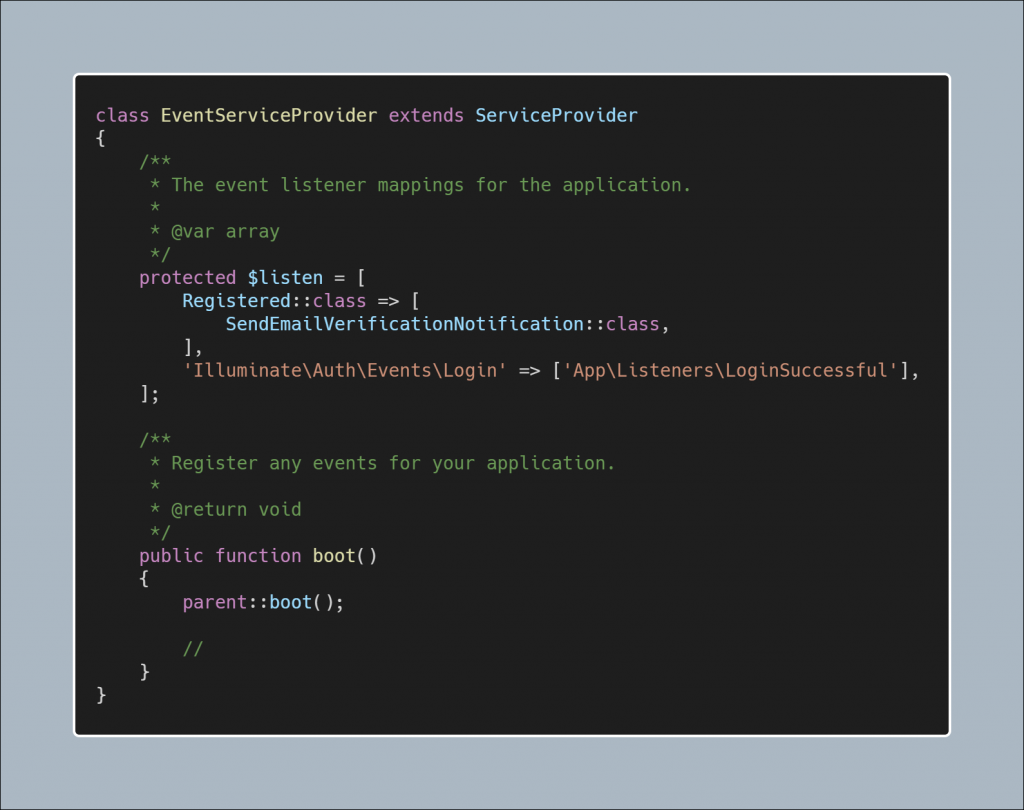
Once we created the listener, we should attach it to the EventServiceProvider.php file.

Attaching the Event Listener to the Event Service Provider

Now we can record all login activity of the user in the log activity Laravel table. When the user will login into the application a new record will be created in our table.

So, if you want to grow even more, don’t hesitate to watch a Spatie activity log tutorial again and again or any spatie/laravel-activitylog example to improve continuously.

Read More
  • Share This:  
  •  Facebook
  •  Twitter
  •  Google+
  •  Stumble
  •  Digg
Newer Posts Older Posts Home

Meta

Popular Posts

  • Generate Migrations from an Existing Database With the Migration Generator Package
    Laravel Migration Generator Migration Generator for Laravel is a package by Bennett Treptow to generate migrations from existing database ...
  • Tailwindcss best practices for responsive design
    Tailwind CSS provides powerful utilities for responsive design out of the box. To use it effectively and maintain clean, scalable code, here...
  • Search Through Models with Laravel Searchable
      Laravel Searchable   is a package by   Spatie   to search through models and other sources pragmatically. Using this package, you can get ...
  • Laravel Razorpay Integration | Payment gateway integration Laravel in 30 mins | Laravel Razorpay
    1 Integration of Razorpay with Laravel. In this tutorial, I have taught how to integrate payment gateway with laravel with mini-project. If...
  • Vue.js Render functions
        Vue.js Render functions Vue.js recommends us to use templates to build HTML. Here, we can use the render function as a closer-to-the-co...

Categories

  • Ajax (26)
  • Bootstrap (30)
  • DBMS (42)
  • HTML (12)
  • HTML5 (45)
  • JavaScript (10)
  • Jquery (34)
  • Jquery UI (2)
  • JqueryUI (32)
  • Laravel (1017)
  • Laravel Tutorials (23)
  • Laravel-Question (6)
  • Magento (9)
  • Magento 2 (95)
  • MariaDB (1)
  • MySql Tutorial (2)
  • PHP-Interview-Questions (3)
  • Php Question (13)
  • Python (36)
  • RDBMS (13)
  • SQL Tutorial (79)
  • Vue.js Tutorial (69)
  • Wordpress (150)
  • Wordpress Theme (3)
  • codeigniter (108)
  • oops (4)
  • php (853)

Social Media Links

  • Follow on Twitter
  • Like on Facebook
  • Subscribe on Youtube
  • Follow on Instagram

Pages

  • Home
  • Contact Us
  • Privacy Policy
  • About us

Blog Archive

  • ▼  2026 (3)
    • ▼  07/26 - 08/02 (2)
      • A stormwater pond in Calgary appears filled with P...
      • Inside Kriti Sanon's duplex sea-facing penthouse w...
    • ►  06/28 - 07/05 (1)
  • ►  2025 (4)
    • ►  07/06 - 07/13 (2)
    • ►  06/29 - 07/06 (2)
  • ►  2024 (486)
    • ►  09/15 - 09/22 (30)
    • ►  09/08 - 09/15 (35)
    • ►  09/01 - 09/08 (35)
    • ►  08/11 - 08/18 (2)
    • ►  08/04 - 08/11 (33)
    • ►  07/28 - 08/04 (30)
    • ►  07/07 - 07/14 (11)
    • ►  06/30 - 07/07 (35)
    • ►  06/23 - 06/30 (5)
    • ►  06/02 - 06/09 (31)
    • ►  05/26 - 06/02 (20)
    • ►  05/05 - 05/12 (29)
    • ►  04/28 - 05/05 (26)
    • ►  04/07 - 04/14 (10)
    • ►  03/31 - 04/07 (34)
    • ►  03/24 - 03/31 (10)
    • ►  03/03 - 03/10 (35)
    • ►  02/25 - 03/03 (15)
    • ►  02/04 - 02/11 (22)
    • ►  01/28 - 02/04 (30)
    • ►  01/07 - 01/14 (8)
  • ►  2023 (484)
    • ►  12/31 - 01/07 (35)
    • ►  12/24 - 12/31 (10)
    • ►  12/03 - 12/10 (33)
    • ►  11/26 - 12/03 (20)
    • ►  11/05 - 11/12 (35)
    • ►  10/29 - 11/05 (20)
    • ►  10/22 - 10/29 (9)
    • ►  10/15 - 10/22 (7)
    • ►  10/08 - 10/15 (9)
    • ►  10/01 - 10/08 (10)
    • ►  09/24 - 10/01 (9)
    • ►  09/17 - 09/24 (9)
    • ►  09/10 - 09/17 (7)
    • ►  09/03 - 09/10 (9)
    • ►  08/27 - 09/03 (9)
    • ►  08/20 - 08/27 (8)
    • ►  08/13 - 08/20 (8)
    • ►  08/06 - 08/13 (8)
    • ►  07/30 - 08/06 (8)
    • ►  07/23 - 07/30 (7)
    • ►  07/16 - 07/23 (8)
    • ►  07/09 - 07/16 (7)
    • ►  07/02 - 07/09 (8)
    • ►  06/25 - 07/02 (7)
    • ►  06/18 - 06/25 (7)
    • ►  06/11 - 06/18 (7)
    • ►  06/04 - 06/11 (11)
    • ►  05/28 - 06/04 (7)
    • ►  05/21 - 05/28 (8)
    • ►  05/14 - 05/21 (11)
    • ►  05/07 - 05/14 (7)
    • ►  04/30 - 05/07 (7)
    • ►  04/23 - 04/30 (8)
    • ►  04/16 - 04/23 (9)
    • ►  04/09 - 04/16 (7)
    • ►  04/02 - 04/09 (4)
    • ►  03/26 - 04/02 (21)
    • ►  03/19 - 03/26 (2)
    • ►  03/12 - 03/19 (9)
    • ►  03/05 - 03/12 (26)
    • ►  02/26 - 03/05 (25)
    • ►  01/15 - 01/22 (7)
    • ►  01/08 - 01/15 (1)
  • ►  2022 (1037)
    • ►  12/11 - 12/18 (13)
    • ►  12/04 - 12/11 (1)
    • ►  11/27 - 12/04 (40)
    • ►  11/06 - 11/13 (1)
    • ►  10/16 - 10/23 (13)
    • ►  09/04 - 09/11 (5)
    • ►  08/21 - 08/28 (24)
    • ►  08/14 - 08/21 (24)
    • ►  07/03 - 07/10 (9)
    • ►  06/19 - 06/26 (3)
    • ►  05/29 - 06/05 (3)
    • ►  05/22 - 05/29 (3)
    • ►  05/15 - 05/22 (109)
    • ►  05/01 - 05/08 (7)
    • ►  04/24 - 05/01 (7)
    • ►  04/17 - 04/24 (64)
    • ►  04/10 - 04/17 (115)
    • ►  04/03 - 04/10 (73)
    • ►  03/27 - 04/03 (77)
    • ►  03/13 - 03/20 (2)
    • ►  03/06 - 03/13 (25)
    • ►  02/27 - 03/06 (18)
    • ►  02/20 - 02/27 (153)
    • ►  02/13 - 02/20 (187)
    • ►  01/30 - 02/06 (45)
    • ►  01/23 - 01/30 (15)
    • ►  01/16 - 01/23 (1)
  • ►  2021 (412)
    • ►  10/24 - 10/31 (2)
    • ►  07/25 - 08/01 (1)
    • ►  07/11 - 07/18 (10)
    • ►  06/13 - 06/20 (29)
    • ►  05/23 - 05/30 (1)
    • ►  05/02 - 05/09 (24)
    • ►  04/25 - 05/02 (24)
    • ►  04/18 - 04/25 (112)
    • ►  04/11 - 04/18 (1)
    • ►  04/04 - 04/11 (6)
    • ►  03/28 - 04/04 (86)
    • ►  03/21 - 03/28 (19)
    • ►  03/14 - 03/21 (2)
    • ►  03/07 - 03/14 (10)
    • ►  02/28 - 03/07 (1)
    • ►  02/21 - 02/28 (29)
    • ►  02/14 - 02/21 (13)
    • ►  02/07 - 02/14 (12)
    • ►  01/31 - 02/07 (6)
    • ►  01/17 - 01/24 (2)
    • ►  01/10 - 01/17 (8)
    • ►  01/03 - 01/10 (14)
  • ►  2020 (376)
    • ►  12/27 - 01/03 (37)
    • ►  12/20 - 12/27 (92)
    • ►  12/13 - 12/20 (29)
    • ►  12/06 - 12/13 (37)
    • ►  11/29 - 12/06 (4)
    • ►  11/15 - 11/22 (14)
    • ►  11/08 - 11/15 (8)
    • ►  11/01 - 11/08 (2)
    • ►  10/18 - 10/25 (14)
    • ►  10/11 - 10/18 (16)
    • ►  10/04 - 10/11 (10)
    • ►  09/20 - 09/27 (10)
    • ►  09/06 - 09/13 (19)
    • ►  08/30 - 09/06 (26)
    • ►  08/23 - 08/30 (4)
    • ►  08/16 - 08/23 (2)
    • ►  07/12 - 07/19 (48)
    • ►  05/17 - 05/24 (2)
    • ►  01/05 - 01/12 (2)
  • ►  2019 (74)
    • ►  07/07 - 07/14 (6)
    • ►  06/16 - 06/23 (6)
    • ►  02/10 - 02/17 (17)
    • ►  01/13 - 01/20 (37)
    • ►  01/06 - 01/13 (8)
  • ►  2018 (376)
    • ►  12/30 - 01/06 (24)
    • ►  12/16 - 12/23 (8)
    • ►  12/09 - 12/16 (98)
    • ►  12/02 - 12/09 (16)
    • ►  11/18 - 11/25 (36)
    • ►  11/04 - 11/11 (18)
    • ►  10/28 - 11/04 (10)
    • ►  10/21 - 10/28 (26)
    • ►  10/14 - 10/21 (52)
    • ►  10/07 - 10/14 (4)
    • ►  09/30 - 10/07 (2)
    • ►  09/23 - 09/30 (68)
    • ►  09/16 - 09/23 (4)
    • ►  09/09 - 09/16 (4)
    • ►  08/26 - 09/02 (6)

Data Publish News

Loading...

Al Jazeera – Breaking News, World News and Video from Al Jazeera

Loading...

Laravel News

Loading...

Copyright © CoderFunda | Powered by Blogger
Design by Coderfunda | Blogger Theme by Coderfunda | Distributed By Coderfunda