CoderFunda
  • Home
  • About us
    • Contact Us
    • Disclaimer
    • Privacy Policy
    • About us
  • Home
  • Php
  • HTML
  • CSS
  • JavaScript
    • JavaScript
    • Jquery
    • JqueryUI
    • Stock
  • SQL
  • Vue.Js
  • Python
  • Wordpress
  • C++
    • C++
    • C
  • Laravel
    • Laravel
      • Overview
      • Namespaces
      • Middleware
      • Routing
      • Configuration
      • Application Structure
      • Installation
    • Overview
  • DBMS
    • DBMS
      • PL/SQL
      • SQLite
      • MongoDB
      • Cassandra
      • MySQL
      • Oracle
      • CouchDB
      • Neo4j
      • DB2
      • Quiz
    • Overview
  • Entertainment
    • TV Series Update
    • Movie Review
    • Movie Review
  • More
    • Vue. Js
    • Php Question
    • Php Interview Question
    • Laravel Interview Question
    • SQL Interview Question
    • IAS Interview Question
    • PCS Interview Question
    • Technology
    • Other

28 March, 2022

WordPress Menus

 Programing Coderfunda     March 28, 2022     Wordpress     No comments   


WordPress Menus

The Menu is a list of options presented to the user. They are mostly used as a navigation building method on WordPress websites. Usually, the common content management system's installation is followed by a default menu that provides links to pages at the top level. These menus can be used at the top of the sites with links. It is generally used as a horizontal menu with links like home, email, contact, or pages.

Defining a WordPress Menu

Firstly, we need to define a WordPress menu before adding items to it or use it. We can use the following steps to define a WordPress menu.

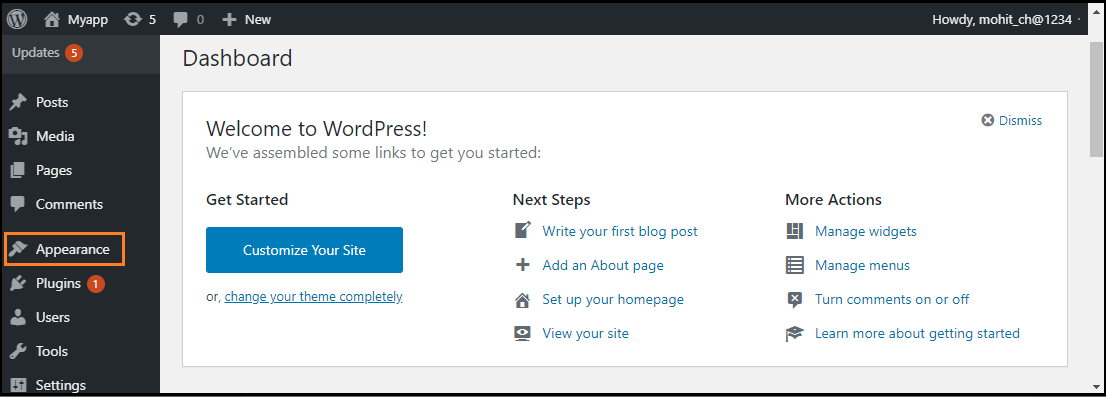
Step 1: First, log in to the WordPress Dashboard and click on the "Appearance" menu option, as shown in the below screenshot.
WordPress Menus

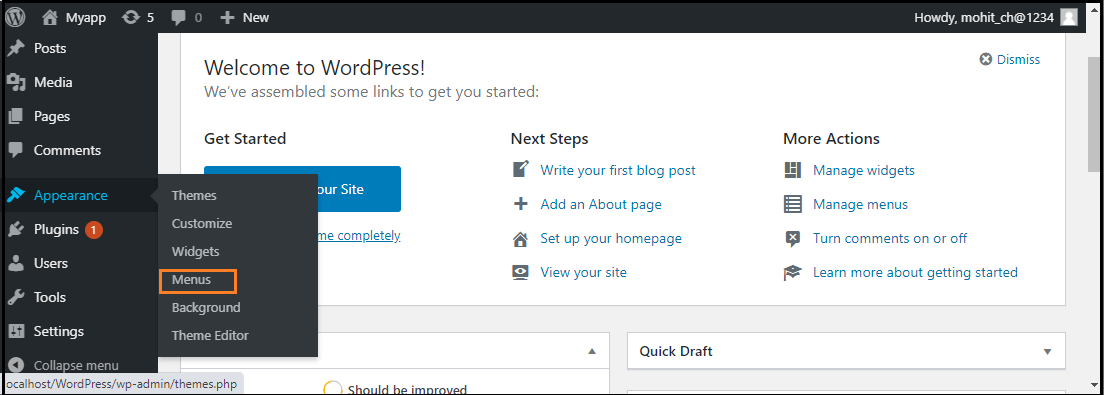
Step 2: The "Appearance" menu option opens a sub-menu where we choose the "Menus" option to bring up the Menu Editor.
WordPress Menus

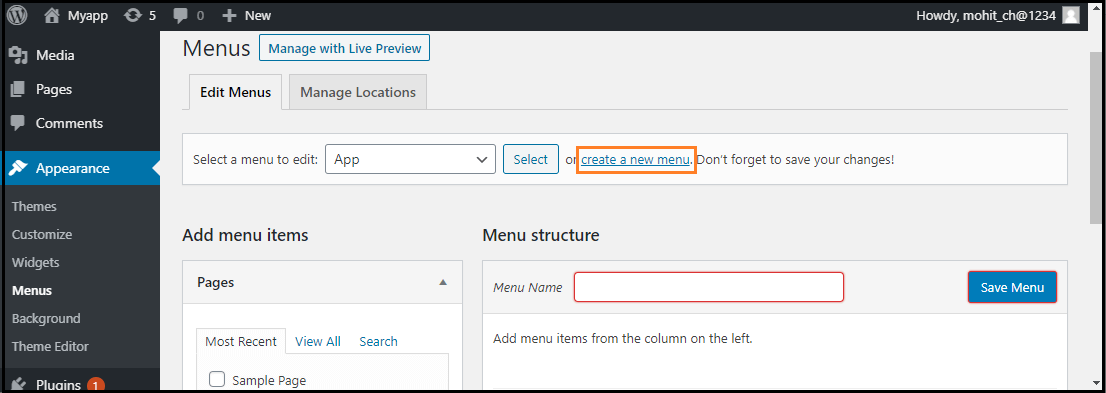
Step 3: After selecting the "Menus" option, choose the "Create a new menu" option shown in the red rectangular box at the top of the page.
WordPress Menus

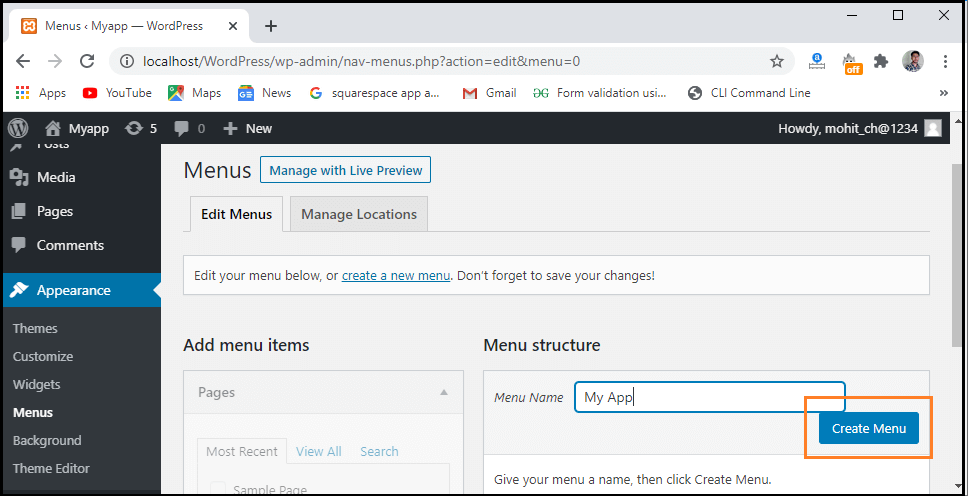
Step 4: Now, enter the name to create a new menu in the "Menu Name" box.

Step 5: After that, click on the "Create Menu" button to create a menu.
WordPress Menus

Adding Menu Items

In this section, we can add several link type options to the menu like Pages, Posts, Custom Links, and Categories. The following are the steps to add items in the menu.

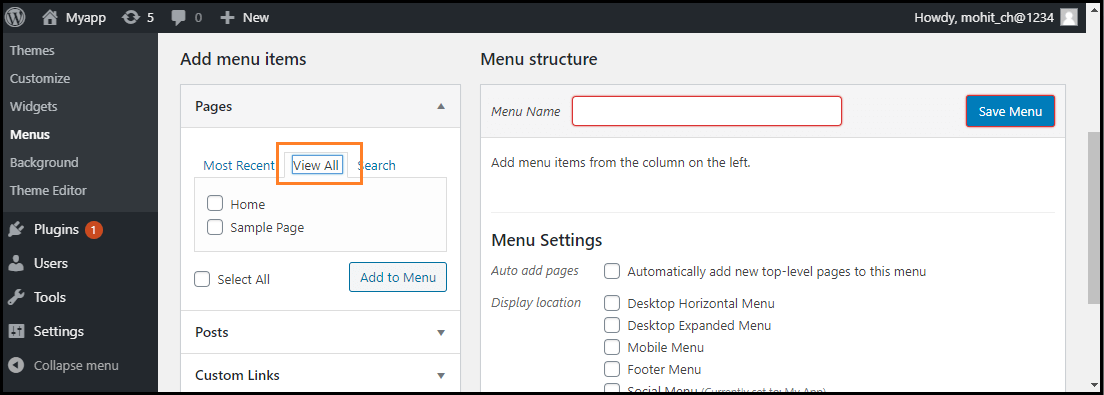
Step 1: Firstly, Find the pane entitled Pages.

Step 2: Choose the "View All" link to see a list of all recently published pages on the WordPress site.
WordPress Menus

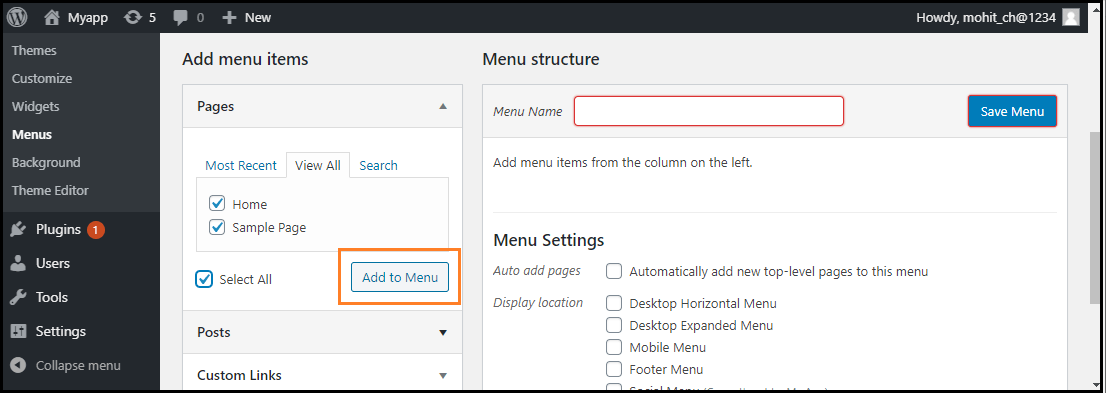
Step 3: Now, we can add Pages by clicking the checkbox corresponding to each page title.

Step 4: To add our selection to the menu that we created in the previous step, click on the "Add to Menu" button shown in the red rectangular box at the bottom of this page.
WordPress Menus

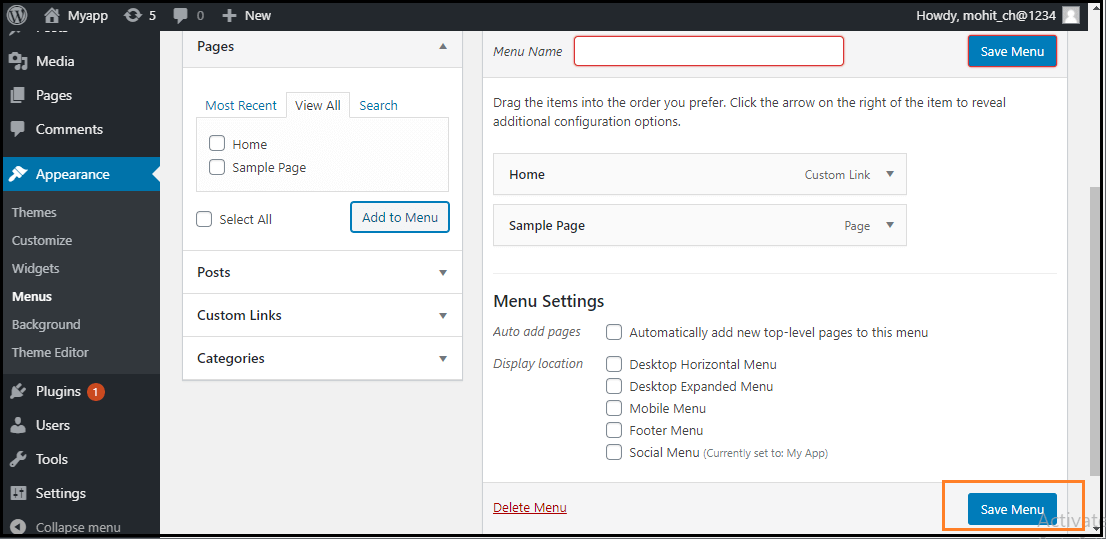
Step 5: After that, click on the "Save Menu" button.
WordPress Menus

Now, the new custom menu has been saved in the WordPress site.

Deleting a Menu Item

If we want to delete an item form the menu, we can use the following steps:

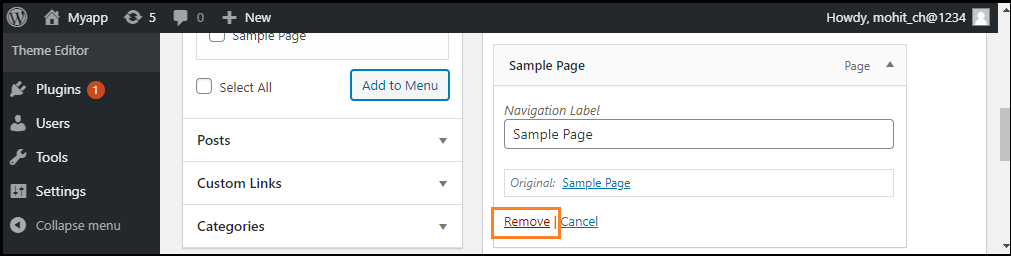
Step 1: First, find the menu items that we want to delete in the menu editor window.

Step 2: Next, click the arrow icon at the top right corner of the menu item.

Step 3: Click on the "Remove" option. The menu item or box will be removed immediately.
WordPress Menus

Step 4: Finally, click on the "Save Menu" button to save the changes.

Customizing Menu Items

There are various customization Menu items available; some of them are as follows:

  • Navigation Label
  • Title Attribute
  • Link Target
  • Link Relationship
  • CSS Classes
  • Original

Navigation Label

This field defines the title of the item on our custom menu. Our visitors will see this when they visit our site or blog.

Title Attribute

This field defines the alternative text ('Alt') for the menu item. This text will be shown when the user's mouse is hovering over the menu item.

Link Target

It allows users to choose the "Same window or tab" or "New window or tab" from the dropdown menu.

Link Relationship

It allows us to automatically create XFN features to demonstrate how we are connected with the authors or owners of the site to whom we are linking.

CSS Classes

It provides the optional CSS classes to the menu item.

Original

It provides a link to the source of the menu item that helps us to see the page or post.

Creating Multi-Level Menus

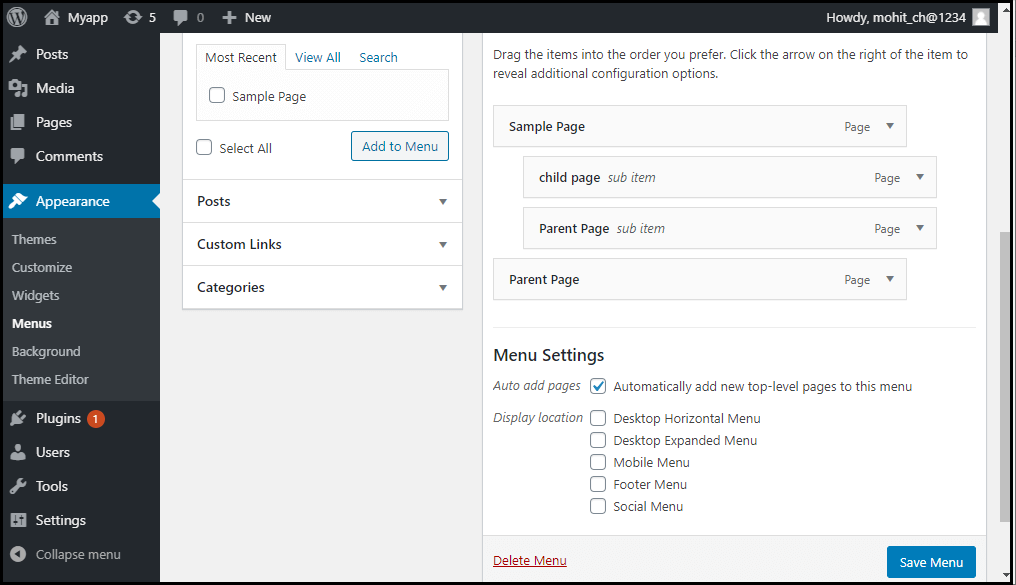
WordPress Menu Editor helps us to build a multi-level menu using the "drag and drop" interface. We can drag the menu items up or down to change the order you want to appear in the WordPress menu. We can also drag menu items left or right to build sub-levels in the Menu.

If we want to create a menu item a subordinate of another, it is required to place the "child" under its "parent" and then drag it slightly to the right. If we want to create a multi-level menu, we can use the following steps:

Step 1: Firstly, move the cursor over the "child" menu item.

Step 2: Drag it to the right while holding the left button of the mouse.

Step 3: Now, release the mouse button.

Step 4: Repeat all these items for every sub-menu items.

Step 5: To save the changes, click on the "Save Menu" button in the Menu Editor.
WordPress Menus

How to add custom links to the Menu

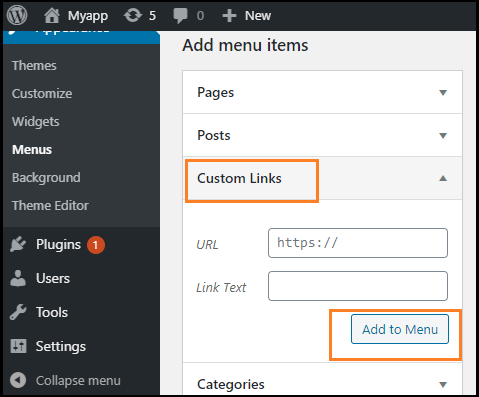
If we want to add the WordPress menu's custom links, we need to follow these steps:

Step 1: First, we need to click on the Custom link option in the menu's left column. Every custom link requires a URL and the Link Text.

Step 2: After that, click on the "Add to Menu" button to add a link.
WordPress Menus

These custom links are useful for situations when we need to link to a page not listed in the left column, such as an external website.

How to link to category pages or tags

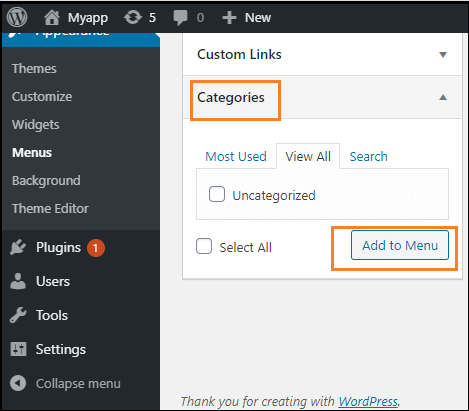
If we want to add the post categories or tags to our menu, we can use the following steps:

Step 1: First, click on the categories tab in the left side column.

Step 2: Now, choose the one tab that should appear in the menu.

Step 3: After that, click on the "Add to Menu" button to add a category or tab.
WordPress Menus

How to Add a social menu

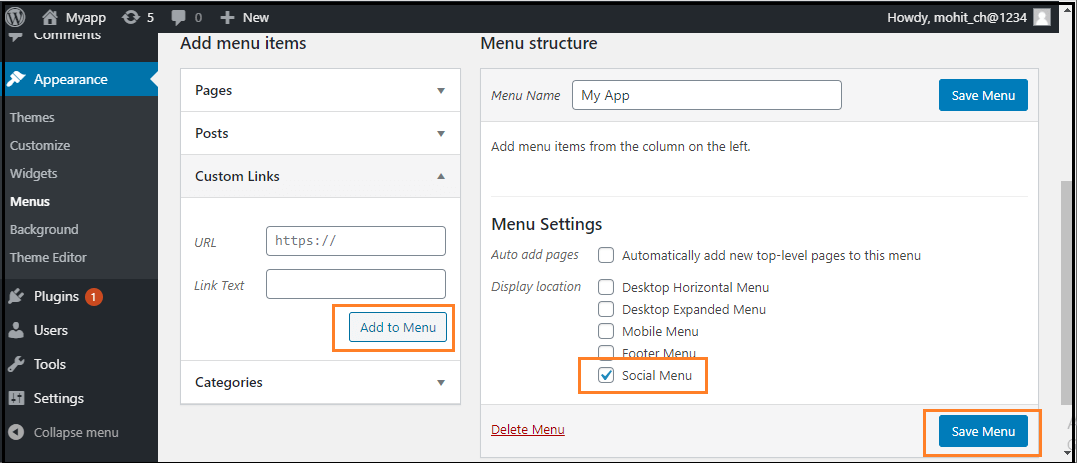
Creating a menu for our social accounts is much easier than creating a regular one. To create a social account in the WordPress Menu Editor, we can use the following steps:

Step 1: First, click on the "Create a new menu" link.

Step 2: Now, input the name of the menu and click on the Create Menu.

Step 3: Next, check the bottom of the "Social Links" menu box, and use the Custom Links tab to add links to the social media menu.

Step 4: After completing all these steps, click on the "Add to Menu" button to add a social menu.
WordPress Menus
  • Share This:  
  •  Facebook
  •  Twitter
  •  Google+
  •  Stumble
  •  Digg
Email ThisBlogThis!Share to XShare to Facebook
Newer Post Older Post Home

0 comments:

Post a Comment

Thanks

Meta

Popular Posts

  • Generate Migrations from an Existing Database With the Migration Generator Package
    Laravel Migration Generator Migration Generator for Laravel is a package by Bennett Treptow to generate migrations from existing database ...
  • Tailwindcss best practices for responsive design
    Tailwind CSS provides powerful utilities for responsive design out of the box. To use it effectively and maintain clean, scalable code, here...
  • Search Through Models with Laravel Searchable
      Laravel Searchable   is a package by   Spatie   to search through models and other sources pragmatically. Using this package, you can get ...
  • Laravel Razorpay Integration | Payment gateway integration Laravel in 30 mins | Laravel Razorpay
    1 Integration of Razorpay with Laravel. In this tutorial, I have taught how to integrate payment gateway with laravel with mini-project. If...
  • Vue.js Render functions
        Vue.js Render functions Vue.js recommends us to use templates to build HTML. Here, we can use the render function as a closer-to-the-co...

Categories

  • Ajax (26)
  • Bootstrap (30)
  • DBMS (42)
  • HTML (12)
  • HTML5 (45)
  • JavaScript (10)
  • Jquery (34)
  • Jquery UI (2)
  • JqueryUI (32)
  • Laravel (1017)
  • Laravel Tutorials (23)
  • Laravel-Question (6)
  • Magento (9)
  • Magento 2 (95)
  • MariaDB (1)
  • MySql Tutorial (2)
  • PHP-Interview-Questions (3)
  • Php Question (13)
  • Python (36)
  • RDBMS (13)
  • SQL Tutorial (79)
  • Vue.js Tutorial (69)
  • Wordpress (150)
  • Wordpress Theme (3)
  • codeigniter (108)
  • oops (4)
  • php (853)

Social Media Links

  • Follow on Twitter
  • Like on Facebook
  • Subscribe on Youtube
  • Follow on Instagram

Pages

  • Home
  • Contact Us
  • Privacy Policy
  • About us

Blog Archive

  • ►  2026 (3)
    • ►  07/26 - 08/02 (2)
    • ►  06/28 - 07/05 (1)
  • ►  2025 (4)
    • ►  07/06 - 07/13 (2)
    • ►  06/29 - 07/06 (2)
  • ►  2024 (486)
    • ►  09/15 - 09/22 (30)
    • ►  09/08 - 09/15 (35)
    • ►  09/01 - 09/08 (35)
    • ►  08/11 - 08/18 (2)
    • ►  08/04 - 08/11 (33)
    • ►  07/28 - 08/04 (30)
    • ►  07/07 - 07/14 (11)
    • ►  06/30 - 07/07 (35)
    • ►  06/23 - 06/30 (5)
    • ►  06/02 - 06/09 (31)
    • ►  05/26 - 06/02 (20)
    • ►  05/05 - 05/12 (29)
    • ►  04/28 - 05/05 (26)
    • ►  04/07 - 04/14 (10)
    • ►  03/31 - 04/07 (34)
    • ►  03/24 - 03/31 (10)
    • ►  03/03 - 03/10 (35)
    • ►  02/25 - 03/03 (15)
    • ►  02/04 - 02/11 (22)
    • ►  01/28 - 02/04 (30)
    • ►  01/07 - 01/14 (8)
  • ►  2023 (484)
    • ►  12/31 - 01/07 (35)
    • ►  12/24 - 12/31 (10)
    • ►  12/03 - 12/10 (33)
    • ►  11/26 - 12/03 (20)
    • ►  11/05 - 11/12 (35)
    • ►  10/29 - 11/05 (20)
    • ►  10/22 - 10/29 (9)
    • ►  10/15 - 10/22 (7)
    • ►  10/08 - 10/15 (9)
    • ►  10/01 - 10/08 (10)
    • ►  09/24 - 10/01 (9)
    • ►  09/17 - 09/24 (9)
    • ►  09/10 - 09/17 (7)
    • ►  09/03 - 09/10 (9)
    • ►  08/27 - 09/03 (9)
    • ►  08/20 - 08/27 (8)
    • ►  08/13 - 08/20 (8)
    • ►  08/06 - 08/13 (8)
    • ►  07/30 - 08/06 (8)
    • ►  07/23 - 07/30 (7)
    • ►  07/16 - 07/23 (8)
    • ►  07/09 - 07/16 (7)
    • ►  07/02 - 07/09 (8)
    • ►  06/25 - 07/02 (7)
    • ►  06/18 - 06/25 (7)
    • ►  06/11 - 06/18 (7)
    • ►  06/04 - 06/11 (11)
    • ►  05/28 - 06/04 (7)
    • ►  05/21 - 05/28 (8)
    • ►  05/14 - 05/21 (11)
    • ►  05/07 - 05/14 (7)
    • ►  04/30 - 05/07 (7)
    • ►  04/23 - 04/30 (8)
    • ►  04/16 - 04/23 (9)
    • ►  04/09 - 04/16 (7)
    • ►  04/02 - 04/09 (4)
    • ►  03/26 - 04/02 (21)
    • ►  03/19 - 03/26 (2)
    • ►  03/12 - 03/19 (9)
    • ►  03/05 - 03/12 (26)
    • ►  02/26 - 03/05 (25)
    • ►  01/15 - 01/22 (7)
    • ►  01/08 - 01/15 (1)
  • ▼  2022 (1037)
    • ►  12/11 - 12/18 (13)
    • ►  12/04 - 12/11 (1)
    • ►  11/27 - 12/04 (40)
    • ►  11/06 - 11/13 (1)
    • ►  10/16 - 10/23 (13)
    • ►  09/04 - 09/11 (5)
    • ►  08/21 - 08/28 (24)
    • ►  08/14 - 08/21 (24)
    • ►  07/03 - 07/10 (9)
    • ►  06/19 - 06/26 (3)
    • ►  05/29 - 06/05 (3)
    • ►  05/22 - 05/29 (3)
    • ►  05/15 - 05/22 (109)
    • ►  05/01 - 05/08 (7)
    • ►  04/24 - 05/01 (7)
    • ►  04/17 - 04/24 (64)
    • ►  04/10 - 04/17 (115)
    • ►  04/03 - 04/10 (73)
    • ▼  03/27 - 04/03 (77)
      • DBMS Tutorial
      • JavaScript Tutorial
      • jQuery Tutorial
      • Watch Jujutsu Kaisen 0 (2022) Online Free Coderfunda
      • Laravel package for the Google Translate API
      • Admin Session Lifetime | Adobe Commerce 2.4
      • How to fix the 'too many redirects' error in Magen...
      • Magento 2 Recent Order not showing in Sales Order ...
      • Magento 2 Media Gallery doesn't show any images
      • How to check if customer is logged in or not
      • Remove Block Programmatically in Magento2
      • Magento 2 Programmatically Create Custom Layout XML
      • Magento 2 ERR_TOO_MANY_REDIRECTS After Importing D...
      • Managing Two-Factor Authentication
      • WordPress Interview Questions
      • WordPress vs. Wix
      • WordPress vs. Weebly
      • WordPress vs. Webflow
      • WordPress Vs. Squarespace
      • WordPress vs. Shopify
      • WordPress vs. Joomla
      • WordPress vs. Drupal
      • WordPress Vs. Blogger
      • WordPress Alternatives
      • WordPress Editor
      • WordPress Installation using MS Webmatrix
      • How to Update PHP in WordPress?
      • How to optimize WordPress performance
      • How to reset Password in WordPress
      • How to improve WordPress security
      • How to backup WordPress site
      • How to Update WordPress site
      • How to Update WordPress Themes
      • WordPress Permalink
      • WordPress Roles
      • How to Update WordPress Themes
      • WordPress Table
      • WordPress Hosting
      • WordPress Event Calendar Plugin
      • WordPress Slider Plugin
      • WordPress Search Plugin
      • WordPress Popup Plugins
      • WordPress Live Chat
      • WordPress Review Plugin
      • Difference between WordPress Themes and Plugins
      • How to install WordPress plugins
      • WordPress Plugins
      • Free vs Paid WordPress Theme
      • How to Install WordPress Themes
      • WordPress Themes
      • WordPress Menus
      • Wordpress Users
      • WordPress Appearance
      • How to Delete Links
      • How to Add a New Link in WordPress Navigation Menus
      • How to Add a New Link in WordPress Text Widgets
      • How to Add a New Link in WordPress Posts and Pages
      • WordPress Links
      • WordPress Categories vs Tags
      • WordPress Tags
      • WordPress Categories
      • WordPress Comments
      • WordPress posts vs pages
      • WordPress Pages
      • WordPress Posts
      • How to create a WordPress website
      • WordPress Dashboard
      • WordPress Installation using MS Webmatrix
      • Installing WordPess on local server
      • Installing WordPress
      • WordPress.com vs WordPress.org
      • WordPress Licensing
      • Reasons to use WordPress
      • WordPress Versions
      • WordPress History
      • What is WordPress
      • WordPress Tutorial
    • ►  03/13 - 03/20 (2)
    • ►  03/06 - 03/13 (25)
    • ►  02/27 - 03/06 (18)
    • ►  02/20 - 02/27 (153)
    • ►  02/13 - 02/20 (187)
    • ►  01/30 - 02/06 (45)
    • ►  01/23 - 01/30 (15)
    • ►  01/16 - 01/23 (1)
  • ►  2021 (412)
    • ►  10/24 - 10/31 (2)
    • ►  07/25 - 08/01 (1)
    • ►  07/11 - 07/18 (10)
    • ►  06/13 - 06/20 (29)
    • ►  05/23 - 05/30 (1)
    • ►  05/02 - 05/09 (24)
    • ►  04/25 - 05/02 (24)
    • ►  04/18 - 04/25 (112)
    • ►  04/11 - 04/18 (1)
    • ►  04/04 - 04/11 (6)
    • ►  03/28 - 04/04 (86)
    • ►  03/21 - 03/28 (19)
    • ►  03/14 - 03/21 (2)
    • ►  03/07 - 03/14 (10)
    • ►  02/28 - 03/07 (1)
    • ►  02/21 - 02/28 (29)
    • ►  02/14 - 02/21 (13)
    • ►  02/07 - 02/14 (12)
    • ►  01/31 - 02/07 (6)
    • ►  01/17 - 01/24 (2)
    • ►  01/10 - 01/17 (8)
    • ►  01/03 - 01/10 (14)
  • ►  2020 (376)
    • ►  12/27 - 01/03 (37)
    • ►  12/20 - 12/27 (92)
    • ►  12/13 - 12/20 (29)
    • ►  12/06 - 12/13 (37)
    • ►  11/29 - 12/06 (4)
    • ►  11/15 - 11/22 (14)
    • ►  11/08 - 11/15 (8)
    • ►  11/01 - 11/08 (2)
    • ►  10/18 - 10/25 (14)
    • ►  10/11 - 10/18 (16)
    • ►  10/04 - 10/11 (10)
    • ►  09/20 - 09/27 (10)
    • ►  09/06 - 09/13 (19)
    • ►  08/30 - 09/06 (26)
    • ►  08/23 - 08/30 (4)
    • ►  08/16 - 08/23 (2)
    • ►  07/12 - 07/19 (48)
    • ►  05/17 - 05/24 (2)
    • ►  01/05 - 01/12 (2)
  • ►  2019 (74)
    • ►  07/07 - 07/14 (6)
    • ►  06/16 - 06/23 (6)
    • ►  02/10 - 02/17 (17)
    • ►  01/13 - 01/20 (37)
    • ►  01/06 - 01/13 (8)
  • ►  2018 (376)
    • ►  12/30 - 01/06 (24)
    • ►  12/16 - 12/23 (8)
    • ►  12/09 - 12/16 (98)
    • ►  12/02 - 12/09 (16)
    • ►  11/18 - 11/25 (36)
    • ►  11/04 - 11/11 (18)
    • ►  10/28 - 11/04 (10)
    • ►  10/21 - 10/28 (26)
    • ►  10/14 - 10/21 (52)
    • ►  10/07 - 10/14 (4)
    • ►  09/30 - 10/07 (2)
    • ►  09/23 - 09/30 (68)
    • ►  09/16 - 09/23 (4)
    • ►  09/09 - 09/16 (4)
    • ►  08/26 - 09/02 (6)

Data Publish News

Loading...

Al Jazeera – Breaking News, World News and Video from Al Jazeera

Loading...

Laravel News

Loading...

Copyright © CoderFunda | Powered by Blogger
Design by Coderfunda | Blogger Theme by Coderfunda | Distributed By Coderfunda